Background information
-
OpenClaw It is an open source AI Agent framework that supports access to communication channels such as DingTalk and large language models such as Bailian Qwen through the plug-in mechanism.
-
Claude Code It is an AI-assisted programming tool launched by Anthropic that supports interaction with code through natural language in the terminal.
-
There are certain thresholds for the installation and configuration of these two tools on Agentic OS ECS:
-
There is no public documentation for the OpenClaw configuration file structure, DingTalk channels are not officially supported, and Gateway initialization sequence requirements are strict.
-
The official tutorial of Claude Code is written for macOS/Ubuntu. Alinux has compatibility differences and npm permission issues.
-
Both lack documentation on how to configure the DashScope API.
-
-
With Skill support, Agent can complete full-link deployment in one sentence, shortening processes that could not be automated or required multiple rounds of trial and error to just a few minutes.
Case 1: Deploy OpenClaw in one sentence
Prerequisites
-
An Agentic OS ECS instance (RAM 4 GB+) has been created and is connected to the Internet.
-
Already inDingTalk Developer BackendCreate an internal enterprise application and obtain the AppKey and AppSecret.
important:The DingTalk application needs to be opened in the developer backendRobot capabilities, message receiving mode selection Stream mode. At the same time, the following permissions need to be enabled:Card.Streaming.Write、Card.Instance.Write、qyapi_robot_sendmsg
-
Already inBailian consoleGet DashScope API Key.
-
YOLO mode can be turned on to avoid manually confirming the execution of Shell commands (
/approval-mode yolo)
Operation steps
Step 1: Initiate deployment instructions
-
In the Agentic OS terminal, send the following command to the Agent:
Help me install OpenClaw, AppKey is <appkey>, AppSecret is <appsecret>, API Key is <dashscope apikey>-
The Agent will automatically perform the following actions:
-
Detect and install the Node.js runtime environment.
-
Install OpenClaw and DingTalk plug-ins through npm, and automatically add npmmirror mirrors to accelerate domestic network downloads.
-
Initialize OpenClaw project structure and configuration files.
-
Configure Gateway mode (
gateway.mode)。 -
implement
openclaw doctor --fixGenerate auth token.
-
important:Gateway initialization order is critical: it must be written firstgateway.modeConfigure and then executeopenclaw doctor --fix. The correct order of execution is built into the skill and requires no manual intervention.
Step 2: Verify deployment results
-
After the deployment is completed, find the corresponding robot in DingTalk and send a test message.
-
If the robot responds normally, it means that the full link deployment is successful.
Things to note
-
If gateway startup fails during deployment, check whether the Gateway initialization sequence is correct.
-
If DingTalk Robot does not respond, please confirm whether the application permissions (Card.Instance.Write, Card.Streaming.Write, etc.) are all enabled.
Case 2: Deploy Claude Code in one sentence
Prerequisites
-
An Agentic OS ECS instance (RAM 4 GB+) has been created and is connected to the Internet.
important:Claude Code uses high memory when running. Please ensure that the RAM of the ECS instance is not less than 4 GB.
-
Already inBailian consoleGet DashScope API Key (if third-party API needs to be configured).
-
YOLO mode can be turned on to avoid manually confirming the execution of Shell commands (
/approval-mode yolo)
Operation steps
Step 1: Initiate the installation command
-
In the Agentic OS terminal, send the following command to the Agent:
Help me install a Claude Code and configure the Dashscope APIKey: <dashscope apikey>-
Agent will automatically detect the current system environment and select the optimal installation method according to priority:
-
Native installation: Prioritize the installation using the package manager that comes with the system.
-
npm install: If the native method is not available, install it globally through npm to automatically fix the EACCES permission problem.
-
nvm installation: If the npm method fails, automatically install an independent Node.js environment through nvm and then install it.
-
illustrate:The three installation methods will automatically downgrade without manual intervention. Skill automatically handles Alinux 4 compatibility issues, including EACCES permissions fixes.
Step 2: Verify installation results
Agent executes the following command to confirm that Claude Code has been installed correctly:
claude --version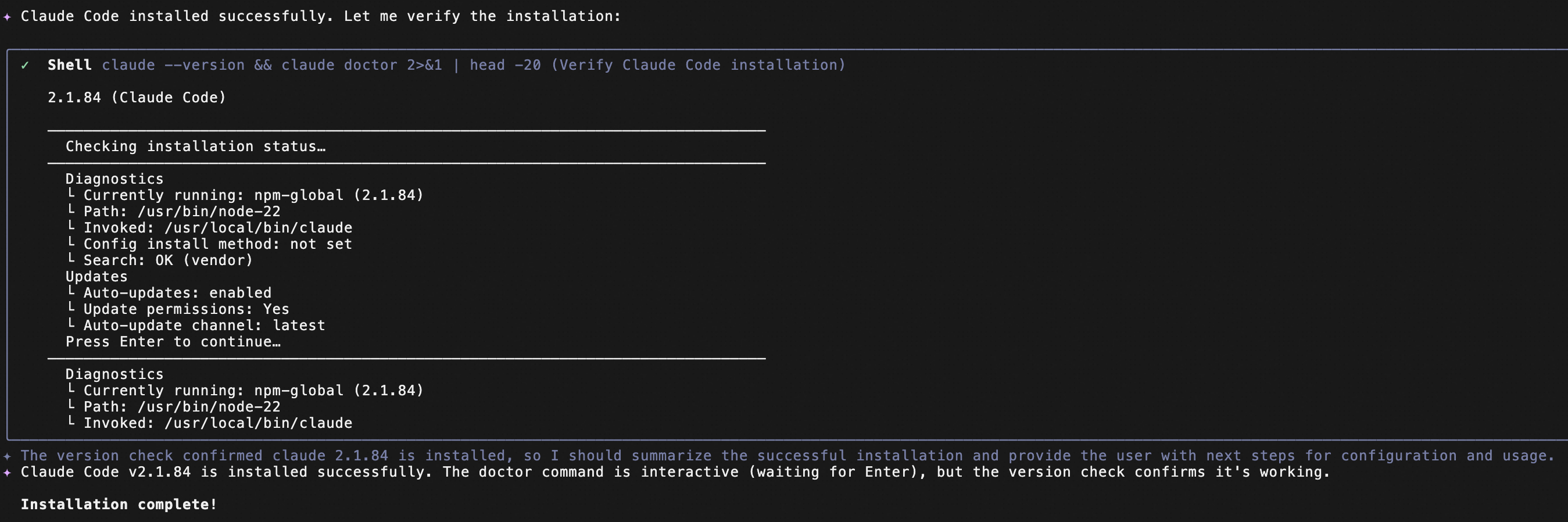
Step 3: Configure Dashscope APIKey
-
Agent automatically configures Dashscope APIKey for Claude Code
-
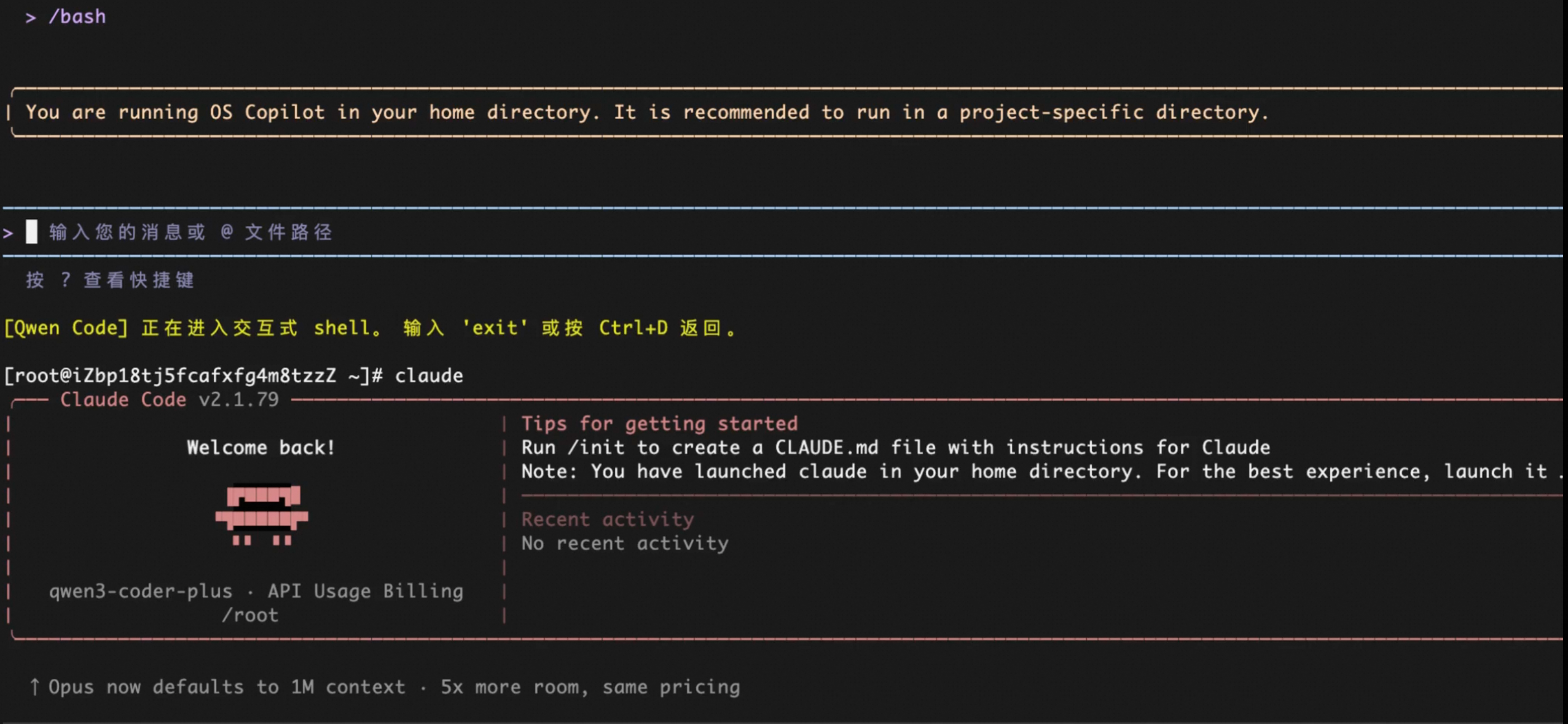
Start Claude Code and test whether the interaction with the model is normal.
Things to note
-
Please obtain the DashScope API Key in advance from the Alibaba Cloud Bailian console and activate related services.
-
If all installation methods fail, check network connectivity and Node.js version (18+ recommended).