The knowledge base feature in AgentRun lets you associate an AI agent with external professional documents or private data. When performing a task, the agent can retrieve relevant context from the integrated knowledge base, which significantly improves the accuracy and timeliness of its responses.
AgentRun currently supports the following types of knowledge bases:
-
Alibaba Cloud Model Studio
-
RAGFlow
Attach a knowledge base
-
Log in to the AgentRun console. In the top menu bar, click Others.
-
In the left navigation pane, choose Knowledge Base > Create Knowledge Base.
Attach an Alibaba Cloud Model Studio knowledge base
If you use Alibaba Cloud Model Studio as your retrieval-augmented generation (RAG) service, configure the following parameters:
-
Knowledge Base Name: Enter a display name for the knowledge base.
-
Description: A brief description of the purpose or data scope of the knowledge base.
-
For Knowledge Base Type, select Model Studio.
-
Workspace: For first-time use, click the authorization button for the Default Workspace to grant authorization and confirm it.
-
Knowledge Base: From the drop-down list, select one or more knowledge bases that you created in Alibaba Cloud Model Studio. Modify the Retrieval Configuration as needed.
Click Create Knowledge Base to attach a knowledge base from Alibaba Cloud Model Studio to the AgentRun platform.
Attach a RAGFlow knowledge base
RAGFlow is an open source engine for deep document understanding. To attach a RAGFlow knowledge base, provide the following information:
-
Knowledge Base Name: Enter a custom display name.
-
Description: A brief description of the purpose or data scope of the knowledge base.
-
For Knowledge Base Type, select RAGFlow.
-
RAGFlow configuration (For instructions, see Quickly deploy RAGFlow using SAE):
-
BaseURL: Enter the API endpoint of the RAGFlow service.
-
DataSet IDs: Enter the IDs of the datasets to associate. You can enter multiple IDs.
-
Credential Configuration: Select the saved API-KEY credential for RAGFlow.
NoteFor more information about how to obtain the RAGFlow configuration parameters, see How to obtain RAGFlow configuration information.
-
-
Retrieval Configuration: You can adjust the Similarity Threshold and Vector Similarity Weight as needed.
Click Create Knowledge Base to attach your self-hosted RAGFlow knowledge base to the AgentRun platform.
How to obtain RAGFlow configuration information
For the RAGFlow deployed using SAE, you can log on to the RAGFlow platform from . To connect to RAGFlow, you need to fetch the following three core pieces of information from the RAGFlow platform:
Obtain the BaseURL
-
Click your profile picture in the upper-right corner to open the personal settings or account management page.
-
In the API section, the value for API Server is the BaseURL.
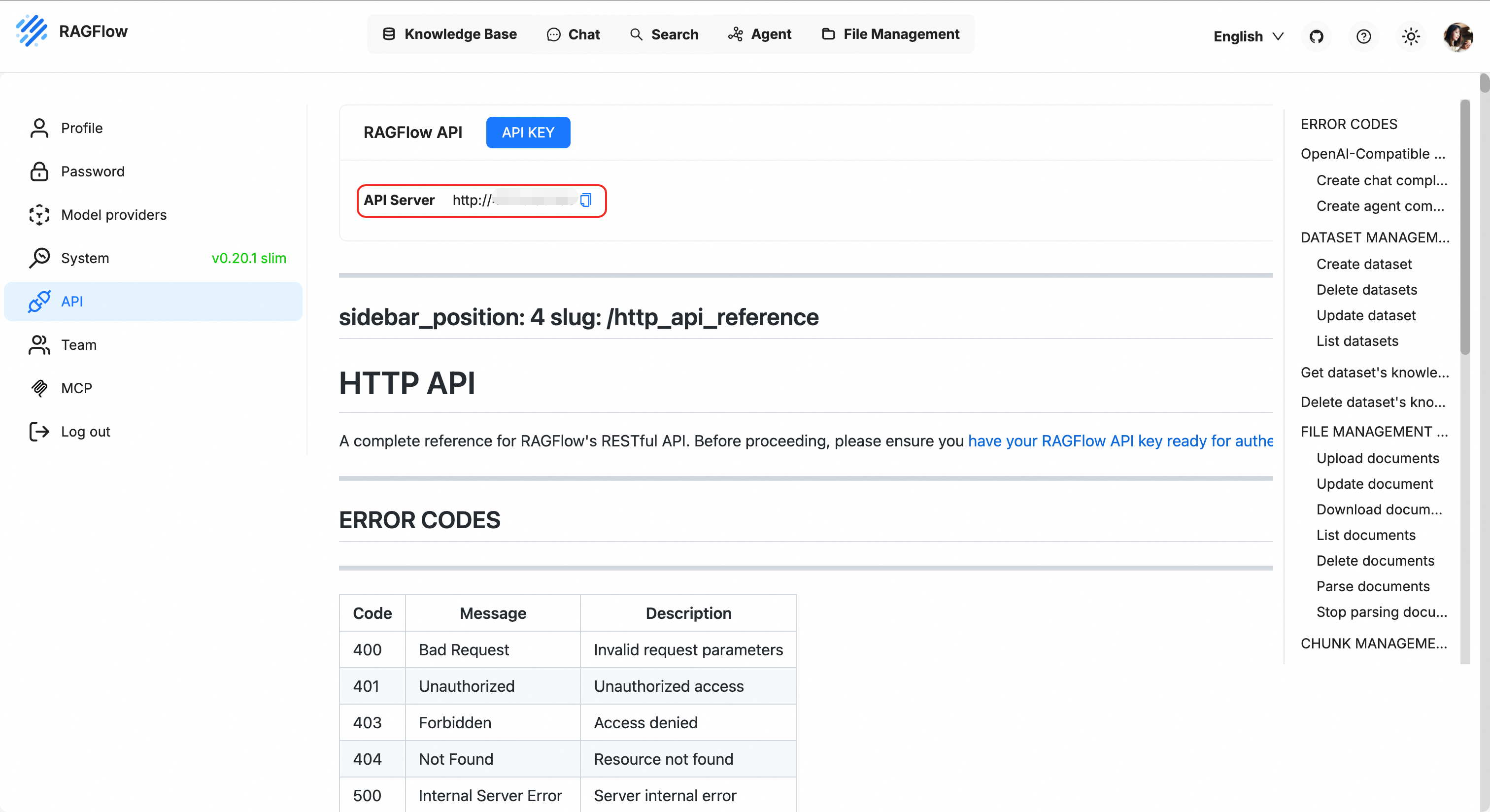
Obtain the API-KEY
-
On the personal API settings page, find the .
-
Copy an existing API key. If you do not have one, click Create new key.
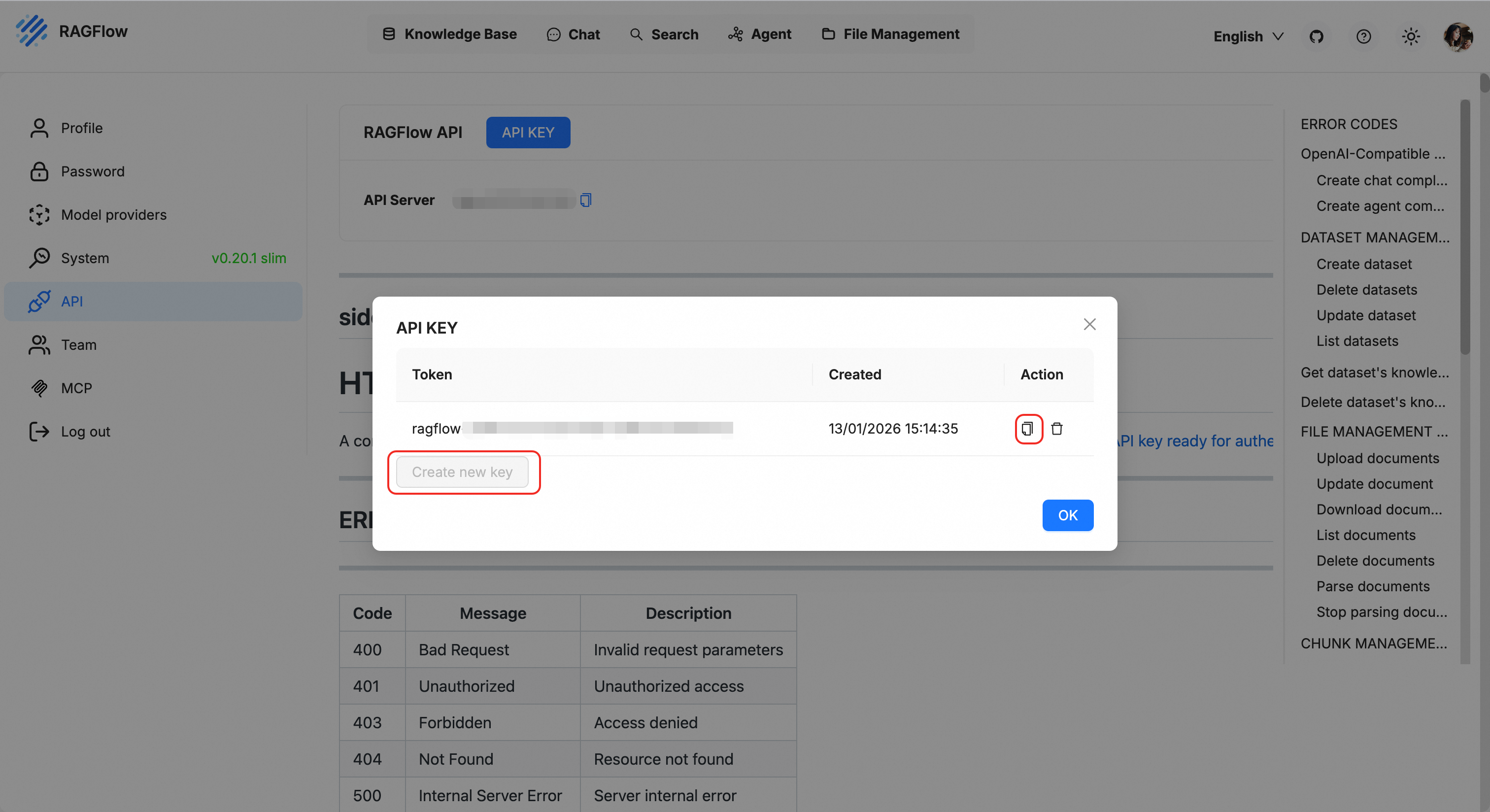
-
Refer to Credential Management and attach the API key as a credential to access third-party services on the AgentRun platform. When you create the credential, set Service Type to Other Services.
Obtain the Dataset ID
-
In the top menu bar, click Knowledge Base.
-
In the list, find and click the dataset you want to associate.
-
Check the URL in your browser's address bar or find the dataset's UUID in the configuration section on the page. This UUID is the
Dataset ID.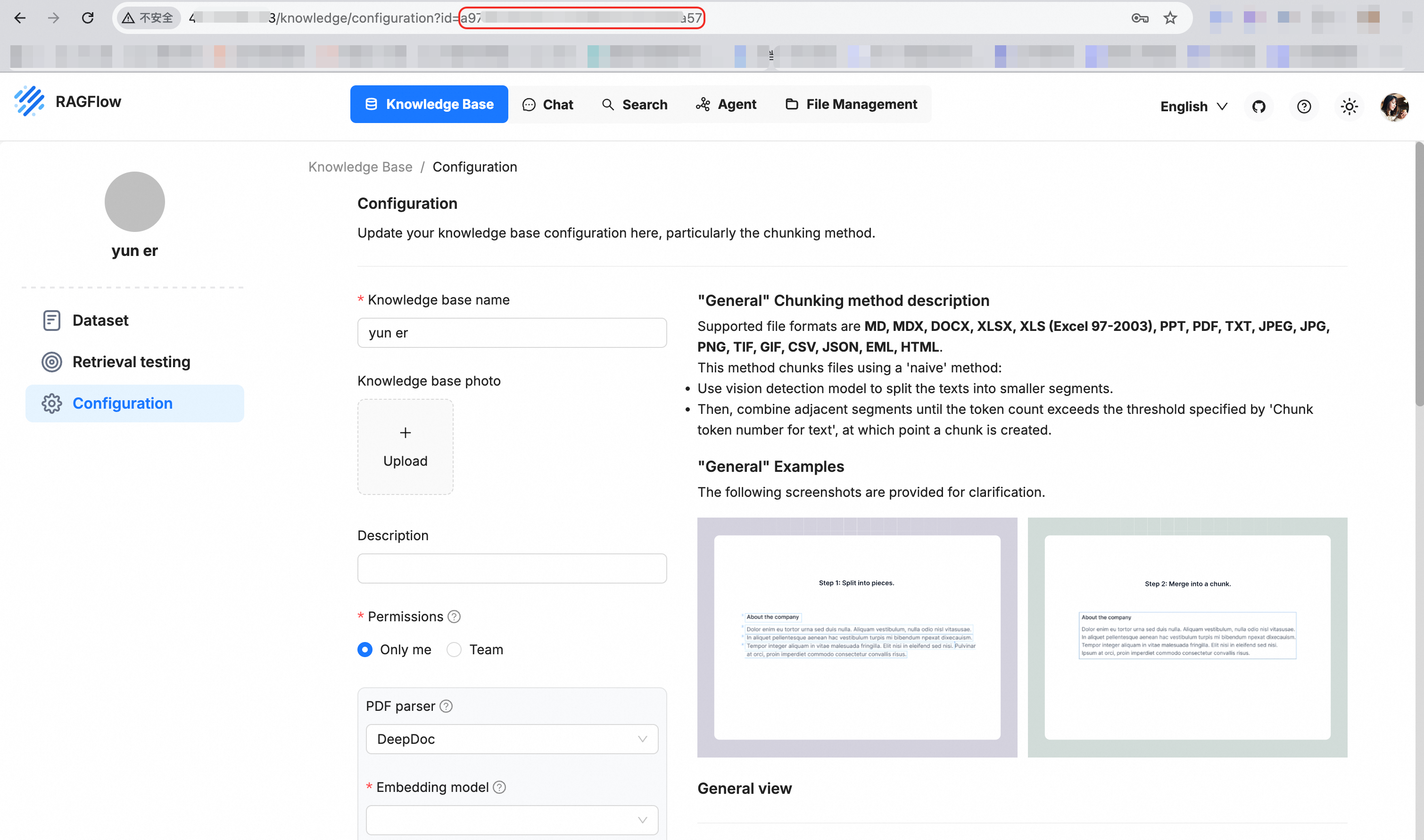
Developer guide: Integrate a knowledge base into an agent
After you attach a knowledge base, you can call it at the code level using the AgentRun SDK.
Code example: Query a knowledge base
Use the agentrun.knowledgebase module to directly retrieve content from a knowledge base.
from agentrun.knowledgebase import KnowledgeBase

## Get a single knowledge base and perform a query.
knowledgebase = KnowledgeBase.get_by_name("ragflow-test")
single_kb_retrieve_result = knowledgebase.retrieve("<your-query>")
print(single_kb_retrieve_result)

## Get multiple knowledge bases and perform a query. Cross-vendor knowledge base types are supported.
multi_kb_retrieve_result = KnowledgeBase.multi_retrieve(
    query="<your-query>",
    knowledge_base_names=["ragflow-test", "<your-knowledge-base-name-2>"],
)
print(multi_kb_retrieve_result)
Integrate a knowledge base into an agent framework
Inject the knowledge base as a tool into LangChain or other agent frameworks. This enables the AI to automatically consult documents.
"""AgentRun knowledge base agent integration code example

Before you start, see https://docs.agent.run/docs/tutorial/quick-start to configure the required authentication information and environment variables.

curl http://127.0.0.1:9000/openai/v1/chat/completions -X POST \
    -H "Content-Type: application/json" \
    -d '{"messages": [{"role": "user", "content": "What is Serverless?"}], "stream": true}'
"""

import json
import os
from typing import Any

from langchain.agents import create_agent
import pydash

from agentrun import Config
from agentrun.integration.langchain import model
from agentrun.integration.langchain import knowledgebase_toolset
from agentrun.integration.langgraph.agent_converter import AgentRunConverter
from agentrun.knowledgebase import KnowledgeBase
from agentrun.server import AgentRequest, AgentRunServer
from agentrun.server.model import ServerConfig
from agentrun.utils.log import logger

# Replace with the name of the model that you created.
AGENTRUN_MODEL_SERVICE = os.getenv("AGENTRUN_MODEL_SERVICE", "<your-model-service>")
AGENTRUN_MODEL_NAME = os.getenv("AGENTRUN_MODEL_NAME", "<your-model-name>")
KNOWLEDGE_BASES = os.getenv("AGENTRUN_KNOWLEDGE_BASES", "ragflow-test").split(",")

if AGENTRUN_MODEL_NAME.startswith("<") or not AGENTRUN_MODEL_NAME:
    raise ValueError("Replace MODEL_NAME with the name of the model that you created.")

## Load the knowledge base tools. The knowledge base can be called by the agent as a tool.
knowledgebase_tools = []
if KNOWLEDGE_BASES and not KNOWLEDGE_BASES[0].startswith("<"):
    knowledgebase_tools = knowledgebase_toolset(
        knowledge_base_names=KNOWLEDGE_BASES,
    )
else:
    logger.warning("KNOWLEDGE_BASES is not set or has not been replaced. Skip loading knowledge base tools.")

agent = create_agent(
    model=model(AGENTRUN_MODEL_SERVICE, model=AGENTRUN_MODEL_NAME, config=Config(timeout=180)),
    tools=[
        *knowledgebase_tools,   ## Integrate knowledge base query capabilities using tools.
    ],
    system_prompt="You are an AgentRun AI expert who can answer user questions by querying knowledge base documents.",
)


async def invoke_agent(request: AgentRequest):
    messages = [
        {"role": msg.role, "content": msg.content}
        for msg in request.messages
    ]

    # If a knowledge base is configured, query the knowledge base and add the result to the context.
    if KNOWLEDGE_BASES and not KNOWLEDGE_BASES[0].startswith("<"):
        # Obtain the content of the user's latest message as the query.
        user_query = None
        for msg in reversed(request.messages):
            if msg.role == "user":
                user_query = msg.content
                break

        if user_query:
            try:
                retrieve_result = await KnowledgeBase.multi_retrieve_async(
                    query=user_query,
                    knowledge_base_names=KNOWLEDGE_BASES,
                )
                # Directly add the retrieval result to the context.
                if retrieve_result:
                    messages.append({
                        "role": "assistant",
                        "content": json.dumps(retrieve_result, ensure_ascii=False),
                    })
            except Exception as e:
                logger.warning(f"Failed to retrieve the knowledge base: {e}")

    input: Any = {"messages": messages}

    converter = AgentRunConverter()
    if request.stream:

        async def async_generator():
            async for event in agent.astream(input, stream_mode="updates"):
                for item in converter.convert(event):
                    yield item

        return async_generator()
    else:
        result = await agent.ainvoke(input)
        return pydash.get(result, "messages[-1].content", "")


AgentRunServer(
    invoke_agent=invoke_agent,
    config=ServerConfig(
        cors_origins=[
            "*"
        ]
    ),
).start()
Notes
-
Network connectivity: If you deploy a private RAGFlow instance, ensure that the server environment where the AgentRun service runs can access the RAGFlow
BaseURL. -
API key validity: Regularly check that your API-KEY is valid. If you reset the key in RAGFlow, you must also update it in the AgentRun console.
-
Semantic consistency: For optimal retrieval results, the embedding model used by the knowledge base should match the semantic understanding capabilities of the large language model (LLM) that the agent uses.