Large model observability allows you to monitor LangChain/LangGraph applications by using the Python agent. The Python agent is a proprietary observability data collection agent from Alibaba Cloud that provides automatic instrumentation based on the OpenTelemetry standard. This topic describes how to connect LangChain/LangGraph applications to ARMS Application Monitoring to help you understand the real-time running status of your AI applications.
Framework overview
LangChain is a framework for developing applications powered by large language models (LLMs). It provides capabilities such as model invocation, prompt management, tool integration, retrieval-augmented generation (RAG), and agent construction to help developers quickly build complex LLM applications.
LangGraph is an agent orchestration framework within the LangChain ecosystem. It uses a graph structure to build LLM applications that support multi-step reasoning and multi-agent collaboration, enabling features like cyclic control flow, state management, and tool calls.
After integration, the following capabilities are automatically monitored:
-
Execution traces for LangChain chains and agents
-
LLM calls (model name, token usage, and input/output content)
-
Tool calls (tool name, parameters, and return results)
-
Traces related to retrievers and retrieval-augmented generation (RAG)
-
Execution and state transitions of LangGraph nodes
Integration methods
ACK and ACS
Step 1: Install ack-onepilot
-
Log on to the . On the Clusters page, click the name of the cluster.
-
In the left-side navigation pane, click add-ons. Then, in the upper-right corner, search for ack-onepilot.
-
On the ack-onepilot card, click Install. Configure the parameters—we recommend using the defaults—and then click OK.
NoteEnsure the ack-onepilot component is version 5.1.1 or later. The version is displayed on the component card before installation. If you have an earlier version installed, click Upgrade instead of Install.
Step 2: Modify configurations for AI observability
-
Log on to the Container Service for Kubernetes (ACK) console. In the left-side navigation pane, click Clusters.
-
On the Clusters page, click the name of the target cluster. In the left-side navigation pane, choose . The same procedure applies to StatefulSets and DaemonSets.
-
Navigate to your target workload's namespace. Find the workload, click the More icon
 in the Actions column, and then select Edit YAML.
 -
Add the following
labelsto the spec > template > metadata level in your YAML file. Then, click Update.labels: aliyun.com/app-language: python # Required for Python applications. Specifies that this is a Python application. armsPilotAutoEnable: 'on' armsPilotCreateAppName: "deployment-name" # The display name of the application in ARMS.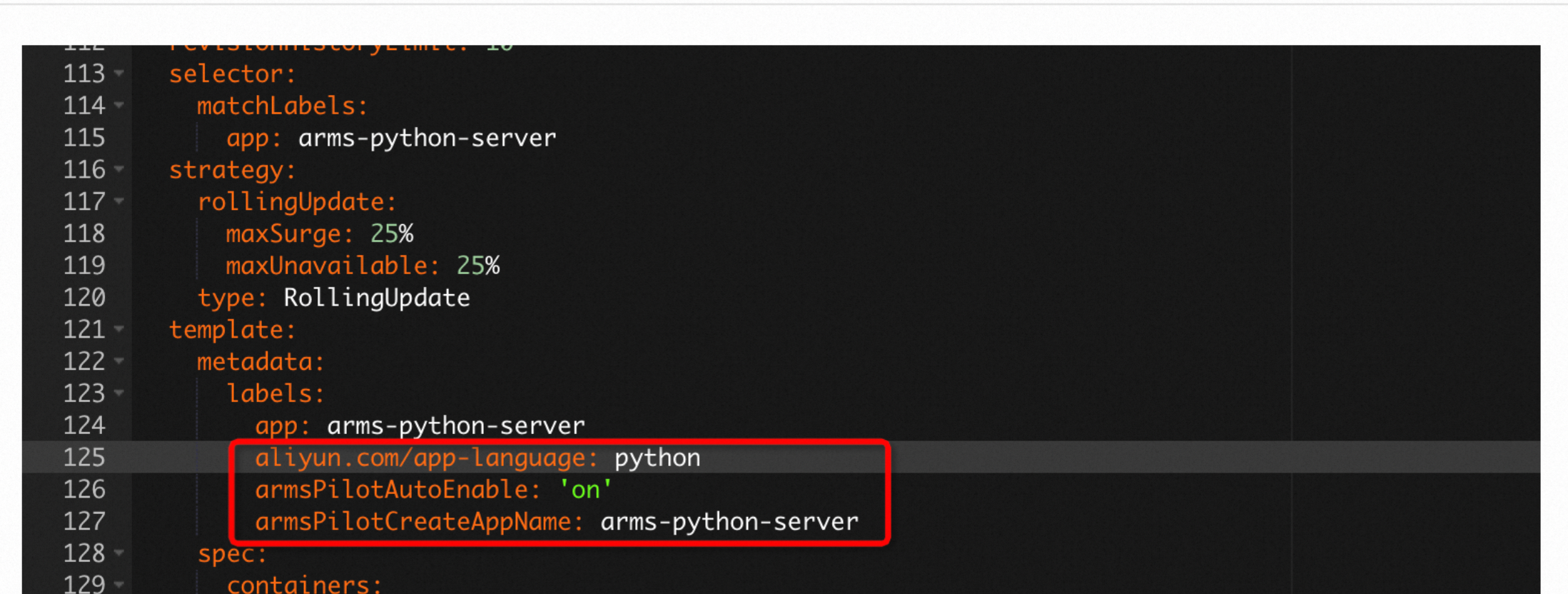
Manual integration
Step 1: Download the aliyun-bootstrap probe installer
Download the probe installer from PyPI.
pip3 install aliyun-bootstrapStep 2: Configure environment variables
You must manually add the following environment variables for your Python application:
# Method 1: Add environment variables for all processes in the current shell.
export ARMS_APP_NAME=xxx   # The application name.
export ARMS_REGION_ID=xxx   # The region ID of your Alibaba Cloud account.
export ARMS_LICENSE_KEY=xxx   # Your Alibaba Cloud license key.
# Method 2: Set environment variables for a single process
ARMS_APP_NAME=xxx ARMS_REGION_ID=xxx ARMS_LICENSE_KEY=xxx aliyun-instrument xxx.pyTo obtain the license key, see the authToken field in the response of the GetApplicationObservability API operation.
Optional: Docker installation
For Docker environments, modify your Dockerfile based on the following example.
# Add environment variables
ENV ARMS_APP_NAME={AppName}
ENV ARMS_REGION_ID={regionId}
ENV ARMS_LICENSE_KEY={licenseKey}
## Original environment
Step 3: Install the Python agent
-
To speed up the installation, set the mirror repository by running the following command:
pip config set global.index-url https://mirrors.aliyun.com/pypi/simple/ && pip config set install.trusted-host mirrors.aliyun.com -
Install the agent.
aliyun-bootstrap -a install
Step 4: Start the application
Start with the ARMS Python agent
aliyun-instrument python app.pySample code
import os
from langchain_openai import ChatOpenAI
from langgraph.prebuilt import create_react_agent
from langchain_core.tools import tool
@tool
def get_weather(city: str) -> str:
    """Get weather information for a specified city"""
    weather_data = {"Beijing": "Sunny 25°C", "Shanghai": "Cloudy 22°C", "Hangzhou": "Light rain 20°C"}
    return weather_data.get(city, f"{city}: No weather data available")
@tool
def search_product(keyword: str) -> str:
    """Search product information by keyword"""
    products = {
        "ECS": "Elastic Compute Service, providing secure and reliable cloud servers",
        "RDS": "Relational Database Service, supports MySQL/PostgreSQL/SQL Server",
        "OSS": "Object Storage Service, massive, secure, and highly reliable cloud storage",
    }
    return products.get(keyword, f"No product found for '{keyword}'")
llm = ChatOpenAI(
    model="qwen-plus",
    base_url="https://dashscope.aliyuncs.com/compatible-mode/v1",
    api_key=os.environ.get("DASHSCOPE_API_KEY"),
    streaming=True,
    stream_usage=True,  # When enabled, streamed responses include token usage
)
agent = create_react_agent(llm, tools=[get_weather, search_product])
result = agent.invoke({"messages": [{"role": "user", "content": "What's the weather like in Beijing today? Also look up what ECS is as a product"}]})
for msg in result["messages"]:
    if msg.content:
        print(msg.content)
View monitoring details
-
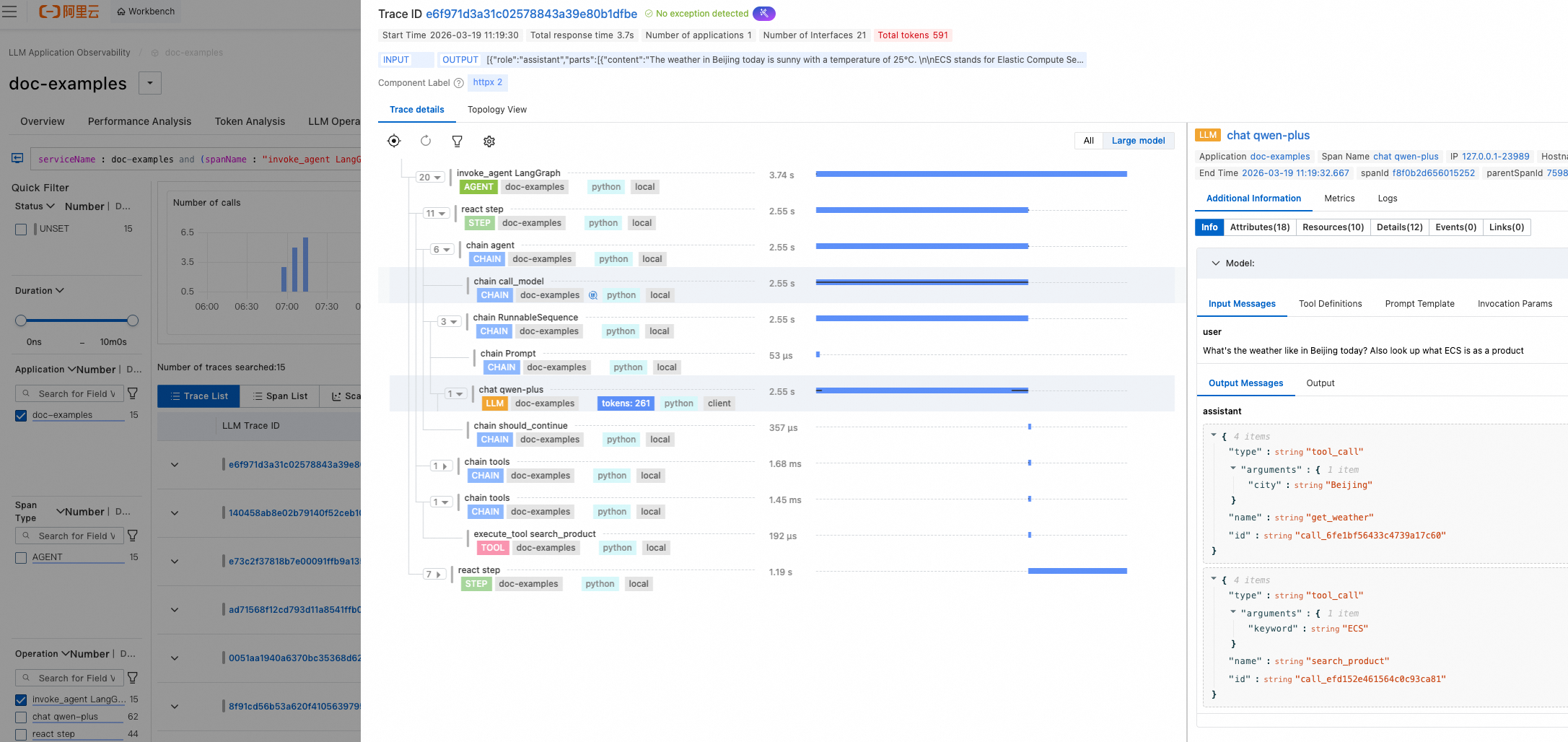
In the ARMS console, go to the LLM Application Insights > App List page and click the name of your target AI application to view detailed monitoring data.
References
Collect token usage in streaming scenarios
To collect token usage information from ChatOpenAI streaming calls, enable the stream_usage parameter:
llm = ChatOpenAI(
    model="qwen-plus",
    base_url="https://dashscope.aliyuncs.com/compatible-mode/v1",
    api_key=os.environ.get("DASHSCOPE_API_KEY"),
    streaming=True,
    stream_usage=True,  # When enabled, streamed responses include token usage.
)
Pass session_id and user_id
When calling agent.invoke, you can pass session_id and user_id in the config object's metadata to enable session- and user-based analysis:
result = agent.invoke(
    {"messages": [{"role": "user", "content": "Hello"}]},
    config={
        "metadata": {
            "session_id": "sess_abc123",
            "user_id": "user_456",
        },
    },
)-
session_id: A session identifier used to correlate multi-turn calls within the same session. -
user_id: A user identifier used for per-user aggregation and filtering.