Agent Sandbox Flash Edition mounts external storage to a Sandbox as a storage volume (Volume) or through dynamic mounting, so that data persists across Sandbox lifecycles and can be reused by multiple tasks.
Overview
Agent Sandbox Flash Edition supports mounting external storage to a Sandbox, so that the data generated by tasks is retained across Sandbox lifecycles and existing data can be reused by multiple tasks.
Persistent storage provides the following two mounting forms:
-
Storage volume: Saves the mount configuration of an existing storage resource as a manageable, authorizable, and reusable Agent Sandbox resource, which is a Volume. A Volume is referenced by its Volume name during a mount.
-
Dynamic mounting: Does not save the mount configuration of an existing storage resource as an independent resource. The mount configuration is passed directly in each request to mount the storage resource.
Both storage volumes and dynamic mounts can be mounted when a Sandbox is created, and additional mounts can be appended after the Sandbox is running.
Storage volumes
A Volume is an independent Agent Sandbox resource that stores a storage mount configuration. Each Volume stores the mount configuration of an existing storage resource, such as Object Storage Service (OSS), AgenticFS, AgenticBucket, or JuiceFS. A Volume has a name, a Team, and permission controls, so applications can reference a Volume by name instead of providing the full storage mount configuration in every request. A Volume can be mounted when a Sandbox is created, or appended as an additional mount after the Sandbox is running.
Storage volumes involve the following three objects:
-
Volume: The unified abstraction exposed at the upper layer. It describes the target storage location, access scope, mount method, and other information, and is an Agent Sandbox resource that can be managed and authorized independently.
-
Underlying storage: The persistent storage resource that actually stores data, such as an OSS bucket, AgenticFS, AgenticBucket, or JuiceFS.
-
Local mount directory: The local path inside the Sandbox that is used to access the underlying data. After the mount succeeds, applications can read and write remote data the same way they access a local directory.
-
Creating a Volume does not create or copy the underlying storage resource.
-
Releasing a Sandbox or deleting a Volume does not delete the data in the underlying storage.
-
Retention and cleanup of the underlying data are the responsibility of the business team. Related retention policies and cleanup operations must be configured or performed separately in the corresponding storage service.
Resource ownership and permission management
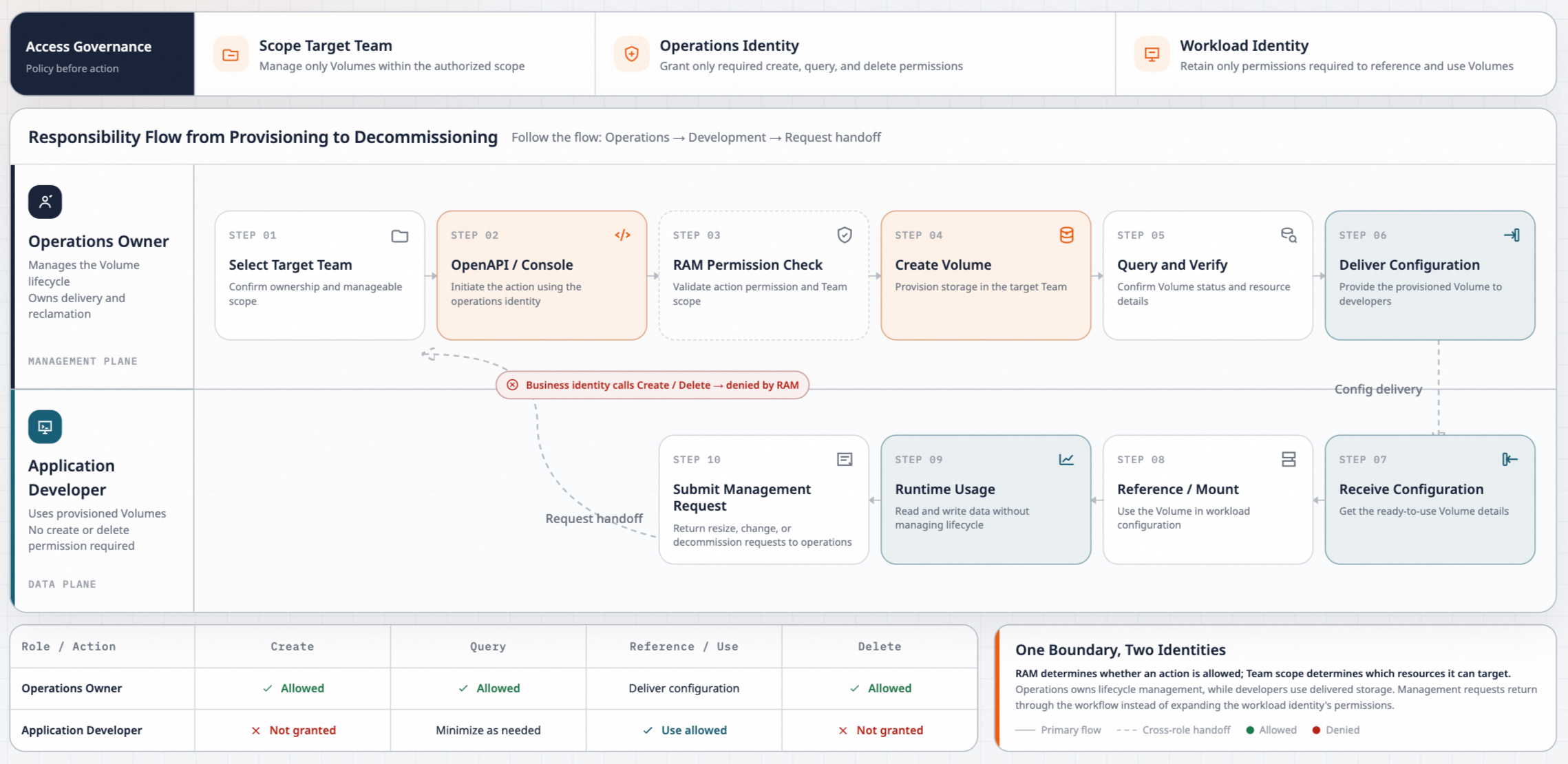
The Volume permission model covers three layers: management permissions, Team membership, and underlying data access. Enterprises can use these layers to separate the responsibilities of operations teams and business teams. Management operations are authorized by Resource Access Management (RAM) and scoped by Team. Business personnel only use the Volumes that are already configured and do not take responsibility for their lifecycle management.
Management permissions
Operations such as creating, querying, and deleting Volumes are performed through Alibaba Cloud OpenAPI or the console, and are controlled by the RAM permissions of the calling identity. Enterprises can grant the required Volume management permissions separately and limit the range of manageable Volumes by Team.
For example, an operations administrator can be responsible for creating and deleting Volumes of a target Team, while other operations engineers have only the permission to query Volumes. Business personnel use Volumes that are already configured, and do not need Volume creation or deletion permissions to mount storage.
Team membership
A Volume belongs to a specified Team, and Volume names cannot be duplicated within the same Team. When a Volume is mounted, the API key, the Sandbox, and the Volume must belong to the same Team. Cross-Team references are not supported. For the relationship between API keys and Teams, see Manage API keys.
Enterprises can plan Teams by group, business, or environment, and manage the corresponding Volumes in the appropriate Teams. Team membership limits the scope in which Agent Sandbox resources can be used. The actual data access scope also depends on the storage resource that the Volume points to and the underlying authorization.
Underlying data access
The execution RAM role of a Sandbox (referred to as the execution role) must have the permissions to access the target storage. During a mount, Agent Sandbox obtains Security Token Service (STS) temporary credentials through the execution role and narrows their permission scope according to the Volume configuration. The effective permissions never exceed the authorization scope of the execution role, and the specific permission boundary varies with the storage type.
The permission boundaries of OSS Volumes and AgenticFS Volumes differ:
-
OSS Volume: The bucket and the object prefix determine the storage scope, and the read-only configuration specifies the read or write mode. For example, a Volume can be configured for read-only access to a prefix that contains input data. The STS temporary credentials generated during the mount are then restricted to that object scope and to read operations.
-
AgenticFS Volume: The directory bound to the access point determines the permission boundary. A subdirectory under the access point specifies the remote directory to access, but cannot further narrow the permission scope of the STS temporary credentials. To isolate data by user or by tenant, configure a separate access point for each isolation unit.
Fine-grained data permission planning requires both the Team membership of the Volume and the permission boundary of the underlying storage. For details, see the permission descriptions in Create an OSS Volume and Create an AgenticFS Volume.
References
Storage volumes currently support the following types. For the activation conditions, permission configurations, SDK and template requirements, mount verification, and troubleshooting of each type, see the corresponding operation documents:
|
Volume type |
Create |
Mount |
Append a mount |
|
OSS Volume |
|||
|
AgenticFS Volume |
|||
|
AgenticBucket Volume |
|||
|
JuiceFS Volume |
Dynamic mounting
Dynamic mounting allows a business application to attach external storage directly to a Sandbox based on task requirements, without creating a Volume in advance. Supported external storage includes OSS, AgenticFS, AgenticBucket, and JuiceFS. After the mount succeeds, the application can access the underlying data through the specified local directory in the Sandbox, without fixing the storage location in a Sandbox template in advance.
Resource ownership and permission management
For management permissions, Team membership, and underlying data access:
-
A dynamic mount configuration is provided directly with the request and is not saved as an independent Agent Sandbox resource. Therefore, the dynamic mount configuration itself has no name, resource identity, or lifecycle, and does not involve resource management operations such as creating, querying, or deleting Volumes. Unlike a Volume, a mount configuration cannot be controlled independently at the resource level through RAM.
-
A dynamic mount configuration itself has no Team membership. The underlying storage still belongs to the corresponding Alibaba Cloud service, such as OSS, AgenticFS, AgenticBucket, or JuiceFS.
-
Whether the mount configuration is provided directly or a Volume is referenced, the execution RAM role of the Sandbox must have the permissions to access the target storage. During a mount, Agent Sandbox obtains STS temporary credentials through the execution role and further narrows their permission scope according to the storage mount configuration. The effective permissions never exceed the existing authorization scope of the execution role. A mount configuration can only restrict permissions, and cannot expand permissions.
References
For the prerequisites, mount parameters, code examples, verification methods, and troubleshooting of each storage type, see the corresponding operation documents.
|
Storage type |
Document |
Description |
|
OSS |
Configure an OSS mount directly when creating a Sandbox. |
|
|
Append an OSS mount to a running Sandbox. |
||
|
AgenticFS |
Configure an AgenticFS mount directly when creating a Sandbox. |
|
|
Append an AgenticFS mount to a running Sandbox. |
||
|
AgenticBucket |
Configure an AgenticBucket mount directly when creating a Sandbox. |
|
|
Append an AgenticBucket mount to a running Sandbox. |
||
|
JuiceFS |
Configure a JuiceFS mount directly when creating a Sandbox. |
|
|
Append a JuiceFS mount to a running Sandbox. |
Differences between Volumes and dynamic mounting
The main difference between a Volume and dynamic mounting is whether the mount configuration is managed and authorized as an independent resource. A Volume saves the storage mount configuration as an independent Agent Sandbox resource that is referenced by Volume name. Dynamic mounting attaches the storage resource directly during the request, with one less layer of abstraction. The following table describes the differences in detail:
|
Item |
Volume |
Dynamic mounting |
|
Resource form |
An independent Agent Sandbox resource with its own identity, Team membership, and permission controls. |
Not an independent Agent Sandbox resource. No separate identity, Team membership, or permission controls. |
|
Configuration method |
Information such as the storage location, access scope, and mount method is saved as a Volume in advance, and is referenced by name during a mount. |
The mount configuration is passed directly in the request. |
|
Management permissions |
The creation, query, and deletion of Volumes are controlled by RAM. |
Subject to the Sandbox operation permissions and the underlying storage permissions. |
|
Configuration reuse |
Multiple tasks can reference the same Volume. |
A dynamic mount configuration is typically generated for a single task. |
|
Scenarios |
An enterprise needs to centrally configure data access scopes and divide resource management responsibilities, or multiple tasks use a consistent storage configuration. |
The mount configuration changes with each task and does not need to be saved as an independent resource. |
Supported regions
Storage volumes and dynamic mounting support the same regions, but the regions vary slightly by storage type:
AgenticFS and AgenticBucket are currently available only to allowlisted accounts. To use them, submit a ticket for the corresponding storage product.
|
Storage type |
Region |
|
OSS |
For the supported regions, see Regions. |
|
AgenticFS |
China (Hangzhou), China (Shanghai), China (Beijing), China (Hong Kong), Singapore, Malaysia (Johor). |
|
AgenticBucket |
China (Hangzhou), China (Shanghai), China (Beijing). |
|
JuiceFS |
For the supported regions, see Regions. |