Deploy alibaba-log-controller and define AliyunLogConfig CRDs to collect text and stdout logs from ECI Pods.
Prerequisites
Ensure that you have:
-
An ACK Serverless cluster is created.
-
ack-virtual-node 2.7.0 or later is installed.
Configure log collection
Deploy alibaba-log-controller
-
Log on to the ACK console.
-
In the upper-left corner, select a region.
-
On the Clusters page, click your cluster name.
-
In the left navigation pane, choose Operations > Add-ons.
-
Click the Logs and Monitoring tab, find the Alibaba-log-controller card, and click Install.
-
In the confirmation dialog, click OK.
After installation, Installed appears on the Alibaba-log-controller card.
Create an AliyunLogConfig CRD
Connect to the ACK Serverless cluster, then write a YAML configuration file for the log collection CRD.
Note these constraints before creating the CRD:
-
configNamemust matchmetadata.nameexactly. -
CRD-based log collection applies only to ECI Pods created after the CRD. To collect logs from existing Pods, recreate them with a rolling update.
-
After creating a Logtail configuration through the CRD, manage it only through the CRD. Changes in the Simple Log Service (SLS) console are not synced back. To update, modify the AliyunLogConfig CRD directly.
CRD template
apiVersion: log.alibabacloud.com/v1alpha1
kind: AliyunLogConfig
metadata:
  name: simple-stdout-example
spec:
  project: k8s-my-project
  logstore: k8s-stdout
  logstoreMode: standard
  shardCount: 2
  lifeCycle: 90
  logtailConfig:
    inputType: plugin
    configName: simple-stdout-example
    inputDetail:
      ...
Basic parameters
| Parameter | Type | Required | Description |
|---|---|---|---|
project |
string | No | The SLS project name. Defaults to the Logtail installation project. Auto-created if nonexistent. |
logstore |
string | Yes | The Logstore name. Auto-created if nonexistent. |
logstoreMode |
string | No | The Logstore type. Valid values: query, standard. Takes effect only on creation. See Manage a Logstore. |
shardCount |
int | No | Number of shards. Valid values: 1–10. Default: 2. |
lifeCycle |
int | No | Log retention period in days. Valid values: 1–3650. Default: 90. 3650 = permanent. Takes effect only on creation. |
machineGroups |
array | No | The machine group. SLS auto-creates k8s-group-${your_k8s_cluster_id} on Logtail installation. |
logtailConfig |
object | Yes | The Logtail configuration. See sub-parameters below. |
logtailConfig sub-parameters:
| Sub-parameter | Description |
|---|---|
configName |
The Logtail configuration name. Must match metadata.name. |
inputType |
The log source type. plugin: stdout and plugin-based sources (such as MySQL binary logs). file: text logs with fixed modes such as regex or delimiter. |
inputDetail |
Detailed input configuration. |
outputType |
The output type. Set to LogService. Logs can only be sent to SLS. |
outputDetail |
Detailed output configuration. |
logSample |
A sample log entry. |
Container filtering
Filtering options depend on your Logtail version.
Logtail earlier than v1.0.34 — filter by environment variables and container labels only.
Kubernetes namespace and container name map to these labels:
-
Namespace:
io.kubernetes.pod.namespace -
Container name:
io.kubernetes.container.name
Use these labels to filter containers. If insufficient, use environment variable whitelists or blacklists.
Logtail v1.0.34 and later — filter by Kubernetes-level metadata including Pod name, namespace, container name, and labels.
Configure filtering parameters in logtailConfig.inputDetail.advanced.k8s:
| Parameter | Description |
|---|---|
IncludeK8sLabel |
Kubernetes label whitelist — containers to include |
ExcludeK8sLabel |
Kubernetes label blacklist — containers to exclude |
K8sNamespaceRegex |
Filter by namespace (regex) |
K8sPodRegex |
Filter by Pod name (regex) |
K8sContainerRegex |
Filter by container name (regex) |
See Collect text logs from Kubernetes containers in DaemonSet mode and Collect stdout and stderr from Kubernetes containers in DaemonSet mode (old version).
Example: collect text logs
Create log-file.yaml with the following content:
apiVersion: log.alibabacloud.com/v1alpha1  # Use the default value. Do not modify.
kind: AliyunLogConfig                      # Use the default value. Do not modify.
metadata:
  name: test-file                  # Unique resource name in the Kubernetes cluster.
spec:
  project: k8s-log-c326bc86****    # Optional. Auto-created if the project does not exist.
  logstore: test-file              # Required. Auto-created if the Logstore does not exist.
  logtailConfig:
    inputType: file                # file = text logs; plugin = stdout logs.
    configName: test-file          # Must match metadata.name.
    inputDetail:
      logType: common_reg_log      # Simple mode.
      logPath: /log/               # Log file directory.
      filePattern: "*.log"         # Log file name pattern. Supports * and ?.
      dockerFile: true             # Set to true to collect from containers.
      advanced:
        k8s:
          K8sNamespaceRegex: ^(default)$
          K8sPodRegex: '^(eci-sls-demo.*)$'
Example: collect stdout logs
Create log-stdout.yaml with the following content:
apiVersion: log.alibabacloud.com/v1alpha1   # Use the default value. Do not modify.
kind: AliyunLogConfig                       # Use the default value. Do not modify.
metadata:
  name: test-stdout               # Unique resource name in the Kubernetes cluster.
spec:
  project: k8s-log-c326bc86****   # Optional. Auto-created if the project does not exist.
  logstore: test-stdout           # Required. Auto-created if the Logstore does not exist.
  shardCount: 2                   # Optional. Default: 2. Valid values: 1–10.
  lifeCycle: 90                   # Optional. Default: 90 days. Valid values: 1–3650. 3650 = permanent.
  logtailConfig:
    inputType: plugin             # plugin = stdout logs; file = text logs.
    configName: test-stdout       # Must match metadata.name.
    inputDetail:
      plugin:
        inputs:
          - type: service_docker_stdout
            detail:
              Stdout: true
              Stderr: true
#              IncludeEnv:
#                aliyun_logs_test-stdout: "stdout"
Apply the CRD configuration
kubectl apply -f log-file.yaml
kubectl apply -f log-stdout.yaml
After applying the configuration, Logtail collects stdout or text logs from each container and sends them to SLS.
Create indexes in the Logstore to enable querying and analysis. See Create indexes.
Test log collection
After creating the CRD, logs from newly created Pods are collected automatically. Verify the setup with these steps.
Create a test application
Create test-sls-crd.yaml with the following Deployment. The container writes to both stdout and a log file.
apiVersion: apps/v1
kind: Deployment
metadata:
  name: eci-sls-demo
  labels:
    app: sls
spec:
  replicas: 1
  selector:
    matchLabels:
      app: sls
  template:
    metadata:
      name: sls-test
      labels:
        app: sls
        alibabacloud.com/eci: "true"
    spec:
      containers:
      - args:
        - -c
        - mkdir -p /log;while true; do echo hello world; date; echo hello sls >> /log/busy.log; sleep 1;done
        command:
        - /bin/sh
        image: registry-vpc.cn-beijing.aliyuncs.com/eci_open/busybox:1.30
        imagePullPolicy: Always
        name: busybox
kubectl create -f test-sls-crd.yamlVerify the Pod status
kubectl get podExpected output:
NAME                            READY   STATUS    RESTARTS   AGE
eci-sls-demo-7bf8849b9f-cgpbn   1/1     Running   0          2m14s
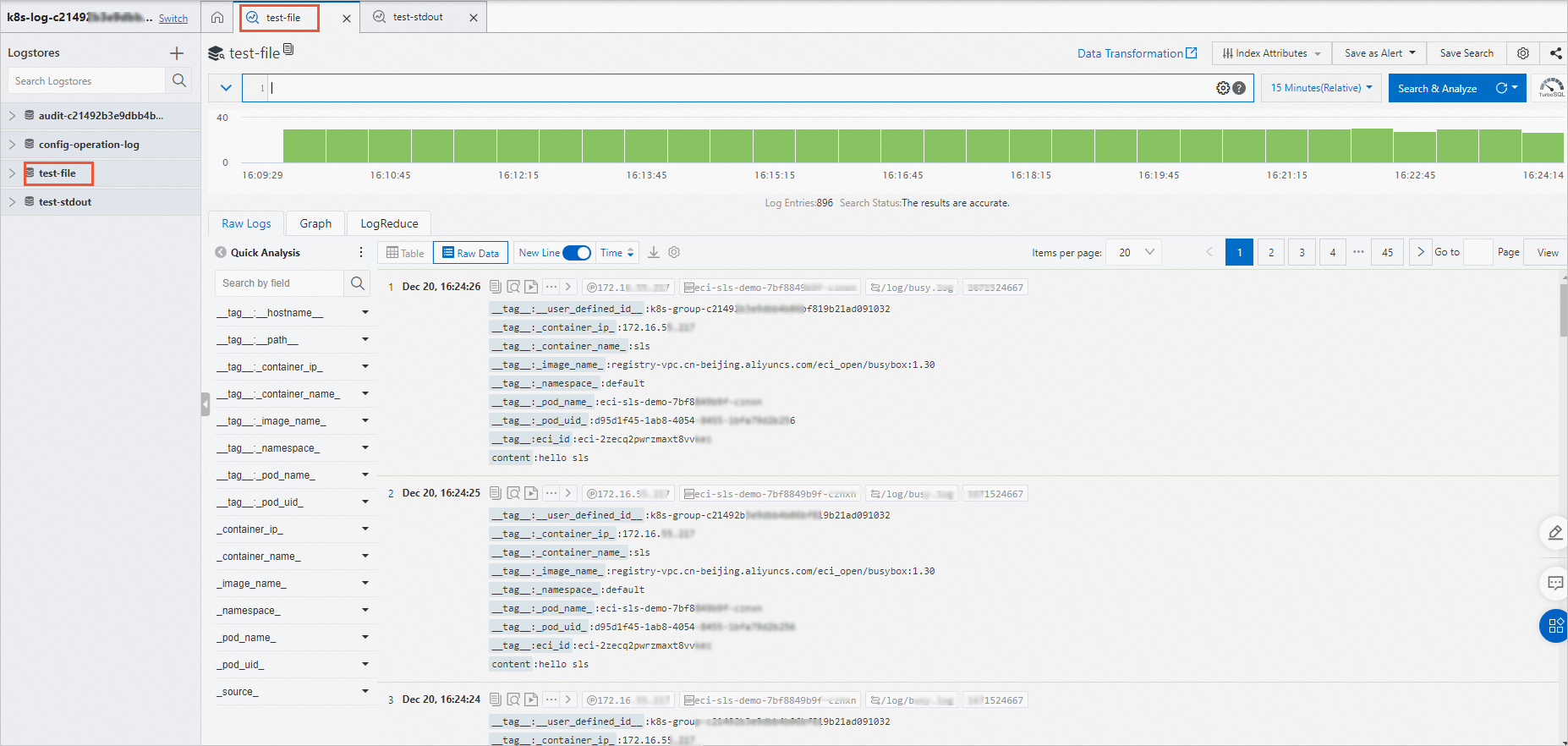
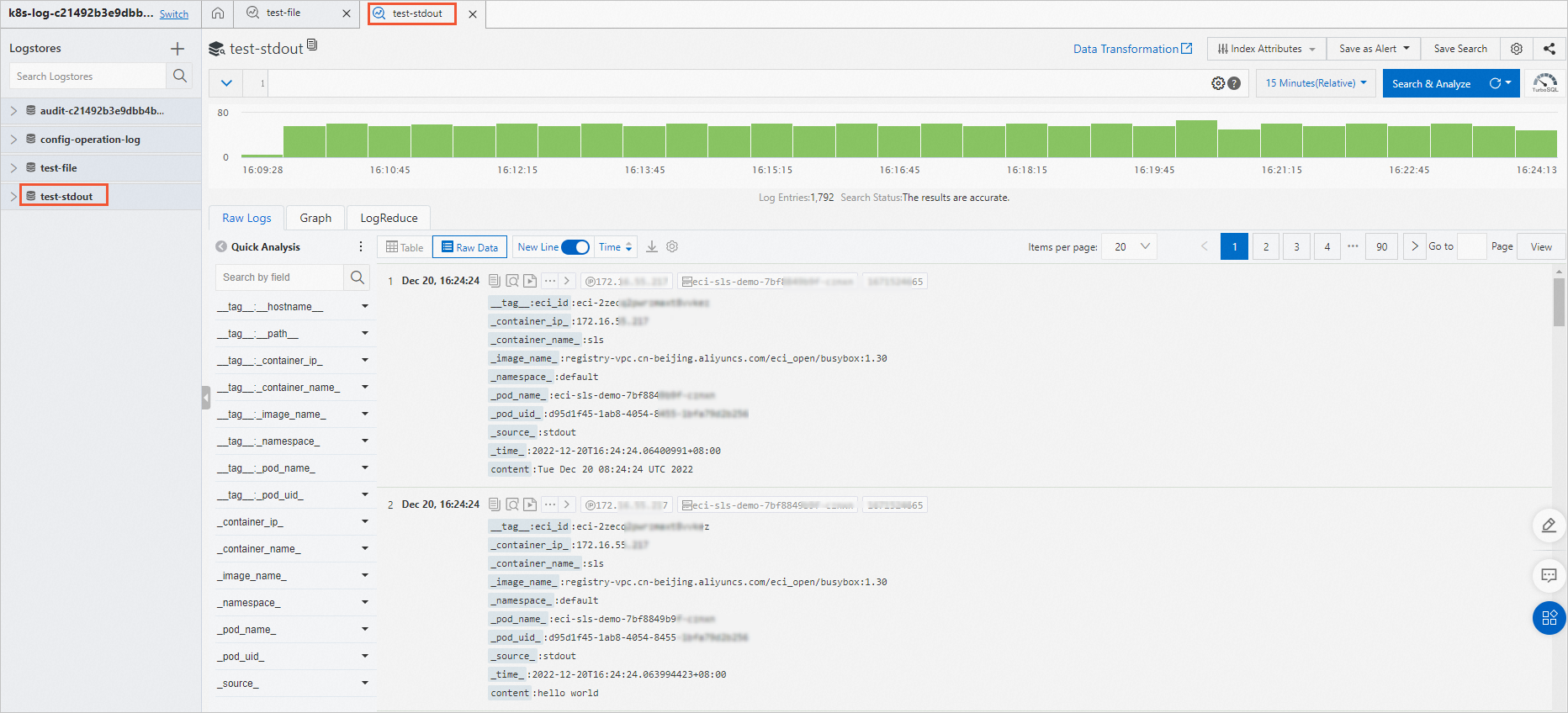
View collected logs
-
Log on to the SLS console.
-
Click the project name.
-
Click the Logstore for your containers to view logs.
Text log collection:
Stdout log collection:
Disable log collection for specific Pods
By default, the CRD collects logs from all matching Pods. To exclude specific Pods, add the k8s.aliyun.com/eci-sls-enable: "false" annotation to the Pod metadata.
-
Add annotations in
spec.template.metadata, not in top-level metadata. -
Annotations take effect only on Pod creation. Changes during Pod updates have no effect.
apiVersion: apps/v1
kind: Deployment
metadata:
  name: eci-sls-demo2
  labels:
    app: sls
spec:
  replicas: 1
  selector:
    matchLabels:
      app: sls
  template:
    metadata:
      name: sls-test
      labels:
        app: sls
        alibabacloud.com/eci: "true"
      annotations:
        k8s.aliyun.com/eci-sls-enable: "false"    # Disables log collection.
    spec:
      containers:
      - args:
        - -c
        - mkdir -p /log;while true; do echo hello world; date; echo hello sls >> /log/busy.log; sleep 1;
          done
        command:
        - /bin/sh
        image: registry.cn-shanghai.aliyuncs.com/eci_open/busybox:1.30
        imagePullPolicy: Always
        name: busybox