yurt-hub is a node-level component that enables autonomy for hybrid cloud node pools in ACK clusters. This topic introduces the yurt-hub component, its usage, and recent updates.
Component overview
yurt-hub acts as a node-level traffic proxy and is designed to ensure availability and a positive user experience in environments with unstable cloud-to-edge network connections.
The component provides the following key capabilities:
Provides data caching. When the connection between a node and the cloud API Server is unavailable, your application pods and system components can still read critical resource data from the local cache of yurt-hub, even after restarts. This prevents startup failures or prolonged unavailability caused by missing configuration or state data.
Prevents cascading failures, such as eviction or restart storms, that are caused by API Server access interruptions. During leased line outages or instability, yurt-hub acts as a local node proxy to handle incoming requests. This reduces timeouts and errors that are caused by an unreachable API Server. This also minimizes pod disruptions and frequent restarts, which makes edge nodes more resilient to disconnections.
Supports automatic adaptation of API Server access paths. Applications or components that use InClusterConfig automatically route API Server requests through yurt-hub without requiring application modifications to adapt to unstable network conditions.
Automatically adapts image repositories for system components. System components automatically switch between private and public image repositories based on whether the connection uses a leased line or the public network.
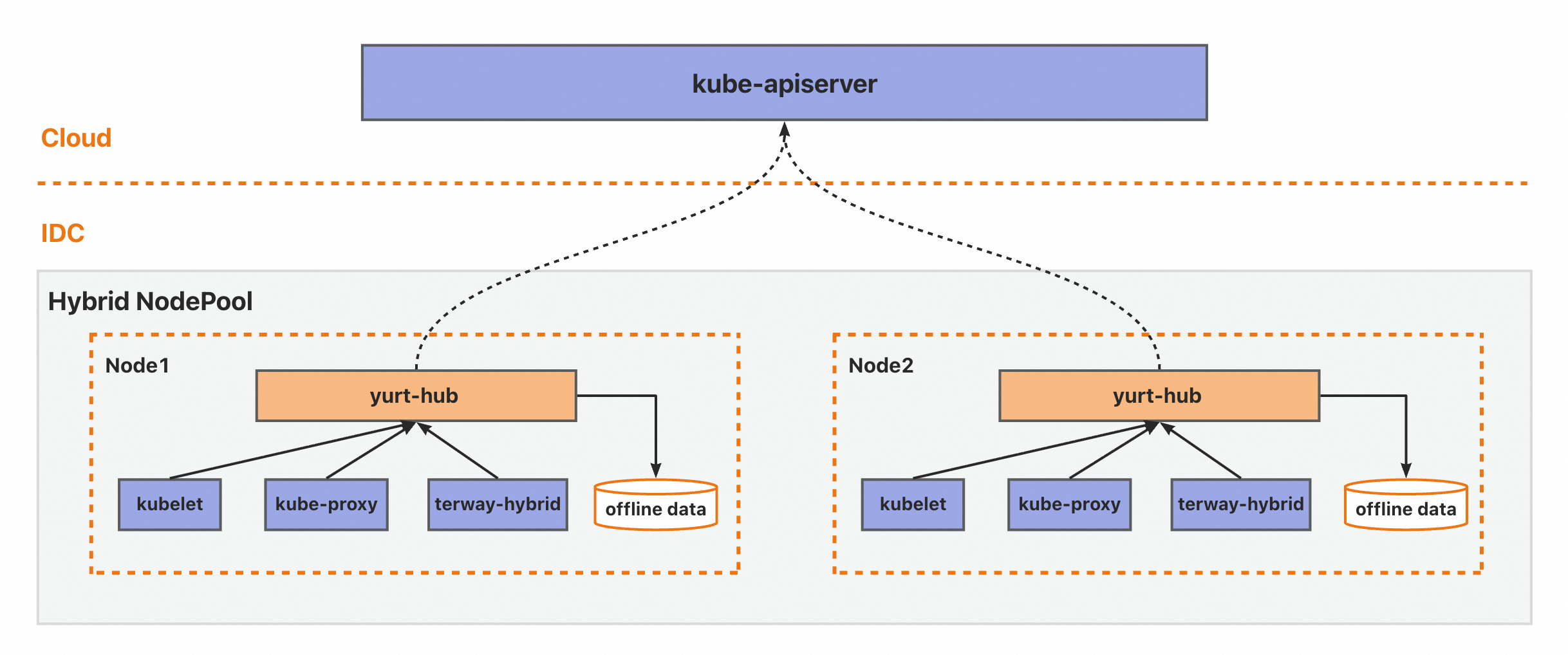
Usage instructions
This component is available only for ACK managed clusters that run version 1.33 or later and can be deployed only in hybrid cloud node pools.
Before you use this component, you must install the control plane component yurt-hub-controlplane.
To install yurt-hub:
Call the OpenAPI InstallNodePoolComponents operation. Specify the cluster ID and the ID of the hybrid cloud node pool where you want to install yurt-hub. Set the component name to yurt-hub and the version to 0.15.0. You can use config.customConfig to configure parameters. For example, you can enable data caching by setting
"cacheAgents": {User-Agent}. The User-Agent typically matches the start command of your application container. Example configuration:apiVersion: v1 kind: Pod metadata: name: hybrid-app-pod spec: containers: - name: "hybrid-app" image: "xxx/hybrid-app-amd64:1.18.8" command: - /bin/sh - -ec - | # User-Agent is the start command: hybrid-app. /usr/local/bin/hybrid-app --v=2
Change log
January 2026
Version | Registry Address | Changes | Modification Time | Impact |
v0.15.0 | registry.cn-hangzhou.aliyuncs.com/acs/yurt-hub:v0.15.0 | Initial release of yurt-hub for hybrid cloud node pools in ACK clusters. | January 13, 2026 | This upgrade has no impact on your workloads. |