Use Hera to build large-scale Argo workflows
Hera is a Python SDK for Argo Workflows that lets you define and submit workflows entirely in Python—no YAML required. This topic walks you through installing Hera, connecting it to an ACK One workflow cluster, and running two real-world workflow patterns: a directed acyclic graph (DAG) diamond and a MapReduce pipeline.
How Hera works
Argo Workflows is an open source workflow engine for automating complex workflow orchestration on Kubernetes. It supports scheduled tasks, machine learning, simulation, scientific computing, extract, transform, load (ETL) tasks, model training, and CI/CD pipelines.

Argo Workflows uses YAML to define workflows. YAML's strict indentation rules make it error-prone for complex dependency graphs—a challenge for data scientists more comfortable with Python.
Hera addresses this by letting you define workflows as Python functions decorated with @script(). Each function becomes an Argo template that you can test locally with standard Python testing frameworks before submitting to the cluster.
| Feature | What it means for you |
|---|---|
| Simplicity | Write workflow logic as plain Python functions—no YAML syntax to learn |
| Complex workflow support | Express DAG dependencies with the >> operator; Hera handles the YAML conversion |
| Python ecosystem integration | Use any Python library inside a template; test templates with pytest or unittest |
| Observability | Run unit tests on template functions before submitting to the cluster |
Workflow clusters of Distributed Cloud Container Platform for Kubernetes (ACK One) run in serverless mode. Argo Workflows is a managed component of workflow clusters.

Prerequisites
Before you begin, ensure that you have:
-
An ACK One workflow cluster. Create a Kubernetes cluster for distributed Argo workflows if you don't have one.
-
Argo Server enabled on the cluster. Use one of the following methods:
-
(Optional, for Express Connect circuit users) Enable Internet access for Argo Server
-
An access token for the cluster. Run the following command to generate one:
kubectl create token default -n default -
Python and pip installed locally
Step 1: Install Hera
pip install hera-workflowsStep 2: Configure the cluster connection
All examples in this topic use hera.shared.global_config to connect to your ACK One workflow cluster. Set the following values before running any example:
| Variable | Description | Example |
|---|---|---|
global_config.host |
Argo Server endpoint for your cluster | https://argo.<clusterid>.<region-id>.alicontainer.com:2746 |
global_config.token |
Access token generated in the prerequisites step | abcdefgxxxxxx |
global_config.verify_ssl |
SSL verification (set to "" to disable for internal endpoints) |
"" |
Step 3: Submit your first workflow
Example 1: DAG diamond
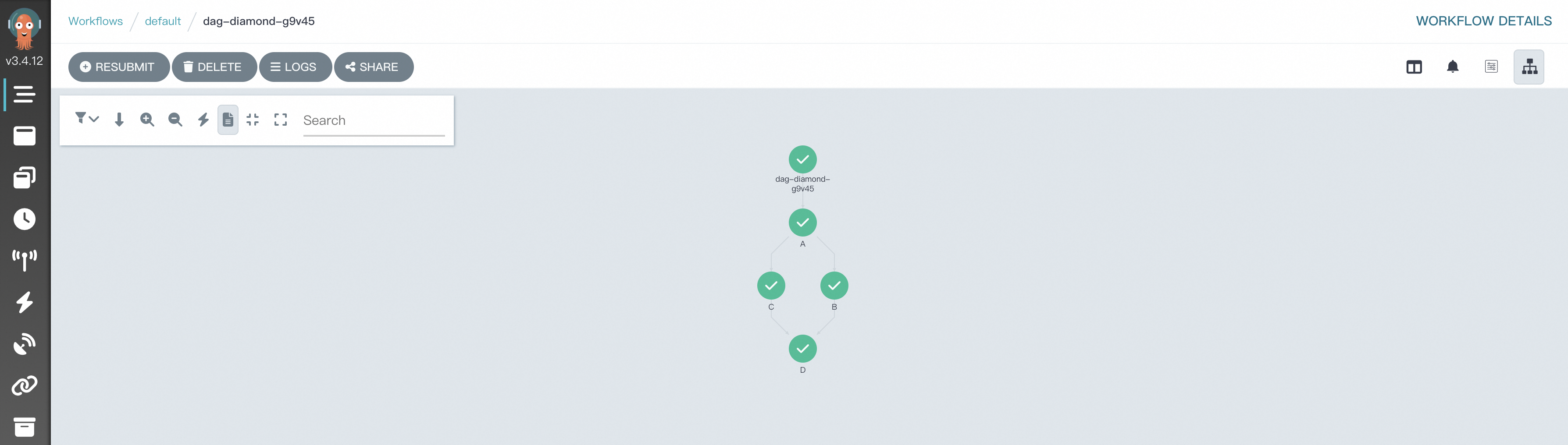
A DAG diamond runs two tasks in parallel and feeds both results into a third task—a common pattern for aggregating parallel computation.
This example defines four tasks (A, B, C, D). A runs first, B and C run in parallel after A, and D runs after both B and C finish. The >> operator expresses all dependencies in a single line.
-
Create
simpleDAG.pyand copy the following content:# Import required packages from hera.workflows import DAG, Workflow, script from hera.shared import global_config import urllib3 urllib3.disable_warnings() # Connect to your ACK One workflow cluster global_config.host = "https://argo.<clusterid>.<region-id>.alicontainer.com:2746" global_config.token = "<your-access-token>" global_config.verify_ssl = "" # The @script decorator turns a Python function into an Argo template. # The function runs normally outside Hera contexts, so you can unit-test it directly. @script() def echo(message: str): print(message) # Define the workflow and its DAG entry point with Workflow( generate_name="dag-diamond-", entrypoint="diamond", ) as w: with DAG(name="diamond"): A = echo(name="A", arguments={"message": "A"}) B = echo(name="B", arguments={"message": "B"}) C = echo(name="C", arguments={"message": "C"}) D = echo(name="D", arguments={"message": "D"}) # A -> (B and C in parallel) -> D A >> [B, C] >> D # Submit the workflow to the cluster w.create()Replace
<clusterid>,<region-id>, and<your-access-token>with the values from your cluster. -
Submit the workflow:
python simpleDAG.py -
Open the Workflow Console (Argo) to view the DAG execution and results.
Example 2: MapReduce
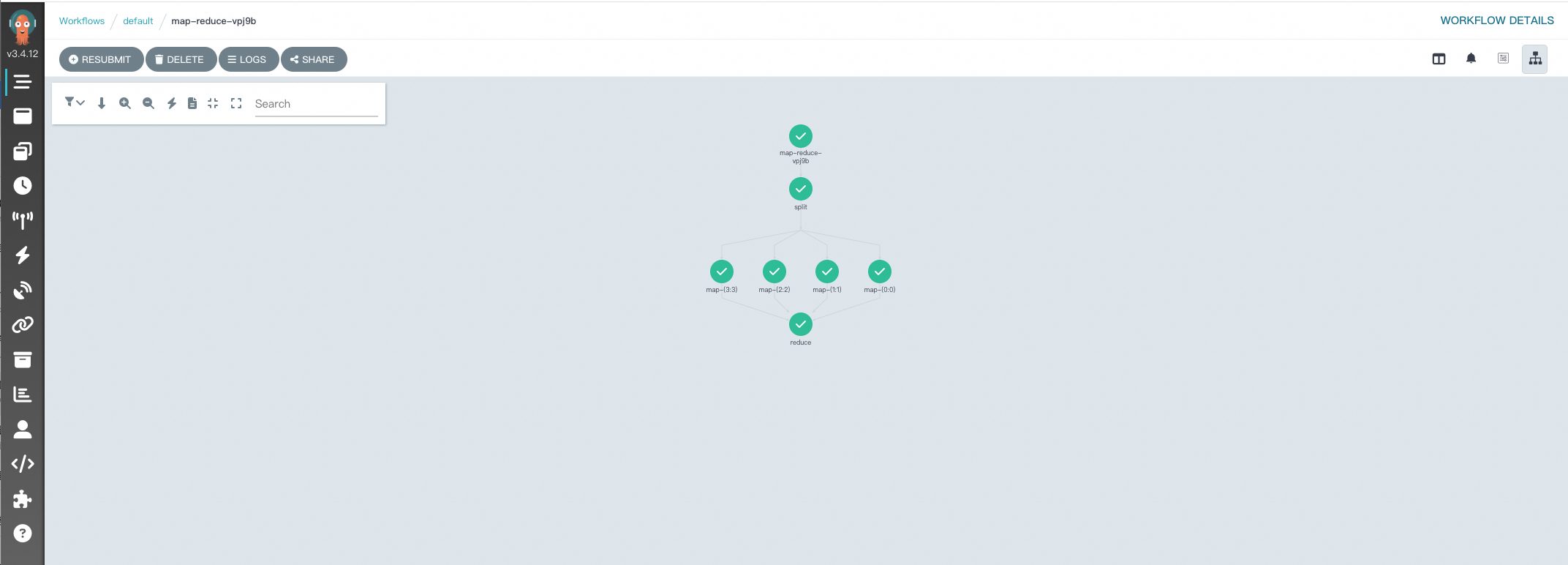
This example demonstrates a MapReduce workflow that counts values across a set of files. It introduces three additional Hera features:
-
Parameterized script decorators — passing
image,inputs, andoutputsto@script()to control execution environment and data flow -
OSSArtifact — using Alibaba Cloud OSS as the artifact store between tasks
-
Dynamic fan-out — using
with_paramto spawn one map task per input part
The workflow has three stages: split creates the input files, map_ processes each file independently, and reduce aggregates all results.
-
Create
map-reduce.pyand copy the following content:from hera.workflows import DAG, Artifact, NoneArchiveStrategy, Parameter, OSSArtifact, Workflow, script from hera.shared import global_config import urllib3 urllib3.disable_warnings() # Connect to your ACK One workflow cluster global_config.host = "https://argo.<clusterid>.<region-id>.alicontainer.com:2746" global_config.token = "<your-access-token>" global_config.verify_ssl = "" # Split: generates num_parts JSON files and writes them to OSS @script( image="python:alpine3.6", inputs=Parameter(name="num_parts"), outputs=OSSArtifact(name="parts", path="/mnt/out", archive=NoneArchiveStrategy(), key="{{workflow.name}}/parts"), ) def split(num_parts: int) -> None: import json import os import sys os.mkdir("/mnt/out") part_ids = list(map(lambda x: str(x), range(num_parts))) for i, part_id in enumerate(part_ids, start=1): with open("/mnt/out/" + part_id + ".json", "w") as f: json.dump({"foo": i}, f) json.dump(part_ids, sys.stdout) # Map: reads one input file and writes a transformed output file to OSS @script( image="python:alpine3.6", inputs=[Parameter(name="part_id", value="0"), Artifact(name="part", path="/mnt/in/part.json"),], outputs=OSSArtifact( name="part", path="/mnt/out/part.json", archive=NoneArchiveStrategy(), key="{{workflow.name}}/results/{{inputs.parameters.part_id}}.json", ), ) def map_() -> None: import json import os os.mkdir("/mnt/out") with open("/mnt/in/part.json") as f: part = json.load(f) with open("/mnt/out/part.json", "w") as f: json.dump({"bar": part["foo"] * 2}, f) # Reduce: reads all map outputs from OSS and aggregates the total @script( image="python:alpine3.6", inputs=OSSArtifact(name="results", path="/mnt/in", key="{{workflow.name}}/results"), outputs=OSSArtifact( name="total", path="/mnt/out/total.json", archive=NoneArchiveStrategy(), key="{{workflow.name}}/total.json" ), ) def reduce() -> None: import json import os os.mkdir("/mnt/out") total = 0 for f in list(map(lambda x: open("/mnt/in/" + x), os.listdir("/mnt/in"))): result = json.load(f) total = total + result["bar"] with open("/mnt/out/total.json", "w") as f: json.dump({"total": total}, f) # Orchestrate: split -> map (one task per part, in parallel) -> reduce with Workflow(generate_name="map-reduce-", entrypoint="main", namespace="default", arguments=Parameter(name="num_parts", value="4")) as w: with DAG(name="main"): s = split(arguments=Parameter(name="num_parts", value="{{workflow.parameters.num_parts}}")) m = map_( with_param=s.result, arguments=[Parameter(name="part_id", value="{{item}}"), OSSArtifact(name="part", key="{{workflow.name}}/parts/{{item}}.json"),], ) s >> m >> reduce() # Submit the workflow to the cluster w.create()Replace
<clusterid>,<region-id>, and<your-access-token>with the values from your cluster. -
Submit the workflow:
python map-reduce.py -
Open the Workflow Console (Argo) to view the DAG execution and results.
YAML vs. Hera: choosing the right tool
| Feature | YAML | Hera |
|---|---|---|
| Simplicity | Relatively high | High — low-code approach |
| Workflow orchestration complexity | High | Low |
| Integration with the Python ecosystem | Low | High — integrates with Python libraries |
| Testability | Low — prone to syntax errors | High — supports Python testing frameworks |
Hera is the better fit for data engineers and data scientists who are already working in Python and want to define, test, and iterate on complex workflows without switching to YAML.
What's next
-
Hera overview — full SDK reference and advanced examples
-
Train LLM with Hera — using Hera for large language model training
-
dag-diamond.yaml — equivalent YAML for the DAG diamond example
-
map-reduce.yaml — equivalent YAML for the MapReduce example
If you have questions about ACK One, join the DingTalk group 35688562.