This topic shows how to create, deploy, update, and roll back applications using GitOps on Container Service for Kubernetes (ACK).
After completing this topic, you will be able to:
Create and deploy an application from a Git repository
View the application's sync status and resource topology
Update the application by committing to Git
Roll back to a previous version
Prerequisites
Before you begin, ensure that you have:
Associated two clusters with the Fleet instance — a service provider cluster and a service consumer cluster
Create and deploy an application
The following steps use an example application named echo-server-demo, deployed to an ACK cluster with API server address https://47.97.XX.XX:6443.
If you cannot access GitHub due to network issues, replace https://github.com/AliyunContainerService/gitops-demo.git with https://code.aliyun.com/shuwei.hsw/gitops-demo.git.
Via the Argo CD console
Log on to the Argo CD UI. For more information, see Use the Argo CD UI to log on to Argo CD.
In the left-side navigation pane, click Applications, then click + NEW APP.
In the panel that appears, configure the following parameters and click CREATE.
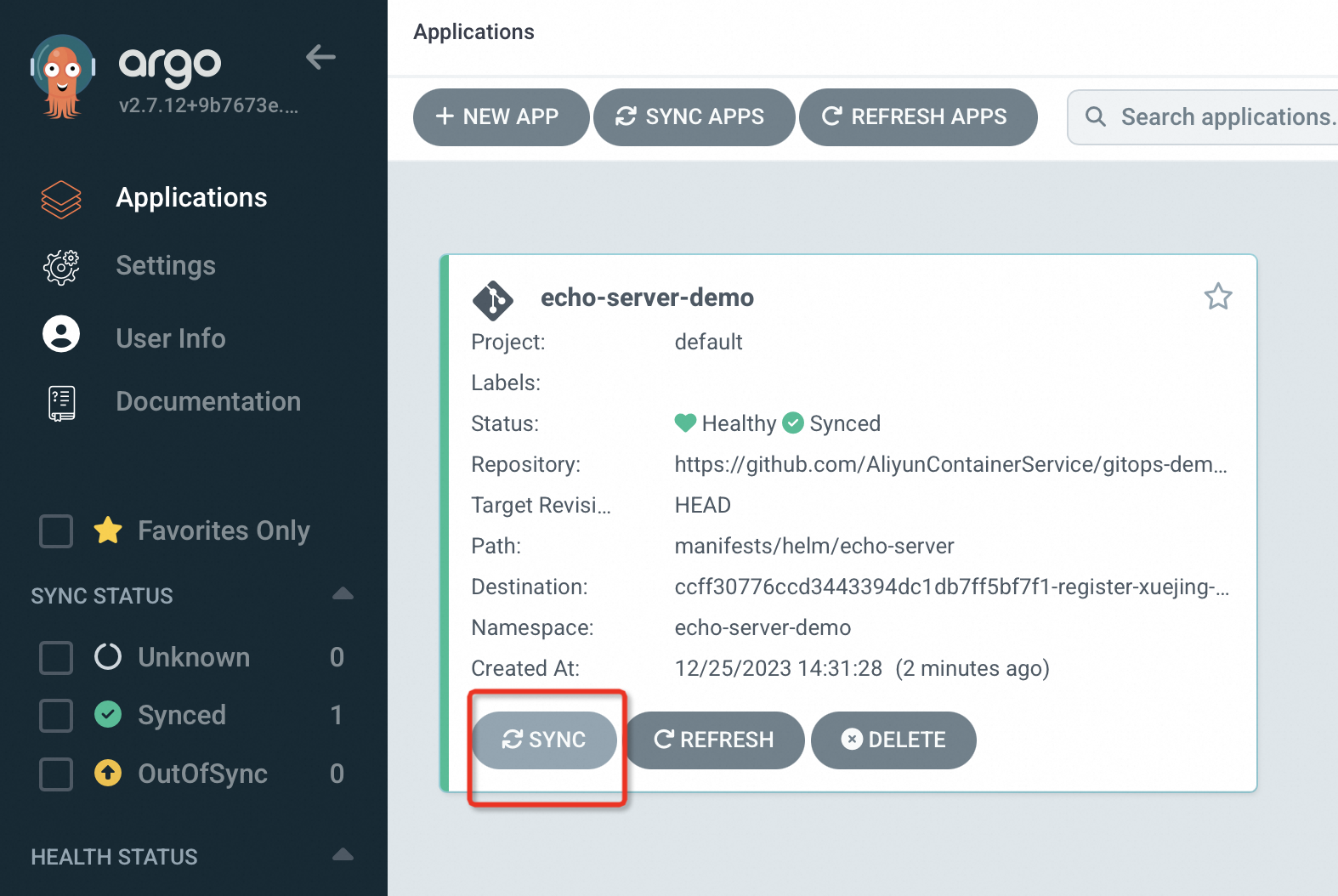
Section Parameter Value GENERAL Application Name echo-server-demoProject Name defaultSYNC POLICY Select Automatic from the drop-down list. With Automatic, Argo CD scans the Git repository every 3 minutes and syncs changes to the cluster. With Manual, you trigger syncs manually by clicking SYNC. SYNC OPTIONS Select AUTO-CREATE NAMESPACE SOURCE Repository URL Select https://github.com/AliyunContainerService/gitops-demo.gitfrom the drop-down listRevision HEADPath manifests/helm/echo-serverDESTINATION Cluster URL/Cluster Name Select your target cluster from the drop-down list Namespace echo-server-demoHELM VALUES FILES values.yamlAfter the application is created, view its status on the Applications page. If SYNC POLICY is set to Manual, click SYNC to deploy the application. The application is successfully deployed when its status shows both Healthy and Synced.
Via the Argo CD CLI
Create the application:
argocd app create echo-server-demo \
  --repo https://github.com/AliyunContainerService/gitops-demo.git \
  --path manifests/directory/production \   # subdirectory containing the application manifests
  --dest-namespace echo-server-demo \        # namespace where the application is deployed
  --dest-server https://47.97.XX.XX:6443 \  # API server endpoint of the ACK cluster
  --sync-policy none                         # none (default): manual sync; auto: automatic sync every 3 minutes
Expected output:
application 'echo-server-demo' createdDeploy the application to the cluster:
argocd app sync echo-server-demoExpected output:
TIMESTAMP                  GROUP        KIND         NAMESPACE                 NAME             STATUS      HEALTH        HOOK  MESSAGE
2022-10-17T16:43:20+08:00  apps         Deployment   echo-server-demo          echo-server      OutOfSync   Missing
2022-10-17T16:43:20+08:00               Service      echo-server-demo          echo-server      OutOfSync   Missing
2022-10-17T16:43:20+08:00               Service      echo-server-demo          echo-server      Synced      Progressing
2022-10-17T16:43:20+08:00               Service      echo-server-demo          echo-server      Synced      Progressing         service/echo-server-demo created
2022-10-17T16:43:20+08:00  apps         Deployment   echo-server-demo          echo-server      OutOfSync   Missing             deployment.apps/echo-server-demo created
2022-10-17T16:43:20+08:00  apps         Deployment   echo-server-demo          echo-server      Synced      Progressing         deployment.apps/echo-server-demo created

Name:               echo-server-demo
Project:            default
Server:             https://47.97.XX.XX:6443
Namespace:          echo-server-demo
URL:                https://127.0.0.1:65384/applications/echo-server-demo
Repo:               https://github.com/AliyunContainerService/gitops-demo.git
Target:
Path:               manifests/directory/production
SyncWindow:         Sync Allowed
Sync Policy:        <none>
Sync Status:        Synced to  (02af62b)
Health Status:      Progressing

Operation:          Sync
Sync Revision:      02af62bf21e76f53ebfcc282c45865d2308c****
Phase:              Succeeded
Start:              2022-10-17 16:43:19 +0800 CST
Finished:           2022-10-17 16:43:20 +0800 CST
Duration:           1s
Message:            successfully synced (all tasks run)

GROUP  KIND        NAMESPACE         NAME              STATUS  HEALTH       HOOK  MESSAGE
      Service     echo-server-demo  echo-server-demo  Synced  Progressing        service/echo-server-demo created
apps   Deployment  echo-server-demo  echo-server-demo  Synced  Progressing        deployment.apps/echo-server-demo created
The sync completes when
PhaseshowsSucceededandMessageshowssuccessfully synced (all tasks run). Resources initially appear asProgressingwhile Kubernetes starts the pods — they transition toHealthyonce all pods are running.
View applications
Via the Argo CD console
In the left-side navigation pane, click Applications to see all applications.
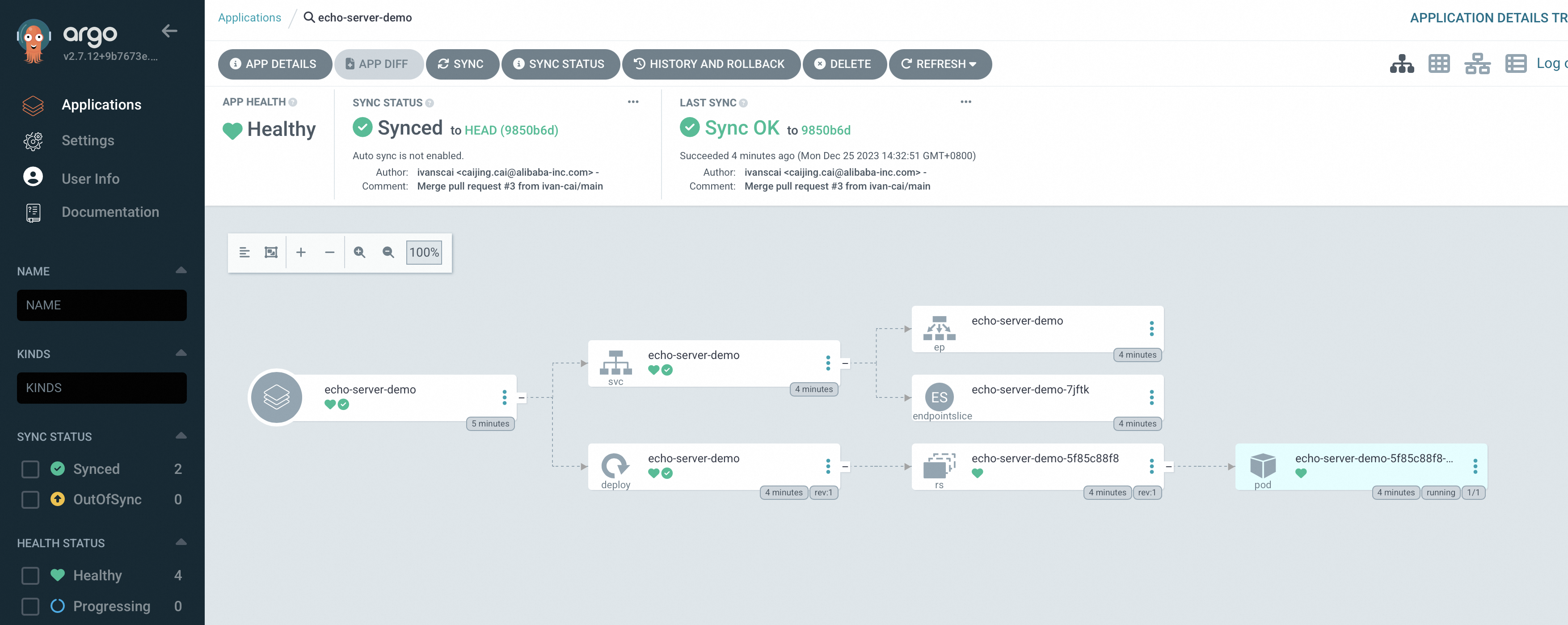
Click an application name to open its details page, which shows the resource topology and the status of each Kubernetes resource.
Via the Argo CD CLI
List all deployed applications:
argocd app listExpected output:
NAME         CLUSTER                     NAMESPACE         PROJECT  STATUS  HEALTH   SYNCPOLICY  CONDITIONS  REPO                                                       PATH                            TARGET
echo-server  https://47.97.XX.XX:6443    echo-server-demo  default  Synced  Healthy  <none>      <none>      https://github.com/AliyunContainerService/gitops-demo.git  manifests/directory/production
A STATUS of Synced and HEALTH of Healthy confirms the application is running and matches the Git repository state.
Update an application
In GitOps, Git is the single source of truth. To update a deployed application, commit changes to the Git repository — do not modify cluster resources directly. If the sync policy is set to auto, Argo CD picks up the change automatically within 3 minutes. With none (manual), run argocd app sync after committing.
Commit your changes to the Git repository.
Sync the changes to the cluster:
argocd app sync echo-server-demoVerify the update by accessing the application:
curl XX.XX.XX.XX:8080/version # Replace XX.XX.XX.XX with the application's IP addressExpected output:
"Hello Echo Server v2.0"
Roll back an application
Via the Argo CD console
In the left-side navigation pane, click Applications. Find
echo-server-demoand click its name.On the application details page, click HISTORY AND ROLLBACK. On the historical version page, select the target version and click Rollback in the upper-right corner.
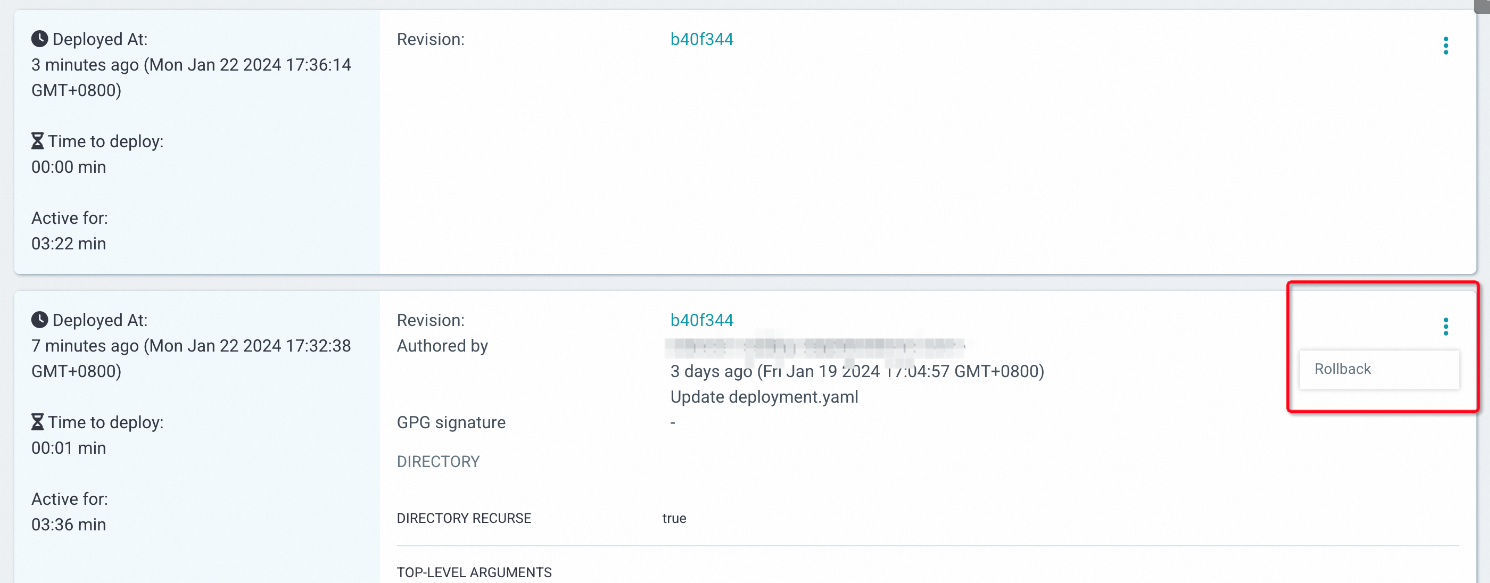
Return to the application details page to confirm the version after the rollback is complete.
Via the Argo CD CLI
View available historical versions:
argocd app history echo-server-demoExpected output:
ID  DATE                           REVISION
0   2022-10-17 16:43:20 +0800 CST   (02af62b)
1   2022-10-17 16:52:49 +0800 CST   (56ae547)
The highest ID is the current version. In this example, ID
1(revision56ae547) is current. To roll back, target a lower ID.Roll back to revision
02af62b(ID0):argocd app rollback echo-server-demo 0Verify the rollback by accessing the application:
curl XX.XX.XX.XX:8080/version # Replace XX.XX.XX.XX with the application's IP addressExpected output:
"Hello Echo Server v1.0"