Workflow clusters support directed acyclic graph (DAG) dynamic fan-out and fan-in, letting you split a task into thousands of sub-tasks, run them in parallel across tens of thousands of vCPUs with auto scaling, and aggregate the results — all while reclaiming resources automatically after each run to control costs.
This topic walks through a complete example: splitting a large log file in Object Storage Service (OSS) into parts, counting keywords in each part in parallel, and merging the results.
Background
Fan-out and fan-in

Fan-out splits a single task into multiple sub-tasks that run in parallel. Fan-in waits for all sub-tasks to finish and aggregates their results. Together, they let you make full use of multiple vCPUs and computing instances to process large amounts of data efficiently.
In a DAG, the split can be either static or dynamic:
Static DAG: The number and type of sub-tasks are fixed at authoring time. For example, collect data from Database 1 and Database 2, then aggregate the results.
Dynamic DAG: Sub-tasks are determined at runtime based on the output of a parent task. In the figure above, Task A scans a dataset and emits one entry per sub-dataset. Argo Workflows launches one sub-task (Bn) per entry, all running in parallel. Task C starts only after all Bn sub-tasks complete. The number of sub-tasks is not known until Task A runs.
The dynamic pattern is powered by withParam: a parent task writes a JSON array to stdout, and each element becomes the input for one parallel sub-task instance. This differs from static withItems, where the list of inputs is fixed in the workflow definition.
Kubernetes clusters for distributed Argo workflows
On-premises computing resources often cannot satisfy the peak vCPU demand of large-scale fan-out. For example, running regression tests that simulate every driving scenario in an autonomous driving simulation requires all scenarios to execute concurrently to keep iteration cycles short.
Kubernetes clusters for distributed Argo workflows (workflow clusters) address this by hosting Argo Workflows with auto scaling that provisions on-cloud computing resources on demand and reclaims them after sub-tasks finish. This applies to data processing, machine learning, simulation computation, and CI/CD scenarios.
Argo Workflows is a graduated project of Cloud Native Computing Foundation (CNCF). It uses Kubernetes CustomResourceDefinitions (CRDs) to define scheduled tasks and DAG workflows and runs each task in a Kubernetes pod. For more information, see Argo Workflows.
Prerequisites
Before you begin, ensure that you have:
A workflow cluster. See Create a Kubernetes cluster for distributed Argo workflows
An OSS bucket with the input log file and an OSS volume mounted to the cluster. See Use volumes
Implement dynamic DAG fan-out/fan-in
How it works
The workflow uses a three-stage map-reduce pattern:
Split (fan-out): Reads the large log file from the OSS volume and divides it into
numPartssmaller files. Writes a JSON array of part IDs (for example,["0", "1", "2", "3", "4"]) to stdout — this is the fan-out signal consumed bywithParam.Map (parallel): Argo Workflows reads the JSON array from the split task's stdout via
withParamand launches one map task per element, each receiving itspartIdas{{item}}. All map tasks run in parallel, each counting keywords in its assigned file.Reduce (fan-in): Starts only after all map tasks succeed (the
depends: "map"field defaults to requiring all instances to succeed). Reads the per-part results from the OSS volume and merges them into a singleresult.json.
In this example, the reduce task reads intermediate results from the OSS volume rather than using Argo's native output aggregation. This approach works when sub-tasks write their outputs to a shared volume that the reduce task can access directly.
Create the workflow
Create a workflow using the following YAML:
View the results
After the workflow completes, log on to the ACK One console to view the DAG graph and execution status.
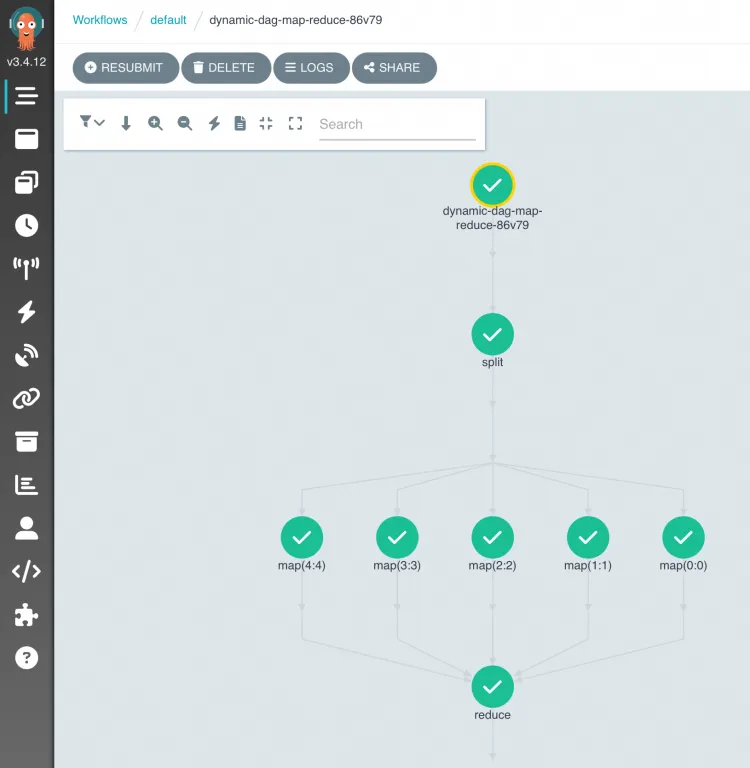
In the OSS object list:
| File or directory | Description |
|---|---|
log-count-data.txt | Input log file |
split-output/ | Intermediate files from the split stage |
cout-output/ | Intermediate results from each map task |
result.json | Final merged output |
Source code
What's next
For questions about ACK One, join the DingTalk group 35688562.