ACK One fleet supports priority-based elastic scheduling for AI inference services across multi-cluster environments. Define a priority order for clusters so that workloads fill higher-priority clusters first and spill over to lower-priority clusters only when capacity runs out. On scale-in, the fleet removes replicas from the lowest-priority cluster first.
This is useful in two scenarios:
-
Multi-region ACK clusters: Designate a primary region (higher priority) for AI inference. On scale-out, the fleet schedules to the primary region first; if capacity is exhausted, it schedules to the backup region. On scale-in, replicas in the backup region are removed first.
-
Hybrid cloud (IDC + cloud): Use on-premises IDC resources as the primary cluster and cloud-based ACK resources as overflow capacity. On scale-out, the fleet fills the IDC cluster first; if IDC resources are exhausted, it schedules to the ACK cluster and triggers instant node elasticity to provision new nodes. On scale-in, cloud replicas are removed first.
The following walkthrough uses the hybrid cloud scenario.
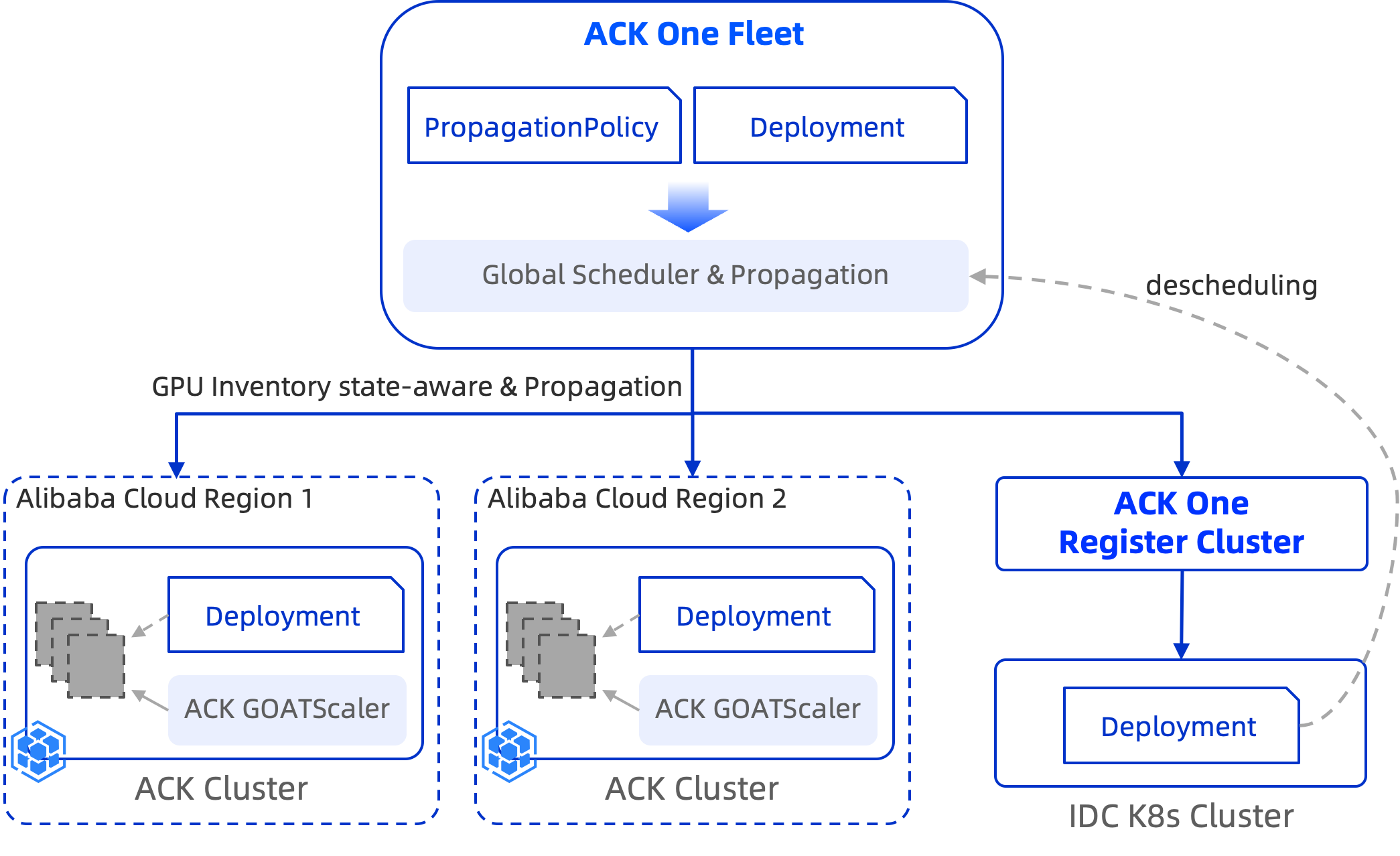
How it works
Cluster priority is defined by the order of clusterAffinities groups in the PropagationPolicy. The scheduler evaluates groups in order:
-
Schedule replicas to the first affinity group (highest priority).
-
If that group has no available capacity, fall back to the next group.
-
dynamicWeight: AvailableReplicasdistributes replicas across clusters based on each cluster's available capacity. When the IDC cluster's available replica count drops to zero, the scheduler falls back to the cloud cluster. -
autoScaling.ecsProvision: trueallows the cloud cluster to trigger instant node elasticity when it lacks the nodes to run pending pods. -
On scale-in, replicas are removed in reverse priority order — cloud cluster first, IDC cluster last.
Prerequisites
Before you begin, ensure that you have:
-
Instant node elasticity enabled for all member clusters, with ACK cluster version 1.24 or later
If node autoscaling is already enabled for a member cluster, switch to instant node elasticity by following Step 1: Enable instant node elasticity.
-
The AMC command-line tool installed
Step 1: Deploy a demo service in the fleet
This example uses the Qwen3-0.6B model, downloaded from ModelScope and served with vLLM. For testing, a T4 or A10 GPU is sufficient.
-
Create the
testnamespace in the fleet. The namespace must also exist in all member clusters.kubectl create ns test -
Save the following manifest as
demo.yaml, then apply it to the fleet to deploy a Deployment and a Service.kubectl apply -f demo.yamlapiVersion: apps/v1 kind: Deployment metadata: name: qwen3 namespace: test spec: progressDeadlineSeconds: 600 replicas: 2 revisionHistoryLimit: 10 selector: matchLabels: app: qwen3 template: metadata: labels: app: qwen3 spec: containers: # Serve the Qwen3-0.6B model from ModelScope using vLLM - command: - sh - -c - export VLLM_USE_MODELSCOPE=True; vllm serve Qwen/Qwen3-0.6B --served-model-name qwen3-0.6b --port 8000 --trust-remote-code --tensor_parallel_size=1 --max-model-len 2048 --gpu-memory-utilization 0.8 image: kube-ai-registry.cn-shanghai.cr.aliyuncs.com/kube-ai/vllm-openai:v0.9.1 imagePullPolicy: IfNotPresent name: vllm ports: - containerPort: 8000 name: restful protocol: TCP readinessProbe: failureThreshold: 3 initialDelaySeconds: 30 periodSeconds: 10 successThreshold: 1 tcpSocket: port: 8000 timeoutSeconds: 1 resources: limits: nvidia.com/gpu: "1" requests: nvidia.com/gpu: "1" dnsPolicy: ClusterFirst restartPolicy: Always schedulerName: default-scheduler securityContext: {} terminationGracePeriodSeconds: 30 --- apiVersion: v1 kind: Service metadata: name: qwen3 namespace: test labels: app: qwen3 spec: ports: - port: 8000 selector: app: qwen3
Step 2: Deploy a propagation policy for hybrid cloud elastic scheduling
The PropagationPolicy below enables inventory-aware scheduling and sets the IDC cluster as the higher-priority group. The fleet fills the IDC cluster first; if IDC capacity is exhausted, it falls back to the cloud cluster and triggers node elasticity.
Replace ${registered cluster ID} with your IDC cluster ID and ${ACK Cluster ID} with your ACK cluster ID. Save the manifest as demo-pp.yaml, then apply it to the fleet.
kubectl apply -f demo-pp.yamlThe spec.resourceSelectors in the example targets the resources from Step 1. In a production environment, replace these with your actual resource information.apiVersion: policy.one.alibabacloud.com/v1alpha1
kind: PropagationPolicy
metadata:
name: vllm-deploy-pp
namespace: test
spec:
autoScaling:
ecsProvision: true # Triggers instant node elasticity on the cloud cluster when pods are pending
placement:
clusterAffinities:
- affinityName: idc # First group (higher priority): schedule here first
clusterNames:
- ${registered cluster ID}
- affinityName: ack # Second group (lower priority): overflow when IDC capacity is exhausted
clusterNames:
- ${ACK Cluster ID}
replicaScheduling:
replicaSchedulingType: Divided # Split replicas across clusters rather than duplicating
replicaDivisionPreference: Weighted
weightPreference:
dynamicWeight: AvailableReplicas # Distribute replicas based on each cluster's available capacity
preserveResourcesOnDeletion: false
resourceSelectors:
- apiVersion: apps/v1
kind: Deployment
namespace: test
schedulerName: default-scheduler
---
apiVersion: policy.one.alibabacloud.com/v1alpha1
kind: PropagationPolicy
metadata:
name: demo-svc
namespace: test
spec:
preserveResourcesOnDeletion: false
resourceSelectors:
- apiVersion: v1
kind: Service
name: qwen3
placement:
replicaScheduling:
replicaSchedulingType: Duplicated # Deploy a copy of the Service to every member clusterStep 3: Verify elastic scaling
-
Check the initial pod distribution. When the IDC cluster has sufficient resources, both replicas run there.
kubectl amc get pod -ntest -MNAME CLUSTER CLUSTER_ALIAS READY STATUS RESTARTS AGE qwen3-5665b88779-7k*** c6b4******** cluster-idc-demo 1/1 Running 0 18m qwen3-5665b88779-ds*** c6b4******** cluster-idc-demo 1/1 Running 0 18m -
Scale out the Deployment to 4 replicas.
kubectl scale deploy qwen3 -ntest --replicas=4Run
kubectl amc get pod -ntest -Magain to check the distribution. The two new pods are scheduled to the ACK cluster and start inPendingstate because the cluster currently lacks node capacity.NAME CLUSTER CLUSTER_ALIAS READY STATUS RESTARTS AGE IP NODE NOMINATED NODE READINESS GATES ADOPTION qwen3-5665b88779-7k*** c043******** cluster-bj-demo 0/1 Pending 0 33s <none> <none> <none> <none> N qwen3-5665b88779-ds*** c043******** cluster-bj-demo 0/1 Pending 0 33s <none> <none> <none> <none> N qwen3-5665b88779-7k*** c6b4******** cluster-idc-demo 1/1 Running 0 18m 172.20.245.125 x.x.x.x <none> <none> N qwen3-5665b88779-ds*** c6b4******** cluster-idc-demo 1/1 Running 0 18m 172.19.8.159 x.x.x.x <none> <none> NRun
kubectl amc get node -Mto check node status. Two new nodes are being provisioned and joining the ACK cluster.After the inference service scales in, elastically provisioned nodes are automatically removed after 10 minutes.
NAME CLUSTER CLUSTER_ALIAS STATUS ROLES AGE VERSION ADOPTION cn-beijing.172.19.8.*** c043******** cluster-bj-demo NotReady <none> 20s N cn-beijing.172.20.245.** c043******** cluster-bj-demo Ready <none> 18h v1.34.1-aliyun.1 N cn-beijing.172.21.3.*** c043******** cluster-bj-demo NotReady <none> 20s N cn-beijing.172.21.3.** c043******** cluster-bj-demo Ready <none> 18h v1.34.1-aliyun.1 N cn-beijing.172.20.245.** c6b4******** cluster-idc-demo Ready <none> 3h14m v1.34.1-aliyun.1 N cn-beijing.172.21.3.** c6b4******** cluster-idc-demo Ready <none> 3h16m v1.34.1-aliyun.1 N cn-beijing.172.21.3.** c6b4******** cluster-idc-demo Ready <none> 3h13m v1.34.1-aliyun.1 N -
Scale in to 2 replicas. The fleet removes replicas from the lower-priority ACK cluster first.
kubectl scale deploy qwen3 -ntest --replicas=2Run
kubectl amc get pod -ntest -Mto confirm. Both remaining replicas are running in the IDC cluster.NAME CLUSTER CLUSTER_ALIAS READY STATUS RESTARTS AGE qwen3-5665b88779-7k*** c6b4******** cluster-idc-demo 1/1 Running 0 18m qwen3-5665b88779-ds*** c6b4******** cluster-idc-demo 1/1 Running 0 18m