OpenKruise extends native Kubernetes with advanced workload management capabilities that the native Kubernetes API does not support, including in-place pod upgrades, independent sidecar injection, and image prefetching. This document explains how to install OpenKruise on an ACK cluster and deploy applications using CloneSet and Advanced StatefulSet.
Prerequisites
Before you begin, ensure that you have:
How OpenKruise works
OpenKruise is an open-source, cloud-native application automation engine from Alibaba Cloud. It is a member of the Cloud Native Computing Foundation (CNCF) Sandbox and runs natively inside Kubernetes clusters as a standard extension.
OpenKruise consists of three components:
| Component | Description |
|---|---|
| Kruise-manager | The central control plane, deployed as a Deployment in the kruise-system namespace. Runs controllers and webhooks that implement features such as in-place upgrades and sidecar management. |
| Kruise-daemon | Deployed as a DaemonSet on every node. Handles node-level operations including image prefetching and container restarts. |
| Kruise-Rollout | A standalone extension that adds a complete Rollout model to Kubernetes. Supports canary releases, blue-green deployments, and A/B testing releases coordinated with live traffic and running instances. |
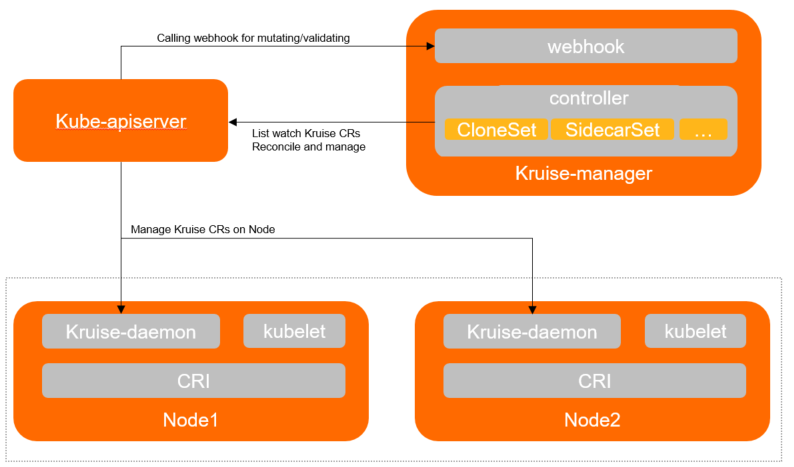
Controllers
OpenKruise provides five workload controllers. Each is a superset of its native Kubernetes equivalent:
| Controller | Native equivalent | YAML compatibility | Key capabilities |
|---|---|---|---|
| CloneSet | Deployment | Not fully compatible | In-place upgrades, targeted scale-in, stream scale-out, phased releases |
| Advanced StatefulSet | StatefulSet | Fully compatible — change only apiVersion | In-place upgrades, parallel pod management, phased releases |
| Advanced DaemonSet | DaemonSet | Fully compatible — change only apiVersion | Hot upgrades, phased releases, node-label-based release ordering |
| SidecarSet | N/A | Standalone custom resource | Independent sidecar lifecycle management, automatic injection, in-place sidecar upgrades |
| UnitedDeployment | N/A | Standalone custom resource | Multi-region sub-workload management across CloneSet, StatefulSet, and Advanced StatefulSet |
Upgrade strategies
OpenKruise controllers support three upgrade strategies:
| Strategy | Behavior | When to use |
|---|---|---|
ReCreate | Deletes old pods and PersistentVolumeClaims (PVCs), then creates new ones | Default Kubernetes behavior; use when pod identity does not need to be preserved |
InPlaceIfPossible | Attempts an in-place upgrade first; falls back to recreate if the change cannot be applied in-place | Recommended for most production workloads |
InPlaceOnly | Always performs in-place upgrades; rejects changes that would require pod recreation | Use when pod IP, name, and node must remain unchanged |
Why choose in-place upgrades?
Standard Kubernetes rolling updates recreate pods, which means pod name, IP address, and host node all change. An in-place upgrade modifies the running pod directly:
No rescheduling — the pod stays on the same node
Faster image pulls — most image layers are already cached on the node
Other containers in the pod are unaffected during the upgrade
Install OpenKruise
Log on to the ACK console. In the left navigation pane, click Clusters.
On the Clusters page, click the name of the cluster you want to manage. In the left navigation pane, click Add-ons.
On the Add-ons page, click the Applications tab. In the ack-kruise section, click Install.
In the Install Ack-kruise dialog box, confirm the component information and click OK.
Deploy a stateless application with CloneSet
CloneSet manages stateless applications and provides all Deployment capabilities plus advanced policies such as in-place upgrades and targeted pod deletion.
CloneSet's YAML schema is not fully compatible with a native Deployment. Do not convert an existing Deployment manifest directly — create a new CloneSet resource instead.
Create a CloneSet
Create a file named
cloneset.yamlwith the following content:apiVersion: apps.kruise.io/v1alpha1 kind: CloneSet metadata: name: demo-clone spec: replicas: 5 selector: matchLabels: app: guestbook template: # Pod template structure is identical to a Deployment metadata: labels: app: guestbook spec: containers: - name: guestbook image: openkruise-registry.cn-shanghai.cr.aliyuncs.com/openkruise/demo:1.10.2 env: - name: test value: foo updateStrategy: type: InPlaceIfPossible # Use in-place upgrade if possible; fall back to recreate maxUnavailable: 20% # Allow up to 20% of pods to be unavailable during an upgrade inPlaceUpdateStrategy: gracePeriodSeconds: 3 # Seconds to wait after marking the pod NotReady before upgrading in-placeKey parameters:
Parameter Description typeUpgrade strategy: ReCreate,InPlaceIfPossible, orInPlaceOnly. See Upgrade strategies.maxUnavailableMaximum number or percentage of pods that can be unavailable during an upgrade. gracePeriodSecondsSeconds the controller waits after marking a pod NotReady before performing the in-place upgrade. Apply the manifest to your cluster:
kubectl create -f cloneset.yamlExpected output:
cloneset.apps.kruise.io/demo-clone created
Verify the CloneSet
Check pod status:
kubectl get podExpected output:
NAME               READY   STATUS    RESTARTS   AGE
demo-clone-5b9kl   1/1     Running   0          3s
demo-clone-6xjdg   1/1     Running   0          3s
demo-clone-bvmdj   1/1     Running   0          3s
demo-clone-dm22s   1/1     Running   0          3s
demo-clone-rbpg9   1/1     Running   0          3s
Check the CloneSet status:
kubectl get cloneExpected output:
NAME         DESIRED   UPDATED   UPDATED_READY   READY   TOTAL   AGE
demo-clone   5         5         5               5       5       46s
Output fields:
Field Kubernetes status field Description DESIRED spec.replicasDesired number of pods UPDATED status.updatedReplicasPods updated to the latest version UPDATED_READY status.updatedReadyReplicasReady pods among those at the latest version READY status.readyReplicasTotal ready pods across all versions TOTAL status.replicasTotal pods managed by this CloneSet
Deploy a stateful application with Advanced StatefulSet
Advanced StatefulSet is a drop-in replacement for the native StatefulSet. Its YAML schema is fully compatible — the only required change is the apiVersion.
Migrate from a native StatefulSet
To use Advanced StatefulSet with an existing StatefulSet manifest, change one line:
- apiVersion: apps/v1
+ apiVersion: apps.kruise.io/v1alpha1
  kind: StatefulSet
The rest of the manifest remains unchanged.
Create an Advanced StatefulSet
Create a file named
statefulset.yamlwith the following content:apiVersion: apps.kruise.io/v1alpha1 kind: StatefulSet metadata: name: demo-asts spec: replicas: 3 selector: matchLabels: app: guestbook-sts podManagementPolicy: Parallel template: # Pod template structure is identical to a native StatefulSet metadata: labels: app: guestbook-sts spec: containers: - name: guestbook image: openkruise-registry.cn-shanghai.cr.aliyuncs.com/openkruise/demo:1.10.2 env: - name: test value: foo readinessGates: - conditionType: InPlaceUpdateReady updateStrategy: type: RollingUpdate rollingUpdate: podUpdatePolicy: InPlaceIfPossible # Use in-place upgrade if possible; fall back to recreate maxUnavailable: 20% # Allow up to 20% of pods to be unavailable during an upgrade inPlaceUpdateStrategy: gracePeriodSeconds: 3 # Seconds to wait after marking the pod NotReady before upgrading in-placeKey parameters:
Parameter Description podUpdatePolicyUpgrade strategy: ReCreate,InPlaceIfPossible, orInPlaceOnly. See Upgrade strategies.maxUnavailableMaximum number or percentage of pods that can be unavailable during an upgrade. gracePeriodSecondsSeconds the controller waits after marking a pod NotReady before performing the in-place upgrade. Apply the manifest to your cluster:
kubectl create -f statefulset.yamlExpected output:
statefulset.apps.kruise.io/demo-asts created
Verify the Advanced StatefulSet
Check pod status:
kubectl get podExpected output:
NAME          READY   STATUS    RESTARTS   AGE
demo-asts-0   1/1     Running   0          3h29m
demo-asts-1   1/1     Running   0          3h29m
demo-asts-2   1/1     Running   0          3h29m
Check the Advanced StatefulSet status:
kubectl get astsExpected output:
NAME        DESIRED   CURRENT   UPDATED   READY   AGE
demo-asts   3         3         3         3       3h30m
Output fields:
Field Kubernetes status field Description DESIRED spec.replicasDesired number of pods UPDATED status.updatedReplicasPods at the latest version READY status.readyReplicasTotal ready pods TOTAL status.replicasTotal pods managed by this Advanced StatefulSet