By default, Knative scales workloads based on request count using the Knative Pod Autoscaler (KPA). If your workloads are CPU-bound or memory-bound rather than request-driven, you can switch to the Horizontal Pod Autoscaler (HPA) to scale on CPU utilization or memory utilization instead.
Prerequisites
Before you begin, ensure that you have:
Knative deployed in the ACK cluster. See Deploy Knative in an ACK cluster
A kubectl client connected to the ACK cluster. See Obtain the kubeconfig file of a cluster and use kubectl to connect to the cluster
(For step 3 only) Knative connected to Managed Service for Prometheus. See View the Knative dashboard in Managed Service for Prometheus
Step 1: Deploy a Knative service
Log on to the ACK console. In the left-side navigation pane, click Clusters.
On the Clusters page, find the cluster that you want to manage and click its name. In the left-side pane, choose Applications > Knative.
On the Services tab of the Knative page, select default from the Namespace drop-down list, click Create from Template, copy the following YAML content to the code editor, and then click Create. The following sample creates a Knative service named
helloworld-go-hpawith HPA configured to scale on CPU utilization:apiVersion: serving.knative.dev/v1 kind: Service metadata: name: helloworld-go-hpa spec: template: metadata: labels: app: helloworld-go-hpa annotations: autoscaling.knative.dev/class: "hpa.autoscaling.knative.dev" # Use HPA instead of the default KPA autoscaling.knative.dev/metric: "cpu" # Scale on CPU utilization autoscaling.knative.dev/target: "30" # Scale out when CPU utilization exceeds 30% autoscaling.knative.dev/minScale: "1" # Keep at least 1 pod running autoscaling.knative.dev/maxScale: "4" # Cap at 4 pods spec: containers: - image: registry.cn-hangzhou.aliyuncs.com/knative-sample/autoscale-go:v1024 resources: requests: cpu: '200m'Run the following command to verify the Knative service is ready:
kubectl get ksvcExpected output:
NAME URL LATESTCREATED LATESTREADY READY REASON helloworld-go-hpa http://helloworld-go-hpa.default.example.com helloworld-go-hpa-00001 helloworld-go-hpa-00001 TrueTruein theREADYcolumn confirms the service is running.
Step 2: Test autoscaling with a load test
This step uses hey, an HTTP load testing tool, to drive CPU utilization above the threshold and observe HPA scaling pods out.
Install hey. For installation instructions, see Hey.
Run a 60-second load test at 100 queries per second (QPS):
hey -z 60s -q 100 \
  -host "helloworld-go-hpa.default.example.com" \
  "http://<gateway-ip>?prime=40000000"
Replace
<gateway-ip>with the IP address or domain name of the gateway.While the load test runs, watch pod scaling in a separate terminal:
kubectl get pods --watchExpected output:
NAME                                                     READY   STATUS              RESTARTS   AGE
helloworld-go-hpa-00001-deployment-67cc8f979b-fxfl5      2/2     Running             0          101m
helloworld-go-hpa-00001-deployment-67cc8f979b-kv6rj      0/2     Pending             0          0s
helloworld-go-hpa-00001-deployment-67cc8f979b-fxq85      0/2     Pending             0          0s
helloworld-go-hpa-00001-deployment-67cc8f979b-kv6rj      0/2     ContainerCreating   0          0s
helloworld-go-hpa-00001-deployment-67cc8f979b-fxq85      0/2     ContainerCreating   0          0s
helloworld-go-hpa-00001-deployment-67cc8f979b-kv6rj      1/2     Running             0          1s
helloworld-go-hpa-00001-deployment-67cc8f979b-kv6rj      2/2     Running             0          1s
helloworld-go-hpa-00001-deployment-67cc8f979b-fxq85      1/2     Running             0          1s
helloworld-go-hpa-00001-deployment-67cc8f979b-fxq85      2/2     Running             0          1s
HPA scales the pod count from 1 to 4 as CPU utilization exceeds the 30% threshold. Each pod progresses through
Pending->ContainerCreating->Running.
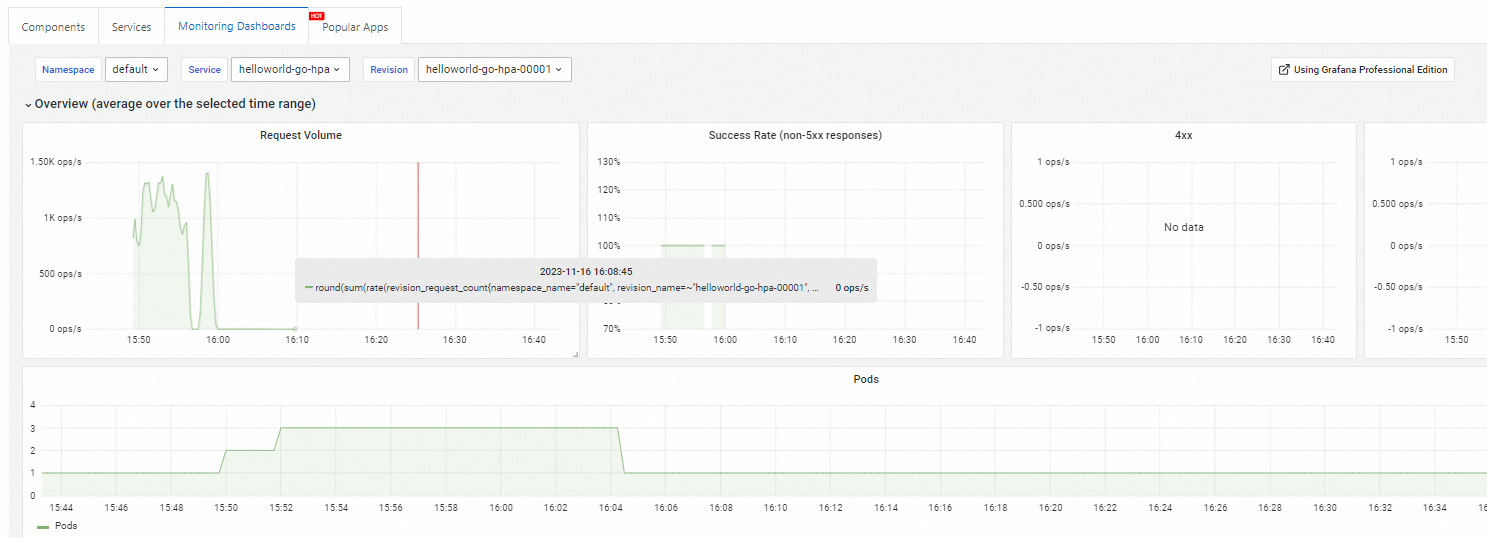
(Optional) Step 3: View the Knative dashboard
Knative provides out-of-the-box observability for Knative services. View the dashboard on the Monitoring Dashboards tab of the Knative page. For setup and usage, see View the Knative dashboard in Managed Service for Prometheus.
What's next
Knative overview — Alibaba Cloud Knative integrates container creation, workload management (autoscaling), and event models into a Kubernetes-based serverless framework.
Comparison between Alibaba Cloud Knative and open source Knative