kube-controller-manager is a control plane component that runs the core Kubernetes controllers—the node controller, StatefulSet controller, and Deployment controller, among others. This topic describes the metrics exposed by kube-controller-manager and how to use the built-in dashboards to monitor its health.
Key concepts
Metrics
Metrics reflect the internal state of kube-controller-manager. The following table describes the available metrics.
| Metric | Type | Description | When to watch |
|---|---|---|---|
workqueue_adds_total |
Counter | Total number of Add events processed by the workqueue. | Unusual spikes may indicate a burst of resource changes—correlate with cluster activity. |
workqueue_depth |
Gauge | Current length of the workqueue. | A sustained high depth means the controller cannot keep up with incoming events. Investigate controller goroutine status and resource pressure. |
workqueue_queue_duration_seconds_bucket |
Histogram | Time a task spends waiting in the workqueue before processing. Bucket thresholds: {10⁻⁸, 10⁻⁷, 10⁻⁶, 10⁻⁵, 10⁻⁴, 10⁻³, 10⁻², 10⁻¹, 1, 10} seconds. | High latency at the p95/p99 quantile indicates queue backlog. Use with histogram_quantile to set SLO-based alerts. |
memory_utilization_byte |
Gauge | Memory used by kube-controller-manager. Unit: bytes. | Alert if memory approaches the container limit to prevent OOM restarts. |
cpu_utilization_core |
Gauge | CPU capacity used by kube-controller-manager. Unit: core. | Sustained high CPU usage may signal excessive controller reconciliations. |
rest_client_requests_total |
Counter | Number of HTTP requests to kube-apiserver, grouped by status code, method, and host. | A rise in 4xx or 5xx responses indicates API server errors affecting controller operations. |
rest_client_request_duration_seconds_bucket |
Histogram | Latency of HTTP requests from kube-controller-manager to kube-apiserver, broken down by verb and URL. | Elevated p99 latency suggests API server slowness, which delays controller reconciliations. |
Deprecated metrics
The following metrics are deprecated and will be removed in a future version. Remove any alerts or dashboards that depend on them.
| Deprecated metric | Replacement |
|---|---|
cpu_utilization_ratio |
cpu_utilization_core |
memory_utilization_ratio |
memory_utilization_byte |
Access dashboards
For instructions on opening the kube-controller-manager dashboards, see View control plane component dashboards in ACK Pro clusters.
Dashboard reference
Dashboards are built from the metrics above using Prometheus Query Language (PromQL). Two parameters apply globally across all dashboards:
-
quantile: The request quantile to display (for example, 0.99 for p99).
-
interval: The PromQL sampling interval used in
rate()calculations.
The following sections describe each dashboard panel and its PromQL.
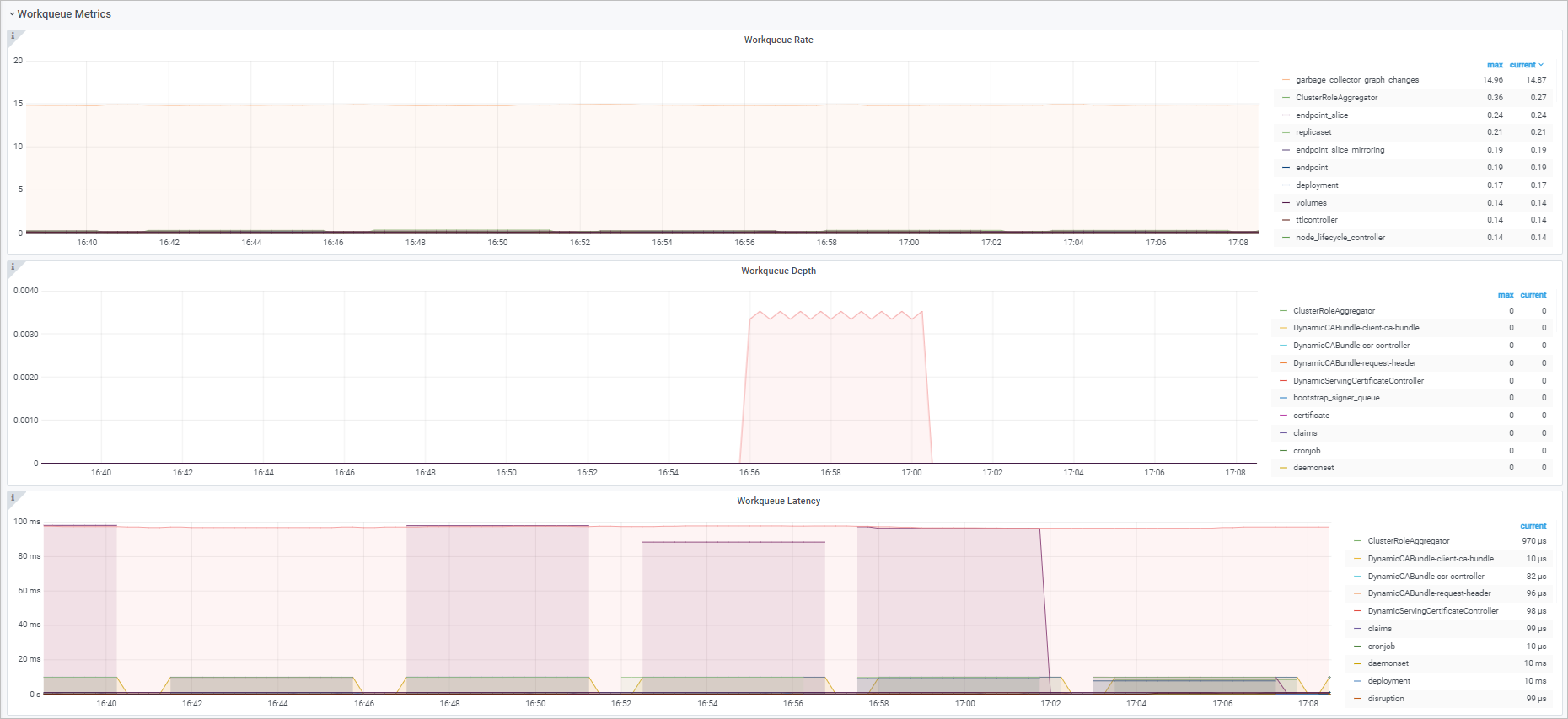
Workqueue dashboard
| Panel | PromQL | What it shows |
|---|---|---|
| Workqueue entry rate | sum(rate(workqueue_adds_total{job="ack-kube-controller-manager"}[$interval])) by (name) |
Rate of Add events entering the workqueue per controller, over the selected interval. |
| Workqueue depth | sum(rate(workqueue_depth{job="ack-kube-controller-manager"}[$interval])) by (name) |
Change in workqueue length per controller over the selected interval. A rising trend indicates a queue backlog. |
| Workqueue processing delay | histogram_quantile($quantile, sum(rate(workqueue_queue_duration_seconds_bucket{job="ack-kube-controller-manager"}[5m])) by (name, le)) |
Time events spend waiting in the workqueue at the selected quantile. |
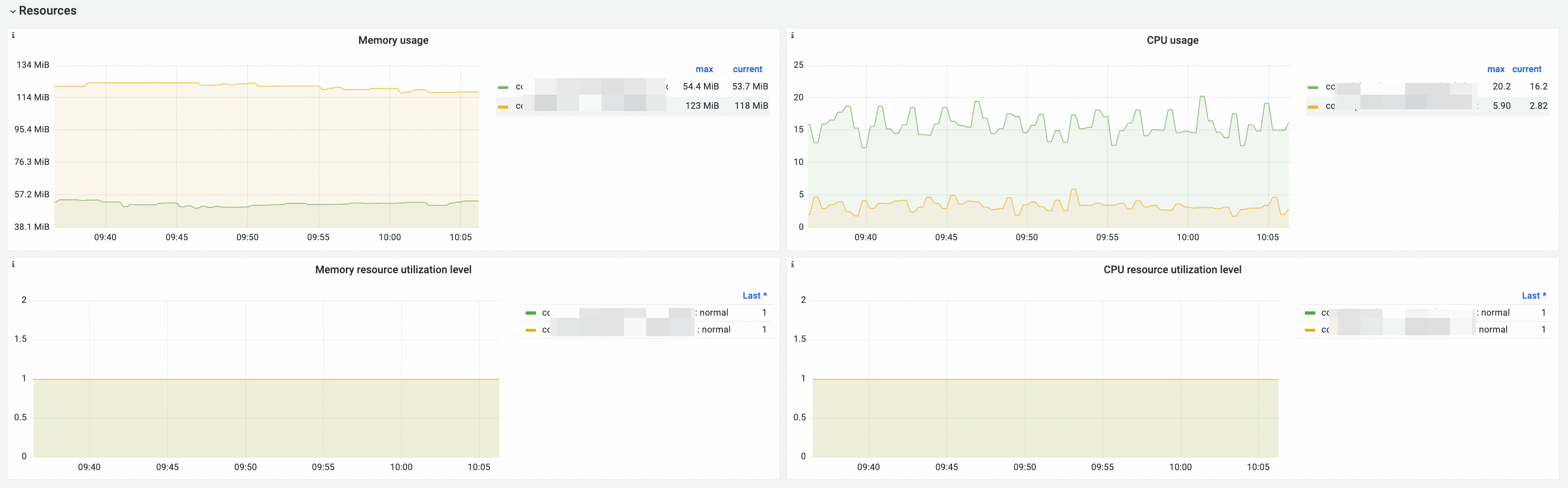
Resources dashboard
| Panel | PromQL | What it shows |
|---|---|---|
| Memory Usage | memory_utilization_byte{container="kube-controller-manager"} |
Memory used by kube-controller-manager. Unit: bytes. |
| CPU Usage | cpu_utilization_core{container="kube-controller-manager"}*1000 |
CPU used by kube-controller-manager. Unit: millicore. |
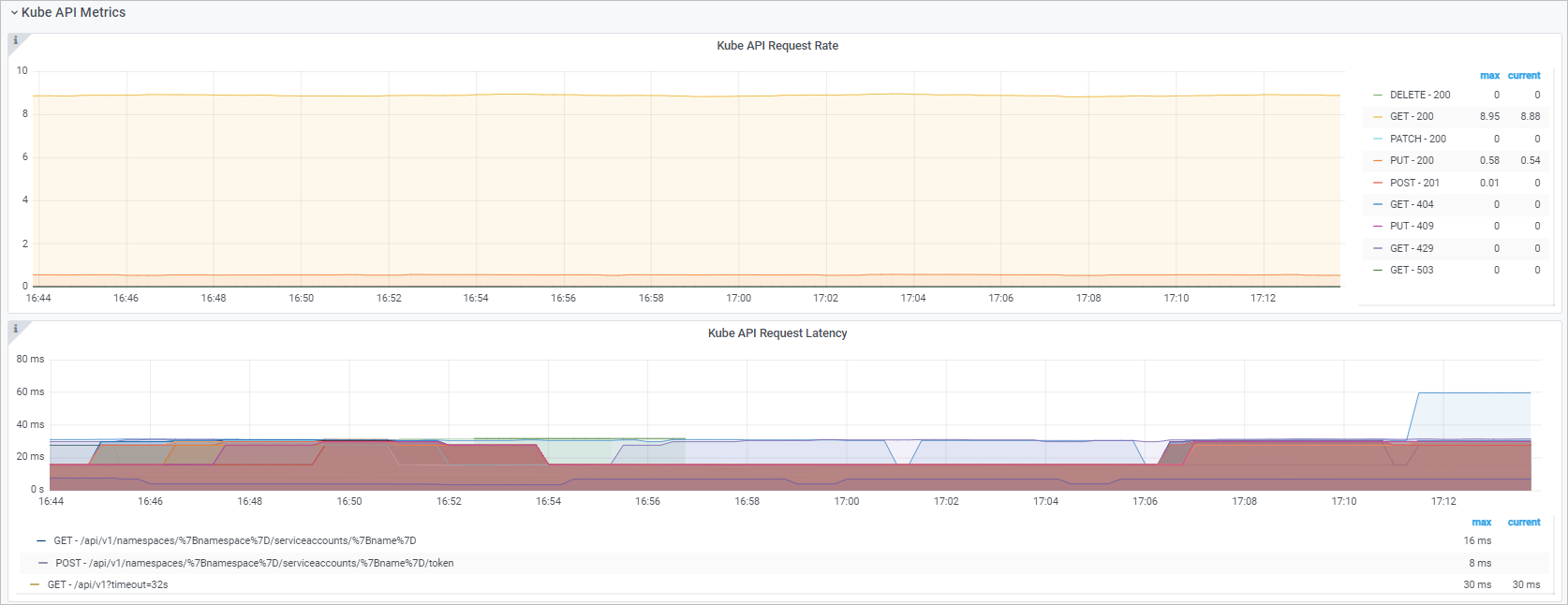
Kube API dashboard
| Panel | PromQL | What it shows |
|---|---|---|
| Kube API request QPS | See below | Queries per second (QPS) from kube-controller-manager to kube-apiserver, broken down by HTTP method and status code. |
| Kube API request delay | histogram_quantile($quantile, sum(rate(rest_client_request_duration_seconds_bucket{job="ack-kube-controller-manager"}[$interval])) by (verb,url,le)) |
Round-trip latency between kube-controller-manager and kube-apiserver at the selected quantile, broken down by verb and URL. |
The Kube API request QPS panel uses four queries to separate responses by status code class:
sum(rate(rest_client_requests_total{job="ack-kube-controller-manager",code=~"2.."}[$interval])) by (method,code)
sum(rate(rest_client_requests_total{job="ack-cloud-controller-manager",code=~"3.."}[$interval])) by (method,code)
sum(rate(rest_client_requests_total{job="ack-cloud-controller-manager",code=~"4.."}[$interval])) by (method,code)
sum(rate(rest_client_requests_total{job="ack-cloud-controller-manager",code=~"5.."}[$interval])) by (method,code)
Troubleshooting
Dashboard panels show no data
Check that the metric collection job is active. The workqueue and Kube API panels use job="ack-kube-controller-manager". If no data appears, verify that the Prometheus scrape job is running and that kube-controller-manager is exposing metrics on the expected port.
Histogram metrics show incomplete data
Histogram metrics like workqueue_queue_duration_seconds_bucket require all three series in the family (_bucket, _sum, _count) to be collected. If any series is missing, histogram_quantile returns no result. Confirm that the scrape configuration collects all three.
workqueue_depth stays elevated
A sustained non-zero workqueue depth means the controller is not processing events fast enough. Check controller goroutine count and API server latency. High rest_client_request_duration_seconds_bucket values at the same time point to API server bottlenecks as the root cause.
What's next
For metrics, dashboard usage, and troubleshooting guidance for other control plane components, see: