Spot instances are preemptible compute instances priced significantly below on-demand rates. If your Knative workloads handle short-lived requests and can tolerate occasional interruptions, switching to spot instances can substantially reduce compute costs while preserving the elasticity and responsiveness of your serverless architecture.
This topic explains how to configure spot instances for Knative Services in Container Service for Kubernetes (ACK), handle interruptions gracefully, and monitor spot instance status.
Prerequisites
Before you begin, ensure that you have:
-
Knative deployed in your ACK cluster. For more information, see Deploy and manage Knative components.
-
ack-virtual-node 2.11.0 or later, if you want to use the Eviction API for graceful shutdown. For more information, see ack-virtual-node.
Key concepts
How it works
Knative Services automatically scale Pods in and out based on incoming requests. Each Pod runs on a virtual node, which provisions the corresponding Elastic Container Instance (ECI) resource based on Pod annotations. To use spot instances, add spot-specific annotations to the Pod template of your Knative Service — the virtual node handles provisioning and automatic replacement.
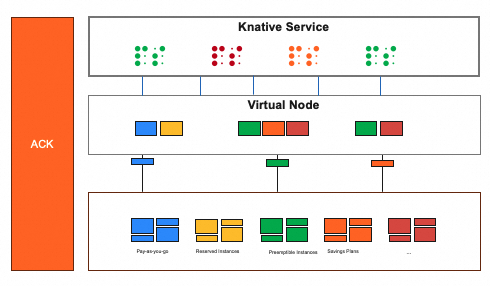
Knative is well-suited for spot instances for the following reasons:
-
Request-scoped workloads: Knative Pods handle individual requests and release resources immediately after completion, so interruptions rarely affect in-progress work.
-
Built-in graceful shutdown: Knative injects a
queue-proxysidecar container into every Pod. When a Pod is terminated,queue-proxywaits for all in-flight requests to complete before the application container shuts down. -
Cost-effective: For cost-conscious users of Knative, using spot instances provides significant savings.
Limitations
Spot instance annotations are applied only when an ECI Pod is created. Adding or modifying these annotations on an existing ECI Pod has no effect.
Configure spot instances
Add the following annotations to the Pod template of your Knative Service.
| Annotation | Example value | Required | Description |
|---|---|---|---|
k8s.aliyun.com/eci-spot-strategy |
SpotAsPriceGo |
Yes | The bidding strategy. Valid values: SpotWithPriceLimit and SpotAsPriceGo. See Choose a bidding strategy for details. |
k8s.aliyun.com/eci-spot-price-limit |
"0.5" |
No | The maximum hourly price for the spot instance. The value can have up to three decimal places. Takes effect only when eci-spot-strategy is set to SpotWithPriceLimit. |
k8s.aliyun.com/eci-spot-duration |
"1" |
No | The protection period in hours. Default: 1. Set to 0 to disable the protection period. During the protection period, the spot instance is not reclaimed even if the market price exceeds your bid. |
k8s.aliyun.com/eci-spot-fallback |
"true" |
No | Whether to create an on-demand instance if spot inventory is unavailable. Default: false. When set to true, the virtual node falls back to an on-demand instance both at creation time and when replacing a reclaimed Pod. |
Choose a bidding strategy
Two bidding strategies are available. Choose based on your tolerance for cost variance and creation failure.
| Strategy | How pricing works | Creation behavior |
|---|---|---|
SpotAsPriceGo |
Follows the current market price automatically | Creation may succeed if inventory exists; when resources of the specified instance type are in high demand, the price may reach the on-demand price |
SpotWithPriceLimit |
Bids at a fixed maximum price you set | Fails if no inventory is available at or below your price limit |
When using SpotAsPriceGo during periods of high resource demand, the spot price may reach the on-demand price.
Examples
Example 1: Fixed price limit
The following YAML creates a spot instance using the SpotWithPriceLimit strategy with a maximum hourly price of $0.25.
-
During creation: fails if no inventory is available for the specified instance type at or below $0.25/hour.
-
After creation: the instance runs for a guaranteed 1-hour protection period. After the protection period, the instance is reclaimed if the market price exceeds $0.25 or if the specified instance type has insufficient inventory.
apiVersion: serving.knative.dev/v1
kind: Service
metadata:
  name: helloworld-go
spec:
  template:
    metadata:
      labels:
        alibabacloud.com/eci: "true"
      annotations:
        k8s.aliyun.com/eci-use-specs : "ecs.c6.large"           # Specify the ECS instance type.
        k8s.aliyun.com/eci-spot-strategy: "SpotWithPriceLimit"  # Use the strategy that sets a custom price limit.
        k8s.aliyun.com/eci-spot-price-limit: "0.25"            # Set the maximum hourly price.
    spec:
      containers:
      - env:
        - name: TARGET
          value: "Knative"
        image: registry.cn-hangzhou.aliyuncs.com/knative-sample/helloworld-go:73fbdd56
Example 2: Fixed price limit with on-demand fallback
The following YAML creates a spot instance with an on-demand fallback. This balances cost savings with availability.
-
During creation: if spot inventory is available at or below $0.05/hour, a spot instance is created with a 1-hour protection period. If spot inventory is unavailable, an on-demand instance is created instead, which is not automatically reclaimed.
-
After creation: if the spot instance is reclaimed after its protection period, the virtual node creates a replacement. If spot inventory is still unavailable at replacement time, an on-demand instance is created.
To check whether a Pod was degraded to on-demand, run kubectl describe pod and look for a SpotDegraded event in the output.
apiVersion: serving.knative.dev/v1
kind: Service
metadata:
  name: helloworld-go
spec:
  template:
    metadata:
      labels:
        alibabacloud.com/eci: "true"
      annotations:
        k8s.aliyun.com/eci-use-specs : "ecs.c6.large"           # Specify the ECS instance type.
        k8s.aliyun.com/eci-spot-strategy: "SpotWithPriceLimit"  # Use the strategy that sets a custom price limit.
        k8s.aliyun.com/eci-spot-price-limit: "0.05"             # Set the maximum hourly price.
        k8s.aliyun.com/eci-spot-fallback: "true"                # Automatically fall back to an on-demand instance if spot inventory is unavailable.
    spec:
      containers:
      - env:
        - name: TARGET
          value: "Knative"
        image: registry.cn-hangzhou.aliyuncs.com/knative-sample/helloworld-go:73fbdd56
Create a Knative Service with spot instances
The following procedure creates a sample Knative Service that uses the SpotAsPriceGo strategy with on-demand fallback enabled.
-
Log on to the ACK console. In the left navigation pane, click ACK consoleClusters.
-
On the Clusters page, click the name of your cluster. In the left navigation pane, click Applications > Knative.
-
On the Knative page, click the Services tab. Select default from the Namespace drop-down list and click Create from Template. In the Sample Template drop-down list, select custom. Paste the following YAML into the editor and click Create.
apiVersion: serving.knative.dev/v1
kind: Service
metadata:
  name: helloworld-go
spec:
  template:
    metadata:
      labels:
        alibabacloud.com/eci: "true"
      annotations:
        k8s.aliyun.com/eci-use-specs : "ecs.c6.large"           # Specify the ECS instance type.
        k8s.aliyun.com/eci-spot-strategy: "SpotAsPriceGo"       # Use the strategy that follows the market price.
        k8s.aliyun.com/eci-spot-duration: "1"                   # Protection period in hours.
        k8s.aliyun.com/eci-spot-fallback: "true"                # Fall back to on-demand if spot inventory is unavailable.
    spec:
      containers:
      - env:
        - name: TARGET
          value: "Knative"
        image: registry-vpc.{REGION-ID}.aliyuncs.com/knative-samples/helloworld-go:160e4dc8 # Replace {REGION-ID} with your cluster's region ID, such as cn-hangzhou.
This configuration creates an
ecs.c6.largespot instance with the following behavior:-
If spot inventory is unavailable at creation, an on-demand instance is created instead.
-
After creation, the instance runs for a guaranteed 1-hour protection period.
-
After the protection period, the spot instance may be reclaimed if the market price exceeds the current bid or if inventory becomes insufficient. The
eci-spot-fallback: "true"setting ensures an on-demand instance is created if spot inventory is unavailable when the virtual node replaces the Pod.
-
Handle spot instance interruptions
Alibaba Cloud sends a SpotToBeReleased event and sets the ContainerInstanceExpired pod condition to true approximately 3 minutes before a spot instance is reclaimed.
The following figure shows an example of the notification.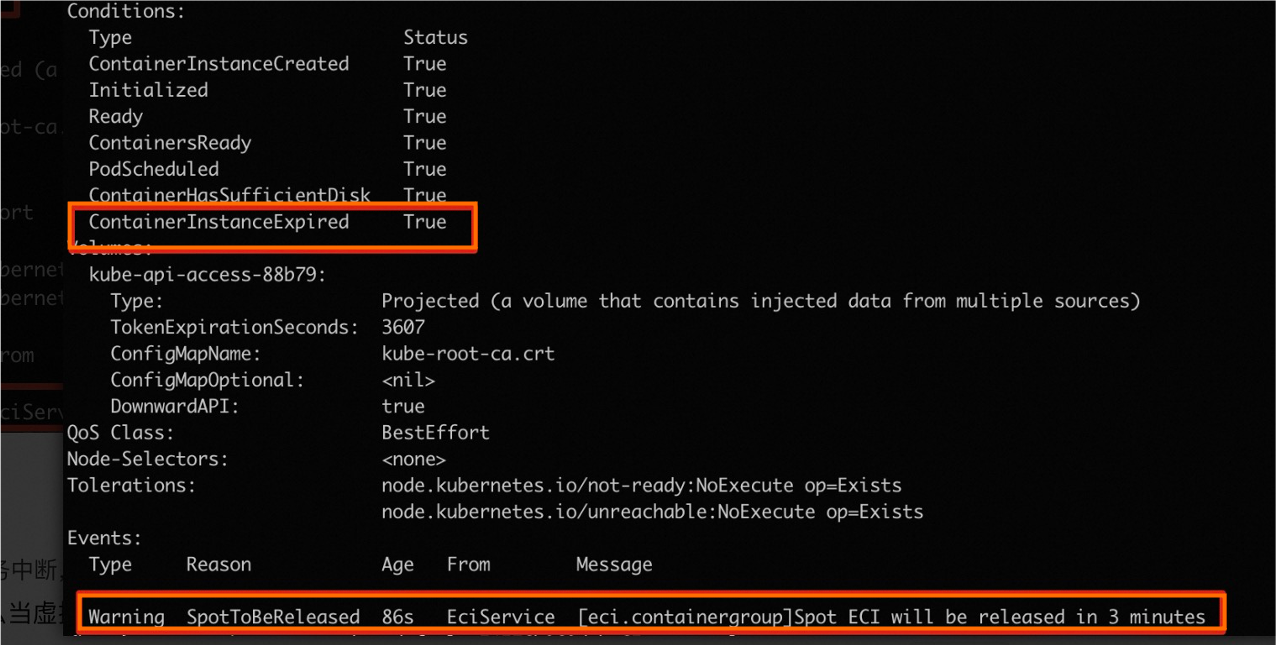
During this 3-minute window, you can configure graceful handling so that in-flight requests complete before the Pod terminates.
Configure API-based eviction
Add the k8s.aliyun.com/eci-spot-release-strategy: api-evict annotation to your spot Pods. When the virtual node receives a SpotToBeReleased event, it calls the Eviction API to evict the Pod. This respects your PodDisruptionBudget (PDB) and terminationGracePeriodSeconds settings.
The eviction sequence is:
-
The virtual node receives a
SpotToBeReleasedevent and calls the Eviction API. -
The API server checks the PDB configured for the Pod.
-
The Pod's deletion timestamp is set, and the grace period begins.
-
The kubelet on the virtual node initiates graceful shutdown for the Pod.
-
The control plane disassociates the Pod from relevant Endpoints and EndpointSlices.
-
When the grace period ends, the kubelet forcefully terminates the Pod.
-
The kubelet notifies the system to delete the Pod.
-
The API server deletes the Pod.
In a Knative environment, the queue-proxy sidecar waits for all in-flight requests to complete before the application container stops, providing a smooth shutdown at step 4.
Monitor spot instance events
View the SpotToBeReleased event
Run kubectl describe to see the interruption warning in the Events section:
Events:
  Type     Reason            Age    From          Message
  ----     ------            ----   ----          -------
  Warning  SpotToBeReleased  3m32s  kubelet, eci  Spot ECI will be released in 3 minutes
Alternatively, run kubectl get events to list all recent events:
LAST SEEN   TYPE      REASON             OBJECT         MESSAGE
3m39s       Warning   SpotToBeReleased   pod/pi-frmr8   Spot ECI will be released in 3 minutes
For information about automating responses to interruption events, see Graceful termination.
Check status after reclamation
After a spot instance is reclaimed, the instance information is still retained. The Pod status changes to BidFailed and the cause of the failure is BidFailed.
Run kubectl get pod to see the status:
NAME       READY   STATUS      RESTARTS   AGE
pi-frmr8   1/1     BidFailed   0          3h5m
Run kubectl describe to see the full status details:
Status:             Failed
Reason:             BidFailed
Message:            The pod is spot instance, and have been released at 2020-04-08T12:36Z
What's next
If your application is sensitive to cold start latency, consider using reserved instances to keep a low-spec burstable instance running at all times. This reduces startup time while keeping costs low. For more information, see Configure reserved instances.