ACK DNS queries flow through CoreDNS and NodeLocal DNSCache, with tunable parameters at each layer.
DNS resolution architectures
DNS resolution in ACK depends on where the application runs and whether NodeLocal DNSCache is active.
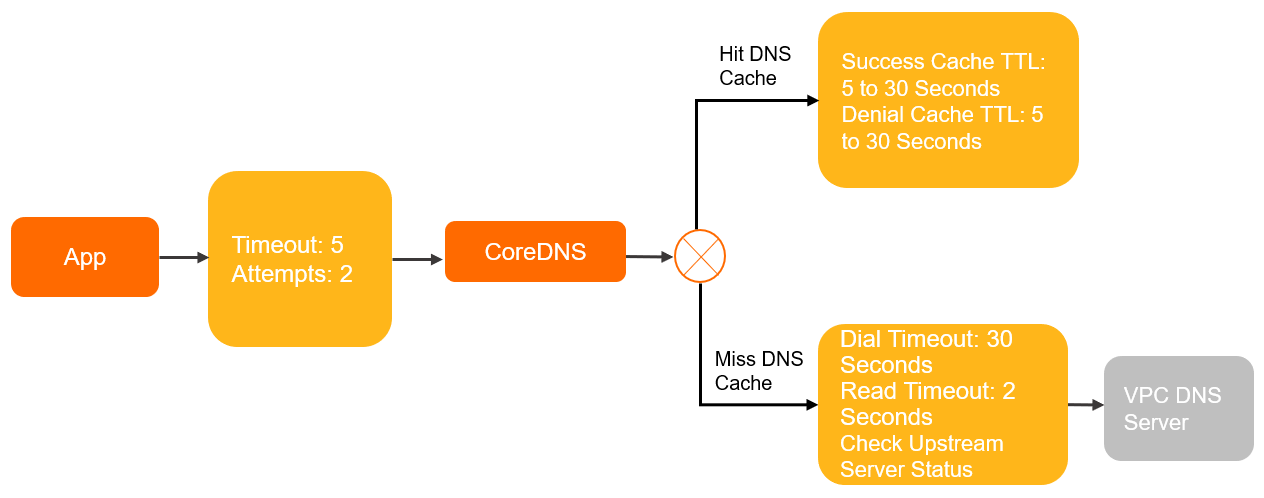
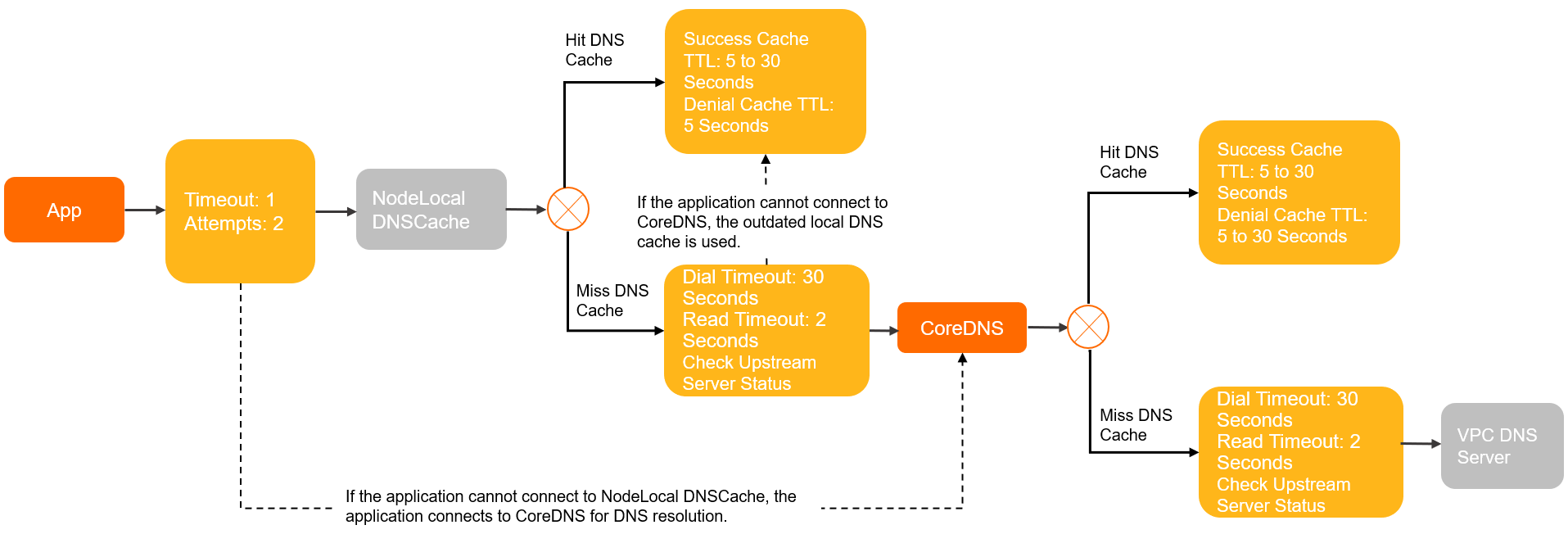
Thetimeoutandattemptsparameters in the diagrams are defined under Resolution policies and Caching policies.
Host-based applications (non-containerized)
Applications running directly on Elastic Compute Service (ECS) instances use the host's /etc/resolv.conf, which points to the Virtual Private Cloud (VPC) DNS servers.

Standard containerized pods (dnsPolicy: ClusterFirst)
By default, pods use the ClusterFirst policy. All DNS queries go to the CoreDNS service within the cluster.
Pods with NodeLocal DNSCache enabled
When NodeLocal DNSCache is active, pods send queries to a local caching agent on the same node. This provides two benefits:
-
Reduced latency: DNS queries resolve locally, skipping the network hop to CoreDNS.
-
Conntrack table protection: Queries use the local agent without creating conntrack entries, reducing conntrack races and preventing UDP DNS from exhausting the conntrack table.
Resolution policies
Client side
These /etc/resolv.conf parameters are interpreted by the glibc resolver. Representative configuration for a ClusterFirst pod:
nameserver 10.x.x.x          # CoreDNS ClusterIP
search default.svc.cluster.local svc.cluster.local cluster.local
options ndots:5 timeout:5 attempts:2
Default values across deployment environments:
|
Parameter |
Description |
Default value in glibc |
ECS |
Pod with DNSPolicy set to |
Pod with DNSPolicy set to |
Pod that uses NodeLocal DNSCache |
Pod with DNSPolicy set to Default and that uses the host network |
|
|
The DNS server used to resolve domain names. |
None |
VPC DNS servers② |
CoreDNS ClusterIP③ |
VPC DNS servers |
|
VPC DNS servers |
|
|
Non-FQDN domain names are appended with the |
None |
None |
|
None |
|
None |
|
|
If a domain name contains more dots than the |
1 |
1 |
5 |
1 |
3 |
1 |
|
|
The timeout for a single DNS resolution request. Unit: seconds. |
5 |
2 |
5 |
5 |
1 |
2 |
|
|
The maximum number of retries on resolution failure. |
2 |
3 |
2 |
2 |
2 |
3 |
|
|
Queries DNS servers in a round-robin manner. |
Disabled |
Enabled |
Disabled |
Disabled |
Disabled |
Enabled |
|
|
When enabled, the resolver reopens the socket between consecutive requests on the same socket. |
Disabled |
Enabled |
Disabled |
Disabled |
Disabled |
Enabled |
^①^ The attempts parameter applies only when the server returns SERVFAIL, NOTIMP, or REFUSED, or returns NOERROR without a result. See Attempts parameter request details.
^②^ VPC DNS servers (100.100.2.136 and 100.100.2.138) are the default DNS servers on ECS instances. They resolve PrivateZone and authoritative domain names.
^③^ The CoreDNS ClusterIP is the kube-dns service IP in the kube-system namespace. It resolves internal service names and forwards PrivateZone and authoritative queries.
^④^ NodeLocal DNSCache listens on 169.254.20.10 on each node when the add-on is deployed.
See resolv.conf for additional /etc/resolv.conf options.
Non-standard resolvers
The glibc defaults above apply only when the container uses glibc. Two common exceptions:
-
Alpine (musl libc): Alpine's built-in
musllibrary replaces glibc and behaves differently (see musl libc):-
Does not honor
single-requestandsingle-request-reopenoptions in/etc/resolv.conf. -
Alpine 3.3 and earlier do not support the
searchparameter or search domains, which breaks service discovery. -
Concurrent requests to multiple DNS servers make NodeLocal DNSCache optimizations ineffective.
-
Concurrent A and AAAA requests on the same socket trigger conntrack race conditions on older kernels, causing intermittent packet loss.
-
-
Languages with built-in resolvers (Go, Node.js): These runtimes often bypass
/etc/resolv.confand resolve differently from the system resolver.
In-cluster DNS servers
By default, CoreDNS reads its upstream from the ECS /etc/resolv.conf and forwards DNS requests with the built-in forward plugin. NodeLocal DNSCache runs an embedded CoreDNS instance with the same forwarding configuration.
Parameters for the forward plugin (full reference):
|
Parameter |
Description |
CoreDNS default value |
NodeLocal DNSCache default value |
|
|
Uses UDP to communicate with the upstream server when possible. |
Enabled |
Disabled |
|
|
Forces TCP for all upstream communication. |
Disabled |
Enabled |
|
|
Consecutive health check failures before an upstream server is marked unhealthy. |
2 |
2 |
|
|
How long to keep the connection to the upstream server open. |
10s |
10s |
|
|
The policy for selecting an upstream server. |
|
|
|
|
The health check interval. |
0.5s |
0.5s |
|
|
The maximum number of concurrent upstream connections. |
None |
None |
|
|
The timeout for connecting to the upstream server. Decreases dynamically based on actual connection time. |
30s |
30s |
|
|
The timeout for receiving data from the upstream server. |
2s |
2s |
Caching policies
Client side
Client-side caching varies by container image and application.
In-cluster DNS servers
Cache parameters for CoreDNS and NodeLocal DNSCache in ACK:
|
Parameter |
Description |
CoreDNS community default |
NodeLocal DNSCache ACK default |
CoreDNS ACK default |
|
success Max TTL |
The maximum time-to-live (TTL) for cached successful results. |
3600s |
30s |
30s |
|
success Min TTL |
The minimum TTL for cached successful results. |
5s |
5s |
5s |
|
success Capacity |
The number of successful results to cache. |
9984 |
9984 |
9984 |
|
denial Max TTL |
The maximum TTL for cached failed results. |
1800s |
5s |
30s |
|
denial Min TTL |
The minimum TTL for cached failed results. |
5s |
5s |
5s |
|
denial Capacity |
The number of failed results to cache. |
9984 |
9984 |
9984 |
|
ServerError TTL |
The TTL when the upstream server is unavailable. |
5s |
0s (default is 5s for NodeLocal DNSCache Helm Chart versions earlier than 1.5.0) |
0s (default is 5s for CoreDNS versions earlier than 1.8.4.2) |
|
serve_stale |
Allows CoreDNS to serve expired cache entries when the upstream is unreachable. |
Disabled |
Enabled (disabled by default for NodeLocal DNSCache Helm Chart versions earlier than 1.5.0) |
Enabled (disabled by default for CoreDNS versions earlier than 1.12.1) |
Effective TTL is determined by the result TTL, Max TTL, and Min TTL:
-
If Result TTL > Max TTL, the effective TTL is the Max TTL.
-
If Result TTL < Min TTL, the effective TTL is the Min TTL.
-
If Min TTL ≤ Result TTL ≤ Max TTL, the effective TTL is the Result TTL.
Optimization suggestions
Adjust DNS behavior by editing the pod YAML, CoreDNS ConfigMap, or NodeLocal DNSCache ConfigMap.
Enhance fault tolerance
With dnsPolicy: Default, the container inherits VPC DNS server settings from the ECS /etc/resolv.conf but not the rotate, single-request-reopen, timeout:2, and attempts:3 options. Without these, network jitter can cause intermittent DNS failures.
Inherited configuration:
apiVersion: v1
kind: Pod
metadata:
  name: example
  namespace: default
spec:
  containers:
  - image: registry.cn-hangzhou.aliyuncs.com/example-ns/example:v1
    name: example
  # The dnsPolicy value in the Pod YAML is Default.
  dnsPolicy: Default

# The /etc/resolv.conf file in the container at this time.
# cat /etc/resolv.conf
nameserver 100.100.2.136
nameserver 100.100.2.138
Add dnsConfig to restore the missing fault-tolerance options:
apiVersion: v1
kind: Pod
metadata:
  name: example
  namespace: default
spec:
  containers:
  - image: registry.cn-hangzhou.aliyuncs.com/example-ns/example:v1
    name: example
  # The dnsPolicy value in the pod YAML is Default.
  dnsPolicy: Default
  # Add the following fault tolerance configuration.
  dnsConfig:
    options:
    - name: timeout
      value: "2"
    - name: attempts
      value: "3"
    - name: rotate
    - name: single-request-reopen

# After modification, redeploy the pod. The options parameter is added to /etc/resolv.conf in the container.
# cat /etc/resolv.conf
nameserver 100.100.2.136
nameserver 100.100.2.138
options rotate single-request-reopen timeout:2 attempts:3
High availability with serve_stale
serve_stale lets CoreDNS return expired cache entries when upstream DNS servers are unreachable, preventing resolution failures from transient outages.
serve_stale is enabled by default in CoreDNS unmanaged edition v1.12.1 and later. See RFC-8767.Configuration format
serve_stale [DURATION] [REFRESH_MODE]-
DURATION: How long expired entries remain servable after expiry. Default:1h. Entries expired longer than this without a successful refresh are no longer served. -
REFRESH_MODE: Controls how CoreDNS handles expired entries:-
verify: Checks upstream reachability first, returns the fresh entry if available, or falls back to the expired entry. Higher latency on stale responses but avoids serving outdated data when fresh data exists. -
immediate: Returns the expired entry immediately and refreshes from upstream in the background. Faster but may serve stale data.
-
Example
Default configuration in CoreDNS unmanaged edition v1.12.1.2 and later:
cache 30 {
  ...
  serve_stale 30s verify
}Default configuration for CoreDNS unmanaged edition v1.12.1.1-4035d7a99-aliyun:
cache 30 {
  ...
  serve_stale 1h immediate
}
With serve_stale 1h immediate, in extreme scenarios — such as DNS resolution during an iterative headless service update — CoreDNS may return an expired entry. If this occurs frequently, switch to verify.