Container Service for Kubernetes (ACK) streams control plane component logs from managed clusters to a Simple Log Service (SLS) project in your account. You can use these logs to monitor cluster health, troubleshoot issues, and audit control plane activity.
Prerequisites
Before you begin, ensure that you have:
A sufficient Logstore quota in SLS
An understanding of SLS pay-as-you-go billing -- collected logs are delivered to your SLS project as log streams and billed accordingly
High-volume components such as kube-apiserver can generate significant log data. To manage costs, enable log collection only for the components you need and disable collection for components you are not actively monitoring.
Supported components and Logstores
Each control plane component writes to a dedicated SLS Logstore. The following table lists the available components. For general information about Kubernetes control plane components, see Kubernetes Components.
| Component | Logstore | Collected by default | Description |
|---|---|---|---|
| kube-apiserver | apiserver | Yes | Exposes the Kubernetes API. |
| kube-controller-manager | kcm | Yes | Runs the core control loops shipped with Kubernetes. |
| kube-scheduler | scheduler | Yes | Assigns pods to nodes. |
| Cloud Controller Manager | ccm | Yes | Integrates Kubernetes with Alibaba Cloud services such as Classic Load Balancer (CLB) and Virtual Private Cloud (VPC). CLB was formerly known as Server Load Balancer (SLB). |
| controlplane-events | controlplane-events | Yes | Captures operational events from control plane components, such as out of memory (OOM) kills. |
| ALB Ingress controller | alb | Yes | Provides a unified Ingress entry point for Services based on Application Load Balancer (ALB). |
| cluster-autoscaler | cluster-autoscaler | No | Automatically scales nodes in ACK clusters. |
| ack-goatscaler | ack-goatscaler | No | Provides instant elasticity for ACK nodes. |
| kuberay-operator | kuberay-operator | No | Extends the open-source KubeRay operator with ACK scheduling, elastic quota, and resource priority capabilities to simplify Ray cluster management. |
Components marked No in the Collected by default column require you to manually enable log collection. See Update the list of components for log collection.
Enable log collection
You can enable control plane component log collection when you create a cluster or for an existing cluster. For more information about Kubernetes control plane components, see Control Plane Components.
Log collection is enabled by default for ACK managed Pro clusters. For ACK managed Basic clusters, enable it manually.
You can select an existing SLS Project in the Control Plane Component Logs section.
Enable during cluster creation
Follow the steps in Create an ACK managed cluster.
In the Component Configurations step, set Control Plane Component Logs to Enable.

Enable for an existing cluster
Log on to the ACK console. In the left navigation pane, click Clusters.
On the Clusters page, click the name of the target cluster. In the left-side pane, choose Operations > Log Center.
Click the Control Plane Component Logs tab, and then click Enable Component Log Collection.
Query logs
Query control plane component logs in the ACK console or the SLS console. For query syntax details, see Index-based query and analysis.
Query in the ACK console
Use either of the following paths:
From the cluster overview:
On the cluster details page, click the Basic Information tab.
Click View next to Control Plane Component Logs.
On the Log Center page, select a component to view its logs.
From the Operations section:
In the left navigation pane of the cluster details page, choose Operations > Log Center.
Click the Control Plane Component Logs tab, then select a component.
Query in the SLS console
Log on to the Simple Log Service console.
In the Projects section, click the project associated with your cluster.
On the Log Storage > Logstores tab, click the Logstore for the component you want to inspect.
Update the list of components for log collection
Add or remove components from log collection at any time.
On the Clusters page, click the name of the target cluster. In the left-side pane, choose Operations > Log Center.
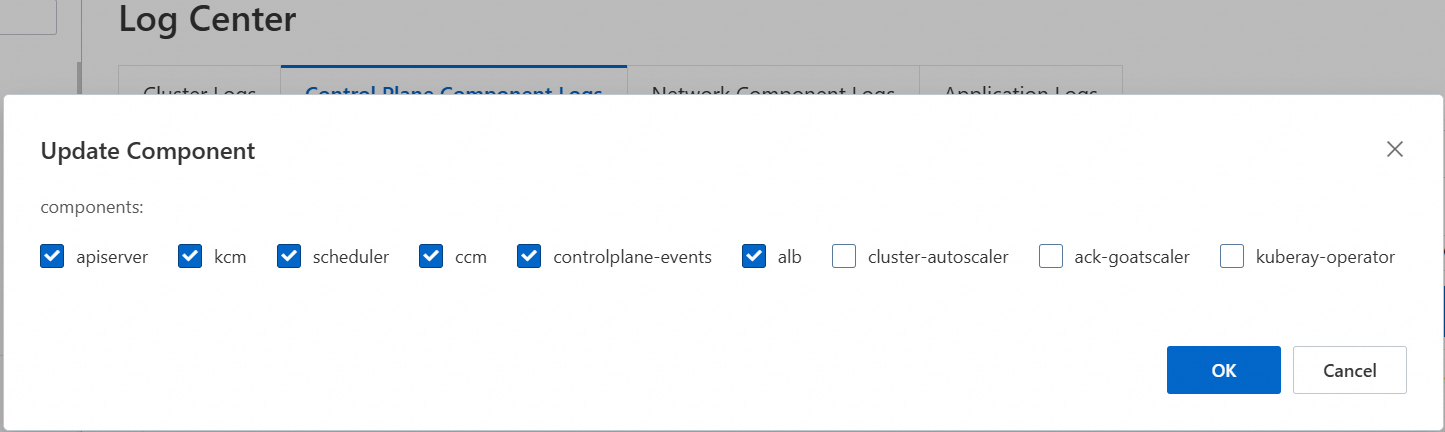
Click the Control Plane Component Logs tab, and then click Update Component.
In the dialog box, select or clear components as needed, and then click OK.
Clearing all components disables the control plane component log feature entirely.
Disable log collection
On the Clusters page, click the name of the target cluster. In the left-side pane, choose Operations > Log Center.
Click the Control Plane Component Logs tab, and then click Close.