Query real-time estimated costs for cluster workloads through the Cost V2 API with flexible time windows and filters by pod, namespace, label, controller name, or controller kind for real-time cost trend analysis.
Prerequisites
Complete the setup in Overview of obtaining cost data using APIs.
API reference
Request syntax
GET /v2/costRequest parameters
Parameter | Type | Required | Description |
| string | Yes | Time range to query.
|
| string | No | Filter by resource category: Separate multiple values with commas: Combine categories with +: |
| string | No | Time interval to split results into multiple cost sets (e.g., Note A cost set contains cost data for a Kubernetes object (such as a pod) over a specific time period. |
| string | No | Aggregation dimension. Supported values:
|
| boolean | No | Specifies whether to include idle costs. Default: |
| boolean | No | Specifies whether to distribute idle costs across non-idle allocations. Default: |
| string | No | Policy for allocating idle costs. Valid values:
|
| boolean | No | Specifies whether to aggregate idle costs at the node level before distribution. Applies only when |
| string | No | Output format. Valid values: |
Response parameters
Parameter | Type | Description |
| object | Kubernetes object properties. |
| string | Pod name. |
| string | Node name. |
| string | Namespace. |
| string | Controller type (e.g., DaemonSet, ReplicaSet). |
| string | Controller name. |
| string | ECS instance ID for the node. |
| map[string]string | Pod labels. Note Prometheus supports only underscores ( |
| string | Start time of the cost set. |
| string | End time of the cost set. |
| float | Average CPU cores requested over the period. |
| float | Average CPU cores used over the period. |
| float | Average memory requested over the period, in bytes. |
| float | Average memory used over the period, in bytes. |
| float | Estimated cost for the period. Default: 100% CPU weight. See Cost estimation policies to customize. |
| float | Fraction of total cluster cost ( |
| float | Cost from a custom estimation policy. |
(Optional) Step 1: Customize resource cost weights
The Cost V2 API defaults to 100% CPU weight ({"cpu": "1.0", "memory": "0.0"}). For mixed CPU-memory weighting, update the ack-alibaba-cloud-metrics-adapter Helm chart.
Log on to the ACK console. In the left navigation pane, click Clusters.
On the Clusters page, click the name of your cluster. In the left navigation pane, click Applications > Helm.
On the Helm page, find
ack-alibaba-cloud-metrics-adapterand click Update in the Actions column.In the YAML file, update the
AlibabaCloudMetricsAdapter.costWeightsparameter, then click OK.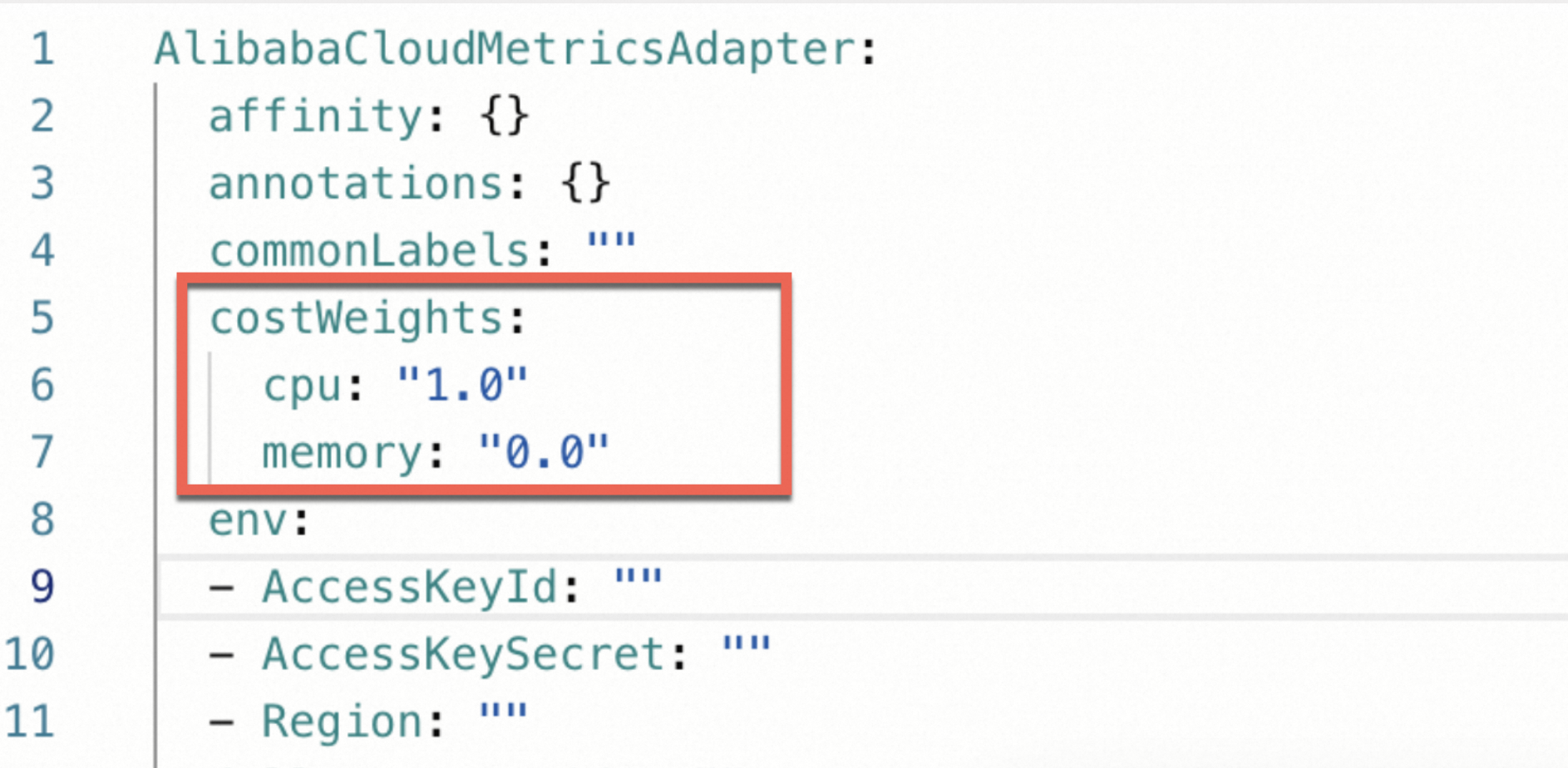
Step 2: Query cost data
All examples use curl with client certificate authentication. For setup, see Use the Kubernetes API.
Example 1: Query yesterday's DaemonSet costs
Filters by namespace, controller type, and label to return per-pod cost data for yesterday.
Request
curl -G -k --cert ./client-cert.pem --key ./client-key.pem \
  -d 'window=yesterday' \
  -d 'filter=namespace:"kube-system"+controllerKind:"DaemonSet"+label[app]:"terway-eniip"' \
  "$APISERVER/api/v1/namespaces/kube-system/services/ack-metrics-adapter-api-service:8080/proxy/v2/cost" | jq .
Sample response
Example 2: Query hourly pod costs over a 3-hour window
Uses step=1h to split a 3-hour window into three hourly cost sets.
Request
curl -G -k --cert ./client-cert.pem --key ./client-key.pem \
  -d 'window=2024-03-24T00:00:00Z,2024-03-24T03:00:00Z' \
  -d 'step=1h' \
  -d 'filter=namespace:"kube-system"+pod:"terway-eniip-kz68n"' \
  "$APISERVER/api/v1/namespaces/kube-system/services/ack-metrics-adapter-api-service:8080/proxy/v2/cost" | jq .
Sample response
Example 3: Query costs aggregated by the app label
Uses aggregate=label:app to group costs by the app label.
Request
curl -G -k --cert ./client-cert.pem --key ./client-key.pem \
  -d 'window=2h' \
  -d 'aggregate=label:app' \
  "$APISERVER/api/v1/namespaces/kube-system/services/ack-metrics-adapter-api-service:8080/proxy/v2/cost" | jq .
Sample response
Next steps
The Allocation API combines bill and cluster cost data for amortized cost reconciliation. See Obtain data using the Allocation API.