Defining Argo Workflows in YAML is error-prone for Python developers unfamiliar with Kubernetes' strict indentation and hierarchy requirements. The Hera Python SDK lets you define and submit Argo Workflows in pure Python—no YAML required. This guide walks through two complete examples: a directed acyclic graph (DAG) diamond pattern and a MapReduce word-counting pipeline.
How it works
Argo Workflows natively uses YAML to define workflows. Hera bridges the gap for Python developers by compiling Python functions into Argo templates at submission time.
The core building block is the @script decorator. Applying it to any Python function turns that function into an Argo Script template:
@script()
def echo(message: str):
    print(message)
When submitted to Argo Workflows, Hera serializes the function body into a YAML Script template. This means the Python function you write is exactly what runs inside the container. Beyond template generation, the @script decorator also provides:
-
Python ecosystem integration — each decorated function is a standard Python callable, so it works with any library or framework
-
Direct testability — the function runs normally outside any Hera context, letting you write unit tests with pytest or any other testing framework
-
Parameterization — pass
image,inputs,outputs, andresourcesdirectly in the decorator to configure the template without touching YAML
To define task dependencies, Hera uses the >> operator:
A >> [B, C] >> D # B and C start after A completes; D starts after both B and C completeThe following equivalent forms all produce the same DAG:
# Single line
A >> [B, C] >> D

# Explicit chains
A >> B >> D
A >> C >> D
Prerequisites
Before you begin, ensure that you have:
-
Argo components and console installed, with the access credentials and Argo Server IP address — see Enable batch task orchestration
-
Hera installed:
pip install hera-workflows
Example 1: Simple DAG diamond
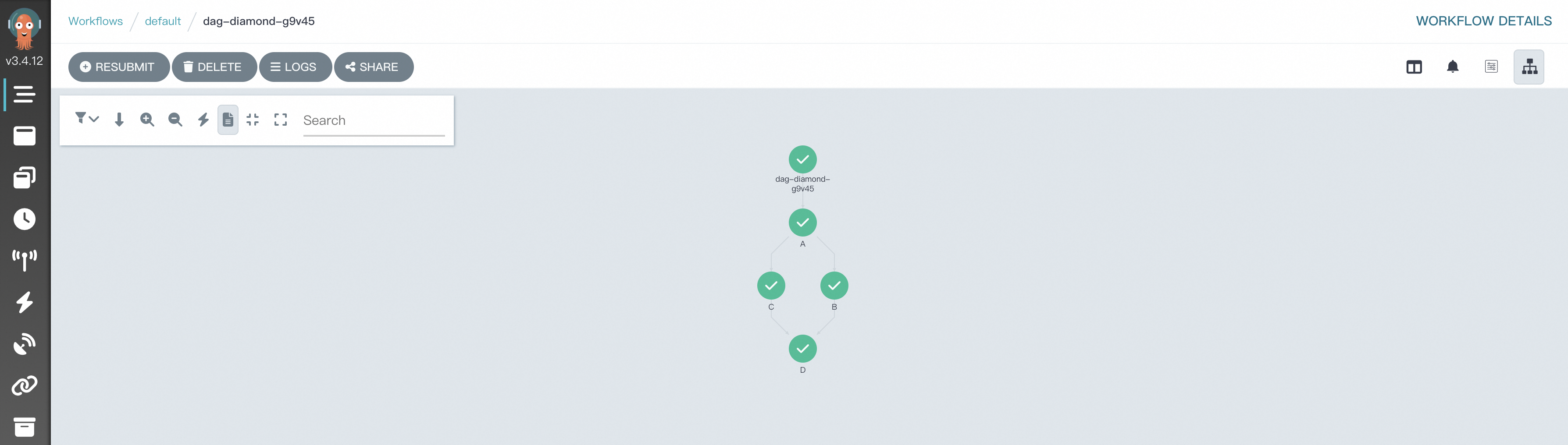
A diamond DAG runs two tasks in parallel (B and C) after an initial task (A) completes, then feeds their combined output into a final task (D). This pattern is common for merging data streams or aggregating parallel processing results.
All steps in this example use the @script decorator to define tasks and the >> operator to declare dependencies.
-
Create a file named
simpleDAG.pywith the following content.# Import the required packages. from hera.workflows import DAG, Workflow, script from hera.shared import global_config import urllib3 urllib3.disable_warnings() # Configure the Argo Server endpoint and access token. global_config.host = "https://<argo-server-ip>:2746" global_config.token = "<your-access-token>" global_config.verify_ssl = "" # The @script decorator turns this function into an Argo Script template. # It runs normally outside of Hera—write unit tests for it directly. @script() def echo(message: str): print(message) # Define the workflow: name prefix, entrypoint template, and namespace. with Workflow( generate_name="dag-diamond-", entrypoint="diamond", namespace="argo", ) as w: with DAG(name="diamond"): A = echo(name="A", arguments={"message": "A"}) B = echo(name="B", arguments={"message": "B"}) C = echo(name="C", arguments={"message": "C"}) D = echo(name="D", arguments={"message": "D"}) A >> [B, C] >> D # B and C run in parallel after A; D runs after both B and C. # Submit the workflow to Argo. w.create()Replace the following placeholders before running:
Placeholder Description Example <argo-server-ip>IP address of the Argo Server 192.168.0.1<your-access-token>Access token obtained from the Argo setup abcdefgxxxxxx -
Submit the workflow.
python simpleDAG.py -
View the DAG and results in the Workflow Console (Argo).
Example 2: MapReduce
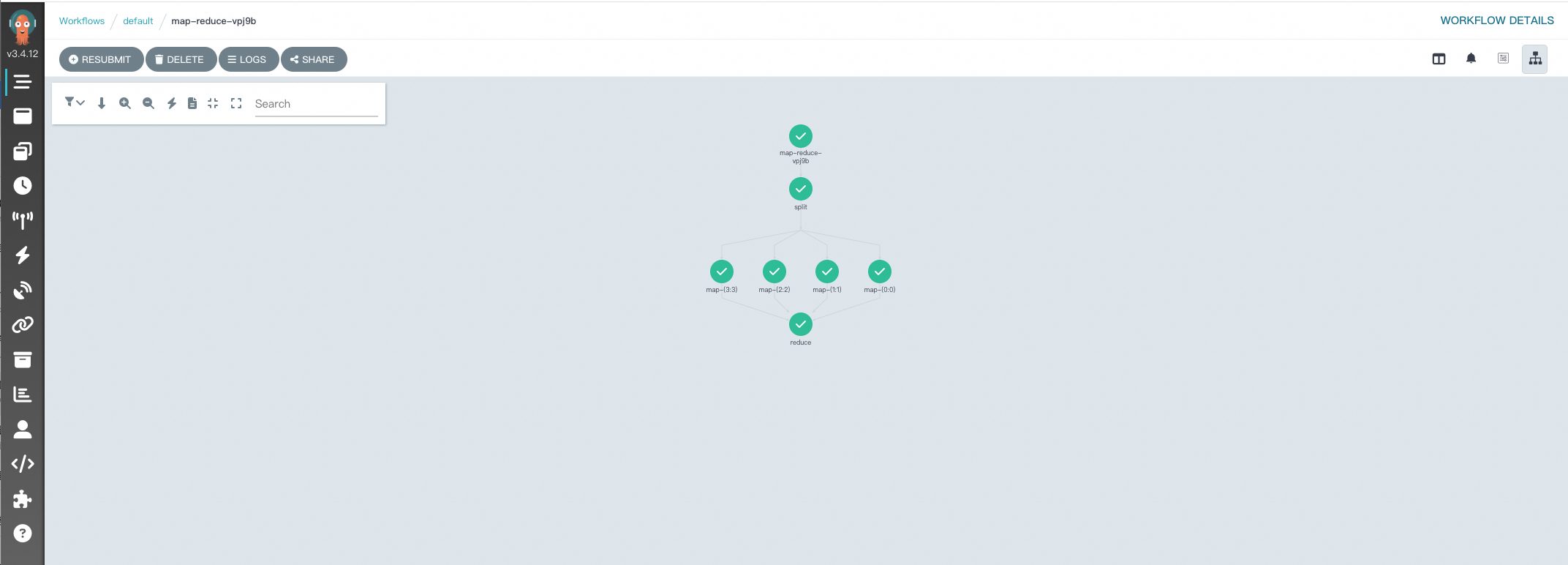
This example implements a word-counting MapReduce pipeline with three stages: split, map, and reduce. Each stage is a Python function decorated with @script, and artifacts are passed between stages using OSS.
Before you begin, configure artifacts — see Configure artifacts.
All three functions in this example use OSSArtifact to read and write intermediate data, and the with_param argument on the map task fans out one task instance per split part.
-
Create a file named
map-reduce.pywith the following content.from hera.workflows import DAG, Artifact, NoneArchiveStrategy, Parameter, OSSArtifact, Workflow, script from hera.shared import global_config import urllib3 urllib3.disable_warnings() # Configure the Argo Server endpoint and access token. global_config.host = "https://<argo-server-ip>:2746" global_config.token = "<your-access-token>" global_config.verify_ssl = "" # Stage 1 — Split: divides the input into num_parts chunks and writes each to OSS. @script( image="mirrors-ssl.aliyuncs.com/python:alpine", inputs=Parameter(name="num_parts"), outputs=OSSArtifact(name="parts", path="/mnt/out", archive=NoneArchiveStrategy(), key="{{workflow.name}}/parts"), ) def split(num_parts: int) -> None: import json import os import sys os.mkdir("/mnt/out") part_ids = list(map(lambda x: str(x), range(num_parts))) for i, part_id in enumerate(part_ids, start=1): with open("/mnt/out/" + part_id + ".json", "w") as f: json.dump({"foo": i}, f) json.dump(part_ids, sys.stdout) # Stage 2 — Map: runs once per part; reads "foo" from each part and writes "bar" = foo x 2. @script( image="mirrors-ssl.aliyuncs.com/python:alpine", inputs=[Parameter(name="part_id", value="0"), Artifact(name="part", path="/mnt/in/part.json"),], outputs=OSSArtifact( name="part", path="/mnt/out/part.json", archive=NoneArchiveStrategy(), key="{{workflow.name}}/results/{{inputs.parameters.part_id}}.json", ), ) def map_() -> None: import json import os os.mkdir("/mnt/out") with open("/mnt/in/part.json") as f: part = json.load(f) with open("/mnt/out/part.json", "w") as f: json.dump({"bar": part["foo"] * 2}, f) # Stage 3 — Reduce: reads all map outputs from OSS and sums the "bar" values into a total. @script( image="mirrors-ssl.aliyuncs.com/python:alpine", inputs=OSSArtifact(name="results", path="/mnt/in", key="{{workflow.name}}/results"), outputs=OSSArtifact( name="total", path="/mnt/out/total.json", archive=NoneArchiveStrategy(), key="{{workflow.name}}/total.json" ), ) def reduce() -> None: import json import os os.mkdir("/mnt/out") total = 0 for f in list(map(lambda x: open("/mnt/in/" + x), os.listdir("/mnt/in"))): result = json.load(f) total = total + result["bar"] with open("/mnt/out/total.json", "w") as f: json.dump({"total": total}, f) # Define the workflow with num_parts=4 as the default input. with Workflow(generate_name="map-reduce-", entrypoint="main", namespace="argo", arguments=Parameter(name="num_parts", value="4")) as w: with DAG(name="main"): s = split(arguments=Parameter(name="num_parts", value="{{workflow.parameters.num_parts}}")) m = map_( with_param=s.result, # Fan out: one map task per split output. arguments=[Parameter(name="part_id", value="{{item}}"), OSSArtifact(name="part", key="{{workflow.name}}/parts/{{item}}.json"),], ) s >> m >> reduce() # Each stage starts after the previous one completes. # Submit the workflow to Argo. w.create()Replace the following placeholders before running:
Placeholder Description Example <argo-server-ip>IP address of the Argo Server 192.168.0.1<your-access-token>Access token obtained from the Argo setup abcdefgxxxxxx -
Submit the workflow.
python map-reduce.py -
View the DAG and results in the Workflow Console (Argo).
References
-
Hera documentation
-
Train LLM with Hera — walkthrough for training Large Language Models (LLMs) with Hera
-
Sample YAML configurations
-
dag-diamond.yaml — the YAML equivalent of the DAG diamond example
-
map-reduce.yaml — the YAML equivalent of the MapReduce example
-
Contact us
For product suggestions or questions, join the DingTalk group (ID: 35688562).