Configure RAM and RBAC permissions for four common ACK cluster roles.
Authorization system

RAM authorization uses system and custom policies to control access to ACK API operations and Alibaba Cloud services. It covers:
-
Creating, viewing, upgrading, and deleting clusters
-
Creating, modifying, and scaling node pools
-
Managing authorization
-
Monitoring clusters and collecting logs and events
RBAC authorization controls access to Kubernetes resources within a cluster using Kubernetes RBAC. It covers add, delete, modify, and query operations on:
-
Workloads: Deployment, StatefulSet, DaemonSet, Job, CronJob, pod, and ReplicaSet
-
Network resources: Service, Ingress, and NetworkPolicy
-
Storage resources: persistent volume (PV), persistent volume claim (PVC), and StorageClass
-
Namespace, ConfigMap, and Secret
Prerequisites
Verify the following:
-
The RAM user or role is designated as a permission administrator (not required for Alibaba Cloud account owners).
Use case 1: Authorize read-only administrators
Assign the Read-only Administrator predefined RBAC role for read-only access to Kubernetes resources across all namespaces. No RAM authorization required.
Assign the Read-only Administrator role
ACK console
See Grant RBAC permissions to a RAM user or role.
Alibaba Cloud CLI
Call GrantPermissions with role_name set to admin-view. Verify with DescribeUserPermission.
aliyun cs POST /permissions/users/234xxxxxxxx --header "Content-Type=application/json;" --body "[{\"cluster\":\"c24xxxxxxxxxxxxxxxxxxxxxxxxxxxxxxx\",\"is_custom\":false,\"role_name\":\"admin-view\",\"role_type\":\"cluster\"}]"Terraform
resource "alicloud_cs_kubernetes_permissions" "default" {
  uid = alicloud_ram_user.user.id
  permissions {
    cluster     = alicloud_cs_managed_kubernetes.default.id
    role_type   = "cluster"
    role_name   = "admin-view"
    namespace   = ""
    is_custom   = false
    is_ram_role = false
  }
}
Use case 2: Authorize O&M engineers
O&M engineers require both RAM and RBAC authorization to manage clusters and applications.
Step 1: RAM authorization
ACK provides two system-managed RAM policies:
| Policy | Access level |
|---|---|
AliyunCSFullAccess |
Full read/write access to all ACK API operations |
AliyunCSReadOnlyAccess |
Read-only access to all ACK API operations |
In the RAM console, attach the policy to the RAM user or role. See Grant permissions to a RAM user and Grant permissions to a RAM role.RAM consoleRAM console
For fine-grained control, create a custom policy. See Use RAM to grant the permissions to access clusters and cloud resources. The following example covers all O&M operations. For each action, see Action description.
{
  "Version": "1",
  "Statement": [
    {
      "Effect": "Allow",
      "Action": [
        "cs:GetClusters",
        "cs:ModifyCluster",
        "cs:UpgradeCluster",
        "cs:DescribeClusterDetail",
        "cs:DescribeClusterVuls",
        "cs:DescribeClusterSecuritySummary",
        "cs:DescribeClusterUserKubeconfig",
        "cs:RevokeK8sClusterKubeConfig",
        "cs:CheckControlPlaneLogEnable",
        "cs:DescribeClusterResources",
        "cs:DescribeClusterEvents",
        "cs:DescribeClusterLogs",
        "cs:GetClusterAuditProject",
        "cs:ListClusterChecks",
        "cs:GetClusterCheck",
        "cs:RunClusterCheck",
        "cs:ModifyClusterAudit",
        "cs:DescribeResourcesDeleteProtection",
        "cs:UpdateResourcesDeleteProtection",
        "cs:DescribeClusterNodePools",
        "cs:DescribeClusterNodePoolDetail",
        "cs:CreateClusterNodePool",
        "cs:ModifyClusterNodePool",
        "cs:UpgradeClusterNodepool",
        "cs:DeleteClusterNodepool",
        "cs:CreateAutoscalingConfig",
        "cs:SyncClusterNodePool",
        "cs:RepairClusterNodePool",
        "cs:AttachInstancesToNodePool",
        "cs:ModifyNodePoolNodeConfig",
        "cs:DescribeClusterNodes",
        "cs:RemoveClusterNodes",
        "cs:RemoveNodePoolNodes",
        "cs:DiagnoseClustersNode",
        "cs:DescribeNodePoolVuls",
        "cs:FixNodePoolVuls",
        "cs:DrainNodes",
        "cs:DescribeClusterAddonMetadata",
        "cs:DescribeClusterAddonsVersion",
        "cs:InstallClusterAddons",
        "cs:UpgradeClusterAddons",
        "cs:ModifyClusterAddon",
        "cs:UnInstallClusterAddons",
        "cs:DescribeClusterAddonInstance",
        "cs:DescribeClusterAddonsUpgradeStatus",
        "cs:DescribeClusterAddonUpgradeStatus",
        "cs:ListClusterComponent",
        "cs:GetClusterComponent",
        "cs:DescribePolicyInstances",
        "cs:DeployPolicyInstance",
        "cs:ModifyPolicyInstance",
        "cs:DeletePolicyInstance",
        "cs:DescribePolicyGovernanceInCluster",
        "cs:DescribePolicyInstancesStatus",
        "cs:UpdateContactGroupForAlert",
        "cs:StartAlert",
        "cs:StopAlert",
        "cs:ListAlertRules",
        "cs:GetAlertHistory",
        "cs:DescribeClusterTasks",
        "cs:GetClusterBasicInfo",
        "cs:ListClusterReportSummary",
        "cs:GetClusterReportSummary",
        "cs:ListReportTaskRule",
        "cs:CreateTrigger",
        "cs:DescribeKubernetesClusterHookTrigger",
        "cs:CreateDiagnose",
        "cs:CreateClusterOverviewReport",
        "cs:GetAIDiagnosisResult",
        "cs:CreateReportTaskRule",
        "cs:CreateClusterReport",
        "cs:GetClusterCheckResult",
        "cs:GetClusterServices",
        "cs:UpdateControlPlaneLog",
        "cs:UpdateClusterName"
      ],
      "Resource": "acs:cs:*:*:cluster/xxxxx"
    },
    {
      "Effect": "Allow",
      "Action": [
        "cs:DescribeSubAccountHelmPermission",
        "cs:CheckServiceRole",
        "cs:DeleteTriggerHook",
        "cs:QueryAlertContact",
        "cs:QueryAlertContactGroup",
        "cs:AddOrUpdateAlertContact",
        "cs:AddOrUpdateAlertContactGroup",
        "cs:DeleteAlertContact",
        "cs:DeleteAlertContactGroup",
        "cs:DescribeKubernetesVersionMetadata",
        "cs:ListOperationPlans",
        "cs:DescribeClusterEndpoints",
        "cs:DescribeTaskInfo",
        "cs:DescribeEvents",
        "cs:DescribeUserQuota",
        "cs:DescribeTasks",
        "cs:PauseTask",
        "cs:CancelTask",
        "cs:DescribeAddons",
        "cs:DeleteReportTaskRule",
        "cs:CreateSessionMessage",
        "cs:DescribePolicies",
        "cs:DescribePolicyDetails"
      ],
      "Resource": "*"
    },
    {
      "Effect": "Allow",
      "Action": [
        "vpc:DescribeVSwitches",
        "vpc:DescribeVpcs",
        "vpc:DescribeEipAddresses"
      ],
      "Resource": "*"
    },
    {
      "Effect": "Allow",
      "Action": "kms:ListKeys",
      "Resource": "*"
    },
    {
      "Effect": "Allow",
      "Action": [
        "arms:ListDashboards",
        "arms:InstallAddon"
      ],
      "Resource": "*"
    },
    {
      "Effect": "Allow",
      "Action": [
        "cloudshell:CreateEnvironment",
        "cloudshell:AttachStorage",
        "cloudshell:DetachStorage",
        "cloudshell:CreateSession"
      ],
      "Resource": "*"
    },
    {
      "Effect": "Allow",
      "Action": [
        "ess:DescribeScalingActivities",
        "ess:DescribeScalingActivityDetail",
        "ess:DescribeLifecycleActions"
      ],
      "Resource": "*"
    },
    {
      "Effect": "Allow",
      "Action": "oos:ListExecutions",
      "Resource": "*"
    },
    {
      "Effect": "Allow",
      "Action": [
        "ecs:DescribeKeyPairs",
        "ecs:DescribeInstances",
        "ecs:DescribeSecurityGroups",
        "ecs:DescribeImages",
        "ecs:DescribePrice"
      ],
      "Resource": "*"
    },
    {
      "Effect": "Allow",
      "Action": [
        "cr:ListInstance",
        "cr:ListInstanceDomain",
        "cr:ListRepository",
        "cr:ListArtifactTag"
      ],
      "Resource": "*"
    },
    {
      "Effect": "Allow",
      "Action": "ram:GetRole",
      "Resource": "acs:ram:*:*:role/aliyuncisdefaultrole"
    },
    {
      "Effect": "Allow",
      "Action": [
        "log:GetDashboard",
        "log:GetSavedSearch",
        "log:GetLogStore",
        "log:GetIndex",
        "log:UpdateIndex",
        "log:GetLogStoreLogs",
        "log:CreateDashboardSharing",
        "log:ListProject",
        "log:GetProjectLogs",
        "log:GetResourceRecord",
        "log:CreateResourceRecord",
        "log:UpdateResourceRecord"
      ],
      "Resource": "*"
    }
  ]
}Replacexxxxxinacs:cs:*:*:cluster/xxxxxwith your cluster ID.
For ACK API actions, see [Product Changes] ACK API enhances user authentication and List of operations by function.
Step 2: RBAC authorization
After RAM authorization, assign a predefined RBAC role. The following table describes all predefined roles and their scope.
| Predefined role | RBAC permissions on cluster resources | When to use |
|---|---|---|
| Administrator | Full read/write access to all Kubernetes resources in all namespaces, plus cluster-level resources: nodes, PVs, namespaces, and resource quotas | Unrestricted cluster access. For permission management, use Custom > cluster-admin. |
| Read-only Administrator | Read-only access to all Kubernetes resources in all namespaces, plus cluster-level resources: nodes, PVs, namespaces, and resource quotas | Cluster-wide visibility without write access. |
| O&M Engineer | Read/write access to all console-visible resources in all namespaces; read and update access to nodes, PVs, and namespaces; read-only access to all other resources | Day-to-day cluster operations. No permission management. |
| Developer | Read/write access to console-visible resources, scoped to all namespaces or a specified set | Application deployment and management. Can be scoped to specific namespaces. |
| Restricted User | Read-only access to console-visible resources, scoped to all namespaces or a specified set | View-only access for developers or operators. |
| Custom | Determined by the ClusterRole you select. Review permissions before assigning. See Use custom RBAC roles to restrict resource operations in a cluster. | Fine-grained access control beyond the predefined roles. |
Assigning the cluster-admin ClusterRole grants the same permissions as the Alibaba Cloud account — full control over all resources in the cluster. Use caution.
To assign a role in the console:
-
Log on to the ACK consoleACK console. In the left navigation pane, click Authorizations.
-
On the Authorizations page, click the RAM Users or RAM Roles tab. Find the target and click Modify Permissions.
-
Click +Add Permissions, select O&M Engineer for the target cluster and namespace, and click Submit.
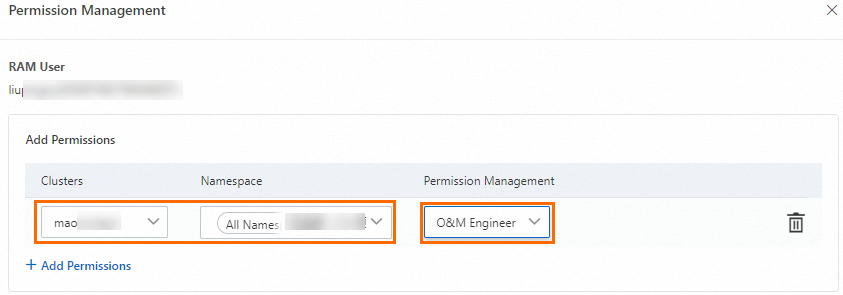
ACK automatically creates a ClusterRoleBinding. The following is the ClusterRole definition for the O&M Engineer role (cs:ops):
apiVersion: rbac.authorization.k8s.io/v1
kind: ClusterRole
metadata:
  name: cs:ops
rules:
- apiGroups: [""]
  resources:  ["pods", "pods/attach", "pods/exec", "pods/portforward", "pods/proxy"]
  verbs: ["create", "delete", "deletecollection", "get", "list", "patch", "update", "watch"]
- apiGroups: [""]
  resources:  ["configmaps", "endpoints", "persistentvolumeclaims", "replicationcontrollers", "replicationcontrollers/scale", "secrets", "serviceaccounts", "services", "services/proxy"]
  verbs: ["create", "delete", "deletecollection", "get", "list", "patch", "update", "watch"]
- apiGroups: [""]
  resources:  ["bindings", "events", "limitranges", "namespaces/status", "replicationcontrollers/status", "pods/log", "pods/status", "resourcequotas", "resourcequotas/status", "componentstatuses"]
  verbs: ["get", "list", "watch"]
- apiGroups: [""]
  resources:  ["namespaces", "nodes", "persistentvolumes"]
  verbs: ["get", "list", "watch", "patch"]
- apiGroups: ["coordination.k8s.io"]
  resources:  ["leases"]
  verbs: ["get"]
- apiGroups: ["apps"]
  resources:  ["daemonsets", "deployments", "deployments/rollback", "deployments/scale", "replicasets", "replicasets/scale", "statefulsets"]
  verbs: ["create", "delete", "deletecollection", "get", "list", "patch", "update", "watch"]
- apiGroups: ["autoscaling"]
  resources:  ["horizontalpodautoscalers"]
  verbs: ["create", "delete", "deletecollection", "get", "list", "patch", "update", "watch"]
- apiGroups: ["batch"]
  resources:  ["cronjobs", "jobs"]
  verbs: ["create", "delete", "deletecollection", "get", "list", "patch", "update", "watch"]
- apiGroups: ["extensions"]
  resources:  ["daemonsets", "deployments", "deployments/rollback", "deployments/scale","ingresses","replicasets", "replicasets/scale", "replicationcontrollers/scale"]
  verbs: ["create", "delete", "deletecollection", "get", "list", "patch", "update", "watch"]
- apiGroups: ["networking.k8s.io"]
  resources:  ["*"]
  verbs: ["create", "delete", "deletecollection", "get", "list", "patch", "update", "watch"]
- apiGroups: ["servicecatalog.k8s.io"]
  resources:  ["clusterserviceclasses", "clusterserviceplans", "clusterservicebrokers", "serviceinstances", "servicebindings"]
  verbs: ["create", "delete", "get", "list", "patch", "update", "watch"]
- apiGroups: ["servicecatalog.k8s.io"]
  resources:  ["clusterservicebrokers/status", "clusterserviceclasses/status", "clusterserviceplans/status", "serviceinstances/status", "serviceinstances/reference", "servicebindings/status",]
  verbs: ["update"]
- apiGroups: ["storage.k8s.io"]
  resources:  ["storageclasses"]
  verbs: ["get", "list", "watch"]
- apiGroups: ["alicloud.com"]
  resources:  ["*"]
  verbs: ["create", "delete", "get", "list", "patch", "update", "watch"]
- apiGroups: ["policy"]
  resources:  ["poddisruptionbudgets"]
  verbs: ["create", "delete", "deletecollection", "get", "list", "patch", "update", "watch"]
- apiGroups: ["metrics.k8s.io"]
  resources: ["pods", "nodes"]
  verbs: ["get", "watch", "list"]
- apiGroups: ["networking.istio.io"]
  resources:  ["*"]
  verbs: ["create", "delete", "deletecollection", "get", "list", "patch", "update", "watch"]
- apiGroups: ["config.istio.io"]
  resources:  ["*"]
  verbs: ["create", "delete", "deletecollection", "get", "list", "patch", "update", "watch"]
- apiGroups: ["rbac.istio.io"]
  resources:  ["*"]
  verbs: ["create", "delete", "deletecollection", "get", "list", "patch", "update", "watch"]
- apiGroups: ["istio.alibabacloud.com"]
  resources:  ["*"]
  verbs: ["create", "delete", "deletecollection", "get", "list", "patch", "update", "watch"]
- apiGroups: ["authentication.istio.io"]
  resources:  ["*"]
  verbs: ["create", "delete", "deletecollection", "get", "list", "patch", "update", "watch"]
- apiGroups: ["log.alibabacloud.com"]
  resources:  ["*"]
  verbs: ["create", "delete", "deletecollection", "get", "list", "patch", "update", "watch"]
- apiGroups: ["monitoring.kiali.io"]
  resources:  ["*"]
  verbs: ["create", "delete", "deletecollection", "get", "list", "patch", "update", "watch"]
- apiGroups: ["kiali.io"]
  resources:  ["*"]
  verbs: ["create", "delete", "deletecollection", "get", "list", "patch", "update", "watch"]
- apiGroups: ["apiextensions.k8s.io"]
  resources: ["customresourcedefinitions"]
  verbs: ["get", "list", "create", "watch", "patch", "update", "delete", "deletecollection"]
- apiGroups: ["serving.knative.dev"]
  resources: ["*"]
  verbs: ["get", "list", "create", "watch", "patch", "update", "delete", "deletecollection"]
- apiGroups: ["eventing.knative.dev"]
  resources: ["*"]
  verbs: ["get", "list", "create", "watch", "patch", "update", "delete", "deletecollection"]
- apiGroups: ["messaging.knative.dev"]
  resources: ["*"]
  verbs: ["get", "list", "create", "watch", "patch", "update", "delete", "deletecollection"]
- apiGroups: ["sources.eventing.knative.dev"]
  resources: ["*"]
  verbs: ["get", "list", "create", "watch", "patch", "update", "delete", "deletecollection"]
- apiGroups: ["tekton.dev"]
  resources: ["*"]
  verbs: ["get", "list", "create", "watch", "patch", "update", "delete", "deletecollection"]
- apiGroups: ["alert.alibabacloud.com"]
  resources: ["*"]
  verbs: ["get", "list", "create", "watch", "patch", "update", "delete", "deletecollection"]
For fine-grained control, create a custom ClusterRole with Kubernetes RBAC and select it on the Authorizations page in the ACK consoleACK console. See Use custom RBAC roles to restrict resource operations in a cluster.
Use case 3: Authorize developers
Developers require RBAC authorization for Kubernetes resources and read-only RAM access on the cluster.
Complete RAM authorization before RBAC authorization. Developers must have at least read-only RAM permissions on the cluster for RBAC authorization to take effect.
Step 1: RAM authorization
Create a custom policy in the RAM console and attach it to the RAM user or role. See Grant access to clusters and cloud resources using RAM. Minimum read-only permissions:
{
  "Statement": [
    {
      "Action": [
        "cs:GetClusters",
        "cs:DescribeClusterDetail",
        "cs:GetClusterAuditProject",
        "cs:DescribeResourcesDeleteProtection"
      ],
      "Resource": "acs:cs:*:*:cluster/xxxxx",
      "Effect": "Allow"
    }
  ],
  "Version": "1"
}Replacexxxxxwith your cluster ID. For read-only access to all ACK clusters, use theAliyunCSReadOnlyAccesssystem policy.
Step 2: RBAC authorization
-
Log on to the ACK consoleACK console. In the left navigation pane, click Authorizations.
-
On the Authorizations page, click the RAM Users or RAM Roles tab. Find the target and click Modify Permissions.
-
Click +Add Permissions, select Developer for the target cluster and namespace, and click Submit.
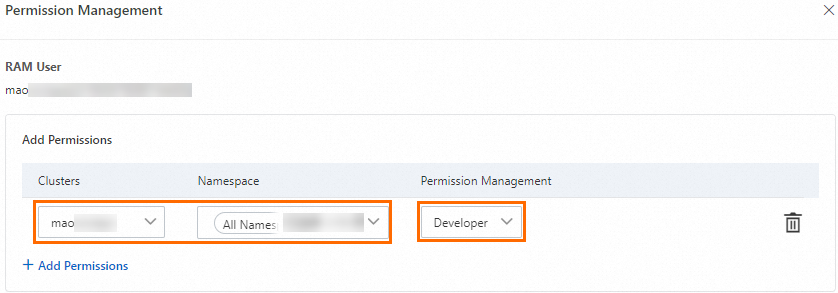
ACK automatically creates a ClusterRoleBinding. The following is the ClusterRole definition for the Developer role (cs:ns:dev):
apiVersion: rbac.authorization.k8s.io/v1
kind: ClusterRole
metadata:
  name: cs:ns:dev
rules:
- apiGroups: [""]
  resources:  ["pods", "pods/attach", "pods/exec", "pods/portforward", "pods/proxy"]
  verbs: ["create", "delete", "deletecollection", "get", "list", "patch", "update", "watch"]
- apiGroups: [""]
  resources:  ["configmaps", "endpoints", "persistentvolumeclaims", "replicationcontrollers", "replicationcontrollers/scale", "secrets", "serviceaccounts", "services", "services/proxy"]
  verbs: ["create", "delete", "deletecollection", "get", "list", "patch", "update", "watch"]
- apiGroups: [""]
  resources:  ["events", "replicationcontrollers/status", "pods/log", "pods/status"]
  verbs: ["get", "list", "watch"]
- apiGroups: ["apps"]
  resources:  ["daemonsets", "deployments", "deployments/rollback", "deployments/scale", "replicasets", "replicasets/scale", "statefulsets"]
  verbs: ["create", "delete", "deletecollection", "get", "list", "patch", "update", "watch"]
- apiGroups: ["autoscaling"]
  resources:  ["horizontalpodautoscalers"]
  verbs: ["create", "delete", "deletecollection", "get", "list", "patch", "update", "watch"]
- apiGroups: ["batch"]
  resources:  ["cronjobs", "jobs"]
  verbs: ["create", "delete", "deletecollection", "get", "list", "patch", "update", "watch"]
- apiGroups: ["extensions"]
  resources:  ["daemonsets", "deployments", "deployments/rollback", "deployments/scale","ingresses","replicasets", "replicasets/scale", "replicationcontrollers/scale"]
  verbs: ["create", "delete", "deletecollection", "get", "list", "patch", "update", "watch"]
- apiGroups: ["networking.k8s.io"]
  resources:  ["*"]
  verbs: ["create", "delete", "deletecollection", "get", "list", "patch", "update", "watch"]
- apiGroups: ["servicecatalog.k8s.io"]
  resources:  ["clusterserviceclasses", "clusterserviceplans", "clusterservicebrokers", "serviceinstances", "servicebindings"]
  verbs: ["create", "delete", "get", "list", "patch", "update", "watch"]
- apiGroups: ["servicecatalog.k8s.io"]
  resources:  ["clusterservicebrokers/status", "clusterserviceclasses/status", "clusterserviceplans/status", "serviceinstances/status", "serviceinstances/reference", "servicebindings/status",]
  verbs: ["update"]
- apiGroups: ["alicloud.com"]
  resources:  ["*"]
  verbs: ["create", "delete", "get", "list", "patch", "update", "watch"]
- apiGroups: ["policy"]
  resources:  ["poddisruptionbudgets"]
  verbs: ["create", "delete", "deletecollection", "get", "list", "patch", "update", "watch"]
- apiGroups: ["networking.istio.io"]
  resources:  ["*"]
  verbs: ["create", "delete", "deletecollection", "get", "list", "patch", "update", "watch"]
- apiGroups: ["config.istio.io"]
  resources:  ["*"]
  verbs: ["create", "delete", "deletecollection", "get", "list", "patch", "update", "watch"]
- apiGroups: ["rbac.istio.io"]
  resources:  ["*"]
  verbs: ["create", "delete", "deletecollection", "get", "list", "patch", "update", "watch"]
- apiGroups: ["istio.alibabacloud.com"]
  resources:  ["*"]
  verbs: ["create", "delete", "deletecollection", "get", "list", "patch", "update", "watch"]
- apiGroups: ["authentication.istio.io"]
  resources:  ["*"]
  verbs: ["create", "delete", "deletecollection", "get", "list", "patch", "update", "watch"]
- apiGroups: ["log.alibabacloud.com"]
  resources:  ["*"]
  verbs: ["create", "delete", "deletecollection", "get", "list", "patch", "update", "watch"]
- apiGroups: ["monitoring.kiali.io"]
  resources:  ["*"]
  verbs: ["create", "delete", "deletecollection", "get", "list", "patch", "update", "watch"]
- apiGroups: ["kiali.io"]
  resources:  ["*"]
  verbs: ["create", "delete", "deletecollection", "get", "list", "patch", "update", "watch"]
- apiGroups: ["apiextensions.k8s.io"]
  resources: ["customresourcedefinitions"]
  verbs: ["get", "list", "create", "watch", "patch", "update", "delete", "deletecollection"]
- apiGroups: ["serving.knative.dev"]
  resources: ["*"]
  verbs: ["get", "list", "create", "watch", "patch", "update", "delete", "deletecollection"]
- apiGroups: ["eventing.knative.dev"]
  resources: ["*"]
  verbs: ["get", "list", "create", "watch", "patch", "update", "delete", "deletecollection"]
- apiGroups: ["messaging.knative.dev"]
  resources: ["*"]
  verbs: ["get", "list", "create", "watch", "patch", "update", "delete", "deletecollection"]
- apiGroups: ["sources.eventing.knative.dev"]
  resources: ["*"]
  verbs: ["get", "list", "create", "watch", "patch", "update", "delete", "deletecollection"]
- apiGroups: ["tekton.dev"]
  resources: ["*"]
  verbs: ["get", "list", "create", "watch", "patch", "update", "delete", "deletecollection"]
- apiGroups: ["alert.alibabacloud.com"]
  resources: ["*"]
  verbs: ["get", "list", "create", "watch", "patch", "update", "delete", "deletecollection"]
For fine-grained control, create a custom ClusterRole with Kubernetes RBAC and select it on the Authorizations page in the ACK consoleACK console. See Use custom RBAC roles to restrict resource operations in a cluster.
Use case 4: Authorize permission administrators
Permission administrators manage RBAC permissions for other RAM users and roles. By default, a RAM user or role cannot grant RBAC permissions — the Authorizations page displays: The current RAM user account has no permission to manage authorizations. Contact the Alibaba Cloud account owner or authorized RAM user to request permission.
This requires both RAM and RBAC authorization.
Step 1: RAM authorization
The RAM policy must include permissions to:
-
Query RAM users and roles in the Alibaba Cloud account
-
Query RBAC permissions of a RAM user or role
-
Grant RBAC permissions to other RAM users or roles
In the RAM console, attach the following policy to the RAM user or role:RAM console
{
  "Statement": [
    {
      "Action": [
        "ram:ListRoles",
        "ram:ListUserBasicInfos",
        "cs:GetClusters",
        "cs:DescribeUserPermission",
        "cs:DescribeClusterDetail",
        "cs:GrantPermissions",
        "cs:UpdateUserPermissions",
        "cs:GetClusterAuditProject",
        "cs:DescribeResourcesDeleteProtection",
        "cs:UpdateResourcesDeleteProtection",
        "cs:DescribeClusterAddonUpgradeStatus"
      ],
      "Resource": "*",
      "Effect": "Allow"
    }
  ],
  "Version": "1"
}
Step 2: RBAC authorization
-
Log on to the ACK consoleACK console. In the left navigation pane, click Authorizations.
-
On the Authorizations page, click the RAM Users or RAM Roles tab. Find the target and click Modify Permissions.
-
Click Add Permissions, select Administrator or
cluster-adminunder Custom, and click Submit.
By default, Alibaba Cloud accounts and cluster owners are assigned the cluster-admin role and have full access to all Kubernetes resources in the cluster.
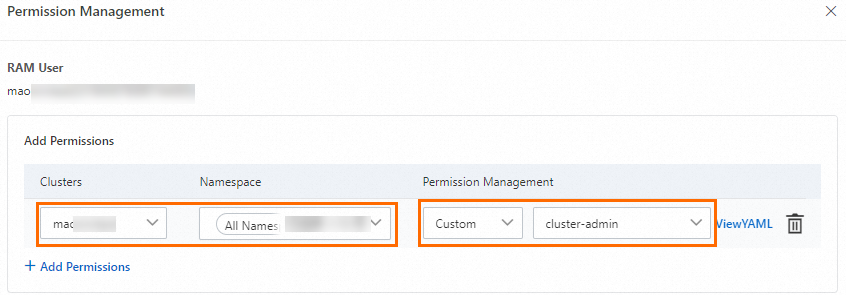
After both steps, the RAM user or role can grant other RAM users or RAM roles RBAC permissions within the configured scope.