Auto-scale Spark executors based on workload demand, reducing resource waste and job latency.
How DRA works
Dynamic Resource Allocation (DRA) is a Spark mechanism that dynamically adjusts compute resources based on workload. The driver automatically releases executors that remain idle and requests more executors when tasks are backlogged, which helps balance resource utilization and job performance.
Request policy
When pending tasks exceed the spark.dynamicAllocation.schedulerBacklogTimeout threshold (default: 1 second), the driver requests executors. If the backlog persists, the driver requests additional batches every spark.dynamicAllocation.sustainedSchedulerBacklogTimeout seconds (default: 1 second). Each batch grows exponentially: 1, 2, 4, 8, and so on.
Remove policy
When an executor remains idle longer than spark.dynamicAllocation.executorIdleTimeout (default: 60 seconds), the driver releases it to reclaim cluster resources.
Enable dynamic resource allocation
DRA works in Standalone, YARN, Mesos, and Kubernetes modes but is disabled by default. To enable it, set spark.dynamicAllocation.enabled to true and configure a shuffle data preservation method:
-
External Shuffle Service (ESS): Set
spark.shuffle.service.enabledtotrueand configure ESS on each worker node. -
Shuffle tracking: Set
spark.dynamicAllocation.shuffleTracking.enabledtotrue. Spark tracks shuffle data to preserve it when executors are released. -
Node decommissioning: Set
spark.decommission.enabledandspark.storage.decommission.shuffleBlocks.enabledtotrue. Spark copies shuffle blocks from decommissioned nodes to available nodes. -
ShuffleDataIO plugin: Set
spark.shuffle.sort.io.plugin.classto a plugin class for external shuffle data I/O.
Configuration by mode
-
Standalone mode: Enable ESS only.
-
Spark on Kubernetes without Celeborn: Enable shuffle tracking (
spark.dynamicAllocation.shuffleTracking.enabled=true). -
Spark on Kubernetes with Celeborn:
-
Spark 3.5.0 or later: Set
spark.shuffle.sort.io.plugin.classtoorg.apache.spark.shuffle.celeborn.CelebornShuffleDataIO. -
Spark earlier than 3.5.0: Patch the Spark version. No additional configuration required. See Support Spark Dynamic Allocation.
-
Spark 3.4.0 or later: Set
spark.dynamicAllocation.shuffleTracking.enabledtofalse. With Celeborn, shuffle tracking prevents idle executors from being released.
-
DRA parameter reference
Key DRA parameters and defaults.
| Parameter | Default | Description |
|---|---|---|
spark.dynamicAllocation.enabled |
false |
Enables or disables DRA. |
spark.dynamicAllocation.shuffleTracking.enabled |
true |
Enables shuffle tracking. Disable when using Celeborn. |
spark.dynamicAllocation.initialExecutors |
spark.dynamicAllocation.minExecutors |
Number of executors to allocate at startup. |
spark.dynamicAllocation.minExecutors |
0 |
Minimum number of executors to retain. |
spark.dynamicAllocation.maxExecutors |
infinity |
Maximum number of executors to allocate. Set a finite value to prevent unbounded pod creation. |
spark.dynamicAllocation.executorIdleTimeout |
60s |
Idle time before the driver releases an executor. |
spark.dynamicAllocation.cachedExecutorIdleTimeout |
infinity |
Idle timeout for executors holding cached data. |
spark.dynamicAllocation.schedulerBacklogTimeout |
1s |
Backlog duration that triggers the first executor request. |
spark.dynamicAllocation.sustainedSchedulerBacklogTimeout |
1s |
Interval between subsequent executor request batches. |
spark.shuffle.sort.io.plugin.class |
(none) | ShuffleDataIO plugin class. Set to CelebornShuffleDataIO when using Celeborn with Spark 3.5.0+. |
Prerequisites
-
ack-spark-operator add-on installed
NoteThis example sets
spark.jobNamespaces=["spark"]. Modify this field for other namespaces. -
ack-spark-history-server add-on deployed
NoteThis example creates a PV named
nas-pvand a PVC namednas-pvc. The Spark History Server reads event logs from/spark/event-logson the NAS file system. -
(Optional) ack-celeborn add-on deployed
Procedure
Select a scenario based on whether you use Celeborn as Remote Shuffle Service (RSS):
-
Without Celeborn: Shuffle tracking preserves shuffle data. Simpler setup, but executors with shuffle data stay allocated until no longer needed.
-
With Celeborn: Celeborn manages shuffle data externally, so executors are released immediately when idle.
Scenario 1: Without Celeborn as RSS
This example uses Spark 3.5.4. Set these parameters to enable DRA without Celeborn:
-
spark.dynamicAllocation.enabled:"true"-- Enable dynamic resource allocation. -
spark.dynamicAllocation.shuffleTracking.enabled:"true"-- Enable shuffle tracking to preserve shuffle data without ESS.
-
Create
spark-pagerank-dra.yamlwith the following SparkApplication manifest.NoteThe Spark image must include Hadoop OSS SDK dependencies. Build it with the following Dockerfile and push to your image repository:
apiVersion: sparkoperator.k8s.io/v1beta2
kind: SparkApplication
metadata:
  name: spark-pagerank-dra
  namespace: spark
spec:
  type: Scala
  mode: cluster
  # Replace <SPARK_IMAGE> with your Spark image.
  image: <SPARK_IMAGE>
  mainApplicationFile: local:///opt/spark/examples/jars/spark-examples_2.12-3.5.4.jar
  mainClass: org.apache.spark.examples.SparkPageRank
  arguments:
  # Replace <OSS_BUCKET> with the name of your OSS bucket.
  - oss://<OSS_BUCKET>/data/pagerank_dataset.txt
  - "10"
  sparkVersion: 3.5.4
  hadoopConf:
    # Use the oss:// format to access OSS data.
    fs.AbstractFileSystem.oss.impl: org.apache.hadoop.fs.aliyun.oss.OSS
    fs.oss.impl: org.apache.hadoop.fs.aliyun.oss.AliyunOSSFileSystem
    # The endpoint to access OSS. You must replace <OSS_ENDPOINT> with your OSS access endpoint.
    # For example, the internal endpoint to access OSS in the China (Beijing) region is oss-cn-beijing-internal.aliyuncs.com
    fs.oss.endpoint: <OSS_ENDPOINT>
    # Obtain OSS access credentials from environment variables.
    fs.oss.credentials.provider: com.aliyun.oss.common.auth.EnvironmentVariableCredentialsProvider
  sparkConf:
    # ====================
    # Event logs
    # ====================
    spark.eventLog.enabled: "true"
    spark.eventLog.dir: file:///mnt/nas/spark/event-logs

    # ====================
    # Dynamic resource allocation
    # ====================
    # Enable dynamic resource allocation
    spark.dynamicAllocation.enabled: "true"
    # Enable shuffled file tracing to implement dynamic resource allocation without relying on ESS.
    spark.dynamicAllocation.shuffleTracking.enabled: "true"
    # The initial value of the number of executors.
    spark.dynamicAllocation.initialExecutors: "1"
    # The minimum number of executors.
    spark.dynamicAllocation.minExecutors: "0"
    # The maximum number of executors.
    spark.dynamicAllocation.maxExecutors: "5"
    # The idle timeout period of the executor. If the timeout period is exceeded, the executor is released.
    spark.dynamicAllocation.executorIdleTimeout: 60s
    # The idle timeout period of the executor that cached the data block. If the timeout period is exceeded, the executor is released. The default value is infinity, which specifies that the data block is not released.
    # spark.dynamicAllocation.cachedExecutorIdleTimeout:
    # When a job exceeds the specified scheduled time, additional executors are requested.
    spark.dynamicAllocation.schedulerBacklogTimeout: 1s
    # After each time interval, subsequent batches of executors are requested.
    spark.dynamicAllocation.sustainedSchedulerBacklogTimeout: 1s
  driver:
    cores: 1
    coreLimit: 1200m
    memory: 512m
    envFrom:
    - secretRef:
        name: spark-oss-secret
    volumeMounts:
    - name: nas
      mountPath: /mnt/nas
    serviceAccount: spark-operator-spark
  executor:
    cores: 1
    coreLimit: "2"
    memory: 8g
    envFrom:
    - secretRef:
        name: spark-oss-secret
    volumeMounts:
    - name: nas
      mountPath: /mnt/nas
  volumes:
  - name: nas
    persistentVolumeClaim:
      claimName: nas-pvc
  restartPolicy:
    type: Never
ARG SPARK_IMAGE=spark:3.5.4 FROM ${SPARK_IMAGE} # Add dependency for Hadoop Aliyun OSS support ADD --chown=spark:spark --chmod=644 https://repo1.maven.org/maven2/org/apache/hadoop/hadoop-aliyun/3.3.4/hadoop-aliyun-3.3.4.jar ${SPARK_HOME}/jars ADD --chown=spark:spark --chmod=644 https://repo1.maven.org/maven2/com/aliyun/oss/aliyun-sdk-oss/3.17.4/aliyun-sdk-oss-3.17.4.jar ${SPARK_HOME}/jars ADD --chown=spark:spark --chmod=644 https://repo1.maven.org/maven2/org/jdom/jdom2/2.0.6.1/jdom2-2.0.6.1.jar ${SPARK_HOME}/jars -
Submit the Spark job. Expected output:
kubectl apply -f spark-pagerank-dra.yamlsparkapplication.sparkoperator.k8s.io/spark-pagerank-dra created -
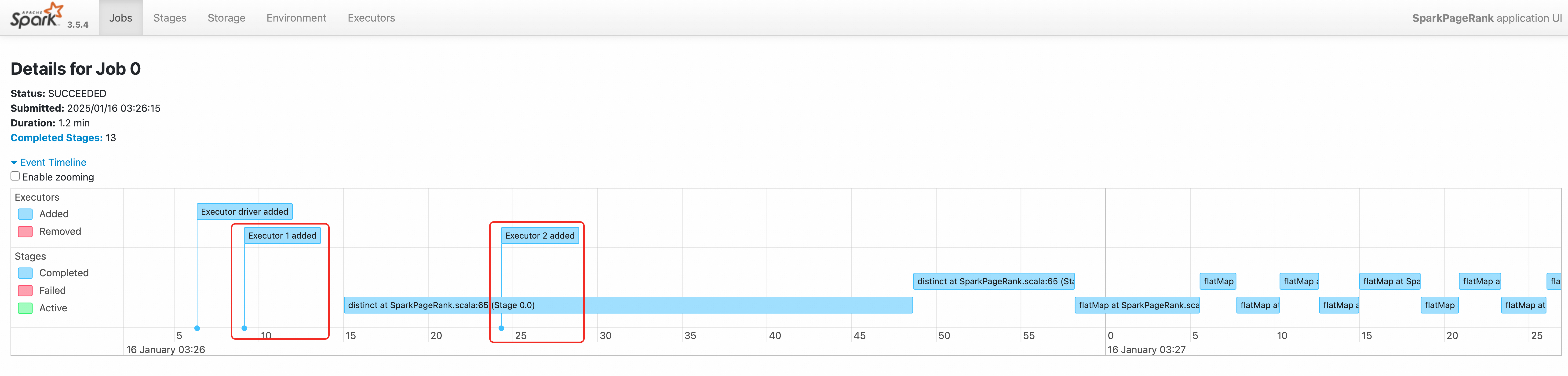
View the driver logs. The output shows executor requests at 03:26:06 and 03:26:16.
kubectl logs -n spark spark-pagerank-dra-driver | grep -a2 -b2 "Going to request"3544-25/01/16 03:26:04 INFO SparkKubernetesClientFactory: Auto-configuring K8s client using current context from users K8s config file 3674-25/01/16 03:26:06 INFO Utils: Using initial executors = 1, max of spark.dynamicAllocation.initialExecutors, spark.dynamicAllocation.minExecutors and spark.executor.instances 3848:25/01/16 03:26:06 INFO ExecutorPodsAllocator: Going to request 1 executors from Kubernetes for ResourceProfile Id: 0, target: 1, known: 0, sharedSlotFromPendingPods: 2147483647. 4026-25/01/16 03:26:06 INFO ExecutorPodsAllocator: Found 0 reusable PVCs from 0 PVCs 4106-25/01/16 03:26:06 INFO BasicExecutorFeatureStep: Decommissioning not enabled, skipping shutdown script -- 10410-25/01/16 03:26:15 INFO TaskSetManager: Starting task 0.0 in stage 0.0 (TID 0) (192.168.95.190, executor 1, partition 0, PROCESS_LOCAL, 9807 bytes) 10558-25/01/16 03:26:15 INFO BlockManagerInfo: Added broadcast_1_piece0 in memory on 192.168.95.190:34327 (size: 12.5 KiB, free: 4.6 GiB) 10690:25/01/16 03:26:16 INFO ExecutorPodsAllocator: Going to request 1 executors from Kubernetes for ResourceProfile Id: 0, target: 2, known: 1, sharedSlotFromPendingPods: 2147483647. 10868-25/01/16 03:26:16 INFO ExecutorAllocationManager: Requesting 1 new executor because tasks are backlogged (new desired total will be 2 for resource profile id: 0) 11030-25/01/16 03:26:16 INFO ExecutorPodsAllocator: Found 0 reusable PVCs from 0 PVCs -
View logs in Spark History Server. The event timeline shows two executors created sequentially.
Scenario 2: With Celeborn as RSS
This example uses Spark 3.5.4. Set these parameters to enable DRA with Celeborn:
-
spark.dynamicAllocation.enabled:"true"-- Enable dynamic resource allocation. -
spark.shuffle.sort.io.plugin.class:org.apache.spark.shuffle.celeborn.CelebornShuffleDataIO-- Required for Spark 3.5.0 and later. -
spark.dynamicAllocation.shuffleTracking.enabled:"false"-- Disable shuffle tracking. With Celeborn, shuffle tracking prevents idle executors from being released.
-
Create
spark-pagerank-celeborn-dra.yamlwith the following SparkApplication manifest.NoteThe Spark image must include Hadoop OSS SDK dependencies. Build it with the following Dockerfile and push to your image repository:
apiVersion: sparkoperator.k8s.io/v1beta2
kind: SparkApplication
metadata:
  name: spark-pagerank-celeborn-dra
  namespace: spark
spec:
  type: Scala
  mode: cluster
  # Replace <SPARK_IMAGE> with your Spark image. The image must contain JindoSDK.
  image: <SPARK_IMAGE>
  mainApplicationFile: local:///opt/spark/examples/jars/spark-examples_2.12-3.5.4.jar
  mainClass: org.apache.spark.examples.SparkPageRank
  arguments:
  # Replace <OSS_BUCKET> with the name of your OSS bucket.
  - oss://<OSS_BUCKET>/data/pagerank_dataset.txt
  - "10"
  sparkVersion: 3.5.4
  hadoopConf:
    # Use the oss:// format to access OSS data.
    fs.AbstractFileSystem.oss.impl: org.apache.hadoop.fs.aliyun.oss.OSS
    fs.oss.impl: org.apache.hadoop.fs.aliyun.oss.AliyunOSSFileSystem
    # The endpoint to access OSS. You must replace <OSS_ENDPOINT> with your OSS access endpoint.
    # For example, the internal endpoint to access OSS in the China (Beijing) region is oss-cn-beijing-internal.aliyuncs.com
    fs.oss.endpoint: <OSS_ENDPOINT>
    # Obtain OSS access credentials from environment variables.
    fs.oss.credentials.provider: com.aliyun.oss.common.auth.EnvironmentVariableCredentialsProvider
  sparkConf:
    # ====================
    # Event logs
    # ====================
    spark.eventLog.enabled: "true"
    spark.eventLog.dir: file:///mnt/nas/spark/event-logs

    # ====================
    # Celeborn
    # Ref: https://github.com/apache/celeborn/blob/main/README.md#spark-configuration
    # ====================
    # Shuffle manager class name changed in 0.3.0:
    #    before 0.3.0: `org.apache.spark.shuffle.celeborn.RssShuffleManager`
    #    since 0.3.0: `org.apache.spark.shuffle.celeborn.SparkShuffleManager`
    spark.shuffle.manager: org.apache.spark.shuffle.celeborn.SparkShuffleManager
    # Must use kryo serializer because java serializer do not support relocation
    spark.serializer: org.apache.spark.serializer.KryoSerializer
    # Configure this parameter based on the number of replicas on the Celeborn master node.
    spark.celeborn.master.endpoints: celeborn-master-0.celeborn-master-svc.celeborn.svc.cluster.local,celeborn-master-1.celeborn-master-svc.celeborn.svc.cluster.local,celeborn-master-2.celeborn-master-svc.celeborn.svc.cluster.local
    # options: hash, sort
    # Hash shuffle writer use (partition count) * (celeborn.push.buffer.max.size) * (spark.executor.cores) memory.
    # Sort shuffle writer uses less memory than hash shuffle writer, if your shuffle partition count is large, try to use sort hash writer.
    spark.celeborn.client.spark.shuffle.writer: hash
    # We recommend setting `spark.celeborn.client.push.replicate.enabled` to true to enable server-side data replication
    # If you have only one worker, this setting must be false
    # If your Celeborn is using HDFS, it's recommended to set this setting to false
    spark.celeborn.client.push.replicate.enabled: "false"
    # Support for Spark AQE only tested under Spark 3
    spark.sql.adaptive.localShuffleReader.enabled: "false"
    # we recommend enabling aqe support to gain better performance
    spark.sql.adaptive.enabled: "true"
    spark.sql.adaptive.skewJoin.enabled: "true"
    # If the Spark version is 3.5.0 or later, configure this parameter to support dynamic resource allocation.
    spark.shuffle.sort.io.plugin.class: org.apache.spark.shuffle.celeborn.CelebornShuffleDataIO
    spark.executor.userClassPathFirst: "false"

    # ====================
    # Dynamic resource allocation
    # Ref: https://spark.apache.org/docs/latest/job-scheduling.html#dynamic-resource-allocation
    # ====================
    # Enable dynamic resource allocation
    spark.dynamicAllocation.enabled: "true"
    # Enable shuffled file tracing and implement dynamic resource allocation without relying on ESS.
    # If the Spark version is 3.4.0 or later, we recommend that you disable this feature when you use Celeborn as RSS.
    spark.dynamicAllocation.shuffleTracking.enabled: "false"
    # The initial value of the number of executors.
    spark.dynamicAllocation.initialExecutors: "1"
    # The minimum number of executors.
    spark.dynamicAllocation.minExecutors: "0"
    # The maximum number of executors.
    spark.dynamicAllocation.maxExecutors: "5"
    # The idle timeout period of the executor. If the timeout period is exceeded, the executor is released.
    spark.dynamicAllocation.executorIdleTimeout: 60s
    # The idle timeout period of the executor that cached the data block. If the timeout period is exceeded, the executor is released. The default value is infinity, which specifies that the data block is not released.
    # spark.dynamicAllocation.cachedExecutorIdleTimeout:
    # When a job exceeds the specified scheduled time, additional executors are requested.
    spark.dynamicAllocation.schedulerBacklogTimeout: 1s
    # After each time interval, subsequent batches of executors are requested.
    spark.dynamicAllocation.sustainedSchedulerBacklogTimeout: 1s
  driver:
    cores: 1
    coreLimit: 1200m
    memory: 512m
    envFrom:
    - secretRef:
        name: spark-oss-secret
    volumeMounts:
    - name: nas
      mountPath: /mnt/nas
    serviceAccount: spark-operator-spark
  executor:
    cores: 1
    coreLimit: "1"
    memory: 4g
    envFrom:
    - secretRef:
        name: spark-oss-secret
    volumeMounts:
    - name: nas
      mountPath: /mnt/nas
  volumes:
  - name: nas
    persistentVolumeClaim:
      claimName: nas-pvc
  restartPolicy:
    type: Never
ARG SPARK_IMAGE=spark:3.5.4 FROM ${SPARK_IMAGE} # Add dependency for Hadoop Aliyun OSS support ADD --chown=spark:spark --chmod=644 https://repo1.maven.org/maven2/org/apache/hadoop/hadoop-aliyun/3.3.4/hadoop-aliyun-3.3.4.jar ${SPARK_HOME}/jars ADD --chown=spark:spark --chmod=644 https://repo1.maven.org/maven2/com/aliyun/oss/aliyun-sdk-oss/3.17.4/aliyun-sdk-oss-3.17.4.jar ${SPARK_HOME}/jars ADD --chown=spark:spark --chmod=644 https://repo1.maven.org/maven2/org/jdom/jdom2/2.0.6.1/jdom2-2.0.6.1.jar ${SPARK_HOME}/jars # Add dependency for Celeborn ADD --chown=spark:spark --chmod=644 https://repo1.maven.org/maven2/org/apache/celeborn/celeborn-client-spark-3-shaded_2.12/0.5.3/celeborn-client-spark-3-shaded_2.12-0.5.3.jar ${SPARK_HOME}/jars -
Submit the SparkApplication. Expected output:
kubectl apply -f spark-pagerank-celeborn-dra.yamlsparkapplication.sparkoperator.k8s.io/spark-pagerank-celeborn-dra created -
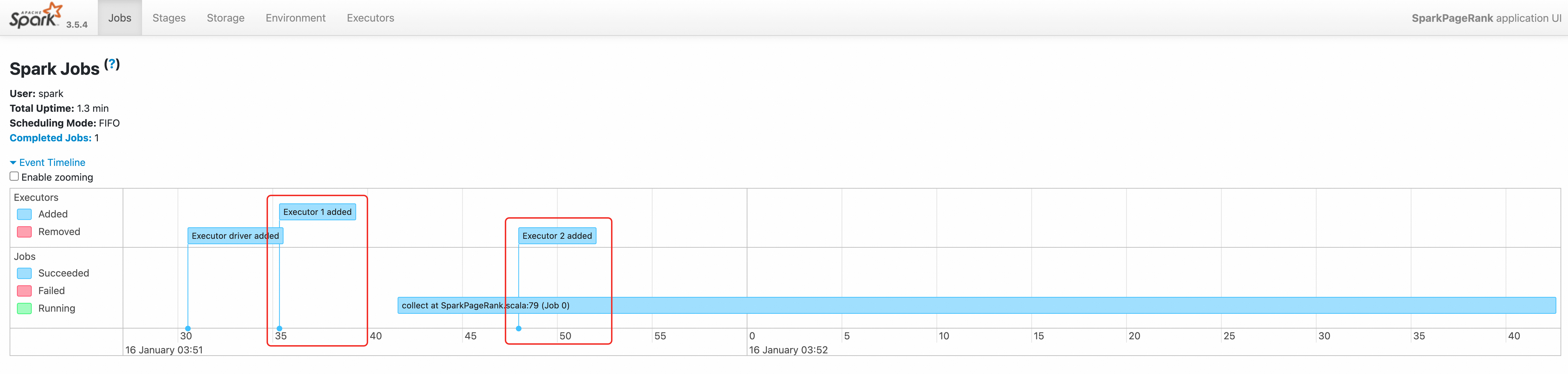
View the driver logs. The output shows executor requests at
03:51:30and03:51:42.kubectl logs -n spark spark-pagerank-celeborn-dra-driver | grep -a2 -b2 "Going to request"3544-25/01/16 03:51:28 INFO SparkKubernetesClientFactory: Auto-configuring K8s client using current context from users K8s config file 3674-25/01/16 03:51:30 INFO Utils: Using initial executors = 1, max of spark.dynamicAllocation.initialExecutors, spark.dynamicAllocation.minExecutors and spark.executor.instances 3848:25/01/16 03:51:30 INFO ExecutorPodsAllocator: Going to request 1 executors from Kubernetes for ResourceProfile Id: 0, target: 1, known: 0, sharedSlotFromPendingPods: 2147483647. 4026-25/01/16 03:51:30 INFO ExecutorPodsAllocator: Found 0 reusable PVCs from 0 PVCs 4106-25/01/16 03:51:30 INFO CelebornShuffleDataIO: Loading CelebornShuffleDataIO -- 11796-25/01/16 03:51:41 INFO TaskSetManager: Starting task 0.0 in stage 0.0 (TID 0) (192.168.95.163, executor 1, partition 0, PROCESS_LOCAL, 9807 bytes) 11944-25/01/16 03:51:42 INFO BlockManagerInfo: Added broadcast_1_piece0 in memory on 192.168.95.163:37665 (size: 13.3 KiB, free: 2.1 GiB) 12076:25/01/16 03:51:42 INFO ExecutorPodsAllocator: Going to request 1 executors from Kubernetes for ResourceProfile Id: 0, target: 2, known: 1, sharedSlotFromPendingPods: 2147483647. 12254-25/01/16 03:51:42 INFO ExecutorAllocationManager: Requesting 1 new executor because tasks are backlogged (new desired total will be 2 for resource profile id: 0) 12416-25/01/16 03:51:42 INFO ExecutorPodsAllocator: Found 0 reusable PVCs from 0 PVCs -
Access the Spark History Server to view the job. For instructions, see Access the Spark History Server Web UI.