Container Service for Kubernetes (ACK) allows you to manage containerized applications that run on the cloud in a convenient and efficient manner. This topic describes how to use ACK and the ACK documentation. This helps you get started with ACK.
How to use ACK
The following figure shows how to use ACK.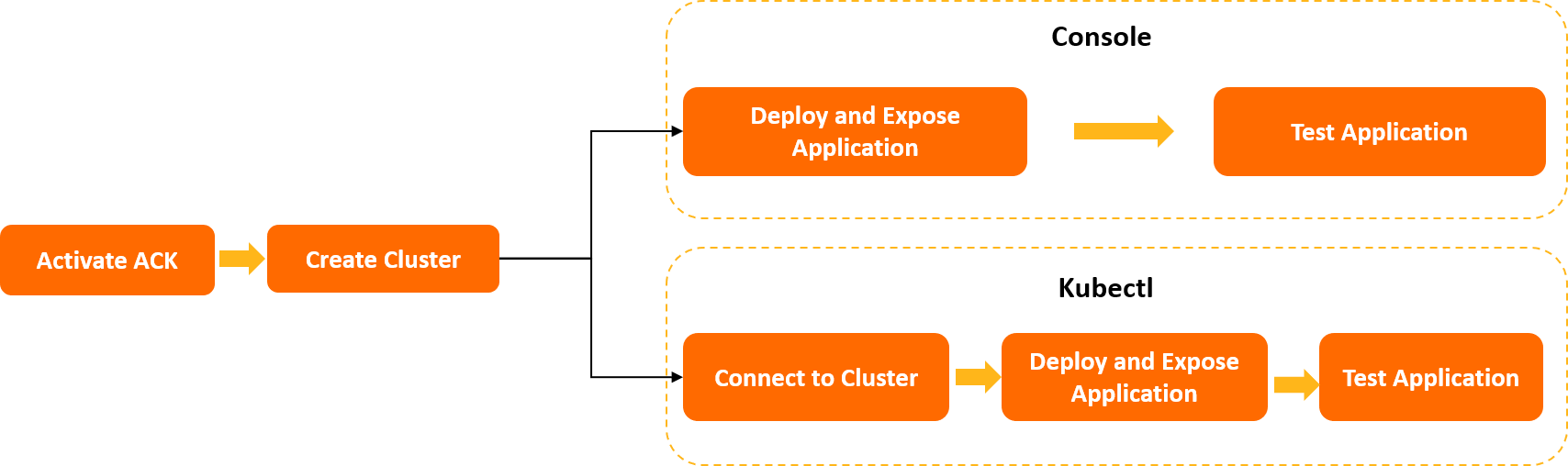
How to use the ACK documentation
The following topics describe how to get started with ACK:
Create an ACK managed cluster: This topic describes how to activate ACK and grant permissions in the ACK console.
Deploy a sample Rubik's cube game application on ACK:
This topic describes how to activate ACK, grant permissions, create an ACK cluster, and deploy, expose, and test a magic cube game in the ACK console.
This topic also describes how to deploy, expose, and test a magic cube game in the Resource Orchestration Service (ROS) console.
Use kubectl to deploy a magic cube game: This topic describes how to use kubectl to activate ACK, create an ACK cluster, and deploy, expose, and test a magic cub game.
References
ACK allows you to use Terraform, the ACK API, ACK SDKs, and Alibaba Cloud CLI to develop your businesses based on ACK. For more information, see Use the Kubernetes API, SDK downloads, ARC usage notes, and Terraform overview.