The Gateway API is the next-generation routing and load balancing API for Kubernetes. This topic describes how to configure HTTP routes, modify request headers, and distribute requests by weight within an ACK Edge cluster using the Gateway with Inference Extension component.
How it works
The Gateway with Inference Extension component is based on the Envoy Gateway project and supports all basic features of the Gateway API and Envoy Gateway extension resources.
The Envoy Gateway architecture includes:
Control plane: The control plane consists of the Envoy Gateway component. It listens for traffic rules within the cluster, dynamically creates and manages Envoy proxy instances, and updates forwarding rules in real time. The control plane does not directly forward service traffic.
Data plane: The data plane consists of Envoy proxy instances. It processes and forwards service traffic.
In an ACK Edge cluster, the deployment method for Envoy Gateway differs from that in a standard ACK cluster:
Differences | Standard ACK | ACK Edge |
Service exposure method | LoadBalancer | NodePort |
Control plane deployment | Cluster-level | One set deployed per node pool |
Data plane deployment | Cluster-level | Deployed by node pool |
Multiple node pools | Share one gateway | A separate gateway must be created for each node pool |
Service topology | No configuration required | Requires the |
The current deployment is configured with a node pool distribution policy. You can adjust the number of replicas in component management to ensure that at least one control plane replica runs in each node pool.
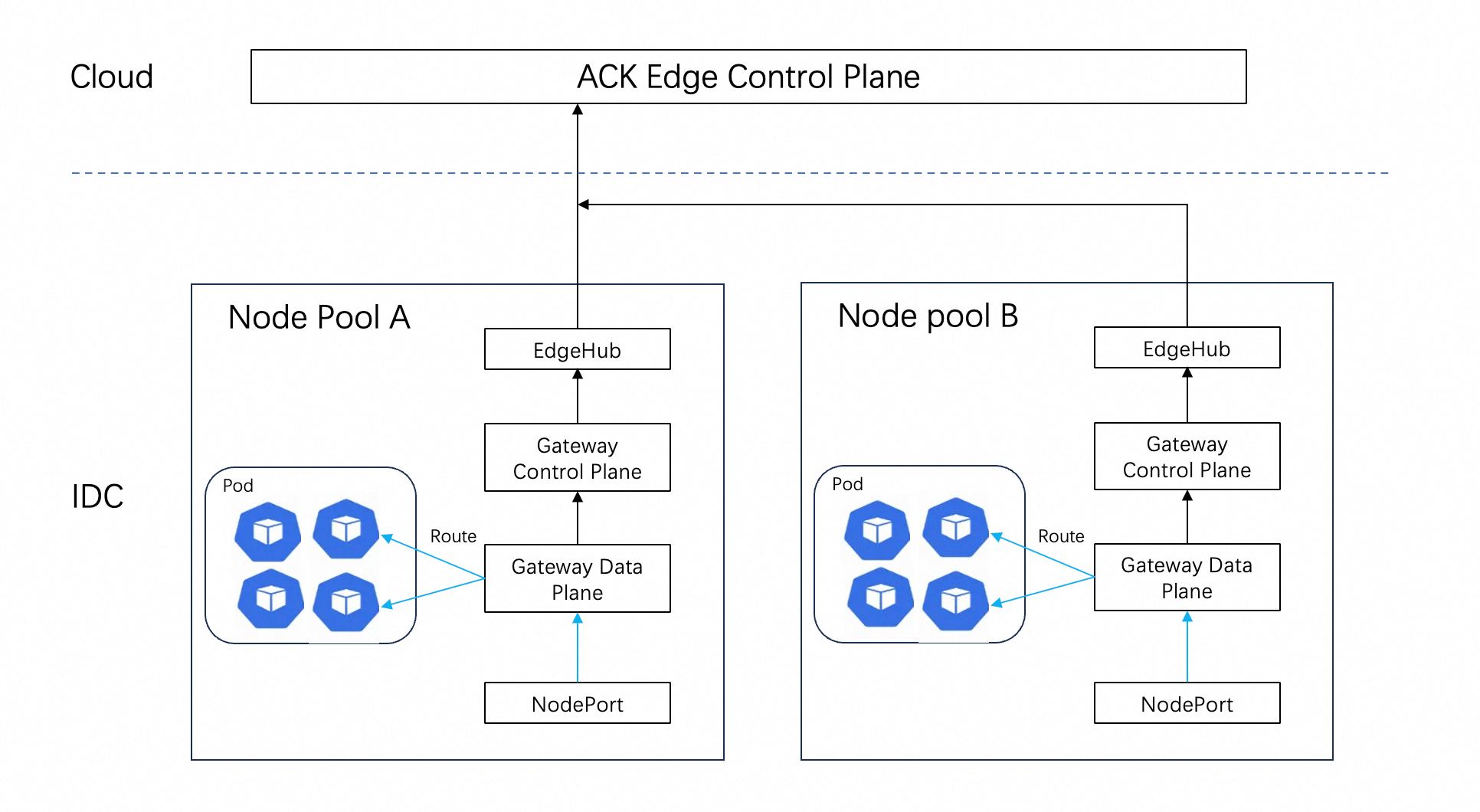
Scope
You have created a cluster of version 1.30 or later.
The Gateway with Inference Extension component is installed.
Preparations
Step 1: Create a test application
Save the following example as backend.yaml and run the kubectl apply -f backend.yaml command to create the test applications: backend and backend-2.
For ACK Edge scenarios, you must configure the service topology. Add the openyurt.io/topologyKeys: openyurt.io/nodepool annotation to the Service to ensure that traffic forwards only to pods within the same node pool. For more information, see Node pool service topology management.apiVersion: v1
kind: ServiceAccount
metadata:
name: backend
---
apiVersion: v1
kind: Service
metadata:
name: backend
annotations:
openyurt.io/topologyKeys: openyurt.io/nodepool # Configure the node pool topology
labels:
app: backend
service: backend
spec:
ports:
- name: http
port: 3000
targetPort: 3000
selector:
app: backend
---
apiVersion: apps/v1
kind: Deployment
metadata:
name: backend
spec:
replicas: 1
selector:
matchLabels:
app: backend
version: v1
template:
metadata:
labels:
app: backend
version: v1
spec:
serviceAccountName: backend
containers:
- image: registry-cn-hangzhou.ack.aliyuncs.com/ack-demo/envoygateway-echo-basic:v20231214-v1.0.0-140-gf544a46e
imagePullPolicy: IfNotPresent
name: backend
ports:
- containerPort: 3000
env:
- name: POD_NAME
valueFrom:
fieldRef:
fieldPath: metadata.name
- name: NAMESPACE
valueFrom:
fieldRef:
fieldPath: metadata.namespace
---
apiVersion: v1
kind: ServiceAccount
metadata:
name: backend-2
---
apiVersion: v1
kind: Service
metadata:
name: backend-2
annotations:
openyurt.io/topologyKeys: openyurt.io/nodepool # Configure the node pool topology
labels:
app: backend-2
service: backend-2
spec:
ports:
- name: http
port: 3000
targetPort: 3000
selector:
app: backend-2
---
apiVersion: apps/v1
kind: Deployment
metadata:
name: backend-2
spec:
replicas: 1
selector:
matchLabels:
app: backend-2
version: v1
template:
metadata:
labels:
app: backend-2
version: v1
spec:
serviceAccountName: backend-2
containers:
- image: registry-cn-hangzhou.ack.aliyuncs.com/ack-demo/envoygateway-echo-basic:v20231214-v1.0.0-140-gf544a46e
imagePullPolicy: IfNotPresent
name: backend-2
ports:
- containerPort: 3000
env:
- name: POD_NAME
valueFrom:
fieldRef:
fieldPath: metadata.name
- name: NAMESPACE
valueFrom:
fieldRef:
fieldPath: metadata.namespaceStep 2: Confirm the GatewayClass
After you install the Gateway with Inference Extension component, a GatewayClass is created by default. Run the following command to confirm:
kubectl get gatewayclassExpected output:
NAME          CONTROLLER                                      ACCEPTED   AGE
ack-gateway   gateway.envoyproxy.io/gatewayclass-controller   True       2m31s
If the GatewayClass resource is not found, you can create it manually. Save the following example as gatewayclass.yaml and run the kubectl apply -f gatewayclass.yaml command to create it.
apiVersion: gateway.networking.k8s.io/v1
kind: GatewayClass
metadata:
  name: ack-gateway
spec:
  controllerName: gateway.envoyproxy.io/gatewayclass-controller
Step 3: Create a custom EnvoyProxy configuration
In an ACK Edge cluster, you can create a custom EnvoyProxy configuration for each node pool to specify the scheduling node pool for data plane pods and the service exposure method.
Replace NPXXX in the following example with your actual node pool ID. Then, save the configuration as gateway-config.yaml and run the kubectl apply -f gateway-config.yaml command.
You can find the node pool ID on the page in the ACK console.
apiVersion: gateway.envoyproxy.io/v1alpha1
kind: EnvoyProxy
metadata:
  name: custom-proxy-config
spec:
  provider:
    type: Kubernetes
    kubernetes:
      envoyDeployment:
        pod:
          nodeSelector:
            alibabacloud.com/nodepool-id: NPXXX  # Replace with your actual node pool ID
      envoyService:
        annotations:
          openyurt.io/topologyKeys: openyurt.io/nodepool  # Configure the service topology
        type: NodePort  # ACK Edge uses NodePort to expose services
This configuration includes three key settings for ACK Edge scenarios:
Configuration item | Description |
| Schedules the gateway data plane pods to the specified node pool |
| Configures the service topology to ensure that traffic remains within the node pool |
| Uses NodePort to expose the service. LoadBalancer is not used in edge scenarios. |
Step 4: Create the Gateway resource
Save the following example as gateway.yaml and run the kubectl apply -f gateway.yaml command.
The component's control plane automatically creates an EnvoyProxy deployment and a NodePort service based on the Gateway resource. It also starts a listener on the specified port on the node.
apiVersion: gateway.networking.k8s.io/v1
kind: Gateway
metadata:
  name: ack-gateway
spec:
  gatewayClassName: ack-gateway
  listeners:
    - name: http
      protocol: HTTP
      port: 80
  infrastructure:
    parametersRef:
      group: gateway.envoyproxy.io
      kind: EnvoyProxy
      name: custom-proxy-config  # Associate with the custom configuration created in Step 3
Step 5: Get the gateway endpoint
The gateway service is exposed as a NodePort. The corresponding service endpoint is the IP address of any node in the node pool and its service port.
Query the service port.
kubectl get service -n kube-system -l gateway.envoyproxy.io/owning-gateway-name=ack-gatewayExpected output:
NAME                                 TYPE       CLUSTER-IP       EXTERNAL-IP   PORT(S)        AGE
envoy-default-ack-gateway-7452df7d   NodePort   192.168.86.174   <none>        80:30364/TCP   19m
You can set the gateway host environment variable. Replace
NODEIPwith the IP address of any node in the node pool andNODEPORTwith the port number obtained in the previous step.export GATEWAY_HOST=NODEIP:NODEPORT
HTTP routing based on path prefix matching
The following example configures an HTTPRoute to match the /get prefix and then tests the configuration.
You can create the HTTPRoute resource. Save the following YAML content as httproute.yaml and run the
kubectl apply -f httproute.yamlcommand.apiVersion: gateway.networking.k8s.io/v1 kind: HTTPRoute metadata: name: backend spec: parentRefs: - name: ack-gateway hostnames: - "www.example.com" rules: - backendRefs: - group: "" kind: Service name: backend port: 3000 weight: 1 matches: - path: type: PathPrefix value: /getTest the access.
curl -H "Host: www.example.com" http://$GATEWAY_HOST/getExpected output:
{
 "path": "/get",
 "host": "www.example.com",
 "method": "GET",
 "proto": "HTTP/1.1",
 "headers": {
  "Accept": [
   "*/*"
  ],
  "User-Agent": [
   "curl/8.9.1"
  ],
  "X-Envoy-External-Address": [
   "115.XX.XXX.55"
  ],
  "X-Forwarded-For": [
   "115.XX.XXX.55"
  ],
  "X-Forwarded-Proto": [
   "http"
  ],
  "X-Request-Id": [
   "953b2f8f-26d3-4ba9-93ba-a482b197b1ff"
  ]
 },
 "namespace": "default",
 "ingress": "",
 "service": "",
 "pod": "backend-5bff7XXXXX-XXXXX"
 }
Add a request header
Update the HTTPRoute configuration to add a header to routed requests.
You can update the HTTPRoute resource. Save the following YAML content as httproute.yaml and run the
kubectl apply -f httproute.yamlcommand.apiVersion: gateway.networking.k8s.io/v1 kind: HTTPRoute metadata: name: backend spec: parentRefs: - name: ack-gateway hostnames: - "www.example.com" rules: - matches: - path: type: PathPrefix value: /get backendRefs: - group: "" kind: Service name: backend port: 3000 weight: 1 filters: - type: RequestHeaderModifier requestHeaderModifier: add: - name: "added-header" value: "foo"Test the access.
curl -H "Host: www.example.com" http://$GATEWAY_HOST/getExpected output: The sample application returns request information in its response. You will see the added
added-headerin the response, which indicates that the operation was successful.{ "path": "/get", "host": "www.example.com", "method": "GET", "proto": "HTTP/1.1", "headers": { "Accept": [ "*/*" ], "Added-Header": [ "foo" ], "User-Agent": [ "curl/8.9.1" ], "X-Envoy-External-Address": [ "115.XX.XXX.55" ], "X-Forwarded-For": [ "115.XX.XXX.55" ], "X-Forwarded-Proto": [ "http" ], "X-Request-Id": [ "d37f19e5-25c1-45cf-90e5-51453e7ae3ed" ] }, "namespace": "default", "ingress": "", "service": "", "pod": "backend-5bff7XXXXX-XXXXX" }
Distribute requests by weight
The following example updates the HTTPRoute configuration again. It adds a routing rule for backend-2 and configures weights for the backend and backend-2 services.
Gateway API does not require the sum of weights for all backendRef to be 100. The proportion for a single service is calculated using the following rule:
You can update the HTTPRoute resource. Save the following YAML content as httproute.yaml and run the
kubectl apply -f httproute.yamlcommand.apiVersion: gateway.networking.k8s.io/v1 kind: HTTPRoute metadata: name: backend spec: parentRefs: - name: ack-gateway hostnames: - "www.example.com" rules: - matches: - path: type: PathPrefix value: /get backendRefs: - group: "" kind: Service name: backend port: 3000 weight: 8 - group: "" kind: Service name: backend-2 port: 3000 weight: 2You can test the access 20 consecutive times to check the ratio between the two services.
The following command is processed to display only
backendandbackend-2in the output.for i in $(seq 1 20); do curl -sS -H "Host: www.example.com" http://$GATEWAY_HOST/get |grep backend; done | \ sed -E 's/".*"(backend(-2)?)-[0-9a-zA-Z]*-.*/\1/'Expected output: The traffic ratio received by the two services is approximately 80% and 20%.
 backend-2
 backend
 backend
 backend
 backend
 backend
 backend
 backend
 backend
 backend
 backend
 backend-2
 backend-2
 backend
 backend
 backend-2
 backend
 backend
 backend
 backend