Delete an ACK Edge cluster from the ACK console when it is no longer needed. Before proceeding, review which resources are released automatically and which require manual cleanup.
What happens when you delete a cluster
When you delete an ACK Edge cluster, the system removes node pools one by one. What happens to each node depends on its type:
Edge node pools
Edge nodes are not automatically cleaned up. After the cluster is deleted, manually remove the ACK components from each edge node. See Remove edge nodes.
Cloud node pools with expected node count enabled
-
All pay-as-you-go nodes are released, along with their system disks.
-
Subscription nodes are not released automatically. To release them, log on to the ECS console, convert them to pay-as-you-go, and then release them.
Cloud node pools without expected node count enabled
-
Manually added nodes, automatically added nodes, and subscription nodes are not released.
-
All other nodes are released.
To check whether a node pool has expected node count enabled, see How do I determine whether the expected number of nodes is enabled for a node pool?.
Prerequisites
Before you begin, ensure that you have:
-
Reviewed the node pool types in your cluster to understand which resources require manual cleanup after deletion
-
(If applicable) Disabled cluster deletion protection — see How do I disable the cluster deletion protection feature?
Delete an ACK Edge cluster
-
Log on to the ACK console. In the left-side navigation pane, click ACK consoleACK consoleACK consoleClusters.
-
On the Cluster List page, find the cluster to delete and click More > Delete in the Actions column.
-
In the Delete Cluster dialog box, review the associated resources. Select the resources to retain or confirm the resources to delete.
-
Select I Have Read And Understood The Above Information And Confirm To Delete The Cluster, and click OK.
The Delete Cluster dialog box shows the deletion and billing rules for associated cloud resources. Read the information carefully before confirming.
Release remaining resources
After deleting the cluster, manually release any remaining resources that were not cleaned up automatically. If these resources are unnecessary, remove them promptly to avoid ongoing charges.
| Resource | Console | OpenAPI |
|---|---|---|
| Subscription ECS nodes | Convert subscription to pay-as-you-go, then release the instances | ModifyInstanceChargeType to convert billing, then release instances via API |
| Virtual Private Cloud (VPC) | Force delete a VPC instance | DeleteVpc |
| Simple Log Service (SLS) project | Delete project | DeleteProject |
| NAT Gateway | Delete a public NAT gateway | DeleteNatGateway |
| vSwitch | Delete a vSwitch | DeleteVSwitch |
| Security group | Delete a security group | DeleteSecurityGroup |
FAQ
What should I do if a cluster fails to be deleted?
Cluster deletion fails when you add resources to a Resource Orchestration Service (ROS)-created resource, such as adding a vSwitch to a ROS-created VPC. ROS cannot delete the parent resource while manually added resources exist inside it.
Use the force delete feature to remove the cluster record and the ROS stack. Note that resources — both ROS-created and manually added — are not automatically released and must be cleaned up manually.
-
Click More > Delete for the cluster that failed to be deleted.

-
In the dialog box, review the resources that failed to delete. Click Confirm to delete the cluster and the ROS stack.
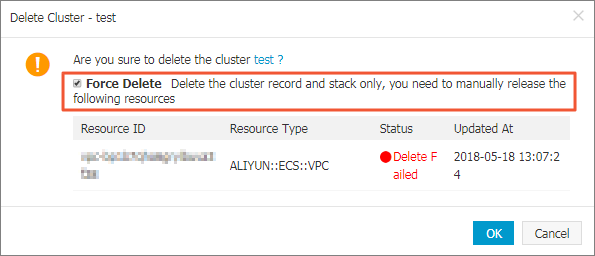
If you selected Retain Resources on the deletion prompt page, those resources are not released. Release them manually.
How do I disable the cluster deletion protection feature?
If deletion protection is enabled for a cluster, the system prompts you to disable it before you can delete the cluster.
-
Log on to the ACK console. In the left-side navigation pane, click Clusters.
-
In the Actions column of the cluster list, click More > Disable Cluster Deletion Protection.
-
In the Disable Cluster Deletion Protection dialog box, turn off the Cluster Deletion Protection switch.
How do I determine whether the expected number of nodes is enabled for a node pool?
-
Log on to the ACK console. In the left-side navigation pane, click Clusters.
-
On the Clusters page, click the name of the cluster you want to manage. In the left-side navigation pane, choose Nodes > Node Pools.
-
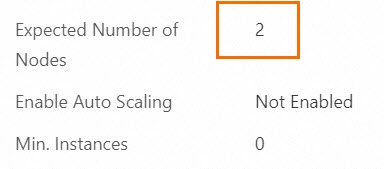
Click the node pool name. On the Basic Information tab, go to the Node Configuration section and check the Expected Nodes field. If expected node count is not enabled, Expected Nodes displays -.
Am I charged for a cluster that is being deleted or fails to be deleted?
No cluster management fee or node management fee is charged while the cluster is in the Deleting or Delete Failed state. However, charges for the underlying cloud resources still apply. For details, see Cluster lifecycle and ACK Edge cluster billing.
How is an ACK Edge cluster in the Inactive or Unavailable state billed?
Cluster management fees and cloud resource charges both apply when a cluster is in the Inactive or Unavailable state. For details, see Billing of ACK Edge clusters.
When is the cluster management fee not charged?
No cluster management fee is charged when the cluster is in one of the following states: Initializing, Create Failed, Deleting, Delete Failed, or Deleted. Cloud resource charges still apply. Deleted clusters cannot be viewed. For details, see Cluster lifecycle and Billing of ACK Edge clusters.