ACK Edge clusters let you centrally manage ECS instances spread across multiple regions, virtual private clouds (VPCs), or Resource Access Management (RAM) users — all from a single Kubernetes control plane.
Use cases
Use this approach when your ECS instances span any of the following:
-
Multiple VPCs
-
Multiple regions
-
Multiple RAM users
Manage applications across multiple regions
When you need to deploy and operate the same workload across a large number of ECS instances in different regions, add those instances to an ACK Edge cluster. The cluster gives you a single control plane for deployment and upgrades, regardless of where the nodes are located.
Common scenarios include:
-
Security protection: Deploy network security agents across distributed ECS instances and manage them centrally — no need to log in to each instance separately.
-
Distributed load testing: Install load testing tools on cross-region compute resources and launch tests from multiple regions simultaneously.
-
Cache acceleration: Deploy a cache service in each region and manage the entire distributed cache acceleration system from one cluster.

For a step-by-step walkthrough, see Example 1: Manage applications across multiple regions.
Scale out GPU resources across regions
When GPU resources in one region are insufficient, add a GPU-accelerated ECS instance from another region to your ACK Edge cluster. The cluster scheduler automatically routes pending workloads to the new node.

For a step-by-step walkthrough, see Example 2: Scale out GPU resources when capacity is insufficient in a region.
Benefits
-
Cost-effectiveness: Standard cloud-native tooling reduces the operational overhead of managing distributed applications across regions, lowering O&M costs.
-
Zero O&M: The control plane is fully managed by Alibaba Cloud with a service-level agreement (SLA) guarantee, so you don't need to maintain it yourself.
-
High availability: Built-in edge autonomy, cloud-edge O&M channels, and cell-based management keep applications stable even when individual regions experience issues. Integration with Alibaba Cloud services covers elasticity, networking, storage, and observability.
-
High compatibility: Supports dozens of heterogeneous compute resource types that use different operating systems, so you can onboard existing ECS instances without reconfiguring them.
-
High performance: Optimized cloud-edge communication reduces latency and bandwidth costs. Each ACK Edge cluster supports thousands of nodes.
Example 1: Manage applications across multiple regions
Prerequisites
Before you begin, ensure that you have:
-
An ACK Edge cluster. See Create an ACK Edge cluster.
-
OpenKruise installed on the cluster. See Component management.
-
An edge node pool created in each region where your ECS instances reside, with your ECS instances added to those node pools. See Create an edge node pool.
Choose a deployment method
ACK Edge supports two DaemonSet types for deploying and managing workloads across nodes:
| Method | Use when |
|---|---|
| Kubernetes DaemonSet | Your workload uses standard Kubernetes features and you prefer native kubectl or the ACK console workflow. Choose this method for most use cases. |
| OpenKruise DaemonSet | You need advanced rollout strategies — such as in-place updates or partition-based upgrades — that the native DaemonSet does not support. |
Deploy with a Kubernetes DaemonSet
Create a DaemonSet:
-
Log on to the ACK console. In the left navigation pane, click Clusters.
-
On the Clusters page, click the name of your cluster. In the left navigation pane, choose Workloads > DaemonSets.
-
On the DaemonSets page, select a namespace and a deployment method, enter the application name, set Type to DaemonSet, and follow the on-screen instructions. For details, see Create a DaemonSet.
Upgrade the workload:
On the DaemonSets page, find the DaemonSet and click Edit in the Actions column. Modify the DaemonSet template to apply version upgrades or configuration changes.
Deploy with an OpenKruise DaemonSet
Create a DaemonSet:
-
Log on to the ACK console. In the left navigation pane, click Clusters.
-
On the Clusters page, click the name of your cluster. In the left navigation pane, choose Workloads > Pods.
-
On the Pods page, click Create from YAML. Select Custom from the Sample Template drop-down list, paste your OpenKruise DaemonSet YAML into the editor, and click Create.
Upgrade the workload:
-
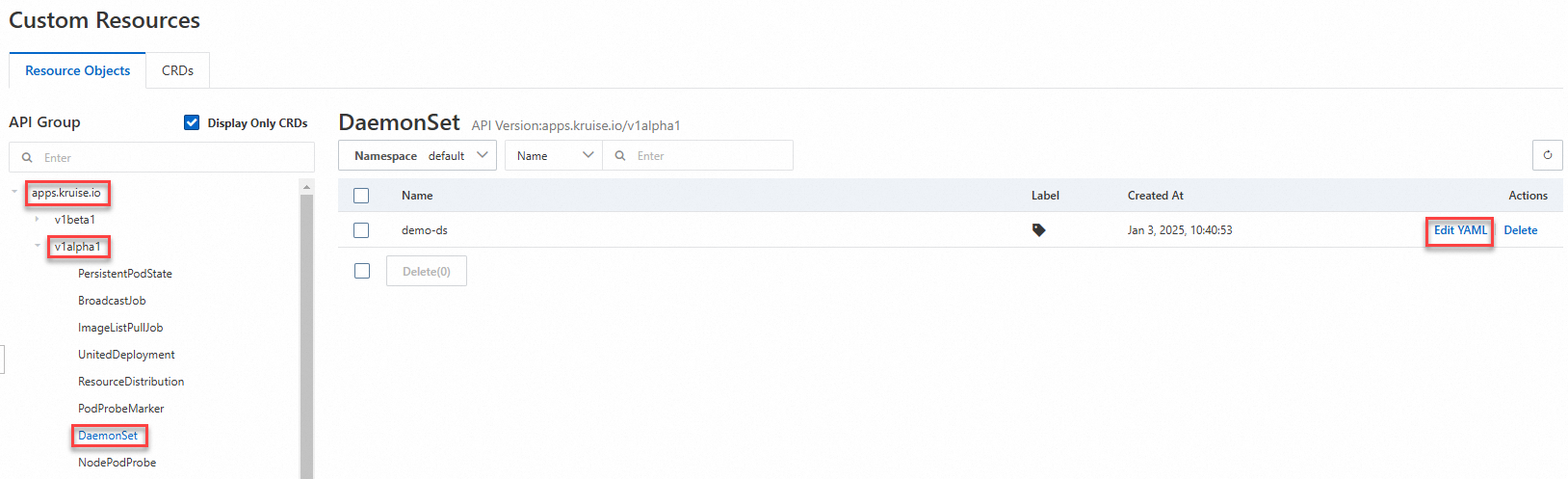
On the Clusters page, click the name of your cluster. In the left navigation pane, choose Workloads > Custom Resources.
-
On the Custom Resources page, click Resource Objects, find your DaemonSet, and click Edit YAML in the Actions column. Modify the template to apply version upgrades or configuration changes.
Example 2: Scale out GPU resources when capacity is insufficient in a region
This example shows how to handle a GPU-accelerated inference service stuck in Pending because the current region has no available GPU nodes. The solution is to add a GPU-accelerated ECS instance from another region to the cluster so the scheduler can place the workload there.
Prerequisites
Before you begin, ensure that you have an ACK Edge cluster with ECS instances from multiple regions already added as nodes. See Create an ACK Edge cluster.
Step 1: Deploy the inference service and check its status.
-
Create a file named
tensorflow-mnist.yamlwith the following content:apiVersion: apps/v1 kind: Deployment metadata: name: tensorflow-mnist labels: app: tensorflow-mnist spec: replicas: 1 selector: matchLabels: app: tensorflow-mnist template: metadata: name: tensorflow-mnist labels: app: tensorflow-mnist spec: containers: - name: tensorflow-mnist image: registry.cn-beijing.aliyuncs.com/acs/tensorflow-mnist-sample:v1.5 command: - python - tensorflow-sample-code/tfjob/docker/mnist/main.py - --max_steps=100000 - --data_dir=tensorflow-sample-code/data resources: limits: nvidia.com/gpu: "1" requests: nvidia.com/gpu: "1" workingDir: /root -
Deploy the inference service:
kubectl apply -f tensorflow-mnist.yaml -
Check the pod status:
kubectl get podsExpected output:
NAME                                 READY   STATUS     RESTARTS   AGE
tensorflow-mnist-664cf976d8-whrbc    0/1     Pending    0          30s
The pod is in the
Pendingstate, which means there are no GPU nodes available in the current region.
Step 2: Create an edge node pool in another region.
Create an edge node pool in the region where you have available GPU resources. See Create an edge node pool.
Step 3: Add GPU-accelerated instances to the edge node pool.
Add the GPU-accelerated ECS instances from that region as edge nodes. See Add a GPU-accelerated node.

Step 4: Verify the new nodes are ready.
kubectl get nodesExpected output:
NAME                        STATUS   ROLES    AGE    VERSION
cn-hangzhou.192.168.XX.XX   Ready    <none>   9d     v1.30.7-aliyun.1
iz2ze21g5pq9jbesubr****     Ready    <none>   8d     v1.30.7-aliyun.1
izf8z0dko1ivt5kwgl4****     Ready    <none>   8d     v1.30.7-aliyun.1
izuf65ze9db2kfcethw****     Ready    <none>   8d     v1.30.7-aliyun.1  # Newly added GPU-accelerated edge node
Step 5: Verify the inference service is running.
kubectl get pods -owideExpected output:
NAME                                 READY   STATUS    RESTARTS   AGE   IP            NODE                       NOMINATED NODE   READINESS GATES
tensorflow-mnist-664cf976d8-whrbc    1/1     Running   0          23m   10.12.XX.XX   izuf65ze9db2kfcethw****    <none>           <none>
The inference service is now scheduled to the newly added GPU-accelerated node and is running.
What's next
-
To monitor workloads running across your edge nodes, see the observability features in the ACK console.
-
To manage node lifecycle and perform rolling upgrades, use the DaemonSet upgrade strategies described in Create a DaemonSet.