Batch jobs are common in fields such as data processing, simulation, and scientific computing, which often require large-scale computing resources. A Container Argo Workflow Cluster is based on the open-source Argo Workflows project and is fully compliant with open-source workflow standards. A Workflow Cluster lets you easily orchestrate workflows. Each step in a workflow runs in a container, enabling you to run large-scale, compute-intensive jobs like machine learning, simulations, and data processing in a short time. You can also quickly run CI/CD pipeline tasks. Migrating your offline tasks and batch jobs to a Workflow Cluster helps reduce operational complexity and reduce running costs.
Background
A Workflow Cluster is a serverless workflow engine built on Kubernetes and hosts the open-source Argo Workflows.
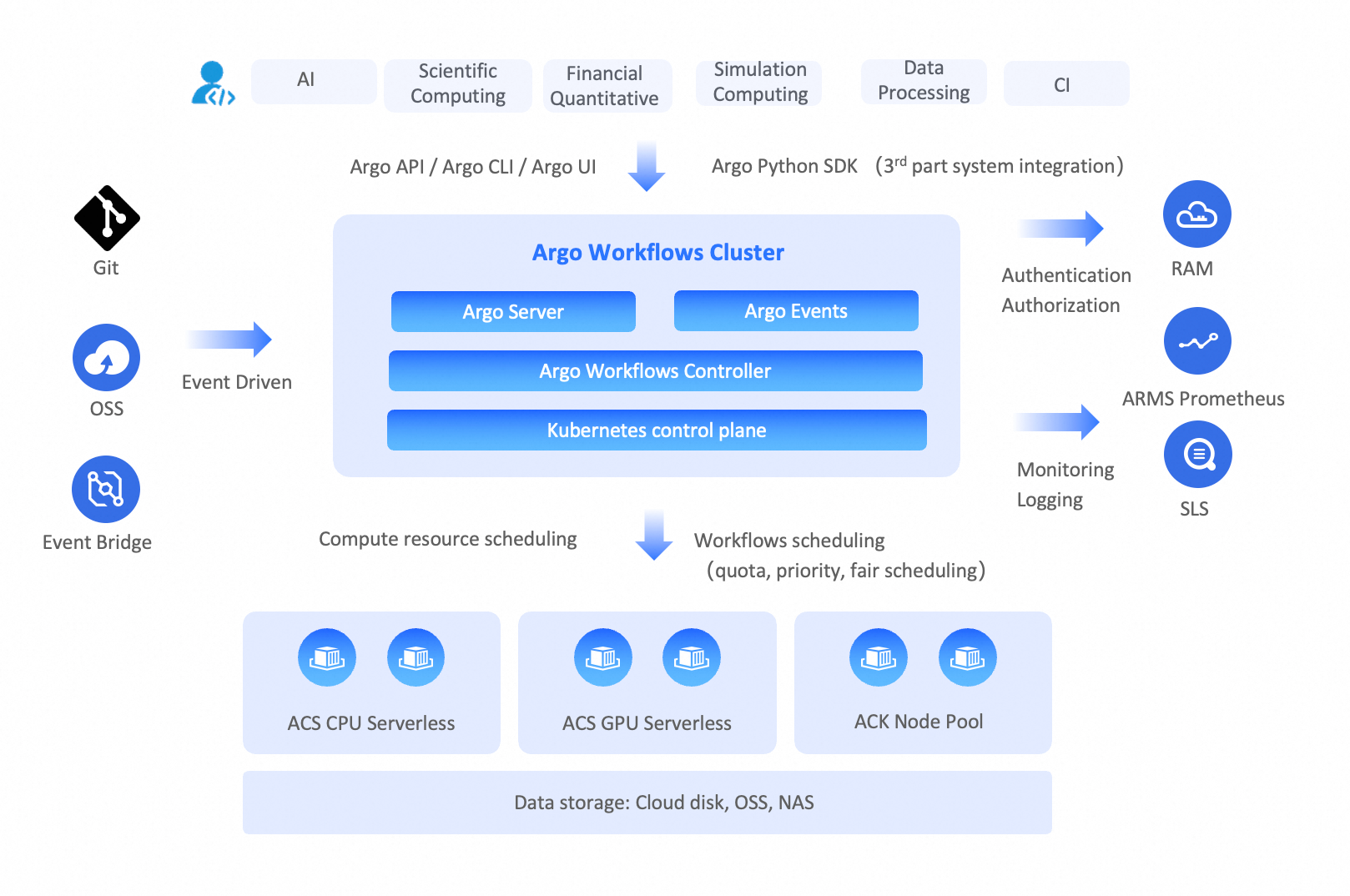
Batch Compute concepts

Jobs
A job is a unit of work, such as a shell script, a Linux executable, or a Docker container image, that you submit to the Batch Compute system. The system then allocates computing resources from a compute environment and runs the job.
Array jobs
An array job is a collection of similar jobs submitted and run as a group. All jobs within the same array job share the same job definition but are distinguished by an index. Each job instance processes a different dataset or performs a slightly different task.
Job definitions
A job definition specifies how a job runs. You must create a job definition before you can run a job.
A job definition typically includes the image used to run the job, specific commands and parameters, required CPU and memory resources, environment variables, and disk storage.
Job queues
When you submit a job to the Batch Compute system, it is placed in a specified job queue until it is scheduled to run. You can set priorities for job queues and associate them with specific compute environments.
Compute environment
A compute environment is a set of computing resources that can run jobs. A compute environment requires you to specify the instance type, the minimum and maximum number of vCPUs for the environment, and the price for spot instances.
Argo Workflows concepts

Templates
A template defines a task (job) and is a building block of a workflow. A workflow must contain at least one template. A template specifies the Kubernetes container to run and its corresponding input and output parameters.
Workflows
A workflow contains one or more tasks and orchestrates them into complex flows, such as running tasks in sequence or in parallel, and executing specific tasks only when certain conditions are met. After you create a workflow, its tasks run as Pods in a Kubernetes cluster.
Workflow templates
A workflow template is a reusable, static definition of a workflow, similar to a function. It can be referenced and run in multiple workflows. You can reuse existing workflow templates when defining complex workflows to reduce repetitive definitions.
Container Argo Workflow Cluster
A Container Argo Workflow Cluster includes a serverless compute environment, which you do not need to create or manage. After you submit a workflow, the system uses Alibaba Cloud Container Compute Service (ACS) to run the workflow tasks in a serverless manner, without requiring you to maintain Kubernetes nodes. By leveraging the elasticity of Alibaba Cloud, you can run large-scale workflows with tens of thousands of task Pods and use hundreds of thousands of vCPUs. Resources are automatically released after the workflow completes. This speeds up workflow execution and reduces computing costs.
Comparison between Batch Compute and Argo Workflows
Batch Compute
Users must learn the specifications for Batch Compute job definitions, which can lead to vendor lock-in.
Users need to manage the compute environment by setting instance types and scale. This is not a serverless approach and results in higher operational costs.
Due to the scale limitations of the compute environment, you need to manage job queues to set job priorities, which adds complexity.
Argo Workflows
Built on Kubernetes and open-source Argo Workflows, it orchestrates and runs workflows in a cloud-native way, eliminating the risk of vendor lock-in.
It supports the orchestration of complex workflow tasks, making it suitable for scenarios like data processing, simulation, and scientific computing.
The compute environment uses ACS, so you do not need to maintain nodes.
It provides large-scale computing power on demand with a pay-as-you-go model. This avoids job queuing, improves efficiency, and reduces computing costs.
Feature mapping
Feature category | Batch Compute | Argo Workflows |
User experience | Batch Compute CLI | |
Job definitions in JSON | Job definitions in YAML | |
SDK | ||
Core capabilities | Jobs | |
Array jobs | ||
Job dependencies | ||
Job environment variables | ||
Automated job retries | ||
Job timeouts | ||
Not supported | ||
Not supported | ||
Not supported | ||
Not supported | ||
GPU jobs | ||
Volumes | ||
Job priority | ||
Job definition | ||
Compute environment | Job queues | Not applicable. Serverless elasticity eliminates the need for job queuing. |
Compute environment | ||
Ecosystem integration | Event-driven | |
Observability |
Argo Workflows examples
Simple workflow
The following example starts a task Pod that uses the alpine image to run the shell command echo helloworld.
You can extend this workflow by specifying and executing multiple shell commands in args, or by using a custom image to run commands defined within it.
cat > helloworld.yaml << EOF
apiVersion: argoproj.io/v1alpha1
kind: Workflow                  # new type of k8s spec
metadata:
  generateName: hello-world-    # name of the workflow spec
spec:
  entrypoint: main         # invoke the main template
  templates:
    - name: main              # name of the template
      container:
        image: mirrors-ssl.aliyuncs.com/alpine:3.18
        command: [ "sh", "-c" ]
        args: [ "echo helloworld" ]
EOF
argo submit helloworld.yaml
Loops in a workflow
In the following example, the pets.input text file and the print-pet.sh script file are contained in the print-pet image. The print-pet.sh script takes job-index as an input parameter and prints the pet from the line in pets.input that corresponds to the job-index value. For the specific file content, visit the GitHub repository.
The workflow starts five Pods simultaneously, passing each a job-index value from 1 to 5. Each Pod prints the corresponding pet based on its job-index value.
You can use loops in a workflow for data sharding and parallel processing, which accelerates the processing of massive datasets. For more Loops examples, see Workflows Loops.
apiVersion: argoproj.io/v1alpha1
kind: Workflow
metadata:
  generateName: loops-
spec:
  entrypoint: loop-example
  templates:
  - name: loop-example
    steps:
    - - name: print-pet
        template: print-pet
        arguments:
          parameters:
          - name: job-index
            value: "{{item}}"
        withSequence:  # loop to run print-pet template with parameter job-index 1 ~ 5 respectively.
          start: "1"
          end: "5"
  - name: print-pet
    inputs:
      parameters:
      - name: job-index
    container:
      image: acr-multiple-clusters-registry.cn-hangzhou.cr.aliyuncs.com/ack-multiple-clusters/print-pet
      command: [/tmp/print-pet.sh]
      args: ["{{inputs.parameters.job-index}}"] # input parameter job-index as args of container
DAG workflow (MapReduce)
In real-world batch processing scenarios, multiple jobs often need to work together. This requires defining dependencies between them, and a Directed Acyclic Graph (DAG) is the best way to do this.
However, mainstream Batch Compute systems require you to specify job dependencies by using job IDs. Because a job ID is available only after a job is submitted, you need to write a script to manage dependencies between jobs (as shown in the pseudocode below). When there are many jobs, the dependency relationships are not intuitive and are costly to maintain.
// In a Batch Compute system, Job B depends on Job A and runs after Job A completes.
batch submit JobA | get job-id
batch submit JobB --dependency job-id (JobA)
Argo Workflows allows you to define dependencies between subtasks by using a DAG, as shown in the following example:

Task B and Task C depend on Task A.
Task D depends on Task B and Task C.
# The following workflow executes a diamond workflow
apiVersion: argoproj.io/v1alpha1
kind: Workflow
metadata:
  generateName: dag-diamond-
spec:
  entrypoint: diamond
  templates:
  - name: diamond
    dag:
      tasks:
      - name: A
        template: echo
        arguments:
          parameters: [{name: message, value: A}]
      - name: B
        depends: "A"
        template: echo
        arguments:
          parameters: [{name: message, value: B}]
      - name: C
        depends: "A"
        template: echo
        arguments:
          parameters: [{name: message, value: C}]
      - name: D
        depends: "B && C"
        template: echo
        arguments:
          parameters: [{name: message, value: D}]
  - name: echo
    inputs:
      parameters:
      - name: message
    container:
      image: mirrors-ssl.aliyuncs.com/alpine:3.7
      command: [echo, "{{inputs.parameters.message}}"]
A MapReduce workflow example is also provided in the Git repository. It supports sharding data for processing and aggregating the results. For the specific example, see map-reduce.
Migrate from Batch Compute to Argo Workflows
Assess and plan
Evaluate your existing Batch Compute jobs, including their dependencies, resource requirements, and parameter configurations. Understand the features and best practices of Argo Workflows, and use the information in this topic to map your Batch Compute jobs to the corresponding Argo Workflows features. The ACS capabilities of a Container Argo Workflow Cluster also eliminate the need to plan a compute environment and manage priority queues.
Create a Container Argo Workflow Cluster
For detailed instructions, see Get started with a Workflow Cluster.
Convert job definitions
Rewrite your Batch Compute jobs as Argo workflows based on the feature mapping from Batch Compute to Argo Workflows. You can also call the Argo Workflows SDK to create workflows programmatically and integrate them into your business systems.
Configure data storage
Ensure that the Container Argo Workflow Cluster can access the data required for workflow execution. A Workflow Cluster can mount and access Alibaba Cloud storage resources such as OSS, NAS, CPFS, and cloud disks. For more information, see Use storage volumes.
Test and validate
Verify that the workflow runs correctly, that data access and result output are as expected, and that resource usage meets expectations.
Operations: Monitoring and logging
Enable the observability feature for your Container Argo Workflow Cluster to view workflow status and logs.
Recommendations
Argo Workflows matches the features of mainstream Batch Compute systems in terms of user experience, core capabilities, compute environment, and ecosystem integration. It also offers advantages in complex workflow orchestration and compute environment management.
A Workflow Cluster is built on Kubernetes. Its workflow definitions comply with Kubernetes YAML specifications, and its task definitions comply with Kubernetes container specifications. If you already use Kubernetes to run online applications, you can quickly learn to use a Workflow Cluster and use Kubernetes as the unified technical foundation for both online and offline applications.
The compute environment of a Workflow Cluster uses ACS, which eliminates the need to maintain nodes. It also provides large-scale computing power on demand with a pay-as-you-go model. This avoids job queuing, improves runtime efficiency, and reduces computing costs.
You can significantly reduce computing costs by using Alibaba Cloud spot instances.
Distributed workflows are suitable for business scenarios such as CI/CD, data processing, simulations, and scientific computing.
References
To learn more about open-source Argo Workflows, see Open-source Argo Workflows.
To understand the features, principles, and operations of a Workflow Cluster, see Overview of Container Argo Workflow Cluster.
To create a Workflow Cluster, see Create a Workflow Cluster.
To create a workflow, see Create a workflow.
To mount a storage volume in a Workflow Cluster, see Use storage volumes.