This topic describes how to configure the logon mask and the account logon session duration.
Account security recommendations
To protect your Alibaba Cloud account and cloud assets, Alibaba Cloud provides multilayered security measures. You can combine the following features based on your security requirements to build a defense-in-depth system.
Security measure | Core function | Scenario |
Highly recommended. Adding a layer of dynamic verification codes in addition to your password is one of the most effective ways to prevent account theft. | All accounts must be secured, especially root accounts that hold important assets. | |
Follow the principle of least privilege. Create separate Resource Access Management (RAM) users for different members and grant them limited permissions. This avoids sharing your Alibaba Cloud account and effectively isolates risks. | All scenarios that involve team collaboration and permission delegation. | |
Restricts logons to specific static public IP addresses, providing a high level of access control. Incorrect configuration may lock you out of your account. | Companies or individuals with long-term static public IP addresses who have high security requirements. | |
Balances operational convenience with security risks. Shortening the session duration on public devices reduces the risk of session hijacking. | All users. Adjust dynamically based on the network environment, such as a public network or a corporate internal network. |
Set an IP address whitelist for account logon (logon mask)
For the highest level of logon security, you can set a logon mask, also known as an IP address whitelist. This restricts logons to the account from specified public IP addresses or IP address ranges. After you configure the whitelist, only users with source IP addresses in the whitelist can log on to the Alibaba Cloud Management Console.
Best practice: To prevent accidental lockouts, add a backup, trusted static IP address (such as an IP address from another fixed network connection) as an emergency access channel. You can click Add while you set your primary IP address.
After you set a logon mask, you can log on to the Alibaba Cloud website only from the specified IP addresses or IP address ranges. Logons from any other IP address will fail. Proceed with caution.
Procedure
Log on to the Alibaba Cloud Account Center. On the Security Settings page, in the Other Settings section, click Set up in the Logon Mask column.

In the Logon Mask text box, enter the target IP address. For example, enter 192.168.0.1. This means you can log on to the Alibaba Cloud website only from this IP address. Then, click Save.
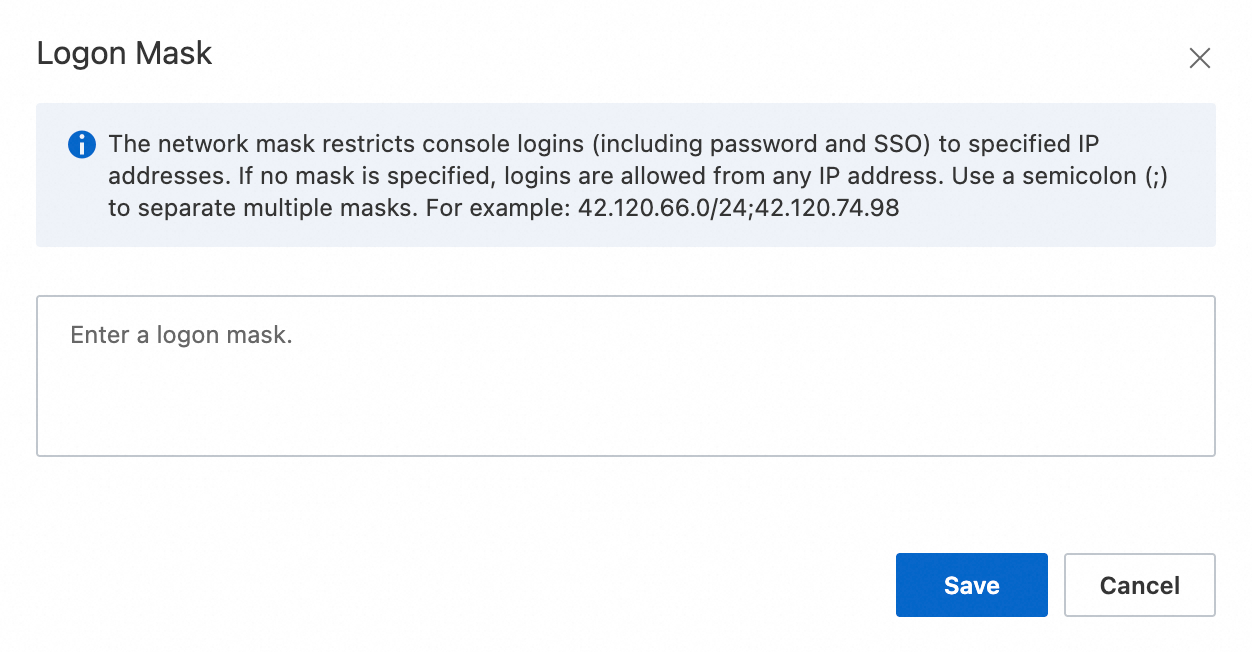
If you try to log on to the Alibaba Cloud account from an IP address that is not in the whitelist, the logon fails.
How to recover if you are locked out by the IP whitelist
If you cannot log on to the console because of an IP configuration error, for example, the public IP address of your network has changed, you can submit a ticket to request that all IP whitelist settings be cleared.
To submit a ticket: For more information, see Virtual MFA is unavailable or logon is restricted by an IP mask and submit an account ticket.
The ticket review process usually takes three business days. Plan accordingly.
Set the account session duration
The session duration is the maximum length of time your browser session remains active after you log on to the Alibaba Cloud Management Console. After this time, the system automatically logs you out.
Default duration: The default session duration for an Alibaba Cloud account is 3 hours.
Scope:
Applicable: This setting applies only to browser sessions when an Alibaba Cloud account (root account) logs on to the console.
Not applicable: This setting does not affect the logon sessions of RAM users (which must be configured separately in Manage RAM user security settings). It also does not affect API or software development kit (SDK) calls made using an AccessKey.
Configuration recommendations
Extending the session duration provides convenience but also increases the security risk if the device is accessed without authorization. Choose a duration carefully based on your operating environment.
Recommended duration | Security level | Scenario |
1 to 8 hours | High | On public networks, shared devices, or when performing highly sensitive operations such as finance or permission management. |
8 to 24 hours | Chinese | For daily operations on a trusted personal device in a secure network environment. This is the recommended configuration for most scenarios. |
Procedure
Log on to the Alibaba Cloud Account Center. On the Security Settings page, in the Other Settings section, click Modify in the Login Status column.
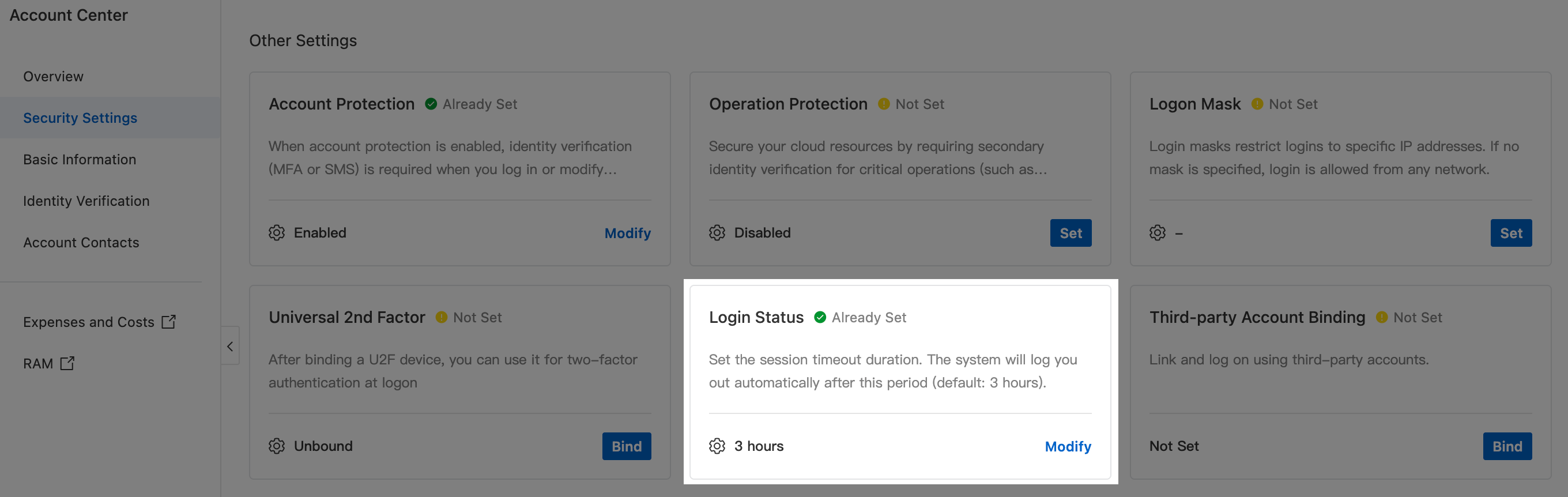
In the dialog box, set Logon persistence period and click Save.
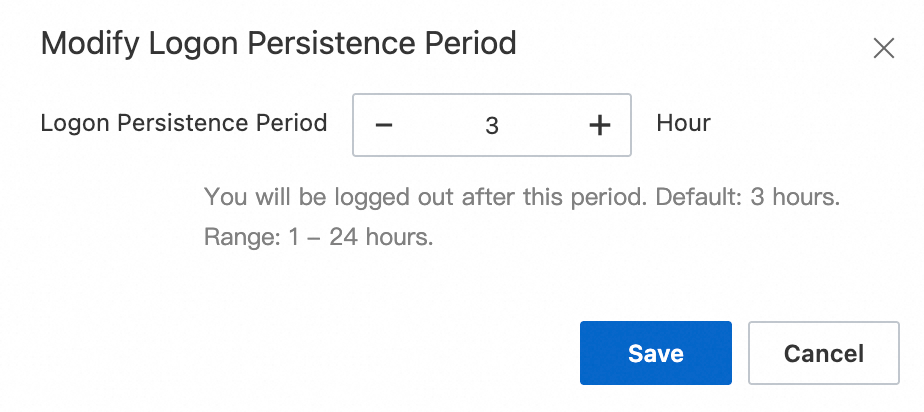
After you set the Logon persistence period, log on again for the setting to take effect.