ossbrowser lets you grant employees access to specific OSS resources without writing policies manually. Two authorization models are available:
| Model | Scope | Access duration | Use when |
|---|---|---|---|
| Temporary authorization | A single folder in a bucket | Time-limited; expires automatically | Granting a contractor or employee one-time access to a specific folder |
| Long-term authorization | A bucket or a folder | Permanent until revoked | Granting a team member ongoing read-only or read/write access |
Prerequisites
Before you begin, ensure that you have:
A RAM user created
The RAM user granted permissions to manage the target bucket
The AliyunRAMFullAccess policy attached to the RAM user
The AliyunSTSAssumeRoleAccess policy attached to the RAM user
For setup instructions, see Create a RAM user and Grant permissions to a RAM user.
For security, always log in to ossbrowser with the AccessKey pair of a RAM user, not with your Alibaba Cloud account credentials.
Grant temporary access to a folder
Temporary authorization uses Security Token Service (STS) and the AssumeRole operation to issue time-limited credentials — a temporary AccessKey pair plus an authorization token. Anyone who receives the token can access the specified folder until the token expires, at which point it becomes invalid automatically.
Authorization tokens can only be generated for folders, not for individual objects.
The role used to generate the token must have at least read-only permissions on the folder.
Generate and share a token
Log in to ossbrowser with the AccessKey pair of the RAM user described in Prerequisites.
Click the bucket name to open it.
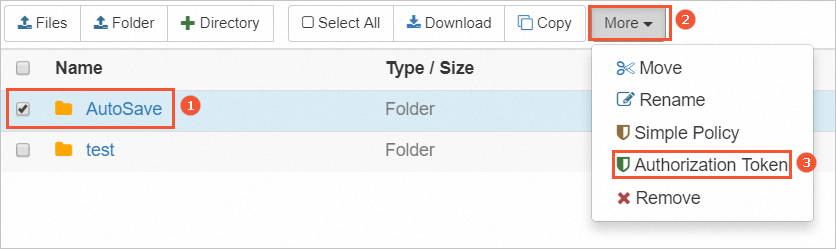
Select the folder you want to share, then choose More > Authorization Token.
Set the permission level, validity period, and role, then click Generate.
Click Copy to copy the authorization token.
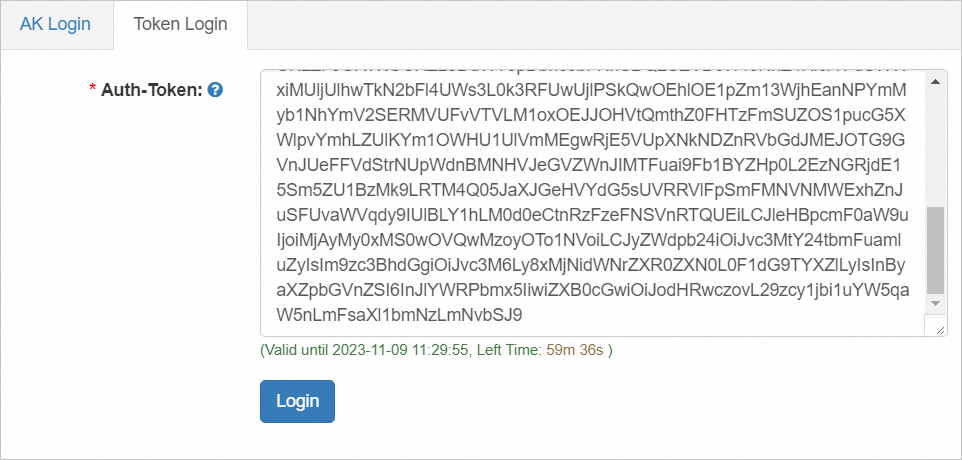
Share the authorization token with the intended user. The user enters the token when logging in to ossbrowser to access the folder. The token stops working once it reaches the validity period you set.
Grant long-term access to a bucket or folder
Long-term authorization uses Resource Access Management (RAM) to automatically create a simplified policy based on the permissions you select and attach it to a RAM user. After authorization, the RAM user has permanent read-only or read/write access to the specified bucket or folder.
The simple policy feature in ossbrowser automatically creates policies based on the permissions you select. To view or manage RAM users directly, log in to the RAM console from the Alibaba Cloud website.
Create a simplified policy and assign it to a RAM user
Log in to ossbrowser with the AccessKey pair of the RAM user described in Prerequisites.
Click the bucket name to open it.
Select one or more objects or folders, then choose More > Simplify policy authorization.
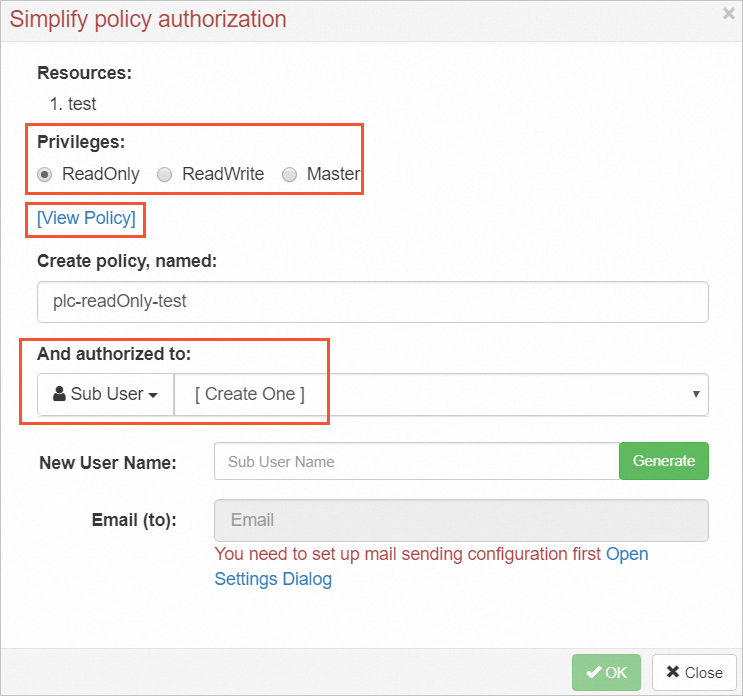
In the Simplify policy authorization dialog box, set the permission level (read-only or read/write).
Select an existing RAM user to grant access to, or create a new one.
Click View Policy to review the generated policy text. To apply the same policy in the OSS console, copy the text and paste it into the policy editor there.
Have the RAM user log in to ossbrowser with their own AccessKey pair to access the resources.
What's next
To manage RAM users and policies directly, log in to the RAM console.
To grant programmatic temporary access without using ossbrowser, see the STS AssumeRole API documentation.