Cloud Assistant is a native automated O&M tool that is developed for Elastic Compute Service (ECS). It allows you to batch run commands, including shell, PowerShell, and batch commands, on instances in a password-free manner without the need to log on to the instances or use jump servers. You can use Cloud Assistant to perform automated O&M tasks, poll processes, install and uninstall software, start and stop services, and install patches or security updates.
Benefits
If Cloud Assistant Agent is installed on instances and the instances are in the Running (Running) state, you can use Cloud Assistant to perform operations on the instances by using the ECS console or by calling API operations. Cloud Assistant provides the following benefits:
Support for batch operations
You can run a command simultaneously on multiple instances on which Cloud Assistant Agent is installed. The execution state and results of the command on one instance do not affect the other instances.
Support for uploading files
You can upload files, such as configuration files and scripts, from on-premises to ECS instances.
Common commands
Common commands include Cloud Assistant plug-ins in the form of scripts or executables and specific complex scripts that are used to configure servers, perform health or security checks, install applications or system patches, process files, update system configurations, and manage services or applications. You can run common commands to make complex configurations in an easy and quick manner, which significantly improves the efficiency of O&M.
Ease of use
You can configure custom or built-in parameters in commands to adapt to different scenarios.
Security and controllability
Cloud Assistant does not initiate any operations on its own. You have full control over all Cloud Assistant operations.
Scenarios
Cloud Assistant helps you perform deployment and O&M tasks on instances. The following list provides some examples of the tasks:
Uploading and running automated O&M scripts
Running scripts that are already uploaded to instances
Managing software lifecycle
Deploying code or applications
Polling processes
Installing patches or security updates
Obtaining updates from Object Storage Service (OSS) or YUM repositories
Changing hostnames or user logon passwords
Billing
Cloud Assistant is provided free of charge.
However, you may be charged when you use Cloud Assistant to deploy, operate, or maintain Alibaba Cloud resources. For information about the billing of ECS resources, see Billing overview.
Limits
Python or Perl scripts can be run only by using the ECS console.
NoteMake sure that the instance on which you want to run a command has a valid environment. For example, if you want to run a Python command on an instance, make sure that a Python environment is installed on the instance.
For files or commands that consist of batch, PowerShell, or shell scripts with custom parameters, the following size limits apply after Base64 encoding:
If a command is created not by using the immediate execution feature, the command cannot exceed 18 KB in size after Base64 encoding.
If a command is created and run simultaneously by using the immediate execution feature and is saved, the command cannot exceed 18 KB in size after Base64 encoding.
If a command is created and run simultaneously by using the immediate execution feature but is not saved, the command cannot exceed 24 KB in size after Base64 encoding.
A file that you want to upload cannot exceed 32 KB in size after Base64 encoding.
Each command can contain up to 20 custom parameters.
Cloud Assistant commands can be run only on instances that use the following operating system versions:
Alibaba Cloud Linux
CentOS 6, CentOS 7, and CentOS 8 and later
CoreOS
Debian 8, Debian 9, and Debian 10 and later
OpenSUSE
Rocky Linux
RedHat 5, RedHat 6, and RedHat 7 and later
For Red Hat instances, you must download the RPM package to install Cloud Assistant Agent. For more information, see Install Cloud Assistant Agent.
SUSE Linux Enterprise Server (SLES) 11, SLES 12, and SLES 15 or later
Ubuntu 12, Ubuntu 14, Ubuntu 16, and Ubuntu 18 or later
Windows Server 2012, Windows Server 2016, and Windows Server 2019 or later
For more information about the limits and quotas for Cloud Assistant, see the "Cloud Assistant limits" section of Limits.
Resources
Cloud Assistant Agent uses the resources of the host where Cloud Assistant Agent is installed. The following table describes the host resources.
Host resource | Linux operating system | Windows operating system |
CPU | The average CPU utilization is less than 1%. | |
Physical memory | About 17 MB of physical memory is used. | About 10 MB of physical memory is used. |
Disk I/O | When Cloud Assistant Agent is working as expected, it leverages disk I/O operations only in specific scenarios such as scenarios in which upgrade packages are downloaded and in which command scripts are saved. | |
Network I/O | When Cloud Assistant Agent is working as expected, it leverages a few network I/O operations only in scenarios when data is reported, such as heartbeat data. | |
Terms
The following table describes relevant terms in Cloud Assistant.
Term | Description |
Cloud Assistant | A tool provided by Alibaba Cloud that helps you perform routine maintenance tasks on multiple ECS instances and ECS bare metal instances. Cloud Assistant is available in all Alibaba Cloud regions. |
Cloud Assistant Agent | A lightweight plug-in that can be installed on ECS instances to run Cloud Assistant commands.
|
Cloud Assistant daemon process | A daemon process that is used to monitor the resource consumption of Cloud Assistant Agent, report the status of Cloud Assistant Agent, and restart Cloud Assistant Agent when Cloud Assistant Agent fails.
Note The Cloud Assistant daemon process is available only for Linux instances. |
task execution path | A path in which Cloud Assistant saves your command as a file on an instance and executes the file. The path varies based on operating systems.
|
command | A specific command that can be run on instances. Example: a command that consists of a shell or PowerShell script. |
custom parameter | A variable that is configured in the {{key}} format in a command. You can specify a custom parameter and its value in the {{"<key>":"<value>"}} format when you create a task to run the command. You can retain a limited number of Cloud Assistant commands in each Alibaba Cloud region. To adapt Cloud Assistant commands to multiple scenarios, we recommend that you configure custom parameters. You can also specify built-in environment parameters as custom parameters in a command. Then, when you run the command, the custom parameters can be automatically specified by Cloud Assistant. |
one-time execution | The execution ( |
scheduled execution | An execution of a scheduled task. A scheduled task runs a command on one or more instances based on a schedule. |
Execution states
Execution states of a command that is run on a single instance
The following table describes the instance-level execution state of a command that is run on a single instance. The InvocationStatus response parameter in the InvokeInstance array provided by the DescribeInvocations operation and the InvocationStatus response parameter provided by the DescribeInvocationResults operation both indicate the execution state of a command.
State in API responses | Description | Details |
| The command is being sent. | The command is being verified or sent. |
| Invalid command. | The specified command type or parameter is invalid. |
| The command fails to be sent. | The command fails to be sent. To send a command to an instance, make sure that the instance is in the Running state and the command is sent to the instance within 1 minute. |
| The command is being run. | The command is being run. |
| The command is run. |
|
| The command is run and returns a non-zero exit code. |
|
| An error occurred while the command is being run. | The execution cannot continue due to an exception. |
| A timeout occurred. | The execution timed out. |
| The task is canceled. | The task is canceled, and the command is not run. |
| The task is being stopped. | The command is being stopped. |
| The task is stopped. | The command is stopped. |
| The task is terminated. | The command is terminated. |
| The command is pending execution. | Command that is set to run on a schedule: The command is waiting to be run. |
States of batch executions and scheduled executions
A batch execution is a one-time execution in which a command is run simultaneously on multiple instance. To better manage batch executions or scheduled executions, you can manage the lifecycles of the executions based on the overall execution states, instance-level execution states, and execution-level states. The InvocationStatus parameter in the Invocation parameter array that is provided by the DescribeInvocations operation indicates the execution status of a command. The following figure shows the relationships among the three types of execution states.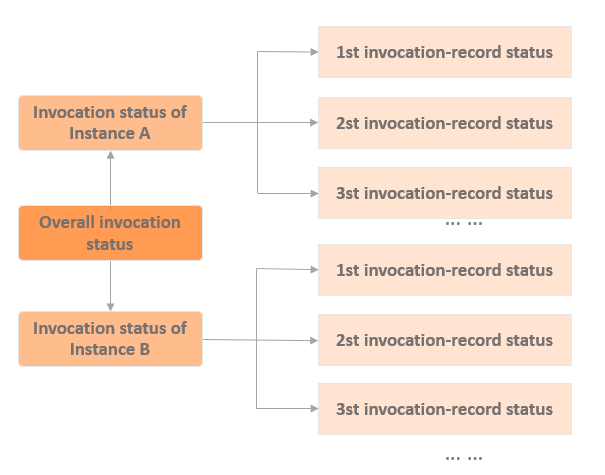
The following table describes the overall execution states of a command that is run on multiple instances at the same time.
State in API responses | Description | Details |
| The command is being verified or sent. | When the execution state is |
| The command that is set to run on a schedule is sent and pending execution. | When the execution state is |
| The command is being run. | When the execution state is |
| The command is run. | When the execution state is
|
| The command fails to be run. | When the execution state is
|
| The task is being stopped. | When the execution state is |
| The task is stopped. | When the execution state is
|
| The task succeeds on some instances and fails on other instances. | When the execution state is |
Use Cloud Assistant
You can use Cloud Assistant by using the ECS console or by calling an API operation.
Scenario | References | API operation |
Cloud Assistant Agent must be installed on an ECS instance before Cloud Assistant can be used on the instance. By default, ECS instances that were created from public images after December 01, 2017 are pre-installed with Cloud Assistant Agent. For some ECS instances, you must manually install Cloud Assistant Agent . | ||
You are familiar with using OpenAPI Explorer and this is the first time that you use Cloud Assistant. | N/A | |
Create a Cloud Assistant command. | ||
Run a created command on ECS instances. | ||
View the execution states and results of commands. Execution results are the actual outputs generated on the specified instances. | ||
Modify a created command. You can modify the name and description of the command. | N/A | |
Create a new version of a Cloud Assistant command or modify the attributes of the command, such as the name, description, type, content, execution path, and timeout period. | N/A | |
Stop a command that is running. | ||
Delete Cloud Assistant commands that are no longer needed to free up quotas for new commands. |