The authorization system of Container Service for Kubernetes (ACK) consists of Resource Access Management (RAM) authorization for infrastructure-level permissions and role-based access control (RBAC) authorization for in-cluster access control. This topic provides authorization best practices for common user roles—including read-only administrators, O&M engineers, developers, and permission administrators—detailing the required permissions for each role at both layers.
Authorization system
The authorization system of ACK consists of RAM authorization and RBAC authorization. RAM authorization is used to grant permissions on cloud resources. RBAC authorization is used to grant permissions on Kubernetes resources within a cluster. The following figure shows the authorization system of ACK.

RAM authorization: based on the system policies and custom policies of RAM. This authorization system is used to grant permissions on the API operations of ACK and other Alibaba Cloud services to support the following O&M operations:
Create, view, upgrade, and delete clusters.
Create, modify, and scale node pools.
Manage authorization.
Monitor clusters and collect logs and events.
RBAC authorization: based on Kubernetes RBAC. This authorization system is used to grant permissions on Kubernetes resources in ACK clusters to support O&M operations. In most cases, you can use RBAC authorization to grant the permissions to add, delete, modify, and query the following Kubernetes resource objects:
Workload resources: Deployment, StatefulSet, DaemonSet, Job, CronJob, pod, and ReplicaSet.
Network resources: Service, Ingress, and NetworkPolicy.
Storage resources: persistent volume (PV), persistent volume claim (PVC), and StorageClass.
Namespace, ConfigMap, and Secret.
Prerequisites
If you are performing these authorization tasks as a RAM user or RAM role (not as the Alibaba Cloud account), you must first be granted the necessary permissions to manage other users and roles. To do this, your account must be configured as a permissions administrator. For instructions, see Designate a RAM user or role as a permission administrator.
Use case 1: Grant read-only administrators the permissions to view cluster resources
Read-only administrators require the permissions to read Kubernetes resources in all namespaces within an ACK cluster.
Assign the Read-only Administrator role to your RAM user or RAM role
ACK console
For more information, see Grant RBAC permissions to a RAM user or RAM role.
Alibaba Cloud CLI
Call the GrantPermissions operation to assign the admin-view role to the RAM user or RAM role that you want to use. When you configure the API request, set the
role_nameparameter to the RAM user or RAM role. You can call the DescribeUserPermission operation to query the permissions of a RAM user or RAM role.aliyun cs POST /permissions/users/234xxxxxxxx --header "Content-Type=application/json;" --body "[{\"cluster\":\"c24xxxxxxxxxxxxxxxxxxxxxxxxxxxxxxx\",\"is_custom\":false,\"role_name\":\"admin-view\",\"role_type\":\"cluster\"}]"Terraform authorization
resource "alicloud_cs_kubernetes_permissions" "default" {
  uid = alicloud_ram_user.user.id
  permissions {
    cluster     = alicloud_cs_managed_kubernetes.default.id
    role_type   = "cluster"
    role_name   = "admin-view"
    namespace   = ""
    is_custom   = false
    is_ram_role = false
  }
}
Use case 2: Grant O&M engineers the permissions to manage clusters and applications
O&M engineers require the permissions to manage and maintain clusters and applications. You must perform RAM authorization and RBAC authorization.
RAM authorization
ACK provides two system-managed policies in RAM:
AliyunCSFullAccess: Grants full read/write access to all ACK API operations.
AliyunCSReadOnlyAccess: Grants read-only access to all ACK API operations.
Log on to the RAM console and attach the appropriate policy to your RAM user or role based on your requirements. For detailed instructions, see Grant permissions to a RAM user and Grant permissions to a RAM role.
If you require fine-grained access control, you can attach custom policies. For more information, see Use RAM to grant the permissions to access clusters and cloud resources.
In this case, you can attach the following policy to the RAM user or RAM role that you want to use. For more information about the RAM actions in RAM policies, see Action description.
{
  "Version": "1",
  "Statement": [
    {
      "Effect": "Allow",
      "Action": [
        "cs:GetClusters",
        "cs:ModifyCluster",
        "cs:UpgradeCluster",
        "cs:DescribeClusterDetail",
        "cs:DescribeClusterVuls",
        "cs:DescribeClusterSecuritySummary",
        "cs:DescribeClusterUserKubeconfig",
        "cs:RevokeK8sClusterKubeConfig",
        "cs:CheckControlPlaneLogEnable",
        "cs:DescribeClusterResources",
        "cs:DescribeClusterEvents",
        "cs:DescribeClusterLogs",
        "cs:GetClusterAuditProject",
        "cs:ListClusterChecks",
        "cs:GetClusterCheck",
        "cs:RunClusterCheck",
        "cs:ModifyClusterAudit",
        "cs:DescribeResourcesDeleteProtection",
        "cs:UpdateResourcesDeleteProtection",
        "cs:DescribeClusterNodePools",
        "cs:DescribeClusterNodePoolDetail",
        "cs:CreateClusterNodePool",
        "cs:ModifyClusterNodePool",
        "cs:UpgradeClusterNodepool",
        "cs:DeleteClusterNodepool",
        "cs:CreateAutoscalingConfig",
        "cs:SyncClusterNodePool",
        "cs:RepairClusterNodePool",
        "cs:AttachInstancesToNodePool",
        "cs:ModifyNodePoolNodeConfig",
        "cs:DescribeClusterNodes",
        "cs:RemoveClusterNodes",
        "cs:RemoveNodePoolNodes",
        "cs:DiagnoseClustersNode",
        "cs:DescribeNodePoolVuls",
        "cs:FixNodePoolVuls",
        "cs:DrainNodes",
        "cs:DescribeClusterAddonMetadata",
        "cs:DescribeClusterAddonsVersion",
        "cs:InstallClusterAddons",
        "cs:UpgradeClusterAddons",
        "cs:ModifyClusterAddon",
        "cs:UnInstallClusterAddons",
        "cs:DescribeClusterAddonInstance",
        "cs:DescribeClusterAddonsUpgradeStatus",
        "cs:DescribeClusterAddonUpgradeStatus",
        "cs:ListClusterComponent",
        "cs:GetClusterComponent",
        "cs:DescribePolicyInstances",
        "cs:DeployPolicyInstance",
        "cs:ModifyPolicyInstance",
        "cs:DeletePolicyInstance",
        "cs:DescribePolicyGovernanceInCluster",
        "cs:DescribePolicyInstancesStatus",
        "cs:UpdateContactGroupForAlert",
        "cs:StartAlert",
        "cs:StopAlert",
        "cs:ListAlertRules",
        "cs:GetAlertHistory",
        "cs:DescribeClusterTasks",
        "cs:GetClusterBasicInfo",
        "cs:ListClusterReportSummary",
        "cs:GetClusterReportSummary",
        "cs:ListReportTaskRule",
        "cs:CreateTrigger",
        "cs:DescribeKubernetesClusterHookTrigger",
        "cs:CreateDiagnose",
        "cs:CreateClusterOverviewReport",
        "cs:GetAIDiagnosisResult",
        "cs:CreateReportTaskRule",
        "cs:CreateClusterReport",
        "cs:GetClusterCheckResult",
        "cs:GetClusterServices",
        "cs:UpdateControlPlaneLog",
        "cs:UpdateClusterName"
      ],
      "Resource": "acs:cs:*:*:cluster/xxxxx"  # Replace xxxxx with your cluster ID.
    },
    {
      "Effect": "Allow",
      "Action": [
        "cs:DescribeSubAccountHelmPermission",
        "cs:CheckServiceRole",
        "cs:DeleteTriggerHook",
        "cs:QueryAlertContact",
        "cs:QueryAlertContactGroup",
        "cs:AddOrUpdateAlertContact",
        "cs:AddOrUpdateAlertContactGroup",
        "cs:DeleteAlertContact",
        "cs:DeleteAlertContactGroup",
        "cs:DescribeKubernetesVersionMetadata",
        "cs:ListOperationPlans",
        "cs:DescribeClusterEndpoints",
        "cs:DescribeTaskInfo",
        "cs:DescribeEvents",
        "cs:DescribeUserQuota",
        "cs:DescribeTasks",
        "cs:PauseTask",
        "cs:CancelTask",
        "cs:DescribeAddons",
        "cs:DeleteReportTaskRule",
        "cs:CreateSessionMessage",
        "cs:DescribePolicies",
        "cs:DescribePolicyDetails"
      ],
      "Resource": "*"
    },
    {
      "Effect": "Allow",
      "Action": [
        "vpc:DescribeVSwitches",
        "vpc:DescribeVpcs",
        "vpc:DescribeEipAddresses"
      ],
      "Resource": "*"
    },
    {
      "Effect": "Allow",
      "Action": "kms:ListKeys",
      "Resource": "*"
    },
    {
      "Effect": "Allow",
      "Action": [
        "arms:ListDashboards",
        "arms:InstallAddon"
      ],
      "Resource": "*"
    },
    {
      "Effect": "Allow",
      "Action": [
        "cloudshell:CreateEnvironment",
        "cloudshell:AttachStorage",
        "cloudshell:DetachStorage",
        "cloudshell:CreateSession"
      ],
      "Resource": "*"
    },
    {
      "Effect": "Allow",
      "Action": [
        "ess:DescribeScalingActivities",
        "ess:DescribeScalingActivityDetail",
        "ess:DescribeLifecycleActions"
      ],
      "Resource": "*"
    },
    {
      "Effect": "Allow",
      "Action": "oos:ListExecutions",
      "Resource": "*"
    },
    {
      "Effect": "Allow",
      "Action": [
        "ecs:DescribeKeyPairs",
        "ecs:DescribeInstances",
        "ecs:DescribeSecurityGroups",
        "ecs:DescribeImages",
        "ecs:DescribePrice"
      ],
      "Resource": "*"
    },
    {
      "Effect": "Allow",
      "Action": [
        "cr:ListInstance",
        "cr:ListInstanceDomain",
        "cr:ListRepository",
        "cr:ListArtifactTag"
      ],
      "Resource": "*"
    },
    {
      "Effect": "Allow",
      "Action": "ram:GetRole",
      "Resource": "acs:ram:*:*:role/aliyuncisdefaultrole"
    },
    {
      "Effect": "Allow",
      "Action": [
        "log:GetDashboard",
        "log:GetSavedSearch",
        "log:GetLogStore",
        "log:GetIndex",
        "log:UpdateIndex",
        "log:GetLogStoreLogs",
        "log:CreateDashboardSharing",
        "log:ListProject",
        "log:GetProjectLogs",
        "log:GetResourceRecord",
        "log:CreateResourceRecord",
        "log:UpdateResourceRecord"
      ],
      "Resource": "*"
    }
  ]
}
For more information about the ACK API, see [Product Changes] ACK API enhances user authentication and List of operations by function.
RBAC authorization
After completing RAM authorization, you must perform RBAC authorization on the RAM user or RAM role. The following table describes the predefined RBAC roles that are provided by ACK.
Predefined role
RBAC permissions on cluster resources
Administrator
Full read/write RBAC permissions for all Kubernetes resources in all namespaces, as well as for cluster-level resources including nodes, PVs, namespaces, and resource quotas.
Read-only Administrator
Read-only RBAC permissions for all Kubernetes resources in all namespaces, as well as for cluster-level resources including nodes, PVs, namespaces, and resource quotas.
O&M Engineer
Grants the following RBAC permissions:
Read/write access to all console-visible Kubernetes resources in all namespaces.
Read and update access to cluster nodes, PVs, and namespaces.
Read-only access to all other resources.
Developer
Read/write RBAC access to console-visible Kubernetes resources, scoped to either all namespaces or a selection of specific ones.
Restricted User
Read-only RBAC access to console-visible Kubernetes resources, scoped to either all namespaces or a selection of specific ones.
Custom
Permissions are determined by the ClusterRole you select. Verify the permissions defined in the selected ClusterRole before granting them to avoid assigning unintended permissions to a RAM user or role. For more information about custom permissions, see Use custom RBAC roles to restrict resource operations in a cluster.
ImportantAfter you assign the cluster-admin role to a RAM user or RAM role, the user or role gains the same permissions as the Alibaba Cloud account to which they belong. This grants full control over all resources within the cluster. Exercise caution when you assign the cluster-admin role to a RAM user or RAM role.
Log on to the ACK console. In the left navigation pane, click Authorizations.
On the Authorizations page, click the RAM Users or RAM Roles tab based on the authorized object. Find the authorized object and click Modify Permissions in the Actions column.
In the panel that appears, click +Add Permissions, select O&M Engineer for the desired cluster and namespace, and then click Submit.
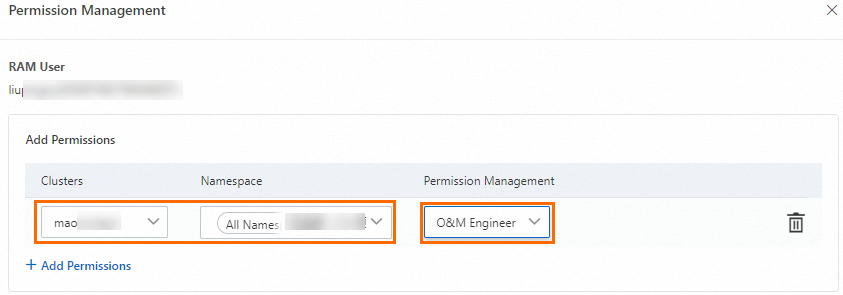
After you assign the predefined role, ACK automatically creates a ClusterRoleBinding object for the RAM user or RAM role. The following sample code shows the permissions provided by the O&M Engineer role:
apiVersion: rbac.authorization.k8s.io/v1
kind: ClusterRole
metadata:
  name: cs:ops
rules:
- apiGroups: [""]
  resources:  ["pods", "pods/attach", "pods/exec", "pods/portforward", "pods/proxy"]
  verbs: ["create", "delete", "deletecollection", "get", "list", "patch", "update", "watch"]
- apiGroups: [""]
  resources:  ["configmaps", "endpoints", "persistentvolumeclaims", "replicationcontrollers", "replicationcontrollers/scale", "secrets", "serviceaccounts", "services", "services/proxy"]
  verbs: ["create", "delete", "deletecollection", "get", "list", "patch", "update", "watch"]
- apiGroups: [""]
  resources:  ["bindings", "events", "limitranges", "namespaces/status", "replicationcontrollers/status", "pods/log", "pods/status", "resourcequotas", "resourcequotas/status", "componentstatuses"]
  verbs: ["get", "list", "watch"]
- apiGroups: [""]
  resources:  ["namespaces", "nodes", "persistentvolumes"]
  verbs: ["get", "list", "watch", "patch"]
- apiGroups: ["coordination.k8s.io"]
  resources:  ["leases"]
  verbs: ["get"]
- apiGroups: ["apps"]
  resources:  ["daemonsets", "deployments", "deployments/rollback", "deployments/scale", "replicasets", "replicasets/scale", "statefulsets"]
  verbs: ["create", "delete", "deletecollection", "get", "list", "patch", "update", "watch"]
- apiGroups: ["autoscaling"]
  resources:  ["horizontalpodautoscalers"]
  verbs: ["create", "delete", "deletecollection", "get", "list", "patch", "update", "watch"]
- apiGroups: ["batch"]
  resources:  ["cronjobs", "jobs"]
  verbs: ["create", "delete", "deletecollection", "get", "list", "patch", "update", "watch"]
- apiGroups: ["extensions"]
  resources:  ["daemonsets", "deployments", "deployments/rollback", "deployments/scale","ingresses","replicasets", "replicasets/scale", "replicationcontrollers/scale"]
  verbs: ["create", "delete", "deletecollection", "get", "list", "patch", "update", "watch"]
- apiGroups: ["networking.k8s.io"]
  resources:  ["*"]
  verbs: ["create", "delete", "deletecollection", "get", "list", "patch", "update", "watch"]
- apiGroups: ["servicecatalog.k8s.io"]
  resources:  ["clusterserviceclasses", "clusterserviceplans", "clusterservicebrokers", "serviceinstances", "servicebindings"]
  verbs: ["create", "delete", "get", "list", "patch", "update", "watch"]
- apiGroups: ["servicecatalog.k8s.io"]
  resources:  ["clusterservicebrokers/status", "clusterserviceclasses/status", "clusterserviceplans/status", "serviceinstances/status", "serviceinstances/reference", "servicebindings/status",]
  verbs: ["update"]
- apiGroups: ["storage.k8s.io"]
  resources:  ["storageclasses"]
  verbs: ["get", "list", "watch"]
- apiGroups: ["alicloud.com"]
  resources:  ["*"]
  verbs: ["create", "delete", "get", "list", "patch", "update", "watch"]
- apiGroups: ["policy"]
  resources:  ["poddisruptionbudgets"]
  verbs: ["create", "delete", "deletecollection", "get", "list", "patch", "update", "watch"]
- apiGroups: ["metrics.k8s.io"]
  resources: ["pods", "nodes"]
  verbs: ["get", "watch", "list"]
- apiGroups: ["networking.istio.io"]
  resources:  ["*"]
  verbs: ["create", "delete", "deletecollection", "get", "list", "patch", "update", "watch"]
- apiGroups: ["config.istio.io"]
  resources:  ["*"]
  verbs: ["create", "delete", "deletecollection", "get", "list", "patch", "update", "watch"]
- apiGroups: ["rbac.istio.io"]
  resources:  ["*"]
  verbs: ["create", "delete", "deletecollection", "get", "list", "patch", "update", "watch"]
- apiGroups: ["istio.alibabacloud.com"]
  resources:  ["*"]
  verbs: ["create", "delete", "deletecollection", "get", "list", "patch", "update", "watch"]
- apiGroups: ["authentication.istio.io"]
  resources:  ["*"]
  verbs: ["create", "delete", "deletecollection", "get", "list", "patch", "update", "watch"]
- apiGroups: ["log.alibabacloud.com"]
  resources:  ["*"]
  verbs: ["create", "delete", "deletecollection", "get", "list", "patch", "update", "watch"]
- apiGroups: ["monitoring.kiali.io"]
  resources:  ["*"]
  verbs: ["create", "delete", "deletecollection", "get", "list", "patch", "update", "watch"]
- apiGroups: ["kiali.io"]
  resources:  ["*"]
  verbs: ["create", "delete", "deletecollection", "get", "list", "patch", "update", "watch"]
- apiGroups: ["apiextensions.k8s.io"]
  resources: ["customresourcedefinitions"]
  verbs: ["get", "list", "create", "watch", "patch", "update", "delete", "deletecollection"]
- apiGroups: ["serving.knative.dev"]
  resources: ["*"]
  verbs: ["get", "list", "create", "watch", "patch", "update", "delete", "deletecollection"]
- apiGroups: ["eventing.knative.dev"]
  resources: ["*"]
  verbs: ["get", "list", "create", "watch", "patch", "update", "delete", "deletecollection"]
- apiGroups: ["messaging.knative.dev"]
  resources: ["*"]
  verbs: ["get", "list", "create", "watch", "patch", "update", "delete", "deletecollection"]
- apiGroups: ["sources.eventing.knative.dev"]
  resources: ["*"]
  verbs: ["get", "list", "create", "watch", "patch", "update", "delete", "deletecollection"]
- apiGroups: ["tekton.dev"]
  resources: ["*"]
  verbs: ["get", "list", "create", "watch", "patch", "update", "delete", "deletecollection"]
- apiGroups: ["alert.alibabacloud.com"]
  resources: ["*"]
  verbs: ["get", "list", "create", "watch", "patch", "update", "delete", "deletecollection"]
If you require fine-grained access control, refer to RBAC and create a custom ClusterRole. Then, go to the Authorizations page of the ACK console, and select the custom ClusterRole that you created from the drop-down list. For details, see Use custom RBAC roles to restrict resource operations in a cluster.
Use case 3: Grant developers the permissions to manage your clusters and applications
Developers require the permissions (RBAC authorization) to manage Kubernetes resources in an ACK cluster and read-only permissions (RAM authorization) on the cluster.
Before you perform RBAC authorization, make sure that the developers have at least read-only permissions (RAM authorization) on the cluster.
RAM authorization
Go to the RAM console and create a custom policy. Then, attach the policy to the RAM user or RAM role that you want to use. For more information, see Grant access to clusters and cloud resources using RAM. Example:
{ "Statement": [ { "Action": [ "cs:GetClusters", "cs:DescribeClusterDetail", "cs:GetClusterAuditProject", "cs:DescribeResourcesDeleteProtection" ], "Resource": "acs:cs:*:*:cluster/xxxxx", # Replace this parameter with your cluster ID. "Effect": "Allow" } ], "Version": "1" }NoteTo grant a RAM user or RAM role read-only permissions on all ACK clusters, attach the
AliyunCSReadOnlyAccesspolicy to the RAM user or RAM role.RBAC authorization
Log on to the ACK console. In the left navigation pane, click Authorizations.
On the Authorizations page, click the RAM Users or RAM Roles tab based on the authorized object. Find the authorized object and click Modify Permissions in the Actions column.
In the panel that appears, click +Add Permissions, select Developer for the desired cluster and namespace, and then click Submit.
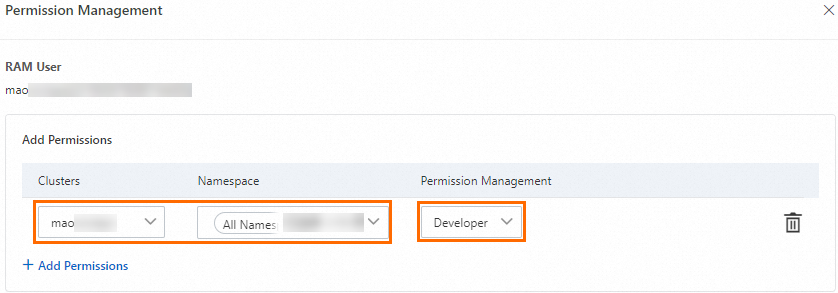
After you assign the predefined role, ACK automatically creates a ClusterRoleBinding object for the RAM user or RAM role. The following sample code shows the permissions provided by the Developer role:
apiVersion: rbac.authorization.k8s.io/v1
kind: ClusterRole
metadata:
  name: cs:ns:dev
rules:
- apiGroups: [""]
  resources:  ["pods", "pods/attach", "pods/exec", "pods/portforward", "pods/proxy"]
  verbs: ["create", "delete", "deletecollection", "get", "list", "patch", "update", "watch"]
- apiGroups: [""]
  resources:  ["configmaps", "endpoints", "persistentvolumeclaims", "replicationcontrollers", "replicationcontrollers/scale", "secrets", "serviceaccounts", "services", "services/proxy"]
  verbs: ["create", "delete", "deletecollection", "get", "list", "patch", "update", "watch"]
- apiGroups: [""]
  resources:  ["events", "replicationcontrollers/status", "pods/log", "pods/status"]
  verbs: ["get", "list", "watch"]
- apiGroups: ["apps"]
  resources:  ["daemonsets", "deployments", "deployments/rollback", "deployments/scale", "replicasets", "replicasets/scale", "statefulsets"]
  verbs: ["create", "delete", "deletecollection", "get", "list", "patch", "update", "watch"]
- apiGroups: ["autoscaling"]
  resources:  ["horizontalpodautoscalers"]
  verbs: ["create", "delete", "deletecollection", "get", "list", "patch", "update", "watch"]
- apiGroups: ["batch"]
  resources:  ["cronjobs", "jobs"]
  verbs: ["create", "delete", "deletecollection", "get", "list", "patch", "update", "watch"]
- apiGroups: ["extensions"]
  resources:  ["daemonsets", "deployments", "deployments/rollback", "deployments/scale","ingresses","replicasets", "replicasets/scale", "replicationcontrollers/scale"]
  verbs: ["create", "delete", "deletecollection", "get", "list", "patch", "update", "watch"]
- apiGroups: ["networking.k8s.io"]
  resources:  ["*"]
  verbs: ["create", "delete", "deletecollection", "get", "list", "patch", "update", "watch"]
- apiGroups: ["servicecatalog.k8s.io"]
  resources:  ["clusterserviceclasses", "clusterserviceplans", "clusterservicebrokers", "serviceinstances", "servicebindings"]
  verbs: ["create", "delete", "get", "list", "patch", "update", "watch"]
- apiGroups: ["servicecatalog.k8s.io"]
  resources:  ["clusterservicebrokers/status", "clusterserviceclasses/status", "clusterserviceplans/status", "serviceinstances/status", "serviceinstances/reference", "servicebindings/status",]
  verbs: ["update"]
- apiGroups: ["alicloud.com"]
  resources:  ["*"]
  verbs: ["create", "delete", "get", "list", "patch", "update", "watch"]
- apiGroups: ["policy"]
  resources:  ["poddisruptionbudgets"]
  verbs: ["create", "delete", "deletecollection", "get", "list", "patch", "update", "watch"]
- apiGroups: ["networking.istio.io"]
  resources:  ["*"]
  verbs: ["create", "delete", "deletecollection", "get", "list", "patch", "update", "watch"]
- apiGroups: ["config.istio.io"]
  resources:  ["*"]
  verbs: ["create", "delete", "deletecollection", "get", "list", "patch", "update", "watch"]
- apiGroups: ["rbac.istio.io"]
  resources:  ["*"]
  verbs: ["create", "delete", "deletecollection", "get", "list", "patch", "update", "watch"]
- apiGroups: ["istio.alibabacloud.com"]
  resources:  ["*"]
  verbs: ["create", "delete", "deletecollection", "get", "list", "patch", "update", "watch"]
- apiGroups: ["authentication.istio.io"]
  resources:  ["*"]
  verbs: ["create", "delete", "deletecollection", "get", "list", "patch", "update", "watch"]
- apiGroups: ["log.alibabacloud.com"]
  resources:  ["*"]
  verbs: ["create", "delete", "deletecollection", "get", "list", "patch", "update", "watch"]
- apiGroups: ["monitoring.kiali.io"]
  resources:  ["*"]
  verbs: ["create", "delete", "deletecollection", "get", "list", "patch", "update", "watch"]
- apiGroups: ["kiali.io"]
  resources:  ["*"]
  verbs: ["create", "delete", "deletecollection", "get", "list", "patch", "update", "watch"]
- apiGroups: ["apiextensions.k8s.io"]
  resources: ["customresourcedefinitions"]
  verbs: ["get", "list", "create", "watch", "patch", "update", "delete", "deletecollection"]
- apiGroups: ["serving.knative.dev"]
  resources: ["*"]
  verbs: ["get", "list", "create", "watch", "patch", "update", "delete", "deletecollection"]
- apiGroups: ["eventing.knative.dev"]
  resources: ["*"]
  verbs: ["get", "list", "create", "watch", "patch", "update", "delete", "deletecollection"]
- apiGroups: ["messaging.knative.dev"]
  resources: ["*"]
  verbs: ["get", "list", "create", "watch", "patch", "update", "delete", "deletecollection"]
- apiGroups: ["sources.eventing.knative.dev"]
  resources: ["*"]
  verbs: ["get", "list", "create", "watch", "patch", "update", "delete", "deletecollection"]
- apiGroups: ["tekton.dev"]
  resources: ["*"]
  verbs: ["get", "list", "create", "watch", "patch", "update", "delete", "deletecollection"]
- apiGroups: ["alert.alibabacloud.com"]
  resources: ["*"]
  verbs: ["get", "list", "create", "watch", "patch", "update", "delete", "deletecollection"]
If you require fine-grained access control, refer to RBAC and create a custom ClusterRole. Then, go to the Authorizations page of the ACK console, and select the custom ClusterRole that you created from the drop-down list. For details, see Use custom RBAC roles to restrict resource operations in a cluster.
Use case 4: Grant authorization administrators the permissions to manage the permissions of RAM users and RAM roles
Permission administrators require permissions to manage the RBAC permissions of other RAM users and RAM roles. By default, you cannot use a RAM user or RAM role to grant RBAC permissions to other RAM users or RAM roles. On the Authorizations page of the ACK console console, the system prompts the following message: The current RAM user account has no permission to manage authorizations. Contact the Alibaba Cloud account owner or authorized RAM user to request permission. This indicates that the RAM user that you use does not have the required RAM permissions and RBAC permissions.
RAM authorization
You must add the following permissions to the policy that is attached to the RAM user or RAM role that you want to use:
Query other RAM users or RAM roles that belong to the same Alibaba Cloud account.
Query the RBAC permissions of a RAM user or RAM role.
Grant RBAC permissions to other RAM users or RAM roles.
Log on to the RAM console and grant permissions to the RAM user or RAM role. For more information, see Use custom RBAC roles to restrict resource operations in a cluster. Example:
{
  "Statement": [
    {
      "Action": [
        "ram:ListRoles",
        "ram:ListUserBasicInfos",
        "cs:GetClusters",
        "cs:DescribeUserPermission",
        "cs:DescribeClusterDetail",
        "cs:GrantPermissions",
        "cs:UpdateUserPermissions",
        "cs:GetClusterAuditProject",
        "cs:DescribeResourcesDeleteProtection",
        "cs:UpdateResourcesDeleteProtection",
        "cs:DescribeClusterAddonUpgradeStatus"
      ],
      "Resource": "*",
      "Effect": "Allow"
    }
  ],
  "Version": "1"
}
RBAC authorization
Log on to the ACK console. In the left navigation pane, click Authorizations.
On the Authorizations page, click the RAM Users or RAM Roles tab based on the authorized object. Find the authorized object and click Modify Permissions in the Actions column.
In the panel that appears, click Add Permissions, select Administrator or
cluster-adminunder Custom, then click Submit.
NoteBy default, Alibaba Cloud accounts and cluster owners are assigned the
cluster-adminrole and have full access to all Kubernetes resources in the cluster.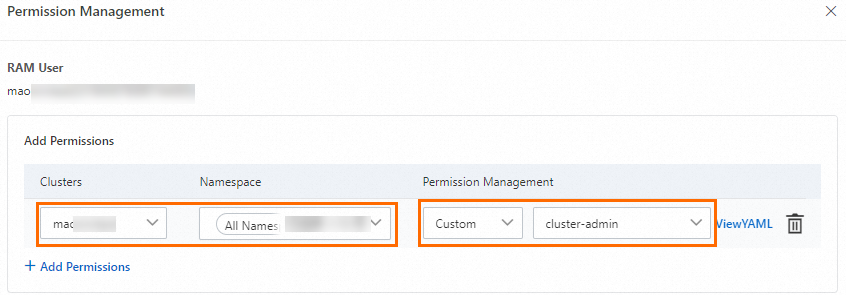
After performing RAM authorization and RBAC authorization for a RAM user or RAM role, you can use them to grant other RAM users or RAM roles RBAC permissions that take effect within the specified scope.