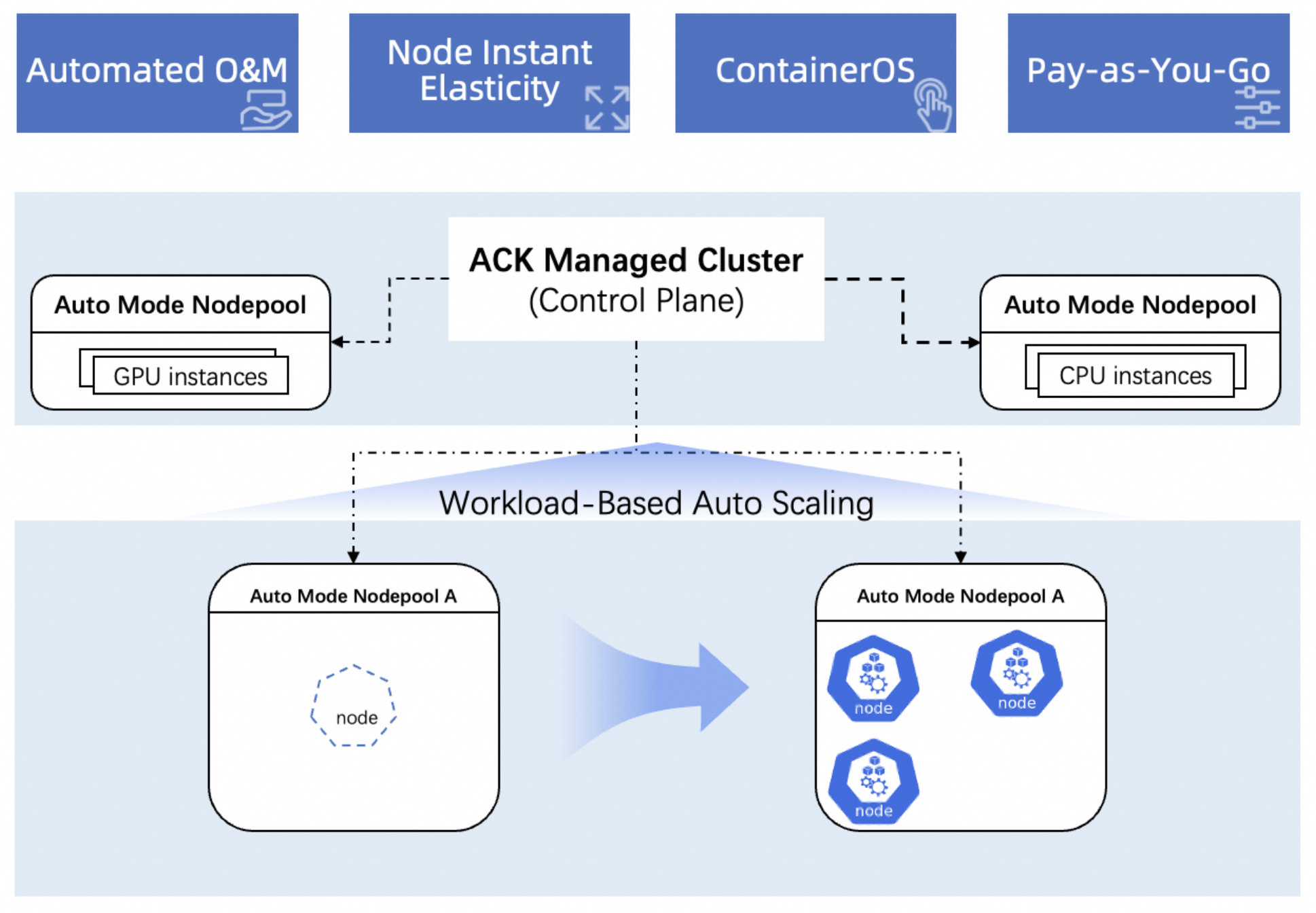
An intelligent managed node pool is a fully managed, zero-maintenance node management mode for Alibaba Cloud Container Service for Kubernetes (ACK). This feature is available in ACK Managed Cluster Pro Edition. When enabled, it automatically scales nodes in and out based on workload requirements and handles O&M tasks such as operating system upgrades, security patching, and automated fault recovery, eliminating the need to manually create and maintain nodes.
Features
Automated full-lifecycle O&M: Automatically manages the entire node lifecycle, from creation to retirement. This includes node image rotation, automatic replacement of unhealthy nodes, and automated patching for OS CVEs.
Instant elastic resource provisioning: Provides built-in node elasticity, triggering node scale-out or scale-in actions in milliseconds based on the resource requests of your Kubernetes workloads.
Enterprise-grade security: Features a built-in, optimized software stack. Nodes use ContainerOS, which enhances security with its immutable root file system.
Pay-as-you-go billing: You pay only for the resources you use. This reduces costs from idle resources and improves cost control.
Automated node O&M
ACK automatically manages the entire node lifecycle from creation to retirement and handles O&M responsibilities such as operating system upgrades, component maintenance, and security vulnerability patching, eliminating the need for manual node configuration planning.
Fault recovery: Automatically detects node exceptions and triggers recovery procedures. You can configure whether to allow node reboots to recover from failures.
OS CVE patching: Automatically patches operating system vulnerabilities, including those of high, medium, and low severity.
Operating system version upgrades: Automatically updates the operating system image of the node pool and completes the upgrade through node rotation.
Automated response to ECS system events: Automatically identifies and responds to ECS system events to improve node stability and availability.
Deterministic elastic resource provisioning
The built-in instant node elasticity capability automatically scales nodes based on workload changes without requiring you to plan capacity in advance. You are billed for actual resource usage, which minimizes idle resource costs and optimizes your spending.
Faster elastic response: Event-driven scaling, accelerated by Alibaba Cloud's ContainerOS, achieves a typical scaling time of 45±10 seconds.
The system reacts to scaling events within 1 to 3 seconds.
More reliable resource delivery: Automatically selects suitable instance types for scaling. If the inventory of the target instance type is insufficient, it automatically falls back to other qualified instance types, achieving a resource delivery success rate of up to 99%. It also provides inventory warnings for potential risks associated with the selected instance types.
More efficient scheduling: Supports the optimal bin packing and PreBind (custom feature) strategies based on Pods, which reduces scheduling fragmentation by up to 30%.
Enterprise-grade security
Nodes in an intelligent managed node pool use ContainerOS as their operating system. ContainerOS is designed for containerized environments and is fully compatible with the Kubernetes ecosystem. It offers advantages such as fast startup, enhanced security, and consistent upgrades.
Rapid node scaling
Lightweight image: The image includes only the software packages and system services that are required to run Kubernetes Pods. System-level optimizations significantly reduce node startup time.
Optimized for GPU scenarios: When you use GPU instances, the system provides a GPU-optimized version of ContainerOS that has NVIDIA drivers and the necessary runtime environment pre-installed. This reduces installation and configuration steps after the node starts.
Security hardening
Read-only root file system: The root file system is read-only by default. Only the
/etcand/vardirectories are writable. This design meets basic system configuration needs and adheres to the immutable infrastructure principle in cloud-native environments. It also effectively prevents escaped containers from tampering with the host file system.Minimized system exposure: By default, the system does not provide a Python runtime environment or allow direct SSH access. This prevents untraceable operations resulting from direct logins. For non-standard O&M scenarios, a dedicated O&M container is available.
Atomic upgrades
Image-level updates and rollbacks: Following the immutable infrastructure principle, traditional package managers like
yumare not provided. The system supports image-level updates and rollbacks (disk replacement upgrades), as well as limited layered hot-upgrades. This ensures that the software versions and system configurations of all cluster nodes remain consistent.
Comparison with other node pool modes
The following table compares the configuration capabilities of unmanaged node pools, managed node pools, and intelligent managed node pools.
Managed configuration | Disabled | Managed node pool | Intelligent hosting | |
Node pool configuration | Instance type | Manual configuration | Manual configuration | Configurable, with intelligent recommendations based on instance type. |
Billing method | Manual configuration | Manual configuration | pay-as-you-go only | |
Operating system | Manual configuration | Manual configuration | Only the container-optimized OS ContainerOS is supported. | |
System disk | Manual configuration | Manual configuration | Default recommended configuration: 20 GiB | |
Data disk | Manual configuration | Manual configuration | One configurable data disk for temporary storage on ContainerOS. | |
Autoscaling | Optional, manual configuration | Optional, manual configuration | Built-in, manually configurable instant node elasticity | |
Automatic response to ECS system events | Not supported | Enabled by default | Enabled by default | |
Node auto-healing | Not supported | Optional, manual configuration | Enabled by default | |
Automatic kubelet and containerd upgrades | Manually configured through cluster auto-upgrade | Enabled by default | ||
Automatic OS CVE patching | Not supported | Optional, manual configuration | Enabled by default | |
Usage notes
Capacity limits
When you use an intelligent managed node pool, ACK dynamically scales nodes based on your workload needs. By default, the node pool can scale out to a maximum of 50 nodes. You can change the maximum number of instances by using the auto scaling feature of the node pool.
Intelligent managed node pools do not support certain instance types, such as those with Arm architecture or local disks, and require ContainerOS 3.6 or later. ACK recommends a set of default instance types that meet the needs of most applications. You can also adjust the selection in the console based on your business requirements. Configure a sufficient number of instance types to improve node pool elasticity and prevent scaling failures.
Operational boundaries
When you use an intelligent managed node pool, ACK is responsible for O&M tasks such as operating system version upgrades, software version upgrades, and security patching. These tasks may involve software updates, configuration changes, reboots, and node draining. To prevent conflicts with automated policies, avoid performing manual operations on the Elastic Compute Service (ECS) nodes in the node pool, such as rebooting them, attaching data disks, or logging in to modify configurations.
Properly configure workload settings such as replica counts, PreStop hooks for graceful shutdown, and PodDisruptionBudgets. This ensures nodes can be drained safely without disrupting services.
Although intelligent managed node pools are designed to provide automated and intelligent Kubernetes node operations, you are still responsible for certain obligations under the shared responsibility model.
Storage guidelines
Intelligent managed node pools use ContainerOS, which improves node security with an immutable root file system. To ensure compatibility, avoid using node system paths for storage, such as by using HostPath. Use PVCs for persistent storage.
Quick start
You can create an intelligent managed node pool in an ACK Managed Cluster Pro Edition.
On the ACK Clusters page, click the name of your cluster. In the left navigation pane, click .
On the Node Pools page, click Create Node Pool. Set Configure Managed Node Pool to Auto Mode and complete the configuration as prompted on the page.
For detailed descriptions of the configuration parameters, see Create a node pool.
Related information
You can use intelligent managed node pools in Auto Mode clusters.
You can use GPU computing power to quickly deploy large model inference services. For more information, see Deploy an inference service for the Qwen large model.