The alibabacloud-adb-openclaw-insight is a three-tiered automated analysis Skill for OpenClaw session data. It connects to an AnalyticDB for MySQL database, mines session logs, and generates structured analytical results and narrative reports. These reports cover multiple dimensions—from operational efficiency and user behavior to organizational insights—providing a comprehensive understanding of agent usage.
How it works: Three-tiered automated analysis
L1 - Operational analysis (LLM not required)
This layer analyzes quantitative operational metrics using only SQL-based statistics and does not require a large language model (LLM).
Use case | Description | Example |
L1-1 token efficiency analysis | Calculates token consumption (input and output), cache hit rate, and average cost per session for each user and model. | Use this analysis to understand user token consumption patterns. |
L1-2 session depth analysis | Analyzes the average number of turns per task chain to identify sessions with deep interaction. | Identifies users who perform the most complex tasks. For example, a task with a high number of turns indicates greater complexity. |
L1-3 toolchain analysis | Tracks the frequency and combination patterns of tools to discover the most commonly used tool sequences. | Discover that the |
L1-4 high-cost session identification | Pinpoints sessions with unusually high token consumption or costs to quickly identify cost hotspots. | Identify that a single session from User A is responsible for over 50% of the total token consumption. |
L1-5 Anomaly detection | Uses the Z-score algorithm to flag statistical anomalies in token consumption and response time. | Detect a task that is stuck in a retry loop, consuming a large number of tokens for no productive work. |
L2 - Behavioral analysis (LLM required)
This layer leverages an LLM to perform in-depth qualitative and quantitative analysis of user behavior and task processes.
Use case | Description | Example |
L2-1 Intent classification | Categorizes user queries into specific intents, such as coding, debugging, Q&A, and data analysis. | If "coding" is the most common intent and "chat" is the least common, it indicates most users are focused on development tasks. |
L2-2 task complexity assessment | Assigns a complexity score (from 1 to 5) to each task chain based on the number of conversation turns, tool usage, and token count. | View a ranked list of all task chains sorted by their execution complexity. |
L2-3 task success rate estimation | Infers whether each task chain successfully achieved its goal based on the final conversation outcome. | Determine that most task chains are successful and identify the root causes for the few that fail. |
L2-4 prompt quality scoring | Scores the quality of user-submitted prompts to identify low-quality input patterns that can be optimized. | Identify users who write high-quality prompts and promote their examples as best practices. |
L2-5 topic clustering | Clusters all conversation sessions by topic to discover the most popular areas of interest for users. | Discover trending AI-related topics that users are frequently discussing. |
L2-6 retry behavior detection | Detects patterns of repeated retries or follow-up questions within the same session. | Identify task types where the agent's performance is weakest, providing valuable feedback to the model provider for optimization. |
L2-7 reasoning depth analysis | Analyzes the number and depth of the assistant's "Thinking" turns to assess the complexity of its reasoning process. | Identifies which task types require the most reasoning from the model, indicating a higher level of complexity. |
L2-8 user proficiency tracking | Classifies users into levels (Beginner, Intermediate, or Advanced) based on their historical interaction patterns. | Gauge the overall AI proficiency level across your user base. |
L3 - Organizational analysis (LLM required)
This layer examines collective behavior patterns across users and sessions from a higher-level perspective. The goal is to identify organizational knowledge gaps and opportunities for improvement.
Use case | Description | Example |
L3-1 technology stack heatmap | Generates a technology heatmap by tracking the mention frequency of technology stacks, programming languages, and frameworks. | Discover the trending technologies and hot topics that your users are focused on. |
L3-2 duplicate question detection | Identifies frequently repeated questions across users and sessions, which often indicates gaps in documentation or knowledge bases. | Pinpoint common user issues and identify business processes that are candidates for full automation. |
L3-3 skill candidate analysis | Recommends potential scenarios that can be standardized into new, standalone Skills based on frequently occurring task patterns. | Convert high-frequency tasks into dedicated Skills to reduce token consumption and simplify complex agent interactions. |
L3-4 User profile report | Generates a summary report for each user, detailing their behavioral characteristics, technology preferences, and usage habits. | Understand each user's AI usage preferences, typical work complexity, and problem-solving efficiency. |
L3-5 final narrative report | Consolidates all analysis results from L1, L2, and L3 to automatically generate a comprehensive analysis report in Markdown format. | Provides a high-level overview for management to understand AI usage costs and the extent of AI adoption across the organization. |
After each analysis, the Skill also automatically generates an insight_logic_explanation.md file. This file explains the calculation logic for the metrics in each use case. The language of this explanation matches the report's primary language (Chinese for Chinese data, English for English data).
Usage notes
Data volume requirements
L1 analysis: No minimum data requirement, but we recommend at least 1 session record for meaningful statistics.
L2 analysis: We recommend at least 50 task chains to ensure the results of intent classification and topic clustering are valuable.
L3 analysis: We recommend at least 100 task chains to ensure accurate duplicate question detection across sessions.
LLM dependencies
L1 analysis does not depend on an LLM.
All L2 and L3 analysis use cases require a configured LLM API. Use cases are skipped if the API is not configured.
By default, a maximum of 500 sessions are sent to the LLM for a single analysis. You can adjust this limit by modifying
maxSessionsForLlmin theconfig.jsonfile.We recommend using a model that supports a long context window (≥ 32K, with 128K+ recommended).
Database schema dependencies
The Skill depends on the following three tables. Theinit_dbscript automatically creates or updates these tables and their fields.Table name
Purpose
openclaw_sessionsStores every message in a session (role, content, tokens, etc.).
openclaw_logsStores runtime logs (optional).
openclaw_analysis_resultsStores the results of each analysis.
By default, analysis is performed on data from the last seven days. You can specify a custom time window using the
--fromand--toflags. Results reflect only the data within that window and are not cumulative. The data retention period is controlled byretentionDays(default: 7 days), and older data is automatically deleted.Real-time stream analysis is not currently supported. All analyses are performed as batch jobs on historical data.
For L2-5 topic clustering, if user intents are highly dispersed, the resulting clusters may be coarse-grained.
The L3-2 duplicate question detection relies on an LLM to infer semantic similarity. It is most accurate for questions that are identical or very close in wording.
Installation and configuration
Automatic installation
You can install the Skill with a single command from the OpenClaw dialog box. Enter the following command and provide the required configuration information when prompted. For detailed instructions, see the Manual deployment tab.
Use the following command to install the alibabacloud-adb-openclaw-insight Skill to your Skill directory:
git clone https://github.com/aliyun/alibabacloud-adb-mysql-mcp-server
cd alibabacloud-adb-mysql-mcp-server/skill/alibabacloud-adb-openclaw-insight
After the download is complete, read SKILL.md, install the dependencies, update the configuration file, and initialize the database.
Manual deployment
Step 1: Clone and prepare environment
git clone https://github.com/aliyun/alibabacloud-adb-mysql-mcp-server
cd alibabacloud-adb-mysql-mcp-server/skill/alibabacloud-adb-openclaw-insight
Step 2: Install project dependencies
Option 1: Use uv (recommended)
# Install the uv package manager
curl -LsSf https://astral.sh/uv/install.sh | sh

# Install project dependencies
uv pip install -r requirements.txt
Option 2: Use pip
pip install -r requirements.txt
# If "pip" is not found, try:
pip3 install -r requirements.txt
Step 3: Configure connection information
This is the only step in the installation process that requires manual intervention. Before you proceed, gather and confirm the following configuration details.
AnalyticDB for MySQL connection information
Parameter
Description
Example
adb.hostThe endpoint for your AnalyticDB for MySQL cluster.
am-xxxxxxxx.ads.aliyuncs.comadb.portThe database port number.
3306adb.databaseThe name of the target database.
openclaw_adbadb.usernameThe database username.
your_useradb.passwordThe database password.
your_passwordLLM configuration
NoteIf you only need L1 operational analysis, you can skip this section.
Parameter
Description
Example
llm.endpointThe service endpoint for the LLM API.
https://dashscope-intl.aliyuncs.com/compatible-mode/v1llm.apiKeyYour API key.
sk-xxxxxxxxxxllm.modelThe model name.
qwen-plusllm.apiTypeThe API protocol type (
openaioranthropic).openai(Optional) Analysis module toggles
Parameter
Description
Default
analysis.enableL1Enable L1 analysis.
trueanalysis.enableL2Enable L2 analysis (requires LLM).
trueanalysis.enableL3Enable L3 analysis (requires LLM).
trueanalysis.analysisWindowDaysThe analysis time window in days.
7
Step 4: Write the configuration file
Generate the config.json file from the config.example.json template.
cp config.example.json config.jsonThen, populate config.json with your configuration details. The final file structure should look like this:
{
  "adb": {
    "host": "<your-provided-host>",
    "port": 3306,
    "database": "<your-provided-database>",
    "username": "<your-provided-username>",
    "password": "<your-provided-password>",
    "sessionTable": "openclaw_sessions",
    "logsTable": "openclaw_logs",
    "connectionPoolSize": 5
  },
  "collection": {
    "intervalMinutes": 5,
    "batchSize": 100,
    "retentionDays": 7,
    "enableLogCollection": true,
    "enableTokenCollection": true
  },
  "filters": {
    "minLevel": "info",

    "includeSubsystems": [ ],

    "excludeSubsystems": ["verbose", "trace"]
  },
  "llm": {
    "endpoint": "<your-llm-endpoint-or-leave-empty>",
    "apiKey": "<your-llm-apikey-or-leave-empty>",
    "model": "<your-llm-model>",
    "apiType": "<your-llm-api-type>",
    "maxConcurrency": 5,
    "temperature": 0.1,
    "maxTokens": 128000
  },
  "analysis": {
    "enableL1": true,
    "enableL2": true,
    "enableL3": true,
    "analysisWindowDays": 7,
    "maxSessionsForLlm": 500
  }
}
Step 5: Initialize the database
This command creates or updates the required table schema in your AnalyticDB for MySQL cluster.
python -m scripts.init_db
# If "python" is not found, try:
python3 -m scripts.init_db
Run and verify
Start the service and data collection
Option 1: Start in the foreground
This command immediately starts the service and runs it in the foreground. This is suitable for quick testing.python -m scripts.main # If "python" is not found, try: python3 -m scripts.mainOnce started, the service automatically collects OpenClaw session logs and runs scheduled analyses.
Option 2: Register as a cron job (Recommended for production)
For continuous and automatic data collection, register the collection script as an OpenClaw cron job.{ "cron": "*/30 * * * * *", "command": "python -m scripts.main collect", "cwd": "/path/to/alibabacloud-adb-mysql-mcp-server/skill/alibabacloud-adb-openclaw-insight" }
Manually trigger analysis
After data collection has run for a while, you can manually trigger the analysis script at any time.
# Analyze the past 1 day
python -m scripts.analyze_usage --from "$(date -d '1 day ago' '+%Y-%m-%d') 00:00:00" --to "$(date '+%Y-%m-%d') 23:59:59"

# Analyze the past 2 days
python -m scripts.analyze_usage --from "$(date -d '2 days ago' '+%Y-%m-%d') 00:00:00" --to "$(date '+%Y-%m-%d') 23:59:59"
Verify the installation
After installing and running the service for a moment, run the following SQL queries to verify that the data collection pipeline is working correctly.
SELECT COUNT(*) FROM openclaw_sessions;
SELECT COUNT(*) FROM openclaw_logs;
If the queries for both tables return a count greater than 0, the Skill is installed correctly and has started collecting data.
Analysis usage example
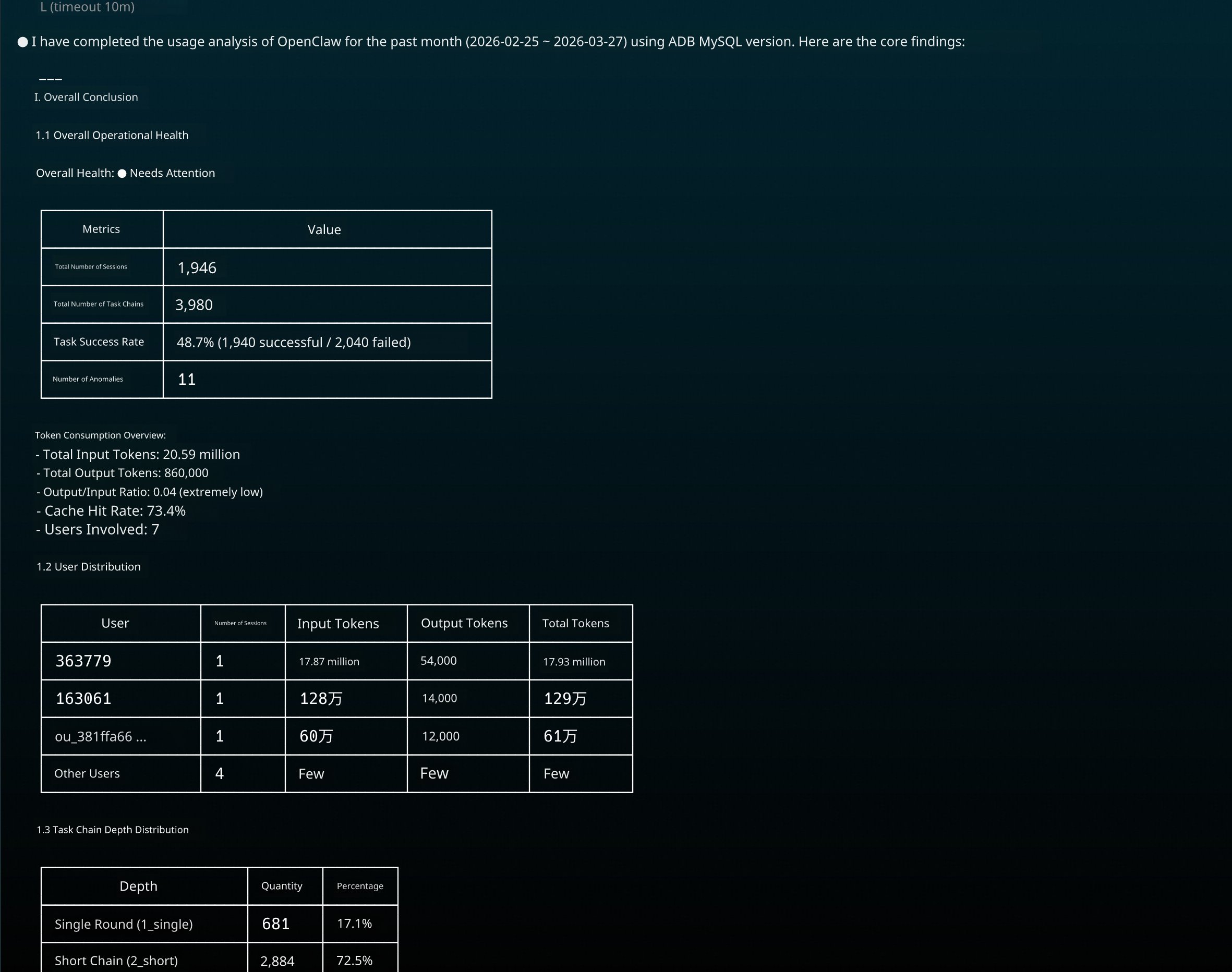
After mounting the Skill, enter the command. The system automatically recognizes the command and returns structured analysis results.
Enter in the command-line interface:
/alibabacloud-adb-openclaw-insight Analyze user OpenClaw usage for the last month.Analysis results