LiteTopics are lightweight, ephemeral sub-channels within a single ApsaraMQ for RocketMQ topic. You can create millions of fine-grained message channels -- one per session, task, or user -- without the resource overhead of separate topics. Each LiteTopic is an auto-managed secondary container inside a single parent topic, with its own ordered queue, lifecycle, and subscription scope.
Prerequisites
Before you begin, make sure that you have:
A non-serverless instance (subscription or pay-as-you-go) or a dedicated serverless instance
For new instances: On the purchase page, a product capability tag with the tag key set to
version_capabilityand the tag value set tolite-topic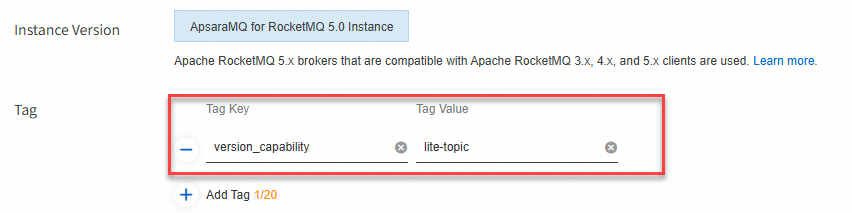
For existing instances: An upgraded instance version that supports LiteTopics. Submit a ticket to request the upgrade. Include the instance ID and region in your request.
You can also submit a ticket to request a free consultation for LiteTopic-based solutions.
Key concepts
What is a LiteTopic
A LiteTopic is a secondary container for message transmission and storage within a parent topic. It groups messages of different child classes -- such as individual sessions, tasks, or users -- under the same business logic.
LiteTopics serve two purposes:
Exclusive consumption and data fencing: Isolate data from different child classes into separate LiteTopics for finer-grained storage and subscription boundaries.
Identity and permissions: Control access at a granularity finer than the topic level by assigning identities and permissions to individual LiteTopics.
How LiteTopics fit into the domain model
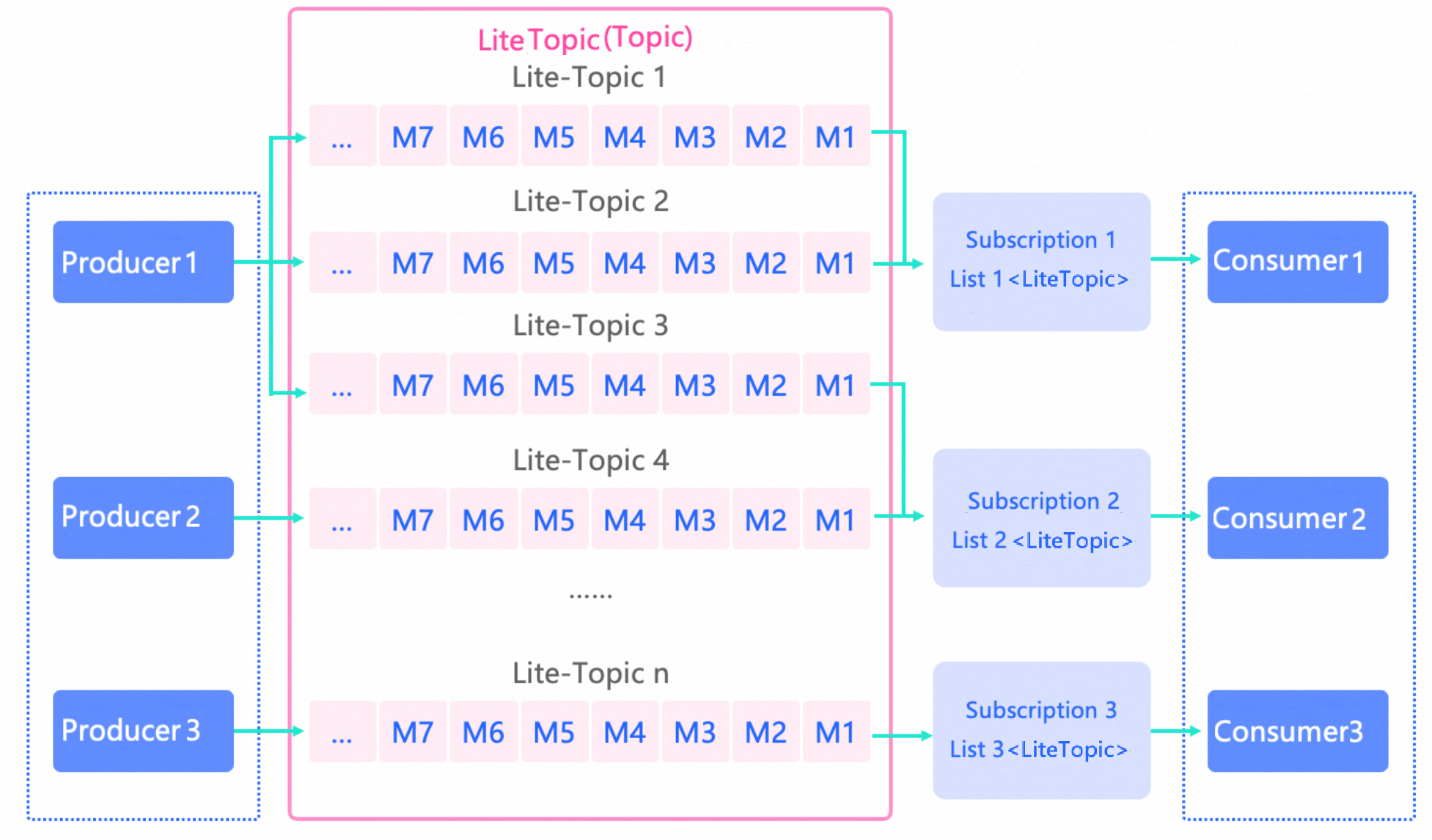
A topic is the top-level container for message transmission and storage in ApsaraMQ for RocketMQ. If a topic is of the Lite type, LiteTopics can be created within it. The combination of a topic and a LiteTopic uniquely identifies a message storage container.
Each LiteTopic contains one queue by default, and messages within that queue are stored and consumed in order.
LiteTopic properties
Name
Must be globally unique within the parent topic.
Auto-created on first use: if
setLiteTopicis called on a message and the specified LiteTopic does not exist, the system creates it automatically.For naming constraints, see Parameter limits.
Time-to-live (TTL)
If a LiteTopic receives no messages for longer than its TTL, the system deletes it automatically. Deletion releases the quota count.
Set the TTL through the
expirationvalue when you create the Lite-type topic.For TTL constraints, see Parameter limits.
Version compatibility
| Component | Minimum version |
|---|---|
| Server | 5.0-rmq-20251024-1 or later |
| Client (gRPC SDK) | RocketMQ gRPC 5.1.0 or later |
LiteTopics vs. normal topics
Switching a topic to Lite type changes its behavior. Each LiteTopic has only one queue by default, which limits per-channel TPS but enables ordered consumption and fine-grained subscription control. Evaluate this tradeoff before adopting Lite-type topics.
| Dimension | Lite topic | Normal topic |
|---|---|---|
| Primary topic | Both require you to create topic resources in advance. | Same as Lite. |
| Secondary channels | Supports millions of LiteTopics under a single parent topic, each with auto-managed lifecycle. | No secondary channel support. |
| Lifecycle management | Automatic creation on first send or subscribe. Automatic deletion after the configured TTL expires. | Manual creation and deletion only. |
| Ordering | Each LiteTopic has one queue by default. Messages are stored in order. | Multiple queues. Only partitioned ordered topics guarantee order. |
| Per-channel TPS | Limited per LiteTopic (single queue). Total TPS scales with the number of LiteTopics. | TPS scales horizontally by queue count and cluster nodes. |
| Subscription consistency | Flexible: each consumer in the same group can subscribe to a different set of LiteTopics. | Strict: all consumers in the same group must share the same subscription. |
| Consumption mode | Ordered only. Each LiteTopic is processed by one consumer thread. | Ordered or concurrent. |
| Dynamic subscription | Consumers can add or remove LiteTopic subscriptions at runtime. | Not supported. |
| Per-consumer subscription scale | Up to thousands of LiteTopics per consumer. | Not applicable. |
| Observability | Message accumulation metrics available. Message processing latency metrics not available. | Both accumulation and latency metrics available. |
| Message trace | Supported. | Supported. |
Use cases
Asynchronous communication for Multi-Agent systems
As AI workflows grow more complex, single agents are giving way to Multi-Agent architectures. Because AI tasks are long-running, synchronous inter-agent calls block the caller's thread and create scalability bottlenecks.

In this pattern, a Supervisor Agent splits a request and assigns sub-tasks to domain-specific sub-agents. The asynchronous communication flow is as follows:
Request flow:
Create a request topic for each sub-agent to serve as a task buffer queue. Use a priority topic to process high-priority tasks first.
The Supervisor Agent sends the split task information to the corresponding request topics.
Response flow:
The Supervisor Agent creates a Lite-type response topic and subscribes to it.
Each sub-agent processes its task and sends the result to a LiteTopic within the response topic. Name the LiteTopic after the task ID to create a dedicated channel per task.
The Supervisor Agent retrieves results in real time and pushes them to the web client through HTTP Server-Sent Events (SSE).
Distributed session state management for AI applications
AI applications rely on long-running, multi-turn sessions. When a persistent connection (such as SSE or WebSocket) breaks due to a gateway restart, timeout, or network instability, the session context and in-progress AI computation can be lost.

LiteTopics decouple session state from the connection. Name each LiteTopic after the session ID (for example, chatbot/{sessionID}). Session results are transmitted in order as messages within the LiteTopic.
When a persistent connection breaks and reconnects to a different node:
Web client 2 establishes a persistent connection with application service node 1 and creates Session2.
Application service node 1 subscribes to the LiteTopic
chat/SessionID2.The large model task scheduler sends results to
chat/SessionID2based on the session ID in the request.A network issue causes the connection to reconnect to application service node 2.
Application service node 1 unsubscribes from
chat/SessionID2. Application service node 2 subscribes tochat/SessionID2.The LiteTopic continues to push unconsumed messages to application service node 2 from the previous consumption offset, preserving session continuity.
Sample code
All examples use the RocketMQ gRPC 5.x SDK. For complete samples, see the RocketMQ 5.x gRPC SDK documentation.
Send messages
Producer producer = provider.newProducerBuilder()
    .setTopics(topic)
    .setClientConfiguration(clientConfiguration)
    .build();

final Message message = provider.newMessageBuilder()
    .setTopic(topic)
    // Set the message key for tracing.
    .setKeys("messageKey")
    // Route to a specific LiteTopic.
    .setLiteTopic("lite-topic-1")
    // Set the message body.
    .setBody("messageBody".getBytes())
    .build();

try {
    final SendReceipt sendReceipt = producer.send(message);
    log.info("Send message successfully, messageId={}", sendReceipt.getMessageId());
} catch (LiteTopicQuotaExceededException e) {
    // The LiteTopic quota is exceeded. Evaluate and increase the quota.
    log.error("Lite topic quota exceeded", e);
} catch (Throwable t) {
    log.error("Failed to send message", t);
}
Consume messages
Use the LitePushConsumer class to consume messages from LiteTopics:
// Initialize LitePushConsumer with consumer group, topic, and communication parameters.
LitePushConsumer litePushConsumer = provider.newLitePushConsumerBuilder()
    .setClientConfiguration(clientConfiguration)
    // The topic bound when the consumer group was created in the console.
    .bindTopic(topicName)
    // Set the consumer group.
    .setConsumerGroup(consumerGroup)
    .setMessageListener(messageView -> {
        // Process the message and return the consumption result.
        LOGGER.info("Consume message={}", messageView);
        return ConsumeResult.SUCCESS;
    })
    .build();

try {
    // Subscribe to the LiteTopics relevant to your workload.
    litePushConsumer.subscribeLite("lite-topic-1");
    litePushConsumer.subscribeLite("lite-topic-2");
    litePushConsumer.subscribeLite("lite-topic-3");
} catch (LiteSubscriptionQuotaExceededException e) {
    // The subscription quota is exceeded. Evaluate and increase the quota.
    log.error("Lite subscription quota exceeded", e);
} catch (Throwable t) {
    log.error("Failed to subscribe lite topic", t);
}

// Unsubscribe from LiteTopics that are no longer needed to release resources.
litePushConsumer.unsubscribeLite("lite-topic-3");

// Get the current set of subscribed LiteTopics.
Set<String> liteTopicSet = litePushConsumer.getLiteTopicSet();
Modify subscriptions at runtime
/**
 * subscribeLite() initiates a network request and performs quota verification,
 * so the call may fail. Always check the result to confirm the subscription
 * was added successfully.
 *
 * Possible failure scenarios:
 * 1. A network error occurs. Retry the operation.
 * 2. Quota verification fails with a LiteSubscriptionQuotaExceededException.
 *    Evaluate your quota and use unsubscribeLite() to release unused subscriptions.
 */

litePushConsumer.subscribeLite("lite-topic-1");

// Remove a subscription when no longer needed.
litePushConsumer.unsubscribeLite("lite-topic-1");
Limitations
| Limit | Value | Adjustable |
|---|---|---|
| Maximum LiteTopics per consumer | 2,000 | Yes, via ticket |
| Maximum consumption TPS per LiteTopic | 200 | Submit a ticket to consult |
Instance-level quotas also apply to the total number of LiteTopics that can be created or subscribed to. These quotas depend on your instance type and specifications. Submit a ticket to adjust them.
LiteTopic creation quota
The creation quota is the total number of active LiteTopics within a single instance. If this limit is reached and a client sends a message to a non-existent LiteTopic (which would trigger auto-creation), the system rejects the message.
LiteTopic subscription quota
The subscription quota is the sum of all active subscription relationships between all online consumers and LiteTopics within an instance. If this limit is reached, new subscription attempts fail.
Even if a LiteTopic has been deleted, any consumer that still holds a subscription to it counts toward the subscription quota until the consumer explicitly unsubscribes.
Serverless instances (dedicated, reserved + elastic)
| Specifications (TPS) | Maximum LiteTopics (created or subscribed) |
|---|---|
| 5,000 | 300,000 |
| 10,000 | 600,000 |
| 15,000 | 720,000 |
| 20,000 - 50,000 | 1,000,000 |
| 50,001 - 100,000 | 1,500,000 |
| 100,001 - 200,000 | 2,400,000 |
| 200,001 - 300,000 | 4,700,000 |
| 300,001 - 500,000 | 6,300,000 |
| 500,001 - 1,000,000 | 11,600,000 |
Non-serverless instances (subscription and pay-as-you-go)
Standard edition
| Instance type | Base TPS (messages/s) | Maximum LiteTopics (created or subscribed) |
|---|---|---|
| rmq.s2.2xlarge | 2,000 | 150,000 |
| rmq.s2.4xlarge | 4,000 | 250,000 |
| rmq.s2.6xlarge | 6,000 | 300,000 |
Professional edition
| Instance type | Base TPS (messages/s) | Maximum LiteTopics (created or subscribed) |
|---|---|---|
| rmq.p2.2xlarge | 2,000 | 150,000 |
| rmq.p2.4xlarge | 4,000 | 250,000 |
| rmq.p2.6xlarge | 6,000 | 300,000 |
| rmq.p2.10xlarge | 10,000 | 600,000 |
| rmq.p2.20xlarge | 20,000 | 800,000 |
| rmq.p2.30xlarge | 30,000 | 1,000,000 |
| rmq.p2.40xlarge | 40,000 | 1,200,000 |
| rmq.p2.50xlarge | 50,000 | 1,400,000 |
| rmq.p2.100xlarge | 100,000 | 2,200,000 |
| rmq.p2.120xlarge | 120,000 | 2,700,000 |
| rmq.p2.150xlarge | 150,000 | 3,300,000 |
| rmq.p2.200xlarge | 200,000 | 4,500,000 |
Platinum edition
| Instance type | Base TPS (messages/s) | Maximum LiteTopics (created or subscribed) |
|---|---|---|
| rmq.u2.10xlarge | 10,000 | 600,000 |
| rmq.u2.20xlarge | 20,000 | 800,000 |
| rmq.u2.30xlarge | 30,000 | 1,000,000 |
| rmq.u2.40xlarge | 40,000 | 1,200,000 |
| rmq.u2.50xlarge | 50,000 | 1,400,000 |
| rmq.u2.60xlarge | 60,000 | 1,600,000 |
| rmq.u2.70xlarge | 70,000 | 1,700,000 |
| rmq.u2.80xlarge | 80,000 | 1,800,000 |
| rmq.u2.90xlarge | 90,000 | 2,000,000 |
| rmq.u2.100xlarge | 100,000 | 2,200,000 |
| rmq.u2.120xlarge | 120,000 | 2,700,000 |
| rmq.u2.150xlarge | 150,000 | 3,300,000 |
| rmq.u2.200xlarge | 200,000 | 4,500,000 |
| rmq.u2.250xlarge | 250,000 | 5,600,000 |
| rmq.u2.300xlarge | 300,000 | 6,300,000 |
| rmq.u2.350xlarge | 350,000 | 7,500,000 |
| rmq.u2.400xlarge | 400,000 | 9,300,000 |
| rmq.u2.450xlarge | 450,000 | 10,400,000 |
| rmq.u2.500xlarge | 500,000 | 11,600,000 |
| rmq.u2.550xlarge | 550,000 | 12,800,000 |
| rmq.u2.600xlarge | 600,000 | 14,000,000 |
| rmq.u2.1000xlarge | 1,000,000 | 23,200,000 |
Related resources
RocketMQ 5.x gRPC SDK -- send and consume messages with LiteTopics
Parameter limits -- naming and TTL constraints
Submit a ticket -- adjust instance-level LiteTopic quotas