All Products
Search
Document Center

Platform For AI:Quickly submit a DataJuicer job

Last Updated:Apr 01, 2026

DataJuicer on DLC is a data processing service jointly launched by Alibaba Cloud PAI and Tongyi Lab that lets you run DataJuicer jobs on the cloud with a single click. Use it to clean, filter, transform, and augment large-scale multimodal datasets — text, images, audio, and video — for large language model (LLM) training.

How it works

  1. Select a DataJuicer image and set the framework to DataJuicer.

  2. Choose a run mode: Single Node for smaller experiments, Distributed for production-scale workloads.

  3. Write a DataJuicer configuration — as a Shell startup command or inline YAML — to define your operators and data paths.

  4. Submit the job. PAI DLC pulls the image, mounts your Object Storage Service (OSS) data, runs the job, and writes results back to the specified output path.

Key capabilities

CapabilityDescription
Rich operatorsOver 100 built-in operators — aggregators, duplicators, filters, formatters, groupers, mappers, and selectors — covering the full data processing lifecycle. Compose operator chains to match your pipeline needs.
High performanceSaves 24.8% of processing time for multimodal data at the scale of tens of millions of samples compared to native nodes, with near-linear scalability.
Resource estimationWhen using a Resource Quota, automatically estimates the optimal resource configuration by analyzing dataset, operator, and quota information, then runs the job without manual sizing.
Large-scale processingHandles workloads from thousands of samples in experiments to tens of billions in production, using PAI DLC distributed computing and hardware acceleration (CUDA and operator fusion).
Automatic fault tolerancePAI DLC provides node-, job-, and container-level fault tolerance. DataJuicer adds operator-level fault tolerance against server and network failures.
Fully managedNo deployment or O&M required. Submit jobs from the console without managing the underlying infrastructure.

Prerequisites

Before you begin, ensure that you have:

  • A PAI DLC workspace

  • An OSS bucket containing your dataset

  • A DataJuicer-compatible image (the official image from the data-juicer repository or a custom image built on top of it that includes the dj-process command)

Submit a DataJuicer job

Step 1: Select an image and framework

The image must have the DataJuicer environment pre-installed and include the dj-process command.

image

Set Framework to DataJuicer.

image

Step 2: Configure the run mode

Choose a run mode based on your workload size. Make sure the run mode matches the executor_type in your configuration file.

Run modeWhen to useexecutor_type
Single nodeExperiments and smaller datasetsdefault (or omit the field)
DistributedProduction-scale or large datasetsray

Single-node configuration:

  • Running Mode: Select Single Node.

  • Number of Nodes: Set to 1.

Distributed configuration:

  • Running Mode: Select Distributed.

  • Resource Estimation (requires a Resource Quota): Enable this option to let the system automatically estimate the optimal resource configuration based on your dataset, operators, and quota. To cap resource usage, set the Maximum Job Resource Limit. If left blank, the system requests resources based on the estimation results.

  • Job Resources (if resource estimation is disabled): Manually configure the following:

    • Quantity: Head nodes must be 1; Worker nodes must be at least 1.

    • Resource Type: The Head node requires more than 8 GB of memory. Configure Worker node resources based on your workload.

  • Fault Tolerance and Diagnosis (optional): Configure Head Node Fault Tolerance by selecting a Redis instance within the same Virtual Private Cloud (VPC).

Step 3: Enter the startup command

DLC supports startup commands in Shell and YAML formats. Shell is the default.

image

The three key parameters are:

ParameterDescription
dataset_pathPath to the input data. In a DLC job, set this to the mounted storage path inside the container (for example, an OSS path mounted at /mnt/data/).
export_pathOutput path for processing results. For distributed jobs, this must be a folder path, not a file path.
executor_typeExecutor type: default for single-node (DefaultExecutor), ray for distributed (RayExecutor). See Data-Juicer distributed data processing for details on the Ray executor.

For a full list of configuration options, see Create a configuration file and config_all.yaml.

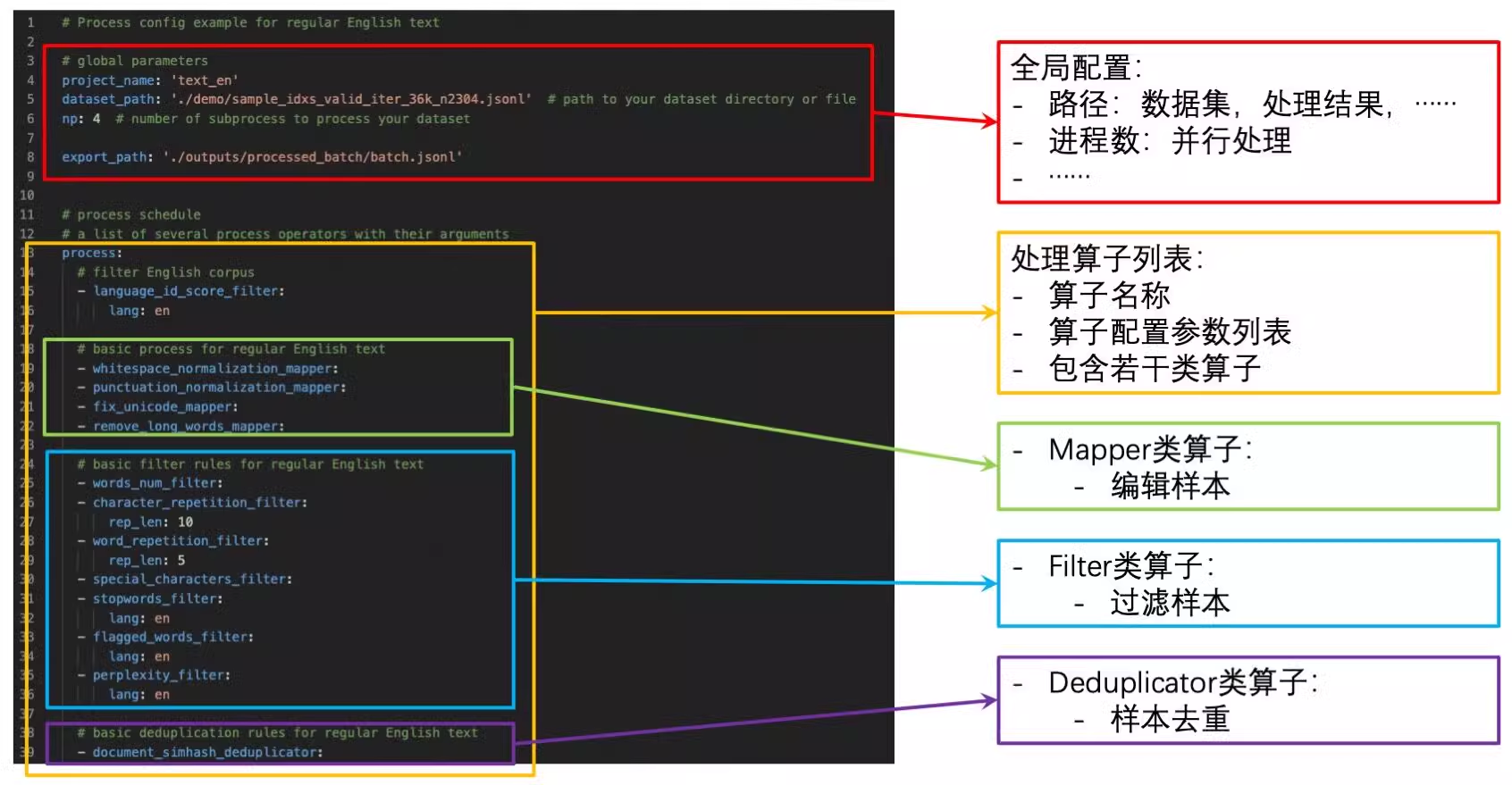
The following figure shows a sample DataJuicer configuration:

image.png

Shell format — example 1: Write the configuration to a temporary file and run dj-process.

set -ex

cat > /tmp/run_config.yaml <<EOL
# Process config example for dataset

# global parameters
project_name: 'ray-demo'
dataset_path: '/mnt/data/process_on_ray/data/demo-dataset2.jsonl'  # path to your dataset directory or file
export_path: '/mnt/data/data-juicer-outputs/20250728/01/process_on_ray/result.jsonl'

executor_type: 'ray'
ray_address: 'auto'                     # change to your ray cluster address, e.g., ray://<hostname>:<port>
np: 12

# process schedule
# a list of several process operators with their arguments
process:
  # Filter ops
  - alphanumeric_filter:                                    # filter text with alphabet/numeric ratio out of specific range.
      tokenization: false                                     # Whether to count the ratio of alphanumeric to the total number of tokens.
      min_ratio: 0.0                                          # the min ratio of filter range
      max_ratio: 0.9                                          # the max ratio of filter range
  - average_line_length_filter:                             # filter text with the average length of lines out of specific range.
      min_len: 10                                             # the min length of filter range
      max_len: 10000                                          # the max length of filter range
  - character_repetition_filter:                            # filter text with the character repetition ratio out of specific range
      rep_len: 10                                             # repetition length for char-level n-gram
      min_ratio: 0.0                                          # the min ratio of filter range
      max_ratio: 0.5                                          # the max ratio of filter range
  - flagged_words_filter:                                   # filter text with the flagged-word ratio larger than a specific max value
      lang: en                                                # consider flagged words in what language
      tokenization: false                                     # whether to use model to tokenize documents
      max_ratio: 0.0045                                       # the max ratio to filter text
      flagged_words_dir: ./assets                             # directory to store flagged words dictionaries
      use_words_aug: false                                    # whether to augment words, especially for Chinese and Vietnamese
      words_aug_group_sizes: [2]                              # the group size of words to augment
      words_aug_join_char: ""                                 # the join char between words to augment
  - language_id_score_filter:                               # filter text in specific language with language scores larger than a specific max value
      lang: en                                                # keep text in what language
      min_score: 0.8                                          # the min language scores to filter text
  - maximum_line_length_filter:                             # filter text with the maximum length of lines out of specific range
      min_len: 10                                             # the min length of filter range
      max_len: 10000                                          # the max length of filter range
  - perplexity_filter:                                      # filter text with perplexity score out of specific range
      lang: en                                                # compute perplexity in what language
      max_ppl: 1500                                           # the max perplexity score to filter text
  - special_characters_filter:                              # filter text with special-char ratio out of specific range
      min_ratio: 0.0                                          # the min ratio of filter range
      max_ratio: 0.25                                         # the max ratio of filter range
  - stopwords_filter:                                       # filter text with stopword ratio smaller than a specific min value
      lang: en                                                # consider stopwords in what language
      tokenization: false                                     # whether to use model to tokenize documents
      min_ratio: 0.3                                          # the min ratio to filter text
      stopwords_dir: ./assets                                 # directory to store stopwords dictionaries
      use_words_aug: false                                    # whether to augment words, especially for Chinese and Vietnamese
      words_aug_group_sizes: [2]                              # the group size of words to augment
      words_aug_join_char: ""                                 # the join char between words to augment
  - text_length_filter:                                     # filter text with length out of specific range
      min_len: 10                                             # the min length of filter range
      max_len: 10000                                          # the max length of filter range
  - words_num_filter:                                       # filter text with number of words out of specific range
      lang: en                                                # sample in which language
      tokenization: false                                     # whether to use model to tokenize documents
      min_num: 10                                             # the min number of filter range
      max_num: 10000                                          # the max number of filter range
  - word_repetition_filter:                                 # filter text with the word repetition ratio out of specific range
      lang: en                                                # sample in which language
      tokenization: false                                     # whether to use model to tokenize documents
      rep_len: 10                                             # repetition length for word-level n-gram
      min_ratio: 0.0                                          # the min ratio of filter range
      max_ratio: 0.5                                          # the max ratio of filter range
EOL

dj-process --config /tmp/run_config.yaml

Shell format — example 2: Store the configuration file in OSS, mount it to the DLC container, and run dj-process with the mounted path.

dj-process --config /mnt/data/process_on_ray/config/demo.yaml

YAML format: Enter the DataJuicer configuration directly in the command line.

# Process config example for dataset

# global parameters
project_name: 'ray-demo'
dataset_path: '/mnt/data/process_on_ray/data/demo-dataset2.jsonl'  # path to your dataset directory or file
export_path: '/mnt/data/data-juicer-outputs/20250728/01/process_on_ray/result.jsonl'

executor_type: 'ray'
ray_address: 'auto'                     # change to your ray cluster address, e.g., ray://<hostname>:<port>
np: 12

# process schedule
# a list of several process operators with their arguments
process:
  # Filter ops
  - alphanumeric_filter:                                    # filter text with alphabet/numeric ratio out of specific range.
      tokenization: false                                     # Whether to count the ratio of alphanumeric to the total number of tokens.
      min_ratio: 0.0                                          # the min ratio of filter range
      max_ratio: 0.9                                          # the max ratio of filter range
  - average_line_length_filter:                             # filter text with the average length of lines out of specific range.
      min_len: 10                                             # the min length of filter range
      max_len: 10000                                          # the max length of filter range
  - character_repetition_filter:                            # filter text with the character repetition ratio out of specific range
      rep_len: 10                                             # repetition length for char-level n-gram
      min_ratio: 0.0                                          # the min ratio of filter range
      max_ratio: 0.5                                          # the max ratio of filter range
  - flagged_words_filter:                                   # filter text with the flagged-word ratio larger than a specific max value
      lang: en                                                # consider flagged words in what language
      tokenization: false                                     # whether to use model to tokenize documents
      max_ratio: 0.0045                                       # the max ratio to filter text
      flagged_words_dir: ./assets                             # directory to store flagged words dictionaries
      use_words_aug: false                                    # whether to augment words, especially for Chinese and Vietnamese
      words_aug_group_sizes: [2]                              # the group size of words to augment
      words_aug_join_char: ""                                 # the join char between words to augment
  - language_id_score_filter:                               # filter text in specific language with language scores larger than a specific max value
      lang: en                                                # keep text in what language
      min_score: 0.8                                          # the min language scores to filter text
  - maximum_line_length_filter:                             # filter text with the maximum length of lines out of specific range
      min_len: 10                                             # the min length of filter range
      max_len: 10000                                          # the max length of filter range
  - perplexity_filter:                                      # filter text with perplexity score out of specific range
      lang: en                                                # compute perplexity in what language
      max_ppl: 1500                                           # the max perplexity score to filter text
  - special_characters_filter:                              # filter text with special-char ratio out of specific range
      min_ratio: 0.0                                          # the min ratio of filter range
      max_ratio: 0.25                                         # the max ratio of filter range
  - stopwords_filter:                                       # filter text with stopword ratio smaller than a specific min value
      lang: en                                                # consider stopwords in what language
      tokenization: false                                     # whether to use model to tokenize documents
      min_ratio: 0.3                                          # the min ratio to filter text
      stopwords_dir: ./assets                                 # directory to store stopwords dictionaries
      use_words_aug: false                                    # whether to augment words, especially for Chinese and Vietnamese
      words_aug_group_sizes: [2]                              # the group size of words to augment
      words_aug_join_char: ""                                 # the join char between words to augment
  - text_length_filter:                                     # filter text with length out of specific range
      min_len: 10                                             # the min length of filter range
      max_len: 10000                                          # the max length of filter range
  - words_num_filter:                                       # filter text with number of words out of specific range
      lang: en                                                # sample in which language
      tokenization: false                                     # whether to use model to tokenize documents
      min_num: 10                                             # the min number of filter range
      max_num: 10000                                          # the max number of filter range
  - word_repetition_filter:                                 # filter text with the word repetition ratio out of specific range
      lang: en                                                # sample in which language
      tokenization: false                                     # whether to use model to tokenize documents
      rep_len: 10                                             # repetition length for word-level n-gram
      min_ratio: 0.0                                          # the min ratio of filter range
      max_ratio: 0.5                                          # the max ratio of filter range

Use case: Processing massive video data

This use case shows how to process video data for autonomous driving and embodied intelligence applications using DataJuicer on DLC.

Challenges

Large-scale video data processing faces three core challenges:

  • Modality separation: Video data contains heterogeneous information from multiple sources, including visual, audio, time series, and text descriptions. This requires a toolchain for cross-modal feature fusion, but traditional pipeline-based tools struggle to perform global association analysis.

  • Quality bottlenecks: Data cleaning involves multiple stages, such as deduplication, annotation repair, keyframe extraction, and noise filtering. Traditional multi-stage processing can easily lead to information loss and redundant computation.

  • Engineering efficiency: Processing large-scale video data (terabytes or petabytes) places extremely high demands on distributed computing power scheduling and heterogeneous hardware adaptation. Self-built systems often have long development cycles and low resource utilization.

Technical advantages

The PAI-DLC DataJuicer framework addresses these challenges with:

  • Multimodal collaborative processing engine: Built-in operators for text, images, video, and audio support joint cleaning and augmentation of visual, text, and time series data, avoiding the fragmented processing of traditional toolchains.

  • Cloud-native elastic architecture: Deeply integrates PAI's distributed storage acceleration of hundreds of GB/s and its GPU/CPU heterogeneous resource pooling capabilities. It supports automatic scaling for jobs with thousands of nodes.

Procedure

The pipeline runs three steps in sequence:

  1. Filter out video clips that are too short (below the minimum duration threshold).

  2. Filter out clips with a high Not Safe For Work (NSFW) score.

  3. Extract keyframes from the remaining clips and generate text captions.

Prepare the data

Use the Youku-AliceMind dataset as sample data. Extract 2,000 video entries and upload them to OSS.

Create the DLC job

Configure the following parameters when creating a new DLC job. Leave all other parameters at their defaults.

ParameterValue
Image ConfigurationSelect Alibaba Cloud Image, then search for and select data-juicer:1.4.3-pytorch2.6-gpu-py310-cu121-ubuntu22.04.
Mount storageSelect OSS. Set Uri to the OSS folder containing your dataset. The default Mount Path is /mnt/data/.
SourceSelect Public Resources.
FrameworkSelect DataJuicer.
Running ModeSelect Distributed.
Job ResourceConfigure nodes and specifications as shown in the figure below.
Startup CommandSelect YAML and enter the configuration below.
image
# global parameters
project_name: 'dj-video-demo'
# Dataset mount path
dataset_path: '/mnt/data/data/Youku-AliceMind/caption/validation/youku_alice_mind_dj_2k.jsonl'

executor_type: 'ray'
skip_op_error: false  # Debugging phase
export_type: 'jsonl'
export_path: '/mnt/data/outputs/video_demo/v1'
video_key: 'videos'
video_special_token: '<__dj__video>'

eoc_special_token: '<|__dj__eoc|>'

# process schedule
# a list of several process operators with their arguments
process:
  - video_duration_filter:
      min_duration: 0
      max_duration: 3600
      any_or_all: any
  - video_nsfw_filter:
      hf_nsfw_model: Falconsai/nsfw_image_detection
      max_score: 0.5
      frame_sampling_method: all_keyframes
      frame_num: 3
      reduce_mode: avg
      any_or_all: any
  - video_captioning_from_frames_mapper:
      hf_img2seq: 'Salesforce/blip2-opt-2.7b'
      caption_num: 1
      keep_candidate_mode: 'random_any'
      keep_original_sample: true
      frame_sampling_method: 'all_keyframes'
      frame_num: 3

Click OK to create the job.