This topic answers frequently asked questions (FAQ) about Log Management for Web Application Firewall (WAF) 3.0.
Why can't I find some logs?
In addition to the required log fields for WAF, logs for some optional fields are not recorded by default. You must manually enable these optional fields. For example, if you configure custom rules, we recommend that you see Log fields and select the acl_action, acl_rule_id, acl_rule_type, and acl_test fields to save the logs that are generated when the corresponding protection rules are triggered.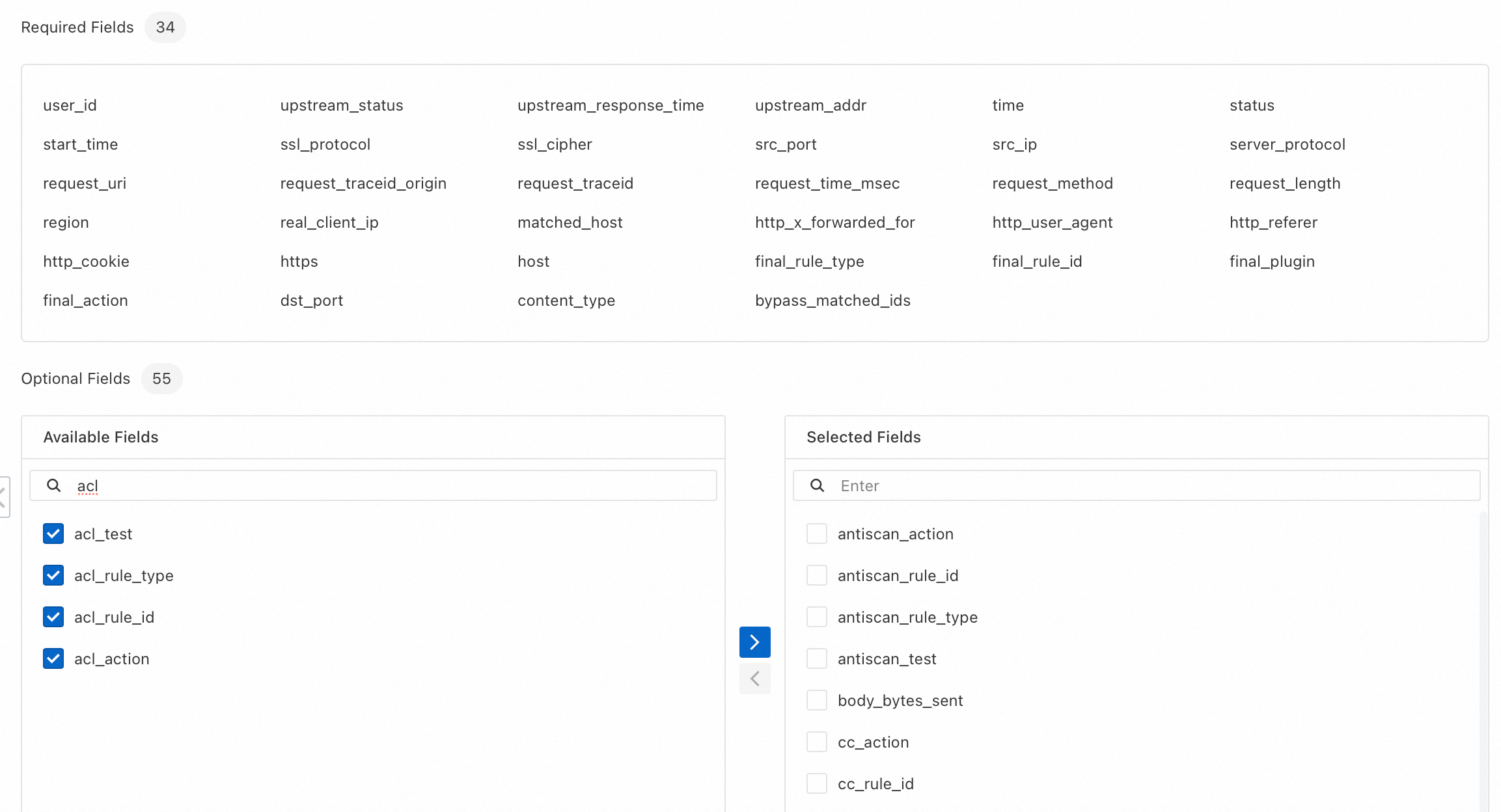
Enabling optional fields increases the storage space that WAF logs consume. We recommend that you enable optional fields only as needed.
Why can I view logs that are older than the specified retention period?
You may be able to view logs that are older than the specified retention period. For example, if you set the log retention period to 90 days, you may still see logs that were generated more than 90 days ago. This is expected behavior. Logs that are older than the retention period may be temporarily visible during the deletion window. The deletion process can be delayed for up to seven days. You are not charged for these delayed-deletion logs, and they do not count towards your storage capacity.
What is the value of the remote_addr field in WAF logs when you use the cloud native mode to add an ALB instance to WAF?
The value of the remote_addr field varies based on the configuration of the Application Load Balancer (ALB) instance.
ALB instance configuration | Value of the remote_addr field | |
Find Real Client Source IP is not enabled for the ALB instance. | The value is the source IP address of the client that directly connects to the ALB instance. If another Layer 7 proxy, such as Alibaba Cloud CDN or Anti-DDoS Pro and Anti-DDoS Premium, is deployed in front of the ALB instance, this field contains the IP address of the upstream proxy. | |
The ALB instance has Retrieve Client Source IP enabled, and the client's source IP address is in the instance's Trusted IP List. | The value is the content of the X-Forwarded-For field. | |
The ALB instance has Retrieve Client Source IP enabled, and the source IP address used to access the instance is not in the instance's Trusted IP List. | The value is the source IP address of the client that directly connects to the ALB instance. If another Layer 7 proxy, such as Alibaba Cloud CDN or Anti-DDoS Pro and Anti-DDoS Premium, is deployed in front of the ALB instance, this field contains the IP address of the upstream proxy. | |