Task Center lets you track the progress and status of instance management operations—such as creating, upgrading, downgrading, or restarting an instance—directly in the ApsaraDB for MongoDB console.
View tasks
-
Open the Task Center page and select a region.
-
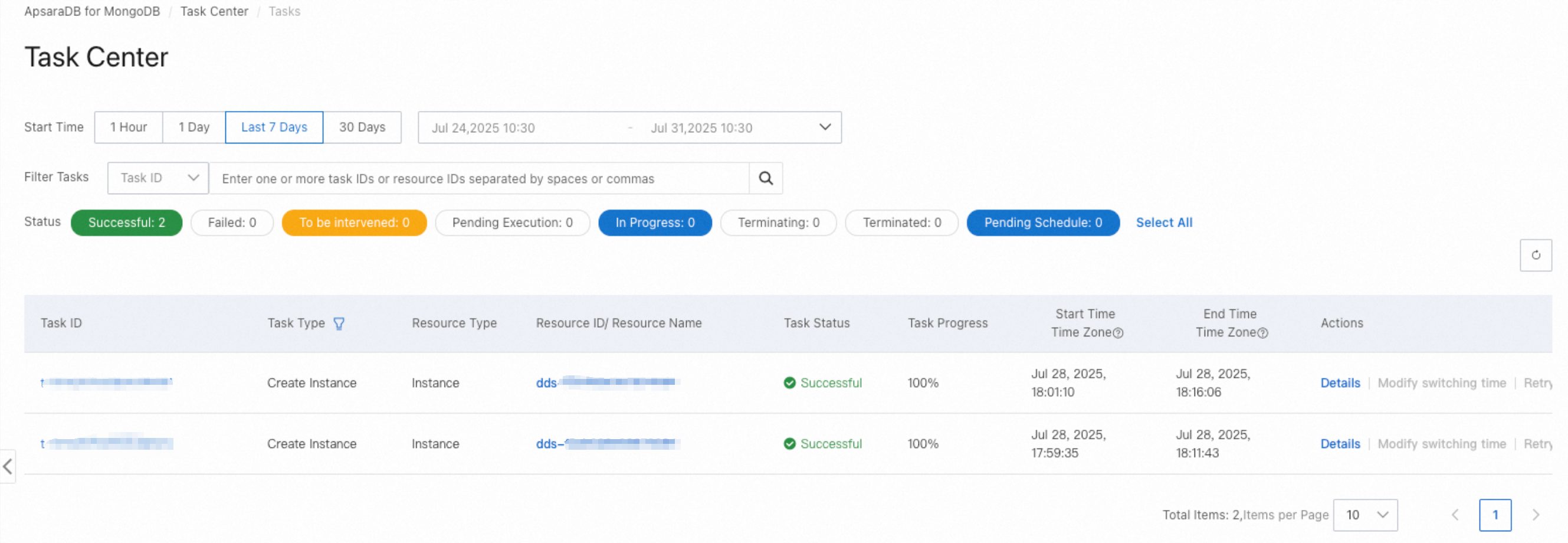
View the task list. Filter tasks by start time, keyword, or status.
Supported task types
Task Center supports the following task types.
Disk version
| Task name | TaskType (API status) | Architecture | Description |
|---|---|---|---|
| Create instance | CreateIns | ReplicaSet / Sharded cluster | Creates an instance. |
| Restart instance | RestartIns | ReplicaSet / Sharded cluster | Restarts an instance. |
| Primary/secondary failover | HaSwitch | ReplicaSet / Sharded cluster | Performs a primary/secondary failover or a role switch for an instance. |
| Kernel version upgrade | KernelVersionUpgrade | ReplicaSet / Sharded cluster | Upgrades the instance to a major or minor kernel version. |
| Specification change or migration | ModifyInsSpec | ReplicaSet / Sharded cluster | Changes the storage class, or upgrades, downgrades, or scales out the instance. |
| Network change | ModifyNetwork | ReplicaSet / Sharded cluster | Changes the VPC and vSwitch. |
| Add node | AddInsNode | ReplicaSet | Adds a node to a replica set instance. |
| Add node | AddInsNode | Sharded cluster | Adds a read-only node to a shard. |
| Delete node | DeleteInsNode | ReplicaSet | Deletes a node from a replica set instance. |
| Delete node | DeleteInsNode | Sharded cluster | Deletes a read-only node from a shard. |
| Data flashback | FlashBackIns | ReplicaSet / Sharded cluster | Performs a data flashback by key. |
| Data restoration | RestoreIns | ReplicaSet / Sharded cluster | Restores data by key. |
| Add shard | AddInsShards | Sharded cluster | Adds a shard to a sharded cluster instance. |
| Delete shard | DeleteInsShards | Sharded cluster | Deletes a shard from a sharded cluster instance. |
| Clone instance | CloneIns | ReplicaSet / Sharded cluster | Restores data from a backup set, performs a point-in-time restore, or recreates an instance from the recycle bin. |
| Delete instance | DeleteIns | ReplicaSet / Sharded cluster | Deletes an instance. |
Local disk version
| Task name | TaskType (API status) | Architecture | Description |
|---|---|---|---|
| Create instance | CreateIns | ReplicaSet / Sharded cluster | Creates an instance. |
| Delete instance | DeleteIns | ReplicaSet / Sharded cluster | Deletes an instance. |
| Parameter adjustment | ChangeVariable | ReplicaSet / Sharded cluster | Modifies kernel parameters, SSL settings, or enables transparent data encryption (TDE), or refreshes the audit log configuration. |
| Configuration change | ModifyInsConfig | ReplicaSet | Changes the instance configuration. |
| Restart instance | RestartIns | ReplicaSet | Restarts an instance. |
| Restart instance | RestartIns | Sharded cluster | Restarts the mongos, shard, or Configserver node. |
| Primary/secondary failover | HaSwitch | ReplicaSet | Performs a primary/secondary failover for a replica set instance. |
| Primary/secondary failover | HaSwitch | Sharded cluster | Performs a primary/secondary failover for a shard or Configserver node. |
| Kernel version upgrade | KernelVersionUpgrade | ReplicaSet / Sharded cluster | Upgrades the instance to a major or minor kernel version. |
| Account change | ModifyAccount | ReplicaSet / Sharded cluster | Resets the password. |
| Specification change or migration | ModifyInsSpec | ReplicaSet | Scales out the local disk or upgrades/downgrades the instance. |
| Specification change or migration | ModifyInsSpec | Sharded cluster | Upgrades or downgrades the mongos, Configserver, or shard node; changes the node instance type; migrates the instance to another zone; or deletes a read-only node from a shard. |
| Network change | ModifyNetwork | ReplicaSet | Changes routing information and replaces the virtual IP address (VIP). |
| Network change | ModifyNetwork | Sharded cluster | Changes the VPC, Internet, or classic network settings. |
| Lock instance | LockIns | ReplicaSet / Sharded cluster | Locks an instance. |
| Unlock instance | UnlockIns | ReplicaSet / Sharded cluster | Unlocks an instance. |
| Add node | AddInsNode | ReplicaSet | Adds a node to a replica set instance. |
| Add node | AddInsNode | Sharded cluster | Adds a read-only node to a shard. |
| Delete node | DeleteInsNode | ReplicaSet | Deletes a node from a replica set instance. |
| Add shard | AddInsShards | Sharded cluster | Adds one or more shards to a sharded cluster instance. |
| Delete shard | DeleteInsShards | Sharded cluster | Deletes a shard from a sharded cluster instance. |
| Clone instance | CloneIns | ReplicaSet / Sharded cluster | Restores data from a backup set, performs a point-in-time restore, or recreates an instance from the recycle bin. |
Switchover time
For maintenance tasks that involve a switchover—such as upgrades, downgrades, version upgrades, and restarts—choose when the switchover occurs:
-
Execute Immediately: The switchover runs as soon as preparations are complete.
-
Execute Within Maintenance Window (Recommended): Preparations run first, and the switchover is performed within your configured maintenance window.
To switch at a specific time outside the maintenance window, wait until the task status changes to Pending Schedule. Then click Modify Switching time in the Actions column and select Execute now.
FAQ
API reference
| API operation | Description |
|---|---|
| DescribeHistoryTasks |
Queries task information in Task Center. |