Age-Viewer is a web-based visualization tool for Apache AGE (A Graph Extension). Use it to write and run Cypher queries against your AnalyticDB for PostgreSQL graph data and explore graph structures interactively.
Prerequisites
Before you begin, make sure that you have:
An AnalyticDB for PostgreSQL instance and an Elastic Compute Service (ECS) instance in the same Virtual Private Cloud (VPC), where:
The AnalyticDB for PostgreSQL instance runs kernel version V7.2.1.1 or later
The ECS instance uses Linux
The ECS instance's VPC IP address added to the whitelist of your AnalyticDB for PostgreSQL instance
The
ageextension installed on your AnalyticDB for PostgreSQL instanceThe
ag_catalogschema added to your database'ssearch_pathby running:ALTER DATABASE <database_name> SET "$user", public, ag_catalog;Skipping this step causes query errors in Age-Viewer.
A graph analysis engine created by technical support in the target database of your AnalyticDB for PostgreSQL instance
Step 1: Deploy Age-Viewer
Two deployment methods are available. Choose based on your preference:
| Method | When to use |
|---|---|
| From source code | You want to customize the code or need the latest upstream version |
| From a Docker image | You want a faster setup with no build steps |
Deploy from source code
Clone the repository.
git clone https://github.com/apache/age-viewer.gitApply the following code modifications. When commenting out code, include a space between
//and the code — otherwise the service fails to start.In
backend/src/services/databaseService.js, comment out line 35: ``js // await DatabaseService.analyzeGraph(gr);``In
backend/src/tools/AGEParser.js, comment out lines 39–43: ``js async function setAGETypes(client, types) { // await client.query(// CREATE EXTENSION IF NOT EXISTS age; // LOAD 'age'; // SET search_path = ag_catalog, "$user", public; //)``In
frontend/src/components/cypherresult/presentations/CypherResultTable.jsx, replace line 23: ``js // import { uuid } from 'cytoscape/src/util'; import uuid from 'react-uuid';``
Build and start the service. The port number is displayed in the terminal output after this step.
In the
age-viewerdirectory, run: ``bash npm run setup``Start the service: ``
bash npm run start``
Add an inbound rule for the port from step 4 to the security group of your ECS instance.
In your local browser, go to
http://<Public IP of ECS instance>:<Port>.
Deploy from a Docker image
Upload the age-viewer-image.tar.gz file to your ECS instance.
Install Docker and Docker Compose, then load the image:
docker load < age-viewer-image.tar.gzStart the container:
docker run -d --name adbpg-age-viewer -p 3000:3000 age-viewer-imageThe service listens on port 3000.
Add an inbound rule for port 3000 to the security group of your ECS instance.
In your local browser, go to
http://<Public IP of ECS instance>:3000. Find the public IP address under Instance Details > Configuration Information > Public IP Address.
Step 2: Connect to the database
Enter the following connection parameters in the Age-Viewer login screen:
| Parameter | Description | Where to find it |
|---|---|---|
| Connect URL | Internal endpoint of the AnalyticDB for PostgreSQL instance | Instance Details page |
| Connect Port | Port of the AnalyticDB for PostgreSQL instance | Fixed at 5432 |
| Database Name | Name of the database | Instance Details page |
| User Name | Database username | — |
| Password | Database password | — |
After connecting, the connection information screen is displayed.
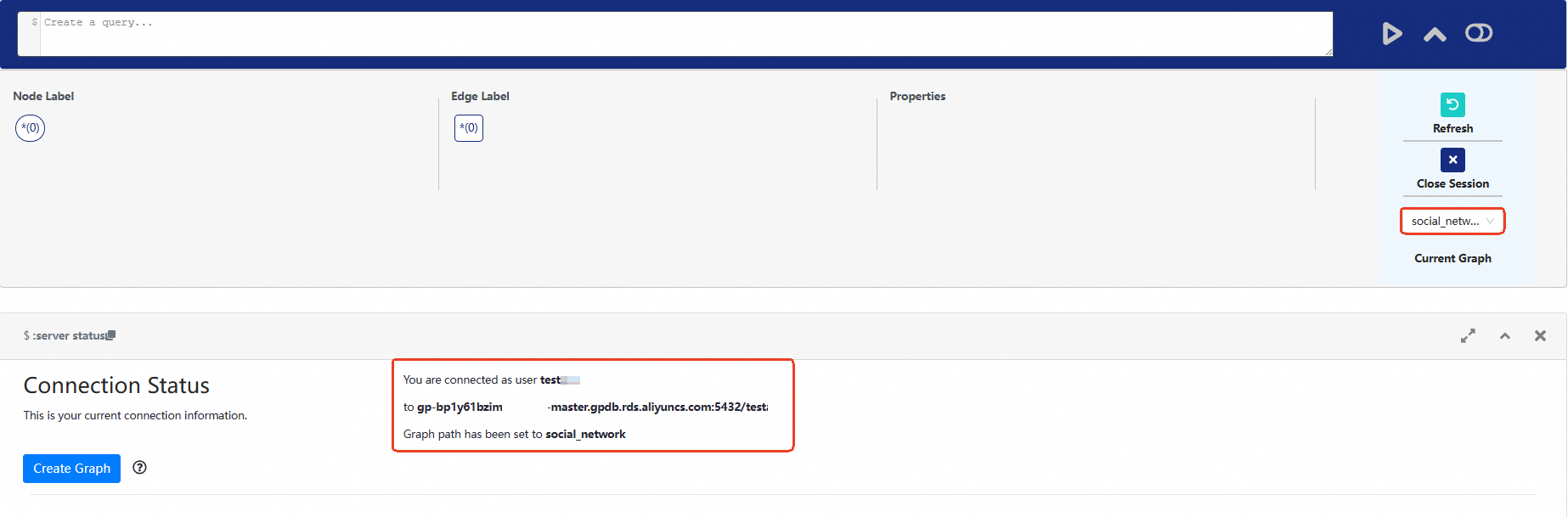
To switch graphs, select a graph from the Current Graph dropdown on the right.
Step 3: Query graph data
If a graph with nodes, edges, and labels already exists in the database, run Cypher queries directly in the query box.
For sample graph data, see Create and use a graph analysis engine.
The following example queries all nodes with the label Person:
SELECT * FROM cypher('relation', $$
  MATCH (m:Person)
  RETURN m
$$) AS (result_a agtype);
Results are displayed visually in the graph view:
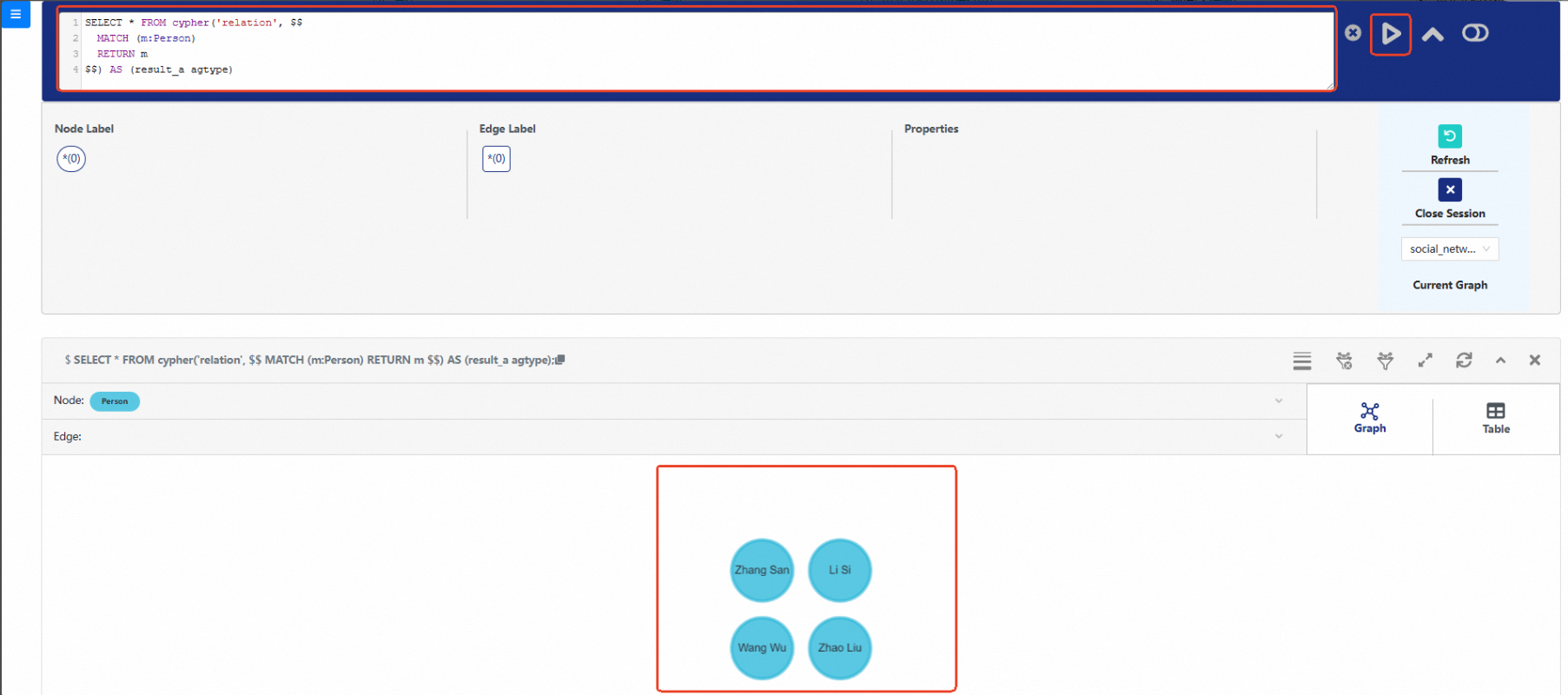
You can also click a label below the query box — for example, EMPLOYED — and Age-Viewer automatically generates the corresponding Cypher query. Click Query on the right to run it and view all relationships of that type.

Troubleshooting
Error: error:0308010C:digital envelope routines::unsupported
This error occurs when the Node.js version uses a newer OpenSSL provider that is incompatible with the build toolchain. Set the legacy OpenSSL provider and restart:
export NODE_OPTIONS=--openssl-legacy-provider
npm run start
Error: Cannot find module '@babel/runtime/helpers/interopRequireDefault'
The @babel/runtime package is missing. Install it and restart:
npm add @babel/runtime
npm run start