The data source management feature integrates with Key Management Service (KMS) to provide unified data source configuration and dynamic credential rotation for your applications. It supports major databases such as ApsaraDB RDS, PolarDB, and ApsaraDB for Redis. Through simple configuration, applications can perform seamless, runtime credential updates without requiring code changes.
This feature is available only in the MSE Nacos Enterprise Edition. It is not supported in the Professional, Developer, or Serverless editions.
Background and challenges
Core capabilities
Data source management is a universal solution designed to address these challenges:
-
Encrypted storage: KMS encrypts and stores data source credentials, eliminating the risk of plain text exposure.
-
Automated rotation: Integrates with KMS to enable scheduled credential rotation, supporting seamless runtime updates without application restarts.
-
Configuration-based access: Applications read data source information from the Nacos Configuration Center, enabling integration without any code changes.
Prerequisites
1. Prepare a database instance
-
Create an ApsaraDB RDS or PolarDB database instance: You can use an existing instance or create a new one.
2. Configure KMS
-
Activate Key Management Service (KMS): Purchase and activate a KMS instance. Ensure the image version of the KMS instance is dkms-3.0.0 or later. To upgrade the image version, see Upgrade the image version of a KMS instance.
-
Create a KMS key: Create a key and obtain its
KeyId. This key encrypts and stores database credentials. -
Create a KMS credential: Associate the credential with the target database instance and configure a rotation account.
3. Bind a KMS key
-
Bind a KMS key in the MSE console to ensure that data source credentials are stored in encrypted form.
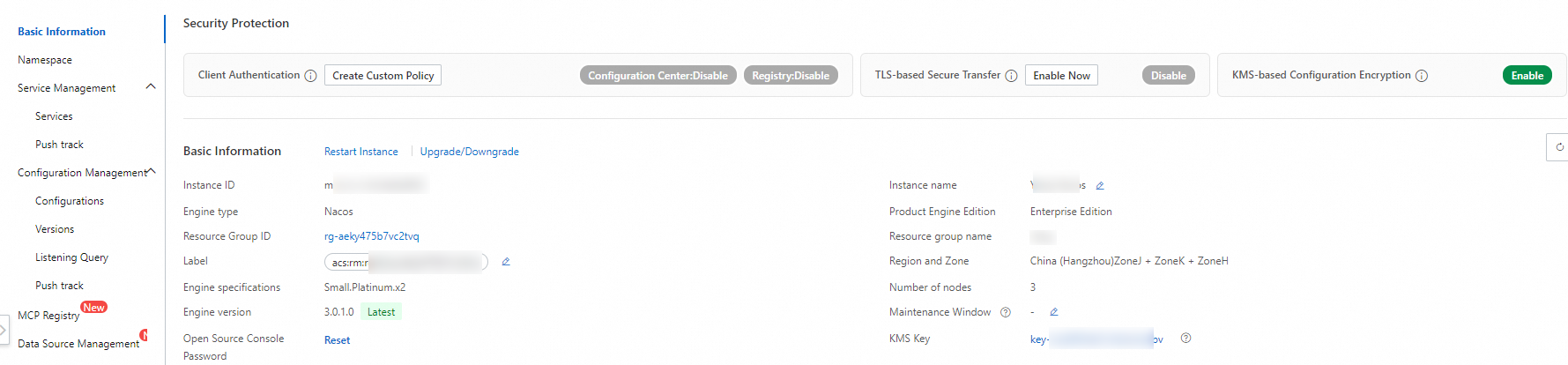
Create a data source
The data source management feature is built on the Nacos Configuration Center, where it stores data source configurations in an encrypted format.
-
On the instance list page of your registry and configuration center, click the name of the target instance and choose Data Source Management.
If you have not bound a KMS key, a dialog box appears. Follow the prompts to bind a KMS key.
-
Select the target Namespace and click Create Data Source. Configure the following parameters:
-
Data Source Name: Enter a name for the data source.
-
Description: Enter a description for the data source. For example: "Internal data source for Application A to access Database XX".
-
Data Source Type:
-
spring-datasource: For Java Spring applications that access a relational database such as MySQL, ApsaraDB RDS, or PolarDB.
-
spring-redis: For Java Spring applications that access a cache database such as ApsaraDB for Redis or Tair. Application access for this type will be available soon.
-
-
Subtype: Currently, only the open source connection pool Druid is supported.
-
Database Type: Select the database type, and then select the database instance.
-
Database Instance Endpoint: For example, rm-02345**********imo.mysql.rds.aliyuncs.com.
-
Database Engine Type: Currently supports MySQL, SQL Server, PostgreSQL, and MariaDB. This affects the format of the JDBC connection string the application uses.
-
Database Port: The port number of the database, for example, 3306.
-
Database Name: The name of the database.
-
Database URL Parameters: Additional JDBC parameters beyond the endpoint, port, and database name. For example: connectTimeout=20000&socketTimeout=60000&serverTimeZone=Asia/Shanghai.
-
Initial Size: The initial number of connections in the application-side connection pool.
-
Min Idle: The minimum number of connections to keep active when the service is idle.
-
Max Active: The maximum number of connections allowed during high-concurrency scenarios.
-
Max Wait: The maximum time a business request will wait for a connection from the pool.
-
Initial Size: The initial number of connections in the application-side connection pool.
-
Min Idle: The minimum number of connections to keep active when the service is idle.
-
Max Active: The maximum number of connections allowed during high-concurrency scenarios.
-
Max Wait: The maximum time a business request will wait for a connection from the pool.
-
Associated KMS Credential (Important): Select a KMS credential. This credential stores the username and password for database access.
-
You can select a database credential or a generic credential. If you use a generic credential, ensure that its value is a JSON object that contains the
AccountNameandAccountPasswordfields. -
If you specify a database instance and database name when you configure the KMS credential, the system validates them against the database instance associated with the data source. This helps prevent configuration errors.
-
-
More Parameters: You can set additional parameters beyond the common ones, such as testWhileIdle, testOnBorrow, and testOnReturn. Example:
# Specifies whether to enable idle connection testing.
spring.datasource.druid.testWhileIdle=true
# Specifies whether to test connections when they are borrowed from the pool. We recommend that you disable this.
spring.datasource.druid.testOnBorrow=false
# Specifies whether to test connections when they are returned to the pool. We recommend that you disable this.
spring.datasource.druid.testOnReturn=false
-
-
Click OK. In the Confirm Data Source Creation dialog box, click OK again to submit the data source.
Data source details
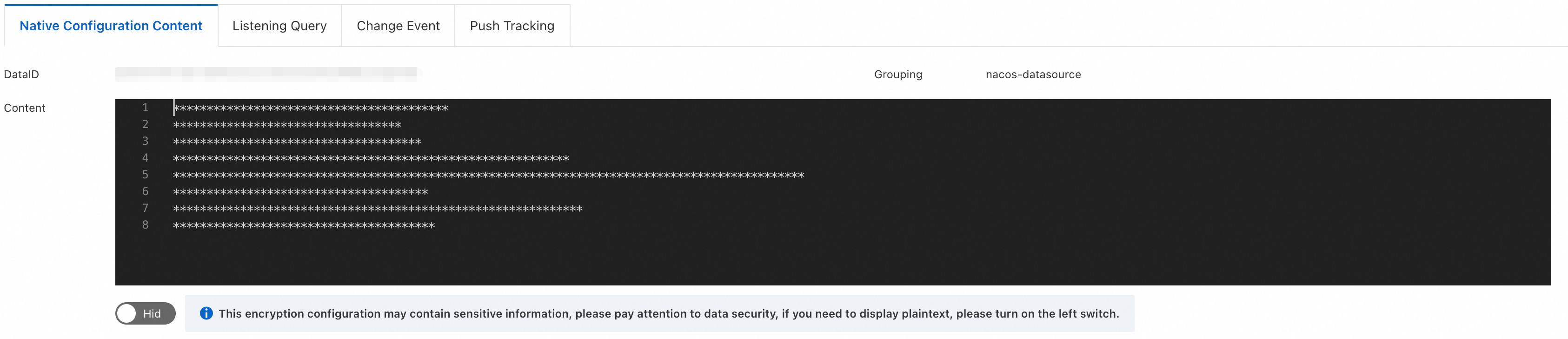
On the Data Source Management page, click a data source name to view its details page:
-
Raw Configuration Content: You can view the Data ID, Group, and content of the underlying configuration. The plain text content is displayed only in the console.
The data source management feature is built on the Nacos Configuration Center, where it stores data source configurations in an encrypted format.
-
Listener Queries: This tab reuses the listener query feature of the Configuration Center. You can view the application nodes listening to this data source.
-
Change Events:
-
Records events such as data source creation, updates, and credential rotations. You can view a comparison of the content before and after a change in the event details.
-
For credential rotation events, navigate to the KMS credential management page to view the credentials before and after the change.
-
-
Push History: This tab reuses the push history feature of the Configuration Center, which records configuration changes and push events for the data source.
Edit a data source
On the Data Source Management page, click Edit next to the target data source.
Considerations
Configuration update mechanism
-
Editing a data source synchronously updates the encrypted configuration in the Configuration Center.
-
If an application is currently subscribed to the data source, Apache Druid provides exception protection for runtime changes.
Impact of runtime changes
-
After changing the database endpoint or port: If the new configuration is inaccessible, existing connections are not affected.
-
After changing the credential (username and password): If the new credential does not have permission to access the data source, existing connections are not affected.
Although the application-side data source supports exception protection, exercise caution when you update online services and monitor business metrics in real time. Exception protection can detect connection-level availability and credential permissions, but it cannot fully cover all business-level scenarios, such as a missing business table in a new database instance.
Credential rotation
KMS provides the credential rotation feature for data sources. There are two rotation methods:
-
Scheduled rotation: You can set a rotation schedule when you create a credential, and it will rotate automatically at the specified interval.
-
Immediate rotation: If credentials are leaked or need to be changed immediately, you can perform an immediate rotation from the KMS credential management console.
When a KMS credential rotates, either on a schedule or manually, KMS notifies MSE Nacos. Nacos then updates the encrypted data source configuration and pushes the update to the application to refresh the credentials. Druid gracefully replaces the online connections to ensure zero impact on your business.
Delete a data source
On the Data Source Management page, click Delete next to the target data source and enter the data source name to confirm.
Note:
-
Deleting a data source also deletes the associated encrypted configuration from the underlying Configuration Center. This action cannot be undone. Proceed with caution.
-
The application provides runtime exception protection for data source deletions to ensure that existing online connections are not affected. However, the application will fail to start if the data source is deleted.
Application access
On the data source details page, click Application Access to view the integration steps for each data source.
For parameter configuration, always refer to the settings displayed in the Application Access section of the console. The console dynamically generates the parameters for each step and links them to the target instance and data source.
Step 1: Upgrade versions
-
Upgrade Spring Cloud to version 2023.0.3.3 or later.
-
Upgrade Druid to version 1.2.25 or later.
<dependency>
    <groupId>com.alibaba</groupId>
    <artifactId>druid</artifactId>
    <version>1.2.25</version>
</dependency>

<dependency>
    <groupId>com.alibaba.cloud</groupId>
    <artifactId>spring-cloud-starter-alibaba-nacos-config</artifactId>
    <version>2023.0.3.3</version>
</dependency>
Step 2: Modify configuration
-
Modify
application.propertiesto enable dynamic data source rotation and specify the corresponding Nacos configuration for the data source.
# Import the data source configuration into Spring to initialize the data source.
spring.config.import[0]=optional:nacos:cipher-kms-aes-256-proxy-spring-{resourceName}.properties?group=nacos-datasource

# Specify the Nacos address. The default is a public endpoint. Modify it as needed.
spring.cloud.nacos.config.server-addr={nacos server}
# Specify the namespace.
spring.cloud.nacos.config.namespace={namespace ID}
# Specify the KMS region ID.
spring.cloud.nacos.config.kms_region_id={instance region}

# Enable Druid data source management and specify the Data ID of its encrypted configuration.
spring.nacos.config.proxy.druid.enabled=true
spring.nacos.config.proxy.druid.data-id={dataID}
Step 3: Set access credentials
You must authorize the credential in advance. Navigate to . For the authorization scope, select "Permission to decrypt KMS-encrypted data" and follow the instructions to complete the authorization.
-
After authorization, the encrypted data source configuration is decrypted in memory at runtime. Therefore, you must provide credentials with the necessary decryption permissions.
Set the JVM parameters:
-
-Dspring.cloud.nacos.config.accessKey=${accessKey} -
-Dspring.cloud.nacos.config.secretKey=${secretKey}
Replace ${accessKey} and ${secretKey} with your actual AccessKey ID and AccessKey secret. Ensure that the corresponding account or role has the "Permission to decrypt KMS-encrypted data". For more credential types, see Configure client access credentials.
-
FAQ
1. Supported data source types
Currently, this feature supports the Druid data source type for Spring applications, which allows for end-to-end configuration management and seamless runtime rotation. Support for the Redis type will be available soon. Support is also planned for the management of AI-related data sources, such as API keys and tokens.
2. Invalidation of old credentials after rotation
When a credential rotation occurs, KMS notifies MSE to update the credentials. KMS keeps two versions of the credentials active, and KMS invalidates any older versions. Future integration with the session management of specific data sources will ensure that an old credential is only invalidated after all of its online connections are closed, further enhancing stability.
3. Detecting the exception protection mechanism
In the Nacos push mechanism, if the exception protection mechanism is triggered in the application's data connection pool, the application reports a notification failure to Nacos. You can detect this event by searching for the "notify-error" keyword in the Nacos `config.log` file. Future versions of Nacos will report the client listener callback status, allowing you to directly view callback failures in the Listener Queries feature.