The cloud-native AI suite allows you to manage models in MLflow Model Registry. This topic describes how to use AI Developer Console of the cloud-native AI suite to manage models.
Background information
MLflow is an open source machine learning lifecycle management platform, which can be used to track model training information, manage machine learning models, and deploy machine learning models. For more information about MLflow Model Registry, see MLflow Model Registry - MLflow documentation.
Prerequisites
A Container Service for Kubernetes (ACK) Pro cluster that runs Kubernetes 1.20 or later is created. For more information, see Create an ACK Pro cluster.
Console and Scheduling Component of the cloud-native AI suite are installed. For more information, see Deploy the cloud-native AI suite.
A Resource Access Management (RAM) user is created in the RAM console and associated with a quota group. For more information about how to create a RAM user, see Create a RAM user. For more information about how to associate quota groups with RAM users, see Step 1: Create a quota group for the RAM user.
The MLflow component is deployed in the
kube-ainamespace of the ACK cluster. For more information, see Configure MLflow Model Registry.
Use AI Developer Console to manage models
Add registered models
Log on to the ACK console. In the left-side navigation pane, click Clusters.
On the Clusters page, find the cluster that you want to manage and click its name. In the left-side navigation pane, choose .
In the upper-left part of the Cloud-native AI Suite page, click AI Developer Console. Then, in the left-side navigation pane of the Cloud Native AI page, click Model Manage.
On the Model Manage page, click New Registered Model.
In the New Registered Model dialog box, configure the Name, Tags, and Description parameters.
In the following example, the model name is
my-model. Thekey1andkey2=value2tags are added to the model. The model description isThis is some description about my-model!.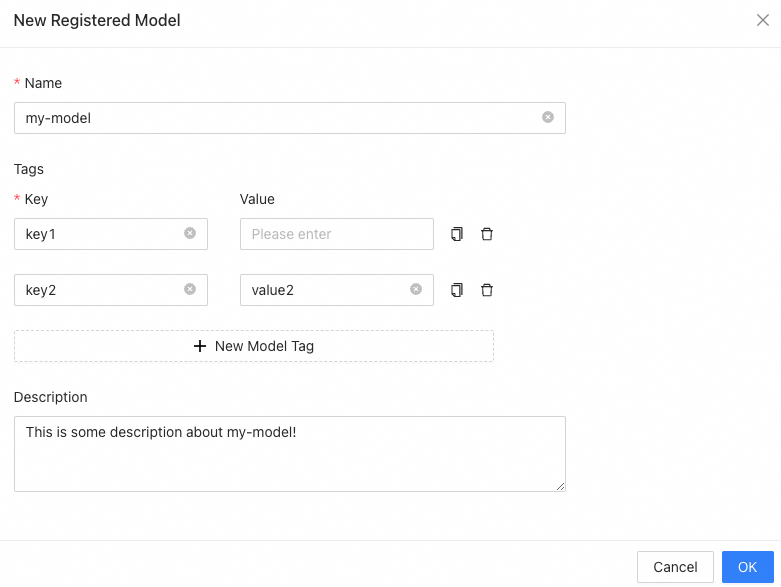
After you complete the configuration, click OK and refresh the model list. Then, the registered model is displayed in Registered Models list.
View registered models
In the registered model list on the Model Manage page, click the name of your model to view the detailed information about the model on the Registered Model Details page.
Modify registered models
On the Registered Model Details page, you can perform the following operations:
Modify the name of the registered model.
Modify the description of the registered model.
Modify the tags of the registered model or add tags to the model.
Add a model version.