ACS provides various compute classes and Quality of Service (QoS) classes. To schedule pods to ACS computing nodes in an ACK Serverless Pro cluster, update the ACK Virtual Node component to the required version and add pod labels when creating pods.
Prerequisites
Before you begin, ensure that you have:
Activated the ACK service and completed authorization. For details, see Create an ACK managed cluster
Activated ACS. Log in to the ACS console and follow the on-screen instructions
An ACK Serverless Pro cluster running Kubernetes 1.26 or later
The ACK Virtual Node component installed at the version that matches your cluster's Kubernetes version: If ACK Virtual Node is already at the required version, skip to Schedule pods to ACS computing nodes.
Kubernetes version ACK Virtual Node version >= 1.26 >= v2.13.0
Update ACK Virtual Node
ACK Serverless Pro clusters have ACK Virtual Node installed by default. Follow these steps to update it to the required version.
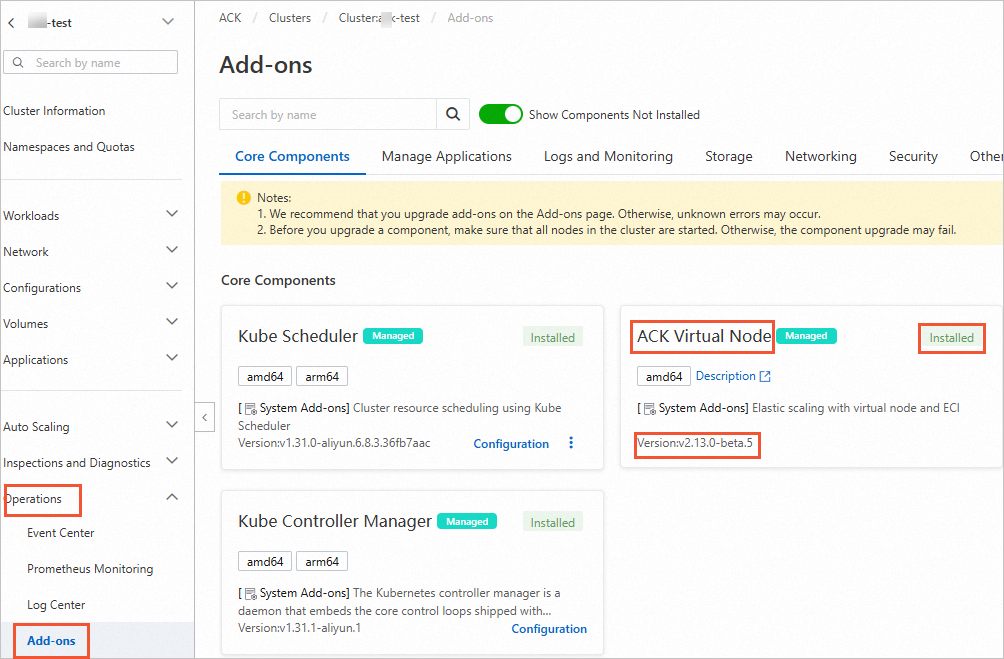
On the Clusters page, find your cluster and click its name. In the left-side navigation pane, click Add-ons.
On the Core Components tab, find and update ACK Virtual Node.
NoteIf prompted to activate ACS and complete authorization, follow the on-screen instructions.
Schedule pods to ACS computing nodes
After installing or updating ACK Virtual Node to the required version, you can create ACS pods and elastic container instances. If no compute class label is specified on a pod scheduled to a virtual node, elastic container instances are used by default.
Add labels to a pod to control how it is scheduled to an ACS computing node. The alibabacloud.com/compute-class label directs pod scheduling to the specified ACS compute class. The alibabacloud.com/compute-qos label sets the QoS class for the pod.
| Label | Description | Default |
|---|---|---|
alibabacloud.com/compute-class | The ACS compute class for the pod. For available values, see ACS pod overview. | general-purpose |
alibabacloud.com/compute-qos | The QoS class for the pod. | default |
The following example creates a Deployment that schedules two nginx pods to ACS computing nodes.
Create a file named
nginx.yamlwith the following content:apiVersion: apps/v1 kind: Deployment metadata: name: nginx labels: app: nginx spec: replicas: 2 selector: matchLabels: app: nginx template: metadata: name: nginx labels: app: nginx alibabacloud.com/compute-class: general-purpose # ACS compute class. Default: general-purpose. alibabacloud.com/compute-qos: default # ACS QoS class. Default: default. spec: containers: - name: nginx image: registry.openanolis.cn/openanolis/nginx:1.14.1-8.6 resources: limits: cpu: 2 requests: cpu: 2Apply the manifest and verify the deployment:
Create the Deployment:
kubectl apply -f nginx.yamlExpected output:
deployment.apps/nginx createdCheck that the pods are running on virtual nodes:
kubectl get pods -o wideExpected output:
NAME                     READY   STATUS    RESTARTS   AGE   IP              NODE                            NOMINATED NODE   READINESS GATES
nginx-675c8f56b4-4zczj   1/1     Running   0          25s   192.168.3.220   virtual-kubelet-cn-shanghai-l   <none>           <none>
nginx-675c8f56b4-dgzvz   1/1     Running   0          25s   192.168.3.219   virtual-kubelet-cn-shanghai-l   <none>           <none>
Confirm that ACS pods are created by checking the pod annotations:
kubectl describe pod nginx-675c8f56b4-4zczjIn the
Annotationssection of the output, thealibabacloud.com/instance-idfield confirms the pod is running on ACS. The ID begins withacs-.Annotations: ProviderCreate: done alibabacloud.com/client-token: dbaa4a4f-4251-402b-b74c-9f762d****** alibabacloud.com/instance-id: acs-uf6008givz7tfq****** alibabacloud.com/pod-ephemeral-storage: 30Gi alibabacloud.com/pod-use-spec: 2-2Gi alibabacloud.com/request-id: 7E1F90D3-D1A4-50F3-867A-313B9F****** alibabacloud.com/schedule-result: finished alibabacloud.com/user-id: 1488999589****** kubernetes.io/pod-stream-port: 10250 kubernetes.io/resource-type: serverless