This topic describes how to connect cloud-native gateways to Alibaba Cloud Content Moderation by using the ai-security-guard plug-in to check the inputs and outputs of large language models (LLMs) and ensure the compliance of dialogues with AI applications.
Running attributes
Plug-in execution stage: default stage. Plug-in execution priority: 300.
Configuration description
Parameter | Data type | Required | Default value | Description |
| string | Yes | - | The name of the service. |
| string | Yes | - | The service port. |
| string | Yes | - | The endpoint of Alibaba Cloud Content Moderation. |
| string | Yes | - | The AccessKey ID of your Alibaba Cloud account. |
| string | Yes | - | The AccessKey secret of your Alibaba Cloud account. |
| bool | No | false | Specifies whether to check the compliance of questions. |
| bool | No | false | Specifies whether to check the compliance of answers provided by LLMs. If you set this attribute to true, non-streaming responses are generated instead of streaming responses. |
| string | No | llm_query_moderation | Specifies that Alibaba Cloud Content Moderation is used to check the inputs of LLMs. |
| string | No | llm_response_moderation | Specifies that Alibaba Cloud Content Moderation is used to check the outputs of LLMs. |
| string | No |
| The JSON path of the content that you want to check in the request body. |
| string | No |
| The JSON path of the content that you want to check in the response body. |
| string | No |
| The JSON path of the content that you want to check in the streaming response body. |
| int | No | 200 | The status code that is returned if the content is non-compliant. |
| string | No | The OpenAI streaming or non-streaming response that is recommended by Alibaba Cloud Content Moderation is returned. | The response that is returned if the content is non-compliant. |
Example
Prerequisites
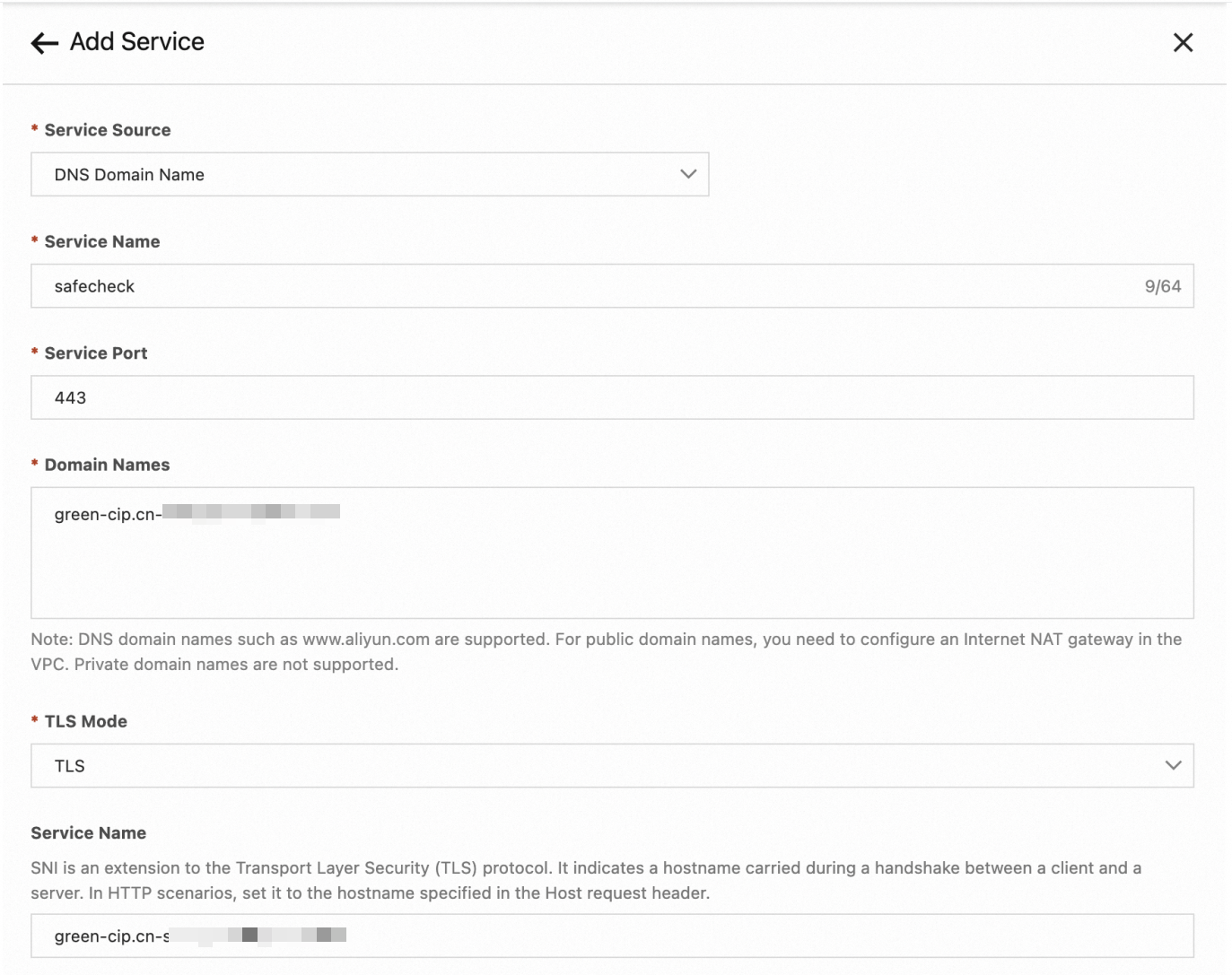
A service of the Domain Name System (DNS) type is created for the plug-in to call Alibaba Cloud Content Moderation. The following figure shows the parameters for creating a service of the DNS type.
Check whether the inputs are compliant
serviceName: safecheck.dns
servicePort: 443
serviceHost: "green-cip.cn-shanghai.aliyuncs.com"
accessKey: "XXXXXXXXX"
secretKey: "XXXXXXXXXXXXXXX"
checkRequest: true
Check whether the inputs and outputs are compliant
serviceName: safecheck.dns
servicePort: 443
serviceHost: green-cip.cn-shanghai.aliyuncs.com
accessKey: "XXXXXXXXX"
secretKey: "XXXXXXXXXXXXXXX"
checkRequest: true
checkResponse: true
Configure a custom content moderation service
You can configure different content moderation services for endpoints, routes, or services to adapt to different scenarios. In this example, the content moderation service llm_query_moderation_01 is created. In this content moderation service, check rules are created based on modifications to the check rules in the llm_query_moderation service.
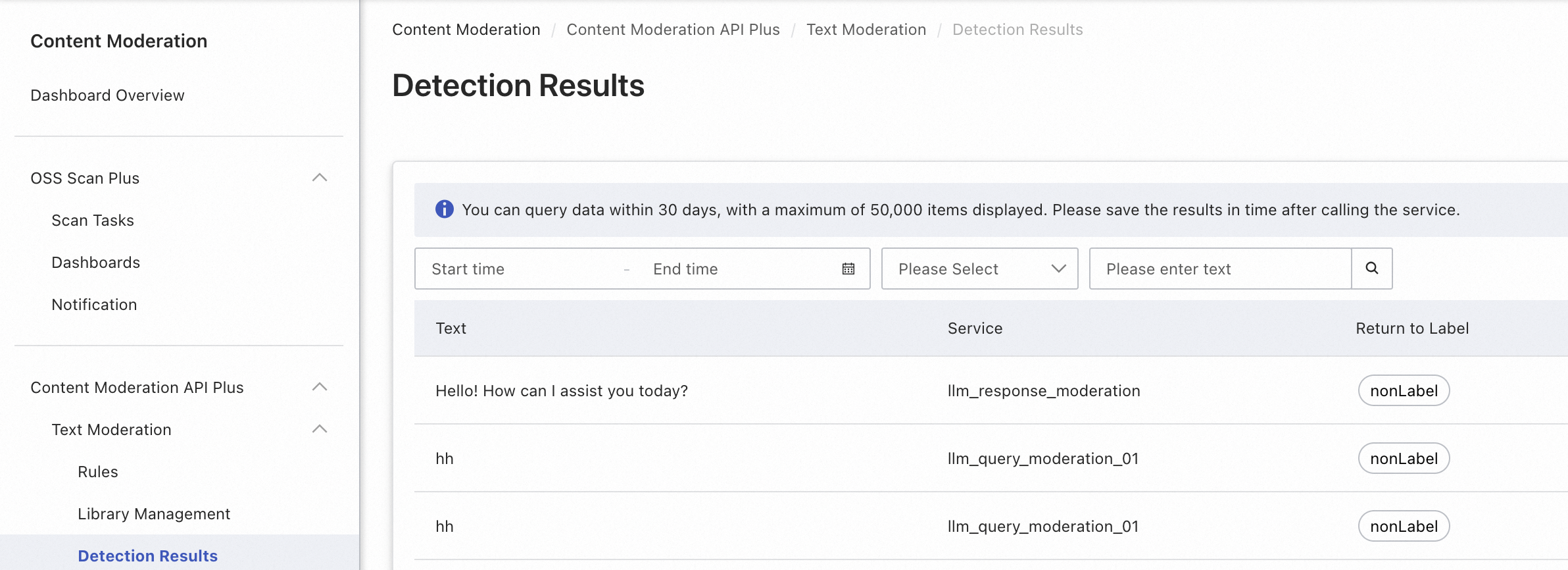
You can run the following code at the endpoint, route, or service level to specify the llm_query_moderation_01 service for content checking.
serviceName: safecheck.dns
servicePort: 443
serviceHost: "green-cip.cn-shanghai.aliyuncs.com"
accessKey: "XXXXXXXXX"
secretKey: "XXXXXXXXXXXXXXX"
checkRequest: true
requestCheckService: llm_query_moderation_01
Configure a service that does not use the OpenAI protocol such as Alibaba Cloud Model Studio
serviceName: safecheck.dns
servicePort: 443
serviceHost: "green-cip.cn-shanghai.aliyuncs.com"
accessKey: "XXXXXXXXX"
secretKey: "XXXXXXXXXXXXXXX"
checkRequest: true
checkResponse: true
requestContentJsonPath: "input.prompt"
responseContentJsonPath: "output.text"
denyCode: 200
denyMessage: "Sorry, I cannot answer your question."
Observability
Metric
The AI-Security-Guard plug-in provides the following metrics:
ai_sec_request_deny: the number of questions that fail content moderation.ai_sec_response_deny: the number of LLM-provided answers that fail content moderation.
Tracing analysis
If you enable tracing analysis, the AI-Security-Guard plug-in adds the following attributes to the query span:
ai_sec_risklabel: the type of risk that the query hits.ai_sec_deny_phase: the stage of the query at which risk is detected. Valid values: request and response.
Example
curl http://localhost/v1/chat/completions \
-H "Content-Type: application/json" \
-d '{
  "model": "gpt-4o-mini",
  "messages": [
    {
      "role": "user",
      "content": "A non-compliant question."
    }
  ]
}'
The question content is sent to Alibaba Cloud Content Moderation for detection. If the content is non-compliant, the gateway returns the following answer:
{
    "id": "chatcmpl-123",
    "object": "chat.completion",
    "created": 1677652288,
    "model": "gpt-4o-mini",
    "system_fingerprint": "fp_44709d6fcb",
    "choices": [
        {
            "index": 0,
            "message": {
                "role": "assistant",
                "content": "As an AI assistant, I cannot provide content on sensitive topics such as pornography, violence, and politics. You are welcome to ask other questions.",
            },
            "logprobs": null,
            "finish_reason": "stop"
        }
    ]
}