1. UDF description
UDF(User-Defined Functions) is a user-defined function used by common data development platforms. In the following examples, UDFs are used instead of custom components.
UDF access consists of configuration and execution. The configuration is used for interface management and canvas configuration components, and the execution is used for callbacks during journey execution. The execution part is similar to webhooks.
2. UDF configuration and access document
To connect to Quick Audience, you need to develop an HTTP server. Note that it is a Post request, and the request timeout period is 10 seconds. The following table shows the common parameters that are required for HTTP requests initiated by Quick Audience and receiving requests.
Flow interface diagram between 2.1 systems
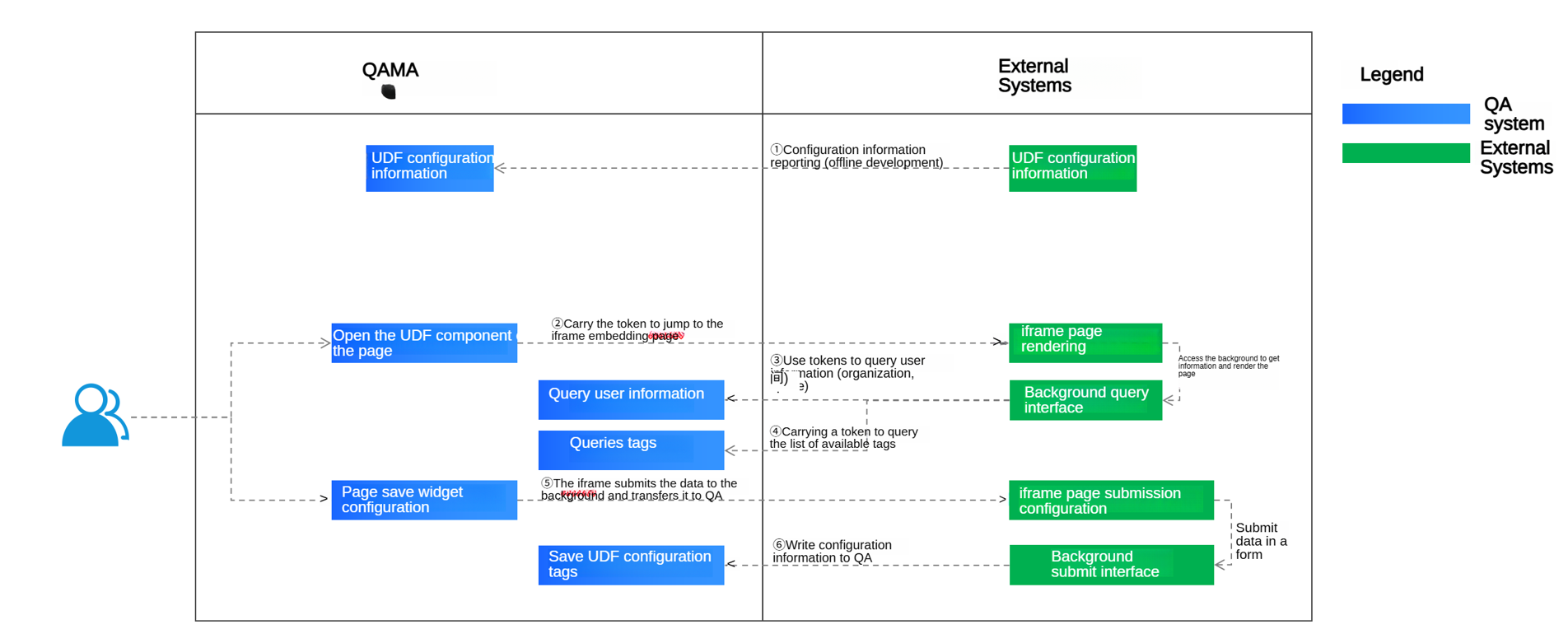
① Provide configuration information for "Development Offline" as follows
② Jump to the iframe page and jump to the external system
③ API interface: obtains user information through tokens; at the same time, the result needs to be returned to the iframe page.
④API interface: obtains tag information by token; at the same time, the result needs to be returned to the iframe page.
⑤ The front-end submits data to the API embedded in the iframe page, and the external system background submits the data to QA through ⑥
⑥ API interface: submit the configuration information to QA, and QA executes the process according to the selected tag information
2.1.1 Product interface configuration UDF component information
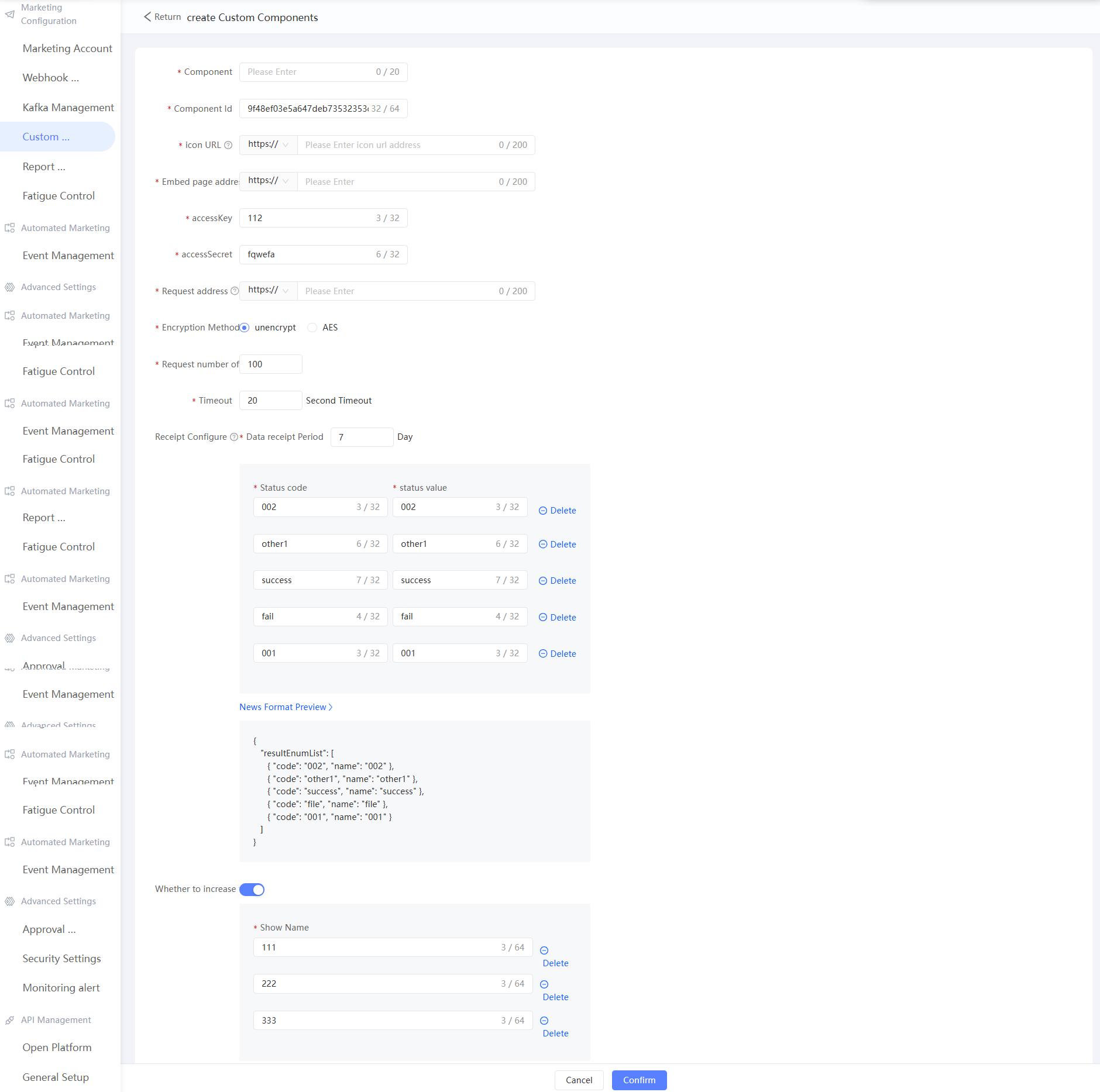
Limits on fields:
Field | Limits |
Embed Page Address | The URL of the component to be embedded in the iframe must be a valid and complete URL that contains the protocol used (such as HTTP or HTTPS). We recommend that you use HTTPS to improve the security of information transmission. |
icon URL | Component display icon, recommended size 21 * 21px |
Request Address | The URL of the interface that you want to push messages to. It must be a valid and complete URL that contains the protocol used (such as HTTP or HTTPS). We recommend that you use HTTPS to improve the security of information transmission. |
Receipt Settings | Receipt settings will return marketing results to QA in the form of interfaces. You need to configure the Receipt Result field, which will be used in automated marketing to determine diversion based on receipt results. |
AES key | The AES key length can be 128, 192, or 256 bits, with characters of 16, 24, and 32 bits. |
Public | The UDF component can be used by all spaces in the current organization. If the public is disabled, the UDF component can be used only in the current space. |
2.1.1.1 Configuration of the original JSON information
{
    "name":"Custom component name",
    "type":"marketing", // Custom component category: Currently, only marketing -> marketing components are supported.
    "version":"version number", // The default 1.0
    "endpoint":"The target domain name of the custom component starts with http or https, such as: http://demo.com /second-level path to point/index.html",
    "iconUrl":"icon address",
    "enable": true // true or false whether to enable
    "accessKey":"AccessKey for component authentication",
    "accessSecret":"AccessKey secret",
    "metaData":{ // The metadata information. The format of the metadata is different from that of the type component.
        "allowIDType":"This component supports user ID types, such as mobile, email, idfa, and imei",
        "encryptionMethod":"Push marketing message encryption algorithm null | encryptionMethod",
        "sendParam":{
            "batchSendUrl":"The URL for pushing marketing tasks starts with http or httpss, such as http://demo.com/send",
            "batchLimit":100, // The number of records to be pushed at a time. The value is 1 to 1000. The default value is 100.
            "timeout": 10, // The request timeout period (unit: seconds) 0 to 60. Default value: 10.
            "retryTimes":0, // The number of retries that are failed is 0 to 3. Default value: 0.
            "retryPeriod":0, // The retry interval (in seconds) of 0 to 3600. Default value: 0.
        },
        "callbackParam":{// Marketing component receipt parameters
            "usableInHours": 3 * 24, //1 to 30 * 24. Default value: 3. The number of days in which the push result receipt data is valid. If the number of days is exceeded, the data is discarded.
            "clearInHours": 7 * 24, //1 to 365 * 24. By default, the number of days after which the result receipt data is recycled.
            "resultEnumList":[ // The list of push result receipts. Default value: success and fail.
                {
                    "code":"success",
                    "name":"Success"
                },
                {
                    "code":"fail",
                    "name":"Failed"
                }
            ],
            "extParams": {
              "extParam1": "Extension parameter column header 001", // The name of the column displayed in the effect analysis. The extension field 01
              "extParam2": "Extension parameter column header 002", // The column name displayed in the effect analysis. The extension field 02
              "extParam3": "Extension parameter column header 003" // The column name displayed in the effect analysis. The extension field 03
            }
        }
    }
}
2.1.2 Iframe Jump
The external system is required to provide an iframe page, and the page link is entered in the endpoint configured in the previous step.
Note: There will be cross-domain problems and cross-domain support needs to be added, X-Frame-Options: allow-from https://example.com/
Jump URL
/endPoint?comeFrom=xxx&qaEndpoint=xxx&token=xxx
Return Result
{
  "success":true,
  "errorDesc":"The error message. This parameter can be empty."
}
2.1.3 API operation: Obtain user information by using tokens
API :/openapi/v3/account/query?token=xxx
Returned value:
{
  "success": false,
  "errorDesc": "",
  "data": {
    "organizationId":"Organization ID",
    "organizationName":"Organization name",
    "userId":"User ID",
    "nickName":"User nickname",
  },
  "@comment": {
    "success": "/**\n * Enumerated values: true | false\n */",
    "errorDesc": "/**\n * The description of the error message \n */",
    "data": "/**\n * User information \n */"
  }
}
If the user information is obtained, the system is normally available. If the user information is not obtained, a token invalid error message is returned when the page is rendered.
2.1.4 API: saves the crowd and event IDs selected by the UDF.
API :/restapi/marketing/udf_component/genUdfComponentNode
input parameter:
{
    "componentId": "1001",
    "sourceId": "c1f5691dd5864479820c10c0089bece9 (The ID of the event or the crowd)",
    "sourceNodeId": "",
    "nodeId": "83a2d328-030d-436a-b607-21da8ee2e34b",
    "sourceType": 1 // The type of the event. 1 indicates the crowd and 2 indicates the event.
}
Returned value:
{
    "data": {
        "nodeId": "83a2d328-030d-436a-b607-21da8ee2e34b",
        "token": "zKBfv7flRQmhd+XP1l1uuKCjE6seEOq8l02cBFWWRr5xQoOUPxb3+tj+ZPctWDG4rM5vC2PMQLxG0Xw7Qw6TpsDfXSYFwD8kmTjpUOV4AjxQfZPfC5q0wPrEFhvgfjz9X1OKDu4V4p1oJnJcbt5nELidsVk6jxkbVwHEL8ezXcyXFRKbC+jVYxOwG5ElUhS0+hraAK5IiwR1XgZCarFgOGf5ZZo/Nacjrp5AP8HbF3tl4+thAjp8ZuMWTYXsBJbe"
    },
    "errorCode": null,
    "errorDesc": null,
    "exStack": null,
    "opers": [],
    "solution": null,
    "success": true,
    "traceId": "48d6e570-1918-47a4-83ee-27c3f32d3a99"
}
2.1.5 API operation: Use tokens to obtain the list of crowd tags and the list of event attributes (dependent on 2.1.4)
API :/openapi/v3/udf_component/marketing/getNodeUsableLabels?token=xxx&nodeId=xxx&version=VERSION_2
Returned value:
[
    {
        "id": "Tag ID /Property ID",
        "name": "Label name /Attribute name"
    }
]
The selected tags and attributes are passed in as parameters when the third-party system is finally transferred.
2.1.6 API for the frontend to submit data to the iframe embedding page
This page parameter is defined by the third party. When the page is finally executed, it is called by QA to the third party, and then the third party executes it. However, the selected QA tag needs to be returned to QA through the interface of ⑥.
2.1.7 Submit UDF configuration information (dependent on 2.1.5)
API: /openapi/v3/udf_component/marketing/saveOrUpdateNodeConfig?token=xxx
Request body:
{
  "nodeId": "Node ID",
  "nodeName": "Node name",
  "labelIdList": [
    "Tag ID.[name]",
    "Label ID.[name]"
  ]
}
Return value: No return value. The HTTP status is 200.
3. UDF execution access document
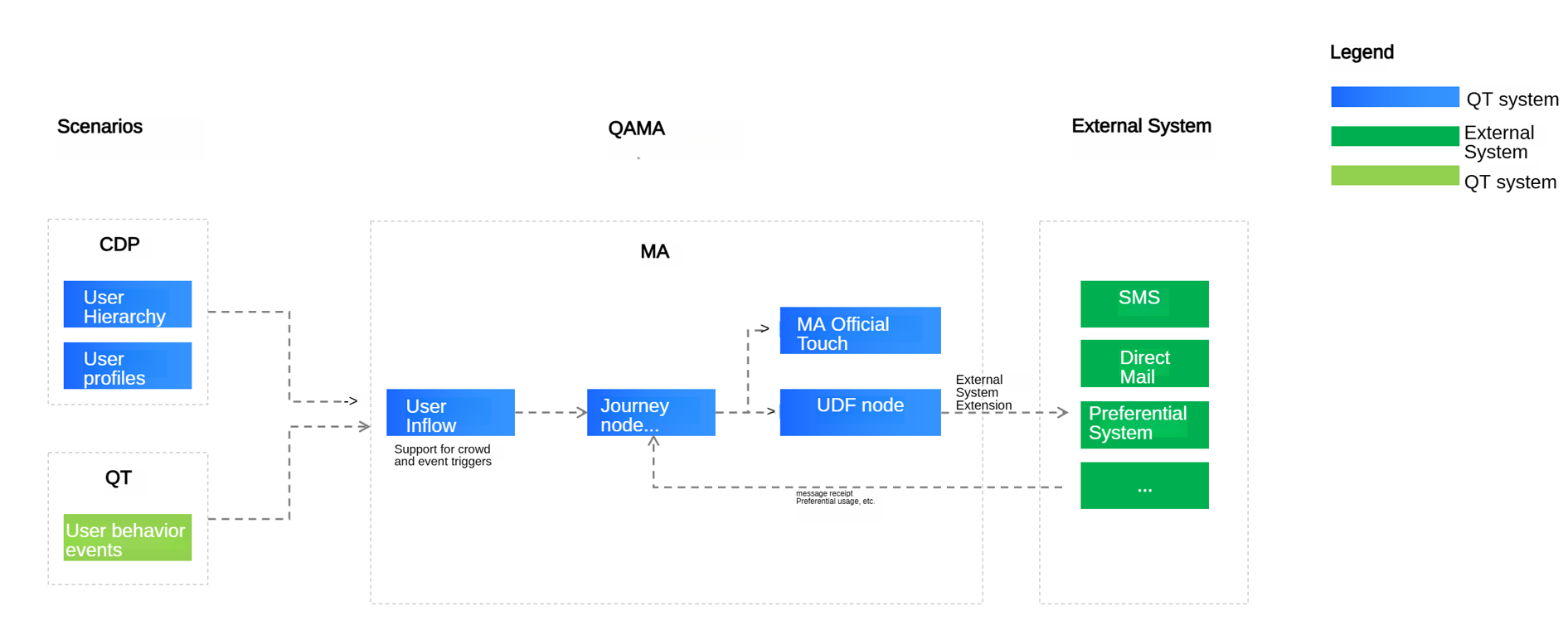
The system flow diagram is shown as follows
3.1 node execution request
To connect to Quick Audience, you need to develop an HTTP server. Note that it is a Post request, and the request timeout period is 10 seconds. The following table provides common parameters for Quick Audience requests and access receipt requests.
Request URL :{sendParam.batchSendUrl }
Request Header Information
After the header information is read, it needs to be java.net.URLDecoder#decode(java.lang.String, java.lang.String) and encoded into UTF-8.
v=4 // The fixed parameter, which is used to distinguish between the new version and the old version. The new version is 4, and the old version does not have this field.
Request Body:
Request input parameters | Remarks | |||
Parameters | Parameter | Parameter | Required | |
Request Timestamp | time | Long | Yes | |
The request ID. | requstId | String | Yes | |
Component ID | componentId | String | Yes | |
AccessKey | accessKey | String | Yes | The AES key length can be 128, 192, or 256 bits, with characters of 16, 24, and 32 bits. |
message body encryption algorithm | encryptionMethod | String | No | By default, null is not encrypted. Currently, only AES encryption is supported. The encryption and padding methods are AES, ECB, and PKCS5Padding. |
Signature | signature | String | Yes | time + componentId + After the accessKey and accessSecret are hmac-encrypted Note: The signature algorithm is the same as that of WebHook. |
Message body | data | String | Yes | message body after encryptionMethod encryption:
|
Sample request body:
{
  "time": 0,
  "requestId": "111",
  "componentId": "111",
  "accessKey": "111",
  "signature": "111",
  "encryptionMethod": [
    "AES"
  ],
  "data": "string format. The detailed format is as follows"
}

// The data format.
{
    "jobId": "",
    "jobName": "",
    "nodeId": "",
    "nodeName": "",
    "componentName": "",
    "taskId": "",
    "taskStartTimestamp": 0,
    "nodeStartTimestamp": 0,
    "data": {
      "messageId": "",
      "customerList": [
        {
          "customerId": "",
          "featureMap": {
            "Receipt field":"Bring back as is"
          },
          "idMappings": {
                    "mobile": "mobile phone number",// The ID type of the instance.
                    "qaid": "QAID generated by QA"
                },
                "labels": {},
          "processInfo": {
            "processInstanceId": "New version: Journey instance ID of each user in a journey cycle",
            "processInstanceStartTime": "New version: the start time of the journey instance for each user in the journey period, in timestamp format",
            "processNodeInstanceId": "New version: journey node instance ID (different each time)",
            "processNodeInstanceStartTime": "New version: The node instance start time of each user's journey in the journey period, in timestamp format",
            "groupName":"nodeId:nodeName:groupResult(node.result),groupName(node.resultExt);nodeId:nodeName:groupResult(node.result),groupName(node.resultExt)",
            "@comment":{
              "groupName" : "node id: node name (configured on the interface): grouping result (percentage number of random grouping, two decimal places): group name (configured on the interface); separate multiple with semicolon"
            }
        	}
          "@comment": {
            "featureMap": "/**\n * The extension field, which must be returned downstream during asynchronous receipt \n */"
          }
        }
      ]
    },
    "activityId": "",
    "activityName": "",
    "subActivityId": "",
    "subActivityName": "",
    "processId": "",
    "processName": "",
    "processInstanceId": "",
    "processInstanceName": "",
    "processInstanceStartTime": "",
    "processNodeId": "",
    "processNodeName": "",
    "processNodeInstanceId": "",
    "processNodeInstanceStartTime": "",
    "groupId": "",
    "groupName": "",
    "@comment": {
      "activityId": "/**\n * Activity ID\n */",
      "activityName": "/**\n * Activity name \n */",
      "subActivityId": "/**\n * The ID of the child activity \n */",
      "subActivityName": "/**\n * child activity name \n */",
      "processId": "/**\n * Journey ID (Automation ID); Activity ID\n */",
      "processName": "/**\n * Journey name (Automation name); Activity name \n */",
      "processInstanceId": "/**\n * Journey instance ID; Activity instance ID\n */",
      "processInstanceName": "/**\n * The name of the activity instance (the time of the activity)\n */",
      "processInstanceStartTime": "/**\n * Activity instance start time \n */",
      "processNodeId": "/**\n * The ID of the active node \n */",
      "processNodeName": "/**\n * Activity node name \n */",
      "processNodeInstanceId": "/**\n * The ID of the active node instance \n */",
      "processNodeInstanceStartTime": "/**\n * Active node instance start time \n */",
      "groupId": "/**\n * The ID of the ABTest group. This parameter is empty. \n */",
      "groupName": "/**\n * ABTest group name (null)\n */"
    }
  }
Returned value:
{
  "success": true,
  "errorDesc": "Error message",
  "customerList": [
    {
      "messageId": "Message ID",
      "customerId": "Customer ID",
      "returnType": "The receipt result. This result is the same as the receipt result. If there is one, it is directly regarded as the receipt result. If you do not want to enter the receipt result directly, do not pass it",
      "returnMessage": "The length of the receipt message is 255. If the length of the receipt message exceeds the limit, it will be automatically intercepted."
    }
  ]
}
3.1.1 Authentication mode
signature algorithm
long sendTime = System.currentTimeMillis();
// The ID of the component.
// Component AK
// Component sk

String sign = getSignatureByHmacSHA1(sendTime, componentModel.getComponentId(), componentModel.getAccessKey(), componentModel.getAccessSecret());

public static String getSignatureByHmacSHA1(long time, String prametersString, String accessKey, String accessSecret) {
    String str = time + prametersString + accessKey;
    return HmacUtils.hmacSha256Hex(accessSecret, str.replaceAll("\\s+", ""));
}
3.2 receipt reporting
After the access point executes the marketing task, the access point reports the receipt to Quick Audience to feedback the sending result of the marketing message.
HTTP Request URL:
API :/restapi/marketing2/udfComponent/receiveCallback?
Request Body:
{
  "time": 0,
  "componentId": "UDF component ID",
  "signature": "Signature",
  "data": "The encrypted receipt information, which is a string",
  "@comment":{
    "time":"The timestamp of the receipt, in milliseconds"
  }
}

// The original format of data.
{
  "nodeId": "Node ID",
  "taskId": "Task ID",
  "customerList": [
    {
      "messageId": "Message ID",
      "customerId": "Customer ID",
      "returnType": "Receipt result",
      "sendTimestamp": 0,
      "featureMap": {
        "request parameters": "Return"
      }
      "@comment": {
        "messageId": "/**\n * The ID of the message. This ID is included when QA pushes the message \n */",
        "customerId": "/**\n * User ID\n */",
        "returnType": "/**\n * Receipt result \n */",
        "sendTimestamp": "/**\n * Message push time \n */",
        "featureMap": "The parameters used to send the request. You must bring them back in the receipt."
      },
      "extParam1": "Extension parameter 001-custom return value",
      "extParam2": "Extension parameter 002-Custom return value",
      "extParam3": "Extension parameter 003-Custom return value"
    }
  ],
  "@comment": {
    "nodeId": "/**\n * Node ID\n */",
    "taskId": "/**\n * Task ID\n */",
    "customerList": "/**\n * list of receipt users /followers \n */"
  }
}
Returned value:
{
  "success": true,
  "errorDesc": "",
  "@comment": {
    "success": "/**\n * Enumerated values: true | false\n */",
    "errorDesc": "/**\n * The description of the error message \n */",
    "data": "/**\n * User information \n */"
  }
}