Configure client certificates to enable TLS mutual authentication (mTLS) between clients and Edge Security Acceleration (ESA) POPs, strengthening access security.
Use cases
mTLS suits high-security scenarios that require strong identity verification for both communicating parties.
When to use mTLS:
-
Both parties are controlled entities, such as services, devices, or systems.
-
You require strong, persistent identity binding, not temporary tokens.
-
You can centrally manage a Public Key Infrastructure (PKI), including the CA, certificate distribution, and revocation.
Typical use cases:
-
Service-to-service authentication in microservices, such as mutual identity verification between an order service and a payment service. Common technologies: Istio, Linkerd, and Kubernetes.
-
API gateway-to-origin connections, such as internal enterprise APIs, open banking, or third-party SaaS integrations.
-
IoT device-to-cloud communication.
-
Zero trust access in corporate networks, replacing the traditional VPN trust model.
-
Finance, payment, and healthcare systems that must comply with PCI-DSS, HIPAA, or GDPR standards.
When not to use mTLS:
-
Public websites (e-commerce, news) accessed by standard browsers. Certificate management is impractical for general users.
-
Open REST APIs without strong identity requirements. Use OAuth 2.0 or API keys instead.
-
Low-security test environments. One-way TLS with basic authentication is simpler.
How mTLS works
In ESA, mTLS applies only between the client and the ESA POP. The POP terminates the TLS handshake, verifies the client certificate, and forwards the request to the origin without passing the certificate through.
For end-to-end mTLS where the client certificate passes through to the origin, use the Layer 4 proxy (Enterprise plan). This proxy forwards TCP traffic in pass-through mode without terminating TLS.
Issue client certificates
Use the CA provided by ESA to create client certificates and deploy them to your mobile applications. ESA generates a unique CA per account, and all certificates from this CA are automatically trusted by ESA POPs.
The default certificate validity is one year.
Create a certificate
-
In the ESA console, go to Websites. In the Website column, click the target site.
-
In the left-side navigation pane, choose . Click Create Certificate.
-
Based on your requirements, select a CSR Generation method, Private Key Type, and Certificate Validity, and click OK.
ImportantESA does not store the certificate or private key, and they cannot be retrieved after you close this dialog box. In the certificate preview dialog box, click Copy Certificate and Copy Private Key to copy the content to your client.
Bind a hostname
Bind a client certificate to hostnames to enable mTLS. Only clients with a valid certificate can access the bound hostnames.
-
In the ESA console, go to Websites. In the Website column, click the target site.
-
In the left-side navigation pane, choose .
-
In the Hostname section, click Configure. In the dialog box that appears, enter the hostnames and click OK.
Note-
You can enter a maximum of 50 hostnames at a time.
-
The hostnames must be associated with the selected site.
-
Revoke a certificate
Revoke a certificate that is no longer needed or has been compromised.
-
In the ESA console, go to Websites. In the Website column, click the target site.
-
In the left-side navigation pane, choose .
-
In the list, find the certificate you want to revoke and click Revoke in the Actions column.
-
In the dialog box that appears, select the I confirm that the certificate is no longer required checkbox, and then click Yes.
Use a custom CA
Besides using certificates from the ESA CA, you can use your own private CA.
Available through OpenAPI only. Each plan supports up to five CA certificates.
Procedure
-
Call UploadClientCaCertificate to upload your root CA certificate. Record the returned certificate ID.
-
Call SetClientCertificateHostnames to bind the CA certificate to hostnames. mTLS validation applies only to bound hostnames.
-
Other API operations for custom mTLS certificates:
API
Description
Uploads a custom-issued CA certificate.
Lists all uploaded custom-issued CA certificates.
Deletes a custom-issued CA certificate.
Queries the details of a specific custom-issued CA certificate.
Binds hostnames to a custom-issued CA certificate.
Queries the hostnames that are bound to a custom-issued CA certificate.
Block failed authentication requests
Configure a Web Application Firewall (WAF) rule to block requests that fail client certificate authentication.
Procedure
-
In the ESA console, go to Websites. In the Website column, click the target site.
-
In the left-side navigation pane, choose to go to the custom rule configuration page.
-
Configure the custom WAF rule.
-
Set Client Certificate Verified to Off
 .
. -
In the Hostname field, enter the hostnames for which you want to apply the rule.
ImportantYou must configure the hostname condition. Otherwise, the rule will block all requests that do not use or fail client certificate authentication.
-
-
Set the Action to Block, or select another action based on your requirements.
-
Click OK to add the rule.
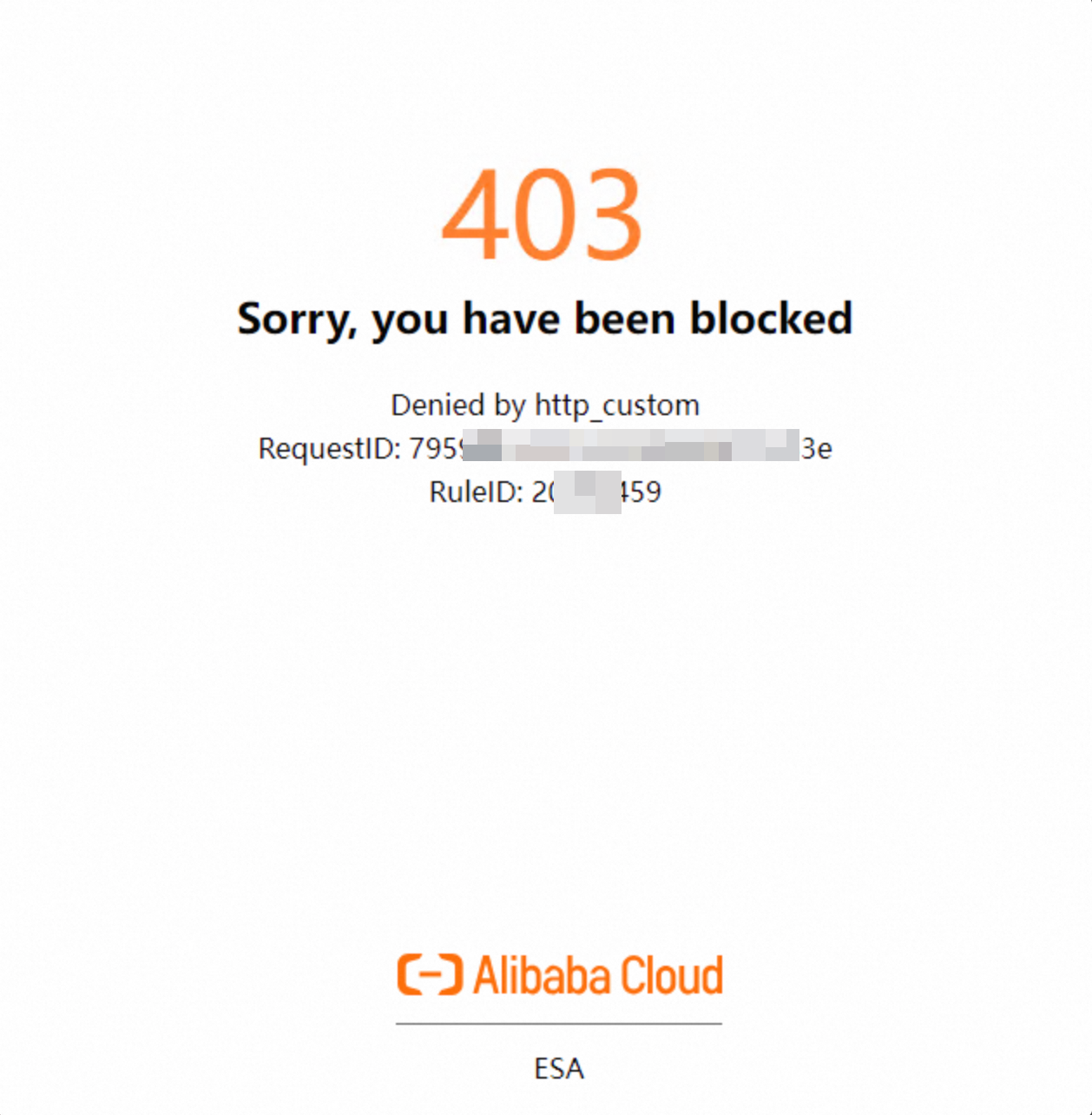
Requests to the specified hostnames that fail or skip client certificate authentication are blocked with a 403 status code.
Verification
-
A request without a client certificate is blocked with a 403 status code.
-
A request with a valid ESA client certificate succeeds. Replace the hostname, certificate path, and key path with your values.
curl -v "https://example.com" --cert ./example.crt --key ./example.key
* Trying 198.51.100.10...
* TCP_NODELAY set
* Connected to example.com (198.51.100.10) port 443 (#0)
* Cipher selection: ALL:!EXPORT:!EXPORT40:!EXPORT56:!aNULL:!LOW:!RC4:@STRENGTH
* successfully set certificate verify locations:
* CAfile: /etc/pki/tls/certs/ca-bundle.crt
CApath: none
* TLSv1.2 (OUT), TLS Unknown, Certificate Status (22):
* TLSv1.2 (OUT), TLS handshake, Client hello (1):
* TLSv1.2 (IN), TLS handshake, Server hello (2):
* NPN, negotiated HTTP1.1
* TLSv1.2 (IN), TLS handshake, Certificate (11):
* TLSv1.2 (IN), TLS handshake, Server key exchange (12):
* TLSv1.2 (IN), TLS handshake, Request CERT (13):
* TLSv1.2 (IN), TLS handshake, Server finished (14):
* TLSv1.2 (OUT), TLS handshake, Certificate (11):
* TLSv1.2 (OUT), TLS handshake, Client key exchange (16):
* TLSv1.2 (OUT), TLS handshake, CERT verify (15):
* TLSv1.2 (OUT), TLS change cipher, Change cipher spec (1):
* TLSv1.2 (OUT), TLS handshake, Next protocol (67):
* TLSv1.2 (OUT), TLS handshake, Finished (20):
* TLSv1.2 (IN), TLS change cipher, Change cipher spec (1):
* TLSv1.2 (IN), TLS handshake, Finished (20):
* SSL connection using TLSv1.2 / ECDHE-RSA-AES128-GCM-SHA256
* Server certificate:
* subject: CN=example.com
* start date: Jul 31 00:00:00 2024 GMT
* expire date: Jul 31 23:59:59 2025 GMT
* subjectAltName: host "example.com" matched cert's "example.com"
* issuer: C=US; O=Example CA; CN=Example DV TLS CA
* SSL certificate verify ok.
> GET / HTTP/1.1
> Host: example.com
> User-Agent: curl/7.74.0
> Accept: */*