The Dataphin metadata warehouse is a centralized repository that manages business and compute engine metadata in Dataphin. The metadata warehouse is located in a Dataphin project space within a metadata warehouse tenant (OPS tenant). It consists of a series of periodic data integration nodes, SQL script nodes, and Shell nodes. To initialize the metadata warehouse, you must configure the compute engine for the Dataphin system and initialize the metadata. This topic describes how to initialize the metadata warehouse using Hadoop as the compute engine.
Prerequisites
To use Hadoop as the compute engine for the metadata warehouse, ensure that the metadatabase is accessible or that the Hive Metastore service is available to retrieve metadata.
Background information
Dataphin supports metadata retrieval through a direct connection to the metadatabase or using the Hive Metastore Service. The following table compares the advantages and disadvantages of each method.
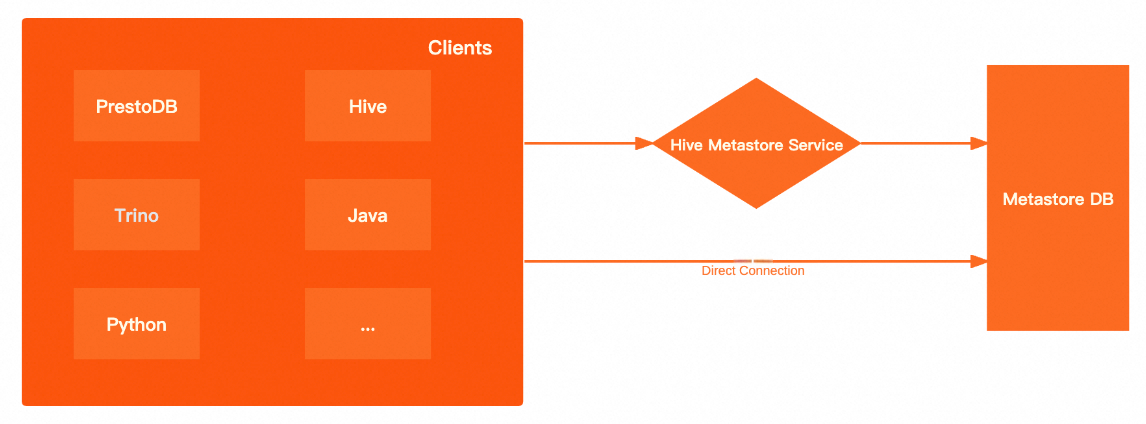
Metadata retrieval method | Advantages and disadvantages |
Direct connection to the metadatabase | High performance: A direct connection to the underlying metadatabase bypasses the Hive Metastore Service (HMS). This improves the performance of metadata retrieval on the client and reduces network latency. More open: When you query the metastore using the HMS, you can use only the methods that are provided by the metastore client. A direct connection to the metadatabase lets you use SQL for queries. |
Hive Metastore Service | More secure: You can enable Kerberos authentication for the metastore. Clients must pass Kerberos authentication to read data from the metastore. More flexible: The client is aware of only the HMS, not the underlying metadatabase. This lets you switch the underlying metadatabase at any time without changing the client. |
The performance of metadata retrieval using Data Lake Formation (DLF) is similar to the performance of metadata retrieval using the Hive Metastore Service.
Limits
Only users with the super administrator or system administrator role for the metadata warehouse tenant can initialize the system.
Keep the credentials for the super administrator or system administrator of the metadata warehouse tenant secure. Exercise caution when you perform operations after you log on to the system as the super administrator.
Procedure
On the Dataphin home page, choose Management Hub > System Settings from the top menu bar.
In the navigation pane on the left, choose System O&M > Warehouse Settings. On the Metadata Deployment wizard page, carefully read the installation instructions and click Start.
On the Select Initialization Engine Type page, select the Hadoop engine type.
ImportantIf the metadata warehouse is already initialized, the system defaults to the engine that was used in the last successful initialization. If you switch to an incompatible compute engine, the administration feature becomes unavailable.
Supported Hadoop engine types include Aliyun E-MapReduce 3.X, Aliyun E-MapReduce 5.x, CDH 5.X, CDH 6.X, FusionInsight 8.X, AsiaInfo DP 5.3 Hadoop, and Cloudera Data Platform 7.x. The parameter configuration is the same for all Hadoop-based compute engines. This topic uses Aliyun E-MapReduce 3.X as an example.
Cluster Configuration
NoteOSS-HDFS cluster storage is supported only for the Aliyun E-MapReduce 5.x Hadoop engine type.
HDFS cluster storage
Parameter
Description
NameNode
The NameNode manages the file system namespace and client access permissions in Hadoop Distributed File System (HDFS).
Click Add.
In the Add NameNode dialog box, enter the hostname and port number of the NameNode and click OK.
After you enter the information, the system automatically generates the configuration in the required format. Example:
host=hostname,webUiPort=50070,ipcPort=8020.
Configuration File
Upload cluster configuration files to configure cluster parameters. The system supports uploading cluster configuration files such as core-site.xml and hdfs-site.xml.
To retrieve metadata using HMS, you must upload the hdfs-site.xml, hive-site.xml, core-site.xml, and hivemetastore-site.xml files. If the compute engine is FusionInsight 8.X or E-MapReduce 5.x Hadoop, you must also upload the hivemetastore-site.xml file.
History Log
Configure the log path for the cluster. Example:
tmp/hadoop-yarn/staging/history/done.Authentication Type
The supported authentication methods are No Authentication and Kerberos. Kerberos is an identity authentication protocol that is based on symmetric key technology. It is often used for authentication between cluster components. Enabling Kerberos improves cluster security.
If you enable Kerberos authentication, configure the following parameters:
Kerberos Configuration Method
KDC Server: Enter the unified KDC service address to assist with Kerberos authentication.
Krb5 File Configuration: Upload the krb5 file for Kerberos authentication.
HDFS Configuration
HDFS Keytab File: Upload the HDFS keytab file.
HDFS Principal: Enter the principal name for Kerberos authentication. Example:
XXXX/hadoopclient@xxx.xxx.
OSS-HDFS cluster storage (Aliyun E-MapReduce 5.x Hadoop)
If you select Aliyun E-MapReduce 5.x Hadoop as the initialization engine, you can set the cluster storage class to OSS-HDFS.
Parameter
Description
Cluster Storage
You can view the cluster storage class in one of the following ways:
If a cluster is not created: You can view the storage class of the cluster that you want to create on the E-MapReduce 5.x Hadoop cluster creation page.
If a cluster is already created: You can view the storage class of the created cluster on the product page of the E-MapReduce 5.x Hadoop cluster.
Cluster Storage Root Directory
Enter the root directory of the cluster storage. You can obtain this information by viewing the E-MapReduce 5.x Hadoop cluster information.
ImportantIf the path that you enter includes an Endpoint, Dataphin uses it by default. If not, the bucket-level Endpoint from the core-site.xml file is used. If a bucket-level Endpoint is not configured, the global Endpoint from the core-site.xml file is used. For more information, see Alibaba Cloud OSS-HDFS Service (JindoFS Service) Endpoint Configuration.
Configuration File
Upload cluster configuration files to configure cluster parameters. The system supports uploading cluster configuration files such as core-site.xml and hive-site.xml. To retrieve metadata using HMS, you must upload the hive-site.xml, core-site.xml, and hivemetastore-site.xml files.
History Log
Configure the log path for the cluster. Example:
tmp/hadoop-yarn/staging/history/done.AccessKey ID, AccessKey Secret
Enter the AccessKey ID and AccessKey secret to access the cluster's OSS. To view your AccessKey, see View an AccessKey.
ImportantThe AccessKey pair that you configure here has a higher priority than the AccessKey pair that is configured in the core-site.xml file.
Authentication Type
The supported authentication methods are No Authentication and Kerberos. Kerberos is an identity authentication protocol that is based on symmetric key technology. It is often used for authentication between cluster components. Enabling Kerberos improves cluster security. If you enable Kerberos authentication, you must upload the krb5 file for Kerberos authentication.
Hive configuration
Parameter
Description
JDBC URL
Enter the Java Database Connectivity (JDBC) URL for connecting to Hive.
Authentication Type
If you set the cluster authentication method to No Authentication, you can set the Hive authentication method to No Authentication or LDAP.
If you set the cluster authentication method to Kerberos, you can set the Hive authentication method to No Authentication, LDAP, or Kerberos.
NoteThe authentication methods are supported only for Aliyun E-MapReduce 3.x, Aliyun E-MapReduce 5.x, Cloudera Data Platform 7.x, AsiaInfo DP 5.3, and Huawei FusionInsight 8.x.
Username, Password
The username and password for accessing Hive.
No Authentication: Enter a username.
LDAP: Enter a username and password.
Kerberos: You do not need to enter a username or password.
Hive Keytab File
Configure this parameter after you enable Kerberos authentication.
Upload the keytab file. You can obtain the keytab file from the Hive server.
Hive Principal
Configure this parameter after you enable Kerberos authentication.
Enter the principal name for Kerberos authentication that corresponds to the Hive keytab file. Example:
XXXX/hadoopclient@xxx.xxx.Execution Engine
Select an appropriate execution engine as needed. The supported execution engines vary based on the compute engine. The following list describes the supported execution engines:
Aliyun E-MapReduce 3.X: MapReduce and Spark.
Aliyun E-MapReduce 5.X: MapReduce and Tez.
CDH 5.X: MapReduce.
CDH 6.X: MapReduce, Spark, and Tez.
FusionInsight 8.X: MapReduce.
AsiaInfo DP 5.3 Hadoop: MapReduce.
Cloudera Data Platform 7.x: Tez.
NoteAfter you set the execution engine, the compute settings, compute sources, and nodes in the metadata warehouse tenant use the specified Hive execution engine. If you reinitialize the metadata warehouse, these items are initialized to use the new execution engine.
Metadata retrieval method
Dataphin supports three methods for metadata retrieval: Metadatabase, Hive Metastore Service (HMS), and DLF. The required configuration information varies depending on the method that you select. The following sections describe these methods in detail.
Metadatabase retrieval
Parameter
Description
Database Type
Select the type of the Hive metadatabase. Dataphin supports MySQL.
The supported MySQL versions are MySQL 5.1.43, MySQL 5.6/5.7, and MySQL 8.
JDBC URL
Enter the JDBC connection address of the destination database. Example:
The format of the connection address for a MySQL database is
jdbc:mysql://host:port/dbnameUsername, Password
The username and password of the destination database.
HMS retrieval
If you use HMS to retrieve metadata from the metadatabase and Kerberos is enabled, you must upload the keytab file and specify the principal.
Parameter
Description
Keytab File
The keytab file for Kerberos authentication of the Hive metastore.
Principal
The principal for Kerberos authentication of the Hive metastore.
DLF retrieval
ImportantThe DLF retrieval method is compatible only with the Aliyun EMR 5.x Hive 3.1.x version.
Parameter
Description
Endpoint
Enter the DLF endpoint for the region where the cluster is located. For more information, see Regions and endpoints.
AccessKey ID, AccessKey Secret
Enter the AccessKey ID and AccessKey secret of the account to which the cluster belongs.
You can obtain the AccessKey ID and AccessKey secret on the User Information Management page.
Metadata production project
Meta Project: Specifies a logical project space for metadata production and processing. Set this parameter to
dataphin_meta. To prevent initialization failures, do not change this name during reinitialization.
Click Test Connection. After the connection test succeeds, click Next.
On the initialization page, click Start.
NoteSystem initialization takes approximately 15 minutes.
After a success message appears, click Finish to complete the configuration.
What to do next
After you initialize the system metadata, you must set the compute engine for the Dataphin instance. When the metadata warehouse engine is set to Hadoop, the business tenant engine can be set to any engine type except MaxCompute. For more information, see Compute settings.