Simple Message Queue (formerly MNS) allows an Alibaba Cloud account to grant resource-level permissions to Resource Access Management (RAM) users. This practice prevents security risks that can arise from exposing the AccessKey pair of the Alibaba Cloud account. Only authorized RAM users can manage resources in the Simple Message Queue (formerly MNS) console, and publish and subscribe to messages using software development kits (SDKs) or calling API operations.
Scenarios
Enterprise A purchases the Simple Message Queue (formerly MNS) service. The employees of Enterprise A need to manage the resources for this service, such as queues and topics. Because employees have different job responsibilities, they require different permissions.
Consider the following scenarios:
For security or trust reasons, Enterprise A does not want to expose its Alibaba Cloud account AccessKey pair directly to employees. Instead, Enterprise A wants to create user accounts for its employees.
User accounts can operate resources only with proper authorization. Billing is not calculated separately for user accounts. All costs are charged to the Alibaba Cloud account of Enterprise A.
Enterprise A can revoke the permissions from a user account or delete the user account at any time.
In this scenario, the Alibaba Cloud account of Enterprise A can grant fine-grained permissions on the resources that employees need to access.
Method 1: Grant permissions to a RAM user on the Users page
Log on to the RAM console as a RAM administrator.
In the left-side navigation pane, choose .
On the Users page, find the required RAM user, and click Add Permissions in the Actions column.

You can also select multiple RAM users and click Add Permissions in the lower part of the page to grant permissions to the RAM users at a time.
In the Grant Permission panel, grant permissions to the RAM user.
Configure the Resource Scope parameter.
Account: The authorization takes effect on the current Alibaba Cloud account.
ResourceGroup: The authorization takes effect on a specific resource group.
ImportantIf you select Resource Group for the Resource Scope parameter, make sure that the required cloud service supports resource groups. For more information, see Services that work with Resource Group. For more information about how to grant permissions on a resource group, see Use a resource group to grant a RAM user the permissions to manage a specific ECS instance.
Configure the Principal parameter.
The principal is the RAM user to which you want to grant permissions. The current RAM user is automatically selected.
Configure the Policy parameter.
A policy contains a set of permissions. Policies can be classified into system policies and custom policies. You can select multiple policies at a time.
System policies: policies that are created by Alibaba Cloud. You can use but cannot modify these policies. Version updates of the policies are maintained by Alibaba Cloud. For more information, see Services that work with RAM.
NoteThe system automatically identifies high-risk system policies, such as AdministratorAccess and AliyunRAMFullAccess. We recommend that you do not grant unnecessary permissions by attaching high-risk policies.
Custom policies: You can manage and update custom policies based on your business requirements. You can create, update, and delete custom policies. For more information, see Create a custom policy.
Click Grant permissions.
Click Close.
Method 2: Grant permissions to a RAM user on the Grant Permission page
Log on to the RAM console as a RAM administrator.
In the left-side navigation pane, choose .
On the Permission page, click Grant Permission.
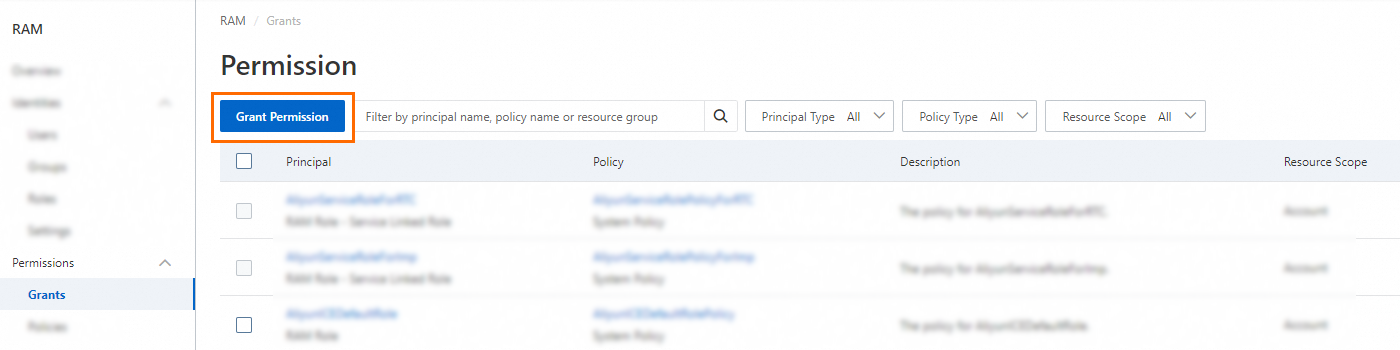
In the Grant Permission panel, grant permissions to the RAM user.
Configure the Resource Scope parameter.
Account: The authorization takes effect on the current Alibaba Cloud account.
Resource Group: The authorization takes effect on a specific resource group.
ImportantIf you select Resource Group for the Resource Scope parameter, make sure that the required cloud service supports resource groups. For more information, see Services that work with Resource Group. For more information about how to grant permissions on a resource group, see Use a resource group to grant a RAM user the permissions to manage a specific ECS instance.
Configure the Principal parameter.
The principal is the RAM user to which you want to grant permissions. You can select multiple RAM users at a time.
Select access policies.
An access policy is a collection of access permissions. Access policies are classified into the following types. You can select multiple access policies.
System policies: policies that are created by Alibaba Cloud. You can use but cannot modify these policies. Version updates of the policies are maintained by Alibaba Cloud. For more information, see Services that work with RAM.
NoteThe system automatically identifies high-risk system policies, such as AdministratorAccess and AliyunRAMFullAccess. We recommend that you do not grant unnecessary permissions by attaching high-risk policies.
Custom policies: You can create, update, and delete custom policies. You are also responsible for managing these policies and their versions. For more information, see Custom permission policy reference.
Click Grant permissions.
Click Close.
What to do next
After you create a RAM user, provide the logon name and password or the AccessKey information to the user. The user can then use the RAM user credentials to log on to the console or call API operations as follows:
Log on to the console.
In a browser, open the RAM User Logon page.
On the RAM User Logon page, enter the RAM user logon name, click Next, enter the RAM user password, and then click Log On.
NoteThe logon name of a RAM user is in the
<$username>@<$AccountAlias>or<$username>@<$AccountAlias>.onaliyun.comformat.<$AccountAlias>is the account alias. If no account alias is set, the ID of the Alibaba Cloud account is used by default.On the Alibaba Cloud Management Console page, click an authorized product to access its console.
Call API operations using the AccessKey pair of the RAM user.
Use the AccessKey ID and AccessKey secret of the RAM user in your code.