Simple Message Queue (SMQ, formerly MNS) is a distributed messaging service that transfers data and notifications between application components. It decouples producers from consumers so that each component can scale, deploy, and fail independently.
SMQ provides two messaging models:
Queue model — point-to-point messaging where each message is processed by a single consumer.
Topic model — publish-subscribe messaging where a single message is delivered to multiple subscribers.
Benefits
|
Benefit |
Description |
|
Scalability |
Handles concurrent requests from multiple producers and consumers. Adjust concurrency settings to match your workload. |
|
Reliability |
Delivers every queue message at least once during its validity period. Automatically retries topic messages according to configurable retry policies. |
|
Security |
Uses the Alibaba Cloud account system to isolate resources, so only authorized entities can access messages. |
|
High availability |
Maintains messaging infrastructure availability continuously. |
Use cases
Decouple microservices. Route service-to-service communication through queues instead of direct calls. Each service consumes messages at its own pace, so a slowdown in one component does not block others.
Fan-out notifications. Publish a single event to a topic to reach multiple downstream systems at once — for example, an order-placed event fans out to a fulfillment queue, a data warehouse queue, and an HTTP notification endpoint simultaneously.
Load leveling. Buffer incoming requests in a queue during traffic spikes. Consumers drain the backlog at a steady rate, protecting backend services from overload.
Asynchronous processing. Offload time-consuming tasks — image processing, report generation, data transformation — to background workers via a queue.
Access methods
SMQ supports access over the Internet and through a Virtual Private Cloud (VPC). Within a VPC, configure the CIDR block, route table, and gateway to access SMQ alongside other Alibaba Cloud services such as Elastic Compute Service (ECS), ApsaraDB RDS, and Server Load Balancer (SLB).
Queue model
In the queue model, producers send messages to a queue and consumers pull messages from it. Each message can be consumed by only one consumer, making this model well suited for task distribution and workload processing.
How it works
A producer sends a message to a queue.
A consumer pulls the message. Once retrieved, the message enters an invisibility period — it becomes hidden from other consumers for a configurable duration.
After processing, the consumer deletes the message from the queue.
If the consumer does not delete the message before the invisibility period expires, the message becomes available again for another consumer to retrieve.
Queue-based message flow 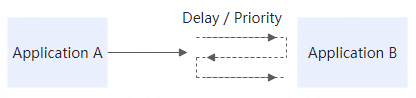
Queue types
|
Type |
Description |
|
Standard queue |
Default queue type for general-purpose messaging. |
|
Delayed queue |
Messages become available for consumption only after a specified delay. |
Customize queue parameters such as visibility timeout, message retention period, and maximum message length to match your workload.
Delivery guarantee
Every message in a queue is delivered at least once during its validity period. SMQ integrates with the Alibaba Cloud account system to isolate resources between users, so only authorized entities can access messages.
Topic model
In the topic model, a publisher sends a message to a topic, and SMQ pushes the message to all active subscriptions. Each subscription routes messages to a specified endpoint, such as a queue. This one-to-many model is well suited for event broadcasting and fan-out patterns.
How it works
A publisher sends a message to a topic.
SMQ evaluates each subscription attached to the topic.
If a subscription has a filter tag, only messages carrying the same tag are delivered. Subscriptions without a filter tag receive all messages.
SMQ pushes the message to the endpoint specified in each matching subscription.
Topic-based message flow 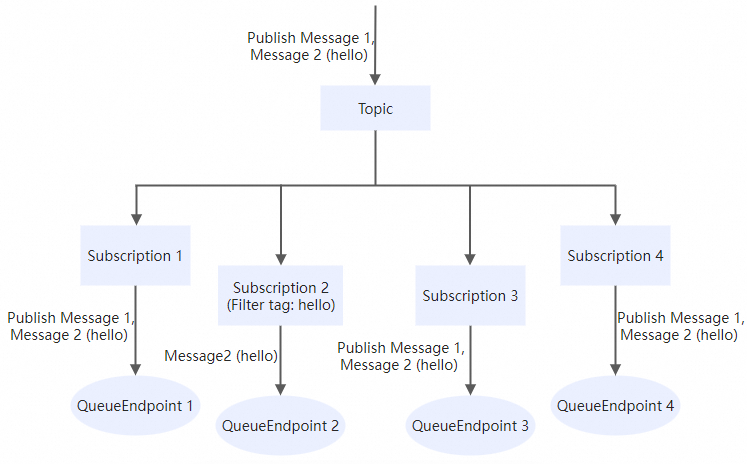
Message filtering
Subscriptions support tag-based filtering. Assign a tag to a subscription to receive only messages that carry the same tag. This reduces unnecessary processing and lets multiple subscribers share a single topic while handling different message types.
No tag on the subscription: All messages published to the topic are delivered, regardless of whether they carry tags.
Tag on the subscription: Only messages with a matching tag are delivered.
For details, see RESTful API operations about topics.
Message delivery
SMQ pushes messages to the endpoints specified in subscriptions. If a callback URL is unavailable, route messages to an SMQ queue instead and retrieve them using the queue model. For setup instructions, see Push messages to a queue and Send messages from one producer client to multiple consumer clients.
SMQ automatically pushes messages during the validity period according to the configured retry policy (NotifyStrategy). This ensures the atomicity of message publishing.
Message formats
|
Format |
Content |
|
XML |
Message body and attributes in XML. |
|
JSON |
Message body and attributes in JSON. |
|
SIMPLIFIED |
Message body only, without attributes (plain text). |
For details, see NotifyContentFormat.
Monitoring and logging
Log management
Track the full lifecycle of every message, including send, receive, and delete events. For topic messages, logs also capture push attempts and delivery results.
Use log management to troubleshoot delivery failures, audit message processing, and verify end-to-end message flow. For details, see Log management.
Cloud Monitor integration
Monitor queue metrics and configure custom alert rules in the Cloud Monitor console. Cloud Monitor notifies you when anomalies occur, such as message delivery failures. For details, see Cloud Monitor.