Service Mesh (ASM) allows a service mesh proxy to rewrite the Authority and Host headers of an HTTP request before the request is sent to a specific host. If a request needs to be redirected to another service by using a virtual service, you must configure a rule to rewrite the Host and Authority headers so that the destination service accepts the request. This topic describes how to configure a rule to rewrite the Host and Authority headers of a request.
Prerequisites
The preparations are completed, and the HTTPBin, sleep, and NGINX services are deployed. For more information, see Preparations.
Procedure
Use the istioctl tool to run the following command to deploy a waypoint proxy for the NGINX service:
istioctl x waypoint apply --service-account nginxExpected output:
waypoint default/nginx appliedConfigure a virtual service for the NGINX service to forward requests destined for the NGINX service to the HTTPBin service. In addition, configure a rule to rewrite the Host and Authority headers to
httpbin:8000.Log on to the ASM console. In the left-side navigation pane, choose .
On the Mesh Management page, click the name of the ASM instance. In the left-side navigation pane, choose . On the page that appears, click Create.
On the Create page, configure the following parameters, and click Preview. Confirm that the YAML content is correct, click Submit, and then click Create.
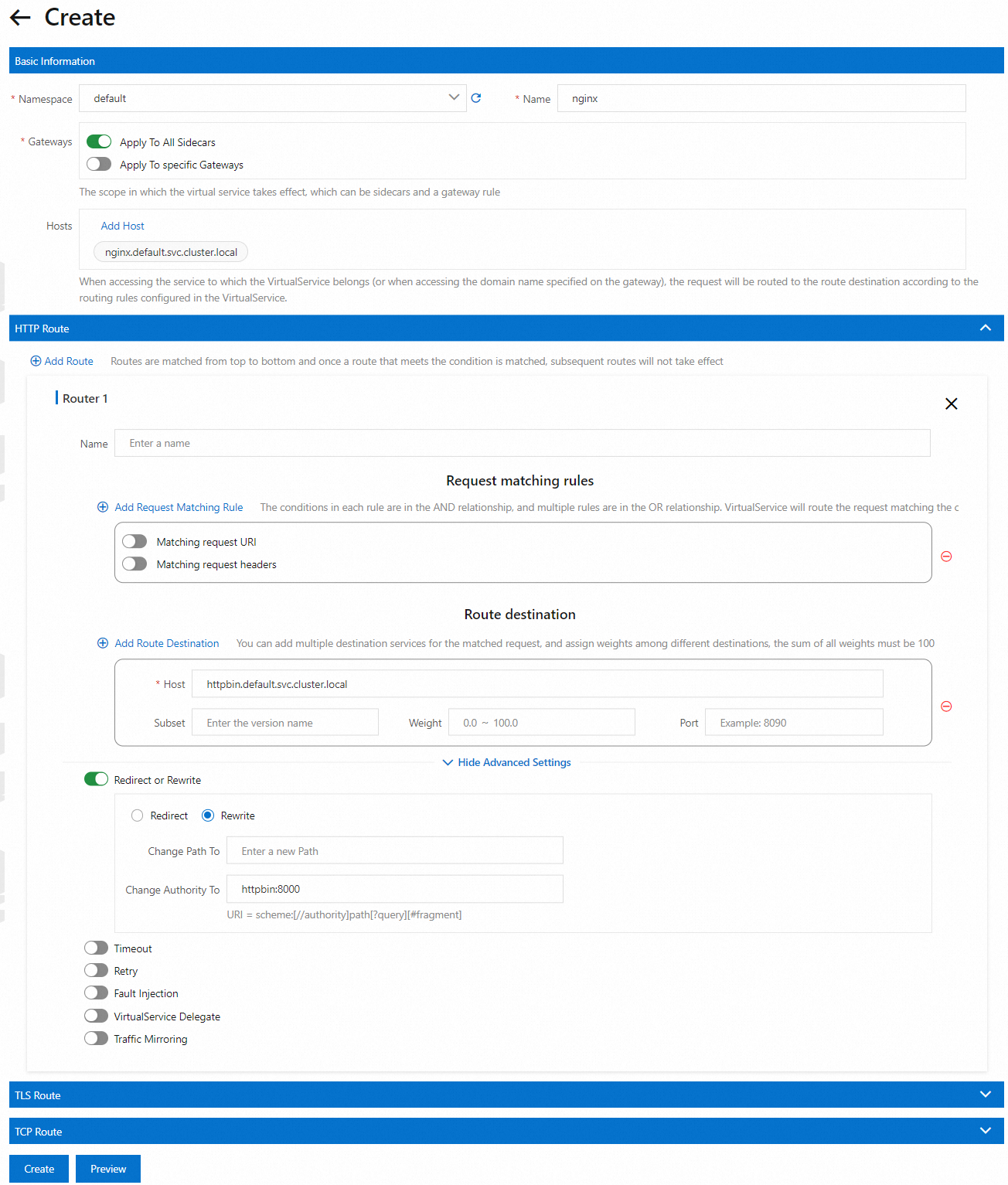
Run the following command to check whether the header rewriting configuration takes effect:
kubectl exec -it deploy/sleep -- curl nginx:8000/headersExpected output:
{
  "headers": {
    "Accept": "*/*",
    "Host": "httpbin:8000",
    "User-Agent": "curl/8.1.2"
  }
}
You can see that the requests that are destined to the
/headerspath of the NGINX service in the sleep container are forwarded to the/headerspath of the HTTPBin service (which indicates that requests are sent tohttp://httpbin:8000/headers). The path returns the received request headers. You can view that the Host headers of the requests are changed tohttpbin:8000.ImportantIn Ambient Mesh mode, if you need to rewrite the Authority and Host headers of requests to forward the requests destined for service 1 to service 2, a waypoint proxy must not be deployed for service 2.