AnalyticDB for PostgreSQL's vector database lets you build a text semantic retrieval system that finds documents by meaning rather than exact keyword matches. This tutorial walks through a complete example: vectorizing a 10,000-entry text corpus, indexing it in AnalyticDB for PostgreSQL, and running semantic similarity queries against it.
By the end, you will have:
Vectorized a real-world text corpus using a sentence embedding model
Stored vectors and created an approximate nearest neighbor (ANN) index in AnalyticDB for PostgreSQL
Queried the database to retrieve the most semantically similar texts
This tutorial creates a table (public.articles) and an index in your database. Clean-up code is provided at the end to drop them when you are done.How it works
Text semantic retrieval has two phases.
Phase 1 — Text vectorization and index creation
A machine learning (ML) model converts each text into a feature vector — a numeric representation that captures the text's meaning. Texts with similar meanings produce similar vectors in the embedding space. Once vectorized, texts and their feature vectors are stored in AnalyticDB for PostgreSQL, and a vector index is built to accelerate similarity queries.
Phase 2 — Vector retrieval
At query time, the same ML model converts the query text into a vector. AnalyticDB for PostgreSQL's vector engine then uses the index to find the stored texts whose feature vectors are most similar to the query vector and returns them ranked by similarity.
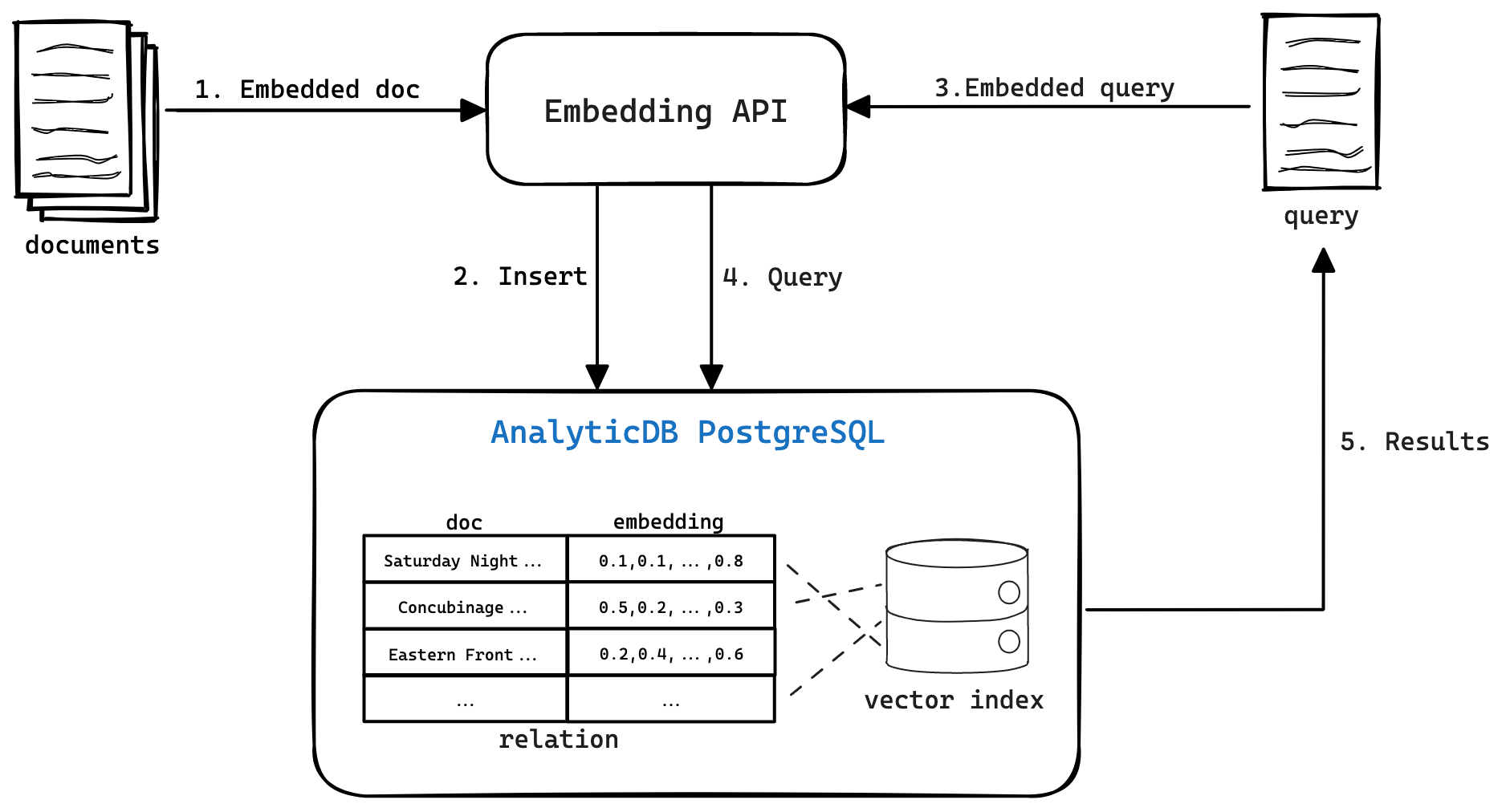
Prerequisites
Before you begin, ensure that you have:
An AnalyticDB for PostgreSQL instance with connection credentials (host, port, database name, username, and password)
Conda installed for managing Python environments
Internet access to download the Quora dataset from Hugging Face
Step 1: Set up the Python environment
Create a dedicated Conda environment with Python 3.8 and install all required packages.
# Create a Python 3.8 virtual environment
conda create -n adbpg_text_env python=3.8

# Activate the environment
conda activate adbpg_text_env

# Install required packages
pip install psycopg2==2.9.3
pip install wget==3.2
pip install pandas==1.2.4
pip install datasets==2.12.0 sentence-transformers==2.2.2
pip install torch==2.0.1 torchvision==0.15.2 torchaudio==2.0.2
On macOS, if you see Error: pg_config executable not found when installing psycopg2, install PostgreSQL client libraries first:brew install postgresql
pip install psycopg2==2.9.3Step 2: Preprocess data
This tutorial uses the Quora dataset from Hugging Face, which contains approximately 400,000 question pairs. The example loads 10,000 entries and extracts unique question texts to build the corpus.
Download the dataset
from datasets import load_dataset

dataset = load_dataset('quora', split='train[0:10000]')
print(dataset[0])
Each entry has two fields:
questions— containsid(serial numbers) andtext(the question texts) for a pair of questionsis_duplicate— whether the two questions have the same meaning (TrueorFalse)
Sample output:
{'questions':
     {'id': [1, 2],
      'text': ['What is the step by step guide to invest in share market in india?', 'What is the step by step guide to invest in share market?']
     },
 'is_duplicate': False
}
Extract feature vectors
The following steps extract a unique list of questions, convert each to a feature vector, and save everything to a CSV file.
Extract all questions and remove duplicates.
sentences = []

for data in dataset['questions']:
    sentences.extend(data['text'])

# Remove duplicate questions
sentences = list(set(sentences))
print('\n'.join(sentences[1:5]))
print(len(sentences))
Sample output (unique sentence count):
How can I know if my spouse is cheating?
Can a snake kill a rabbit?
How i get hair on bald head?
How can I get my name off the first page on Google search?
19413
Load the embedding model and encode the sentences. This tutorial uses
all-MiniLM-L6-v2— a lightweight sentence embedding model that produces high-quality semantic representations. It outputs 384-dimensional vectors, which determines thedimvalue used when creating the vector index in the next step.from sentence_transformers import SentenceTransformer import torch model = SentenceTransformer('all-MiniLM-L6-v2', device='cpu') modelModel details:
SentenceTransformer(
  (0): Transformer({'max_seq_length': 256, 'do_lower_case': False}) with Transformer model: BertModel
  (1): Pooling({'word_embedding_dimension': 384, 'pooling_mode_cls_token': False, 'pooling_mode_mean_tokens': True, 'pooling_mode_max_tokens': False, 'pooling_mode_mean_sqrt_len_tokens': False})
  (2): Normalize()
)
The model truncates input text beyond 256 tokens and produces 384-dimensional vectors.
Encode each sentence and save the results to a CSV file.
import pandas as pd

vectors = []

for sentence in sentences:
    vector = model.encode(sentence)
    # Format vectors as '{0.04067..., ..., -0.01296...}' for import into AnalyticDB for PostgreSQL
    vector_str = "{" + ", ".join(str(x) for x in vector.tolist()) + "}"
    vectors.append(vector_str)

# Generate sequential IDs
ids = [i + 1 for i in range(len(sentences))]

# Combine into a DataFrame and save
df = pd.DataFrame({'ID': ids, 'Sentences': sentences, 'Vectors': vectors})
df.to_csv('sentences_vectors.csv', index=False)
The output CSV (
sentences_vectors.csv) has three columns:ID,Sentences, andVectors.
Step 3: Create a table and vector index
Connect to the database and verify the connection.
import os
import psycopg2

# Set connection parameters as environment variables before running:
# os.environ["PGHOST"] = "xxx.xxx.xxx.xxx"
# os.environ["PGPORT"] = "58894"
# os.environ["PGDATABASE"] = "postgres"
# os.environ["PGUSER"] = "vector_test"
# os.environ["PGPASSWORD"] = "password"

connection = psycopg2.connect(
    host=os.environ.get("PGHOST", "localhost"),
    port=os.environ.get("PGPORT", "5432"),
    database=os.environ.get("PGDATABASE", "postgres"),
    user=os.environ.get("PGUSER", "user"),
    password=os.environ.get("PGPASSWORD", "password")
)

cursor = connection.cursor()
cursor.execute("SELECT 1;")
result = cursor.fetchone()

if result == (1,):
    print("Connection successful!")
else:
    print("Connection failed.")
Create the table and vector index. The index parameters control retrieval quality and build cost:
Parameter Value Description dim384Must match the model's output dimension. all-MiniLM-L6-v2produces 384-dimensional vectors.hnsw_m100Number of connections per node in the HNSW graph. Higher values improve recall but increase memory usage and index build time. pq_enable0Disables product quantization. Set to 1to compress vectors and reduce memory at the cost of some recall accuracy.# Create the articles table with a REAL[] vector column # SET STORAGE PLAIN prevents PostgreSQL from compressing or toasting the vector column, # which is required for ANN index scans to work correctly. create_table_sql = ''' CREATE TABLE IF NOT EXISTS public.articles ( id INTEGER NOT NULL, sentence TEXT, vector REAL[], PRIMARY KEY(id) ) DISTRIBUTED BY(id); ALTER TABLE public.articles ALTER COLUMN vector SET STORAGE PLAIN; ''' # Create an ANN vector index on the vector column create_indexes_sql = ''' CREATE INDEX ON public.articles USING ann (vector) WITH (dim = '384', hnsw_m = '100', pq_enable='0'); ''' cursor.execute(create_table_sql) cursor.execute(create_indexes_sql) connection.commit()Import data from the CSV file.
import io

# Read the CSV file line by line using a generator
def process_file(file_path):
    with open(file_path, 'r') as file:
        for line in file:
            yield line

# Use COPY FROM STDIN to bulk-load the CSV into the table
copy_command = '''
COPY public.articles (id, sentence, vector)
FROM STDIN WITH (FORMAT CSV, HEADER true, DELIMITER ',');
'''

modified_lines = io.StringIO(''.join(list(process_file('sentences_vectors.csv'))))
cursor.copy_expert(copy_command, modified_lines)
connection.commit()
Step 4: Query similar texts
With data loaded, use the vector engine to retrieve the texts most semantically similar to a query.
The query_analyticdb function below encodes a query string, then runs a SQL query using:
dp_distance(vector_col, query_vector)— computes the dot-product distance between vectors (higher score = more similar)<->operator — used in theORDER BYclause to rank results by vector distance
def query_analyticdb(collection_name, query, query_embedding, top_k=20):
    vector_col = "vector"
    query_sql = f"""
    SELECT id, sentence, dp_distance({vector_col},Array{query_embedding}::real[]) AS similarity
    FROM {collection_name}
    ORDER BY {vector_col} <-> Array{query_embedding}::real[]
    LIMIT {top_k};
    """

    connection = psycopg2.connect(
        host=os.environ.get("PGHOST", "localhost"),
        port=os.environ.get("PGPORT", "5432"),
        database=os.environ.get("PGDATABASE", "postgres"),
        user=os.environ.get("PGUSER", "user"),
        password=os.environ.get("PGPASSWORD", "password")
    )

    cursor = connection.cursor()
    cursor.execute(query_sql)
    results = cursor.fetchall()
    connection.close()
    return results


# Encode the query and retrieve the top 10 most similar sentences
query = "What courses must be taken along with CA course?"
query_vector = model.encode(query)

print('query: {}'.format(query))
query_results = query_analyticdb('articles', query, query_vector.tolist(), 10)
for i, result in enumerate(query_results):
    print(f"{i + 1}. {result[1]} (Score: {round(result[2], 2)})")
Sample output:
query: What courses must be taken along with CA course?
1. What courses must be taken along with CA course? (Score: 1.0)
2. What is the best combination of courses I can take up along with CA to enhance my career? (Score: 0.81)
3. Is it possible to do CA after 12th Science? (Score: 0.66)
4. What are common required and elective courses in philosophy? (Score: 0.56)
5. What are common required and elective courses in agriculture? (Score: 0.56)
6. Which course is better in NICMAR? (Score: 0.53)
7. Suggest me some free online courses that provides certificates? (Score: 0.52)
8. I have only 2 months for my CA CPT exams how do I prepare? (Score: 0.51)
9. I want to crack CA CPT in 2 months. How should I study? (Score: 0.5)
10. How one should know that he/she completely prepare for CA final exam? (Score: 0.48)
You can continue to select other texts that you want to query. After you query texts, you can delete the document library and the index to release resources.
Clean up
After testing, drop the table and index to release resources.
drop_table_sql = '''DROP TABLE public.articles;'''
cursor.execute(drop_table_sql)
connection.commit()
connection.close()