This topic describes how to connect Apache Superset to Hologres for visual data analytics.
Background information
Apache Superset (incubating) is an open source business intelligence (BI) tool for data exploration and visual analytics. Apache Superset is developed in Python and uses components such as Flask, Pandas, and SQLAlchemy. Hologres is compatible with PostgreSQL. This topic uses Apache Superset V0.38.0 as an example to demonstrate how to connect to Hologres for data analytics. For more information about Apache Superset, see Why Superset?.
Prerequisites
-
To activate Hologres, see Purchase a Hologres instance.
-
Apache Superset is installed. For more information, see the official Apache Superset website.
Procedure
-
Log on to Superset. In the top menu bar, choose . You are redirected to the Databases page.
-
In the upper-right corner of the page, click DATABASE. You are redirected to the Connect a database page.
-
On the Connect a database page, select PostgreSQL and configure the data source parameters.
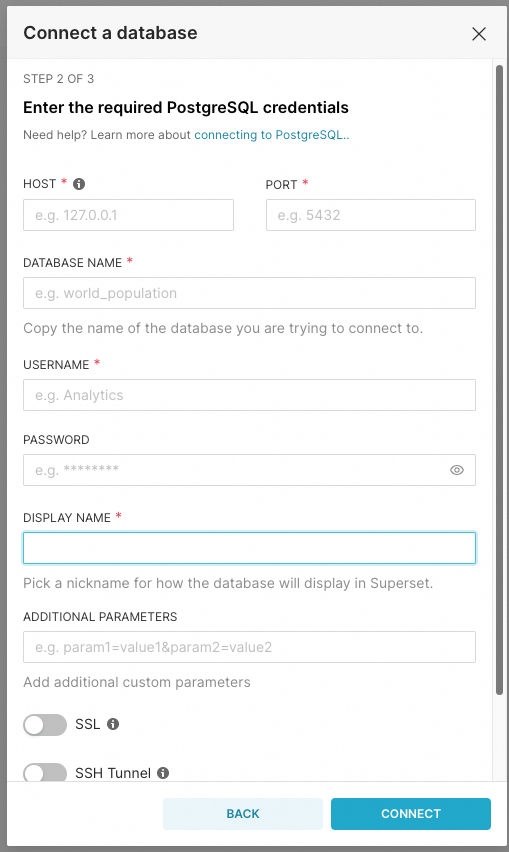
Parameter
Description
HOST
The network address and port of the Hologres instance.
Log on to the Hologres console. In the left-side navigation pane, click Instances. On the Instances page, click the ID of the instance. On the Instance Details page, view the endpoint and port number in the Network Information section.
ImportantSelect the correct network address and port based on the network environment where Apache Superset runs. Otherwise, the connection fails.
PORT
DATABASE NAME
The name of the database that you created in Hologres. Log on to the Hologres management console. In the Actions column of the target instance, click Manage. Then, click Database Management. On the Database Authorization page, obtain and confirm the database name.
USERNAME
The AccessKey ID of your Alibaba Cloud account. Click AccessKey Management to obtain the AccessKey ID.
PASSWORD
The AccessKey secret of your Alibaba Cloud account.
DISPLAY NAME
The display name of the database.
ADDITIONAL PARAMETERS
Configure additional parameters. Configure the
application_nameparameter. This helps you quickly identify queries from Superset during later analysis. For example:application_name=superset.
-
Click FINISH to confirm the connection and validation.
After the settings are saved, you can use the Hologres data source for visual data analytics. For more information, see Apache Superset.