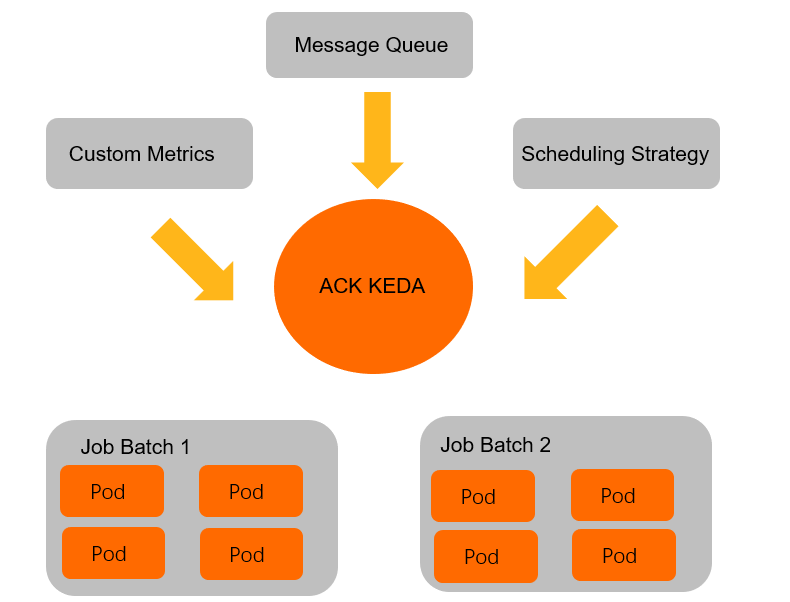
When handling event-driven workloads such as offline jobs or streaming data, traditional Horizontal Pod Autoscaler (HPA) based on CPU or memory utilization may not respond quickly enough. ack-keda monitors backlogs from various event sources—such as message queues or databases—and automatically creates Jobs or Deployments within seconds. After tasks finish, it scales resources down to zero, enabling real-time resource scheduling and cost optimization.
How it works
ack-keda is an enhanced version of KEDA (Kubernetes-based Event-driven Autoscaling) integrated with ACK. Its core mechanism introduces a Scaler to act as a bridge between event sources and applications.

-
Monitor the event source: The
Scalerconnects to an external event source—such as MongoDB—and periodically queries a specified metric, for example, the number of documents that meet certain conditions. -
Drive application scaling:
-
When the
Scalerdetects a backlog of events—for example, unprocessed data—ack-keda scales the target workload associated with aScaledJoborScaledObjectby either creating a new Job or increasing the number of pod replicas in a Deployment. -
After the events are processed and the
Scalerdetects no backlog, ack-keda automatically scales down the workload. For Jobs, it cleans up completed resources to prevent wasted capacity and metadata buildup.
-
Key capabilities:
-
Broad event source support: Supports data sources such as Apache Kafka, MySQL, PostgreSQL, RabbitMQ, and MongoDB. For details, see RabbitMQ Queue.
-
Flexible concurrency control: Use
maxReplicaCountto limit the maximum number of concurrent tasks and protect downstream systems from traffic bursts. -
Automatic metadata cleanup: After a task finishes,
ScaledJobautomatically removes completed Jobs and their pods, reducing pressure on the API server caused by metadata accumulation.
ScaledJob vs. ScaledObject
Use ScaledJob when each event maps to a discrete, long-running task that should run to completion in its own pod. For each detected event, ack-keda schedules a single Job: it initializes, processes one event, and terminates. This isolation prevents a slow task from blocking others and lets you control concurrency precisely with maxReplicaCount.
Use ScaledObject when events drive continuous throughput and your workload is best handled by a pool of long-running Deployment replicas.
The tutorial below uses ScaledJob for a video transcoding scenario. When a record with "state":"waiting" is inserted into MongoDB, ack-keda creates a Job pod to execute the transcoding task and updates the record to "state":"finished" after completion. Once the Job finishes, its metadata is automatically cleaned up.
Prerequisites
Before you begin, ensure that you have:
-
An ACK cluster up and running
-
kubectlconfigured to connect to the cluster -
Sufficient permissions to create namespaces and deploy Helm charts
Step 1: Deploy ack-keda
-
On the ACK Clusters page, click the name of your cluster. On the cluster details page, in the left navigation pane, click Applications > Helm.
-
Click Create. Follow the on-screen instructions to locate and select ack-keda, choose the latest chart version, and complete the installation.
-
Verify that ack-keda is running:
kubectl get pods -n kedaAll pods should show a
Runningstatus before you proceed.
Step 2: Deploy the MongoDB event-driven autoscaling example
Create example namespaces
This example uses the mongodb namespace for the database and mongodb-test for autoscaling configurations.
kubectl create ns mongodb
kubectl create ns mongodb-test
Deploy MongoDB
If you already have a MongoDB service, skip this step.
-
Create
mongoDB.yaml.ImportantThis MongoDB service is for demonstration only and does not provide high availability. Do not use it in a production environment.
apiVersion: apps/v1 kind: Deployment metadata: name: mongodb namespace: mongodb spec: replicas: 1 selector: matchLabels: name: mongodb template: metadata: labels: name: mongodb spec: containers: - name: mongodb image: registry-cn-shanghai.ack.aliyuncs.com/acs/mongo:v5.0.0 imagePullPolicy: IfNotPresent ports: - containerPort: 27017 name: mongodb protocol: TCP --- kind: Service apiVersion: v1 metadata: name: mongodb-svc namespace: mongodb spec: type: ClusterIP ports: - name: mongodb port: 27017 targetPort: 27017 protocol: TCP selector: name: mongodb -
Deploy MongoDB.
kubectl apply -f mongoDB.yaml
Initialize the MongoDB database
-
Get the MongoDB pod name.
MONGO_POD_NAME=$(kubectl get pods -n mongodb -l name=mongodb -o jsonpath='{.items[0].metadata.name}') echo "MongoDB pod name: $MONGO_POD_NAME" -
In the
testdatabase, create usertest_userand collectiontest_collection.# Create user kubectl exec -n mongodb ${MONGO_POD_NAME} -- mongo --eval 'db.createUser({ user:"test_user",pwd:"test_password",roles:[{ role:"readWrite", db: "test"}]})' # Authenticate user kubectl exec -n mongodb ${MONGO_POD_NAME} -- mongo --eval 'db.auth("test_user","test_password")' # Create collection kubectl exec -n mongodb ${MONGO_POD_NAME} -- mongo test --eval 'db.createCollection("test_collection")'
Configure TriggerAuthentication and ScaledJob
ack-keda uses TriggerAuthentication to securely manage credentials for connecting to event sources. ScaledJob defines scaling rules, polling intervals, and the Job template to execute.
The following configuration combines all three required resources—Secret, TriggerAuthentication, and ScaledJob—in a single file.
-
Create
keda-mongodb.yaml. ThesecretTargetReffield inTriggerAuthenticationreads the connection string from the specified Secret and passes it to ack-keda to authenticate with MongoDB. Thequeryfield inScaledJobdefines the data condition: when ack-keda finds documents intest_collectionmatching{"type":"mp4","state":"waiting"}, it launches Job resources.apiVersion: v1 kind: Secret metadata: name: mongodb-secret namespace: mongodb-test type: Opaque data: # Base64-encoded value of: # mongodb://test_user:test_password@mongodb-svc.mongodb.svc.cluster.local:27017/test connect: bW9uZ29kYjovL3Rlc3RfdXNlcjp0ZXN0X3Bhc3N3b3JkQG1vbmdvZGItc3ZjLm1vbmdvZGIuc3ZjLmNsdXN0ZXIubG9jYWw6MjcwMTcvdGVzdA== --- apiVersion: keda.sh/v1alpha1 kind: TriggerAuthentication metadata: name: mongodb-trigger namespace: mongodb-test spec: secretTargetRef: - parameter: connectionString name: mongodb-secret key: connect --- apiVersion: keda.sh/v1alpha1 kind: ScaledJob metadata: name: mongodb-job namespace: mongodb-test spec: jobTargetRef: template: spec: containers: - name: mongo-update image: registry-cn-shanghai.ack.aliyuncs.com/acs/mongo-update:v6 args: - --dataBase=test - --collection=test_collection - --operation=updateMany - --update={"$set":{"state":"finished"}} env: - name: MONGODB_CONNECTION_STRING value: mongodb://test_user:test_password@mongodb-svc.mongodb.svc.cluster.local:27017/test imagePullPolicy: IfNotPresent restartPolicy: Never backoffLimit: 1 pollingInterval: 15 # Check MongoDB every 15 seconds maxReplicaCount: 5 # Run at most 5 concurrent Jobs successfulJobsHistoryLimit: 0 # Delete completed Jobs immediately failedJobsHistoryLimit: 10 # Keep the last 10 failed Jobs for debugging triggers: - type: mongodb metadata: dbName: test collection: test_collection query: '{"type":"mp4","state":"waiting"}' # Launch a Job for each matching document queryValue: "1" authenticationRef: name: mongodb-trigger -
Deploy the configuration.
kubectl apply -f keda-mongodb.yaml
Step 3: Simulate events and verify autoscaling
-
Insert five pending records into MongoDB to simulate incoming transcoding tasks.
MONGO_POD_NAME=$(kubectl get pods -n mongodb -l name=mongodb -o jsonpath='{.items[0].metadata.name}') # Insert 5 pending transcoding records kubectl exec -n mongodb ${MONGO_POD_NAME} -- mongo test --eval 'db.test_collection.insert([ {"type":"mp4","state":"waiting","createTimeStamp":"1610352740","fileName":"My Love"}, {"type":"mp4","state":"waiting","createTimeStamp":"1610350740","fileName":"Harker"}, {"type":"mp4","state":"waiting","createTimeStamp":"1610152940","fileName":"The World"}, {"type":"mp4","state":"waiting","createTimeStamp":"1610390740","fileName":"Mother"}, {"type":"mp4","state":"waiting","createTimeStamp":"1610344740","fileName":"Jagger"} ])' -
Watch the Job resources in the
mongodb-testnamespace.watch kubectl get job -n mongodb-testWithin about 15 seconds (one polling interval), five Jobs are created and automatically cleaned up after completion:
NAME STATUS COMPLETIONS DURATION AGE mongodb-job-4wxgx Complete 1/1 3s 10s mongodb-job-9bs8r Complete 1/1 3s 10s mongodb-job-p6pnb Complete 1/1 3s 10s mongodb-job-pshkv Complete 1/1 4s 10s mongodb-job-t6fs8 Complete 1/1 4s 10s -
Confirm all records are marked as finished.
MONGO_POD_NAME=$(kubectl get pods -n mongodb -l name=mongodb -o jsonpath='{.items[0].metadata.name}')
kubectl exec -n mongodb ${MONGO_POD_NAME} -- mongo test --eval 'db.test_collection.find({"type":"mp4"}).pretty()'
The
statefield of all records changes fromwaitingtofinished, confirming that each Job processed its assigned task and the records were updated successfully.