You can use an existing cluster or create a new one to quickly build a global database network (GDN). A GDN supports cross-region disaster recovery or active geo-redundancy. This topic describes how to create and delete a GDN.
Scope
Cluster configuration
Edition: Enterprise Edition, and the series must be Cluster Edition.
The database engine version must be one of the following:
MySQL 8.0.2.
MySQL 8.0.1 with minor engine version 8.0.1.1.17 or later.
MySQL 5.7 with minor engine version 5.7.1.0.21 or later.
MySQL 5.6 with minor engine version 5.6.1.0.32 or later.
Nodes: Must include at least one read-only node.
Supported regions
All regions in the Chinese mainland, China (Hong Kong), Japan (Tokyo), South Korea (Seoul), Singapore, Malaysia (Kuala Lumpur), Indonesia (Jakarta), Philippines (Manila), Thailand (Bangkok), Germany (Frankfurt), US (Silicon Valley), US (Virginia), and UK (London).
You can deploy secondary clusters across borders, but you must submit a request. For more information, see Add a secondary cluster.
Feature limitations
Clusters in a Global Database Network (GDN) support the In-Memory Column Index (IMCI) feature. However, you must enable the
loose_polar_enable_imci_with_standbycluster parameter before you can add a read-only column store node. The cluster version must also meet one of the following requirements:MySQL 8.0.1 with revision version 8.0.1.1.48 or later.
MySQL 8.0.2 with revision version 8.0.2.2.27 or later.
Clusters in a GDN can be serverless clusters or clusters with defined specifications that have the serverless feature enabled. However, if the minor engine version of the primary cluster is earlier than the following versions, all clusters in the GDN must have at least one read-only node:
MySQL 8.0.1 with a minor engine version earlier than 8.0.1.1.42.
MySQL 8.0.2 with a minor engine version earlier than 8.0.2.2.23.
Clusters in a GDN do not support the database and table restoration feature.
Other limitations
A GDN consists of one primary cluster and up to four secondary clusters.
NoteTo add more secondary clusters, go to Quota Center, find the quota item based on the quota ID
polardb_mysql_gdn_region, and click Apply in the Actions column.A cluster can belong to only one GDN.
You can only create new clusters as secondary clusters. You cannot add an existing cluster as a secondary one.
The primary and secondary clusters must use the same database engine version: MySQL 8.0, MySQL 5.7, or MySQL 5.6.
For secondary clusters in a GDN that are not serverless clusters, each compute node must have at least 4 CPU cores.
By default, each cluster in a GDN contains 2 nodes. You can add up to 16 nodes.
Pricing
When you use a GDN, you are charged for the clusters and any inter-region data transfer fees. Data transfer fees vary based on whether the transfer is cross-border.
Non-cross-border data transfer (Free)
Scenario: The primary and secondary clusters are both deployed in regions outside the Chinese mainland, or both are deployed in regions within the Chinese mainland.
Billing rule: Free.
Cross-border data transfer (Billable)
ImportantCross-border data transfer fees will be charged starting from 00:00 on January 1, 2026 (Singapore time). Before this date, this service is free.
Scenario: One of your clusters (primary or secondary) is deployed in a region outside the Chinese mainland, and the other is deployed in a region in the Chinese mainland.
Billing rule: USD 0.80 per GB, billed hourly. The fee is calculated based on the amount of Redo Log data that is physically replicated from the primary cluster to a cross-border secondary cluster within one hour. You can estimate this traffic fee by querying the physical position converted from the log sequence number (LSN).
If you use the global domain name feature, you will incur additional fees for internal DNS resolution and inter-region data transfer. For more information, see Global domain name pricing.
Create a global database network
Log on to the PolarDB console. In the navigation pane on the left, click Global Database Network.
On the GDN page, click Create GDN.
In the Create GDN dialog box, configure the following parameters.
Configuration
Description
Compatibility
Select MySQL.
Version
Fixed at Active-passive.
Name
The name of the GDN. Enter a descriptive name for easy identification. The name does not need to be unique.
Primary Region
Select the region where the primary cluster is located.
NoteFirst, decide which cluster to use as the primary one, then select the region where that cluster is located.
Primary Cluster
Select an existing cluster as the primary cluster of the GDN.
Global Domain Name
Specifies whether to enable the global domain name feature. A global domain name provides a unified endpoint for the GDN. It not only enables nearest access but also ensures the domain name remains unchanged after a primary cluster switchover.
Click OK. You can view the created GDN on the GDN page. You can then add a secondary cluster to the GDN.
View information about a global database network
Log on to the PolarDB console, click the GDN ID on the GDN page, and view its basic information, cluster list, and topology graph on the details page.
View basic information
The basic information of a GDN includes its ID, Version, Compatible Database, GDN Name, and Created At.

View the cluster list
The cluster list contains all clusters (both primary and secondary) in all regions of the GDN.

View the topology
The topology of the GDN is displayed on a world map to visually represent the geographical distribution of the primary and secondary clusters.
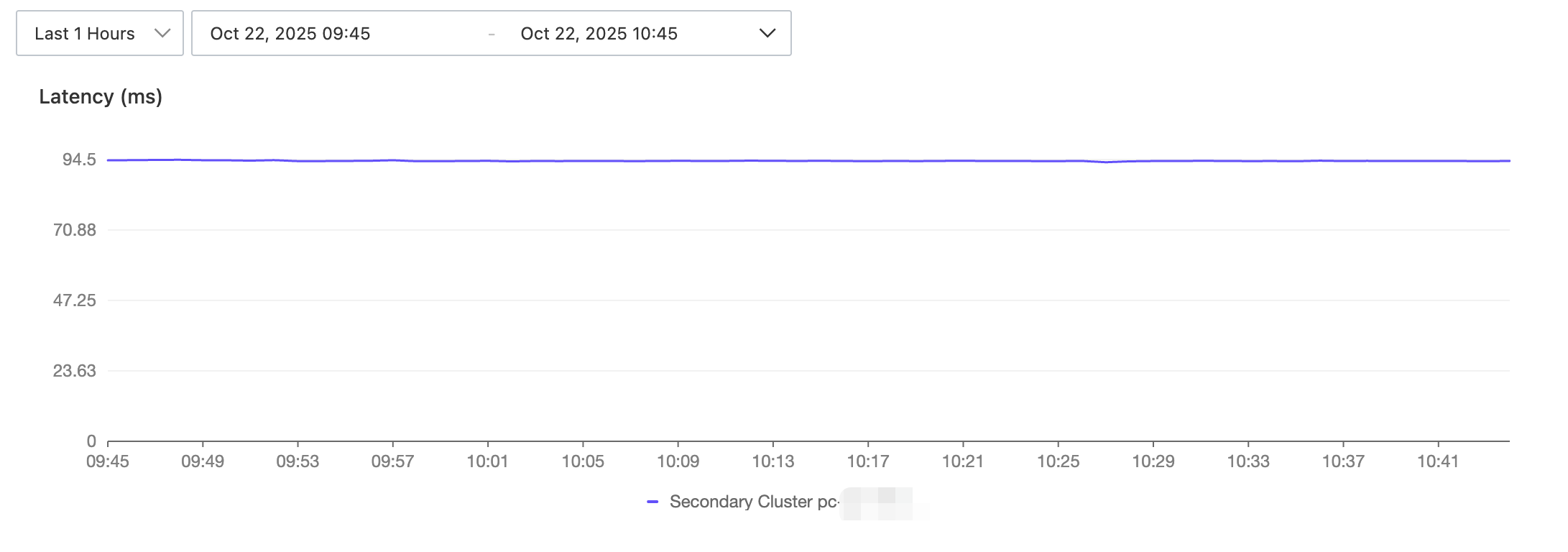
View the replication latency
Click the View Replication Latency button in the Network Topology section. In the dialog box that appears, you can filter and view the delay for a specified time period.
Delete a GDN
You can delete a GDN only when it contains only the primary cluster.
A GDN cannot be restored after it is deleted. Proceed with caution.
After a GDN is deleted, applications connected to it can no longer access the database. Update the connection code in your applications promptly.
When you release the primary cluster of a GDN, the GDN is automatically deleted. You do not need to delete the GDN separately.
Log on to the PolarDB console. In the navigation pane on the left, click Global Database Network.
On the GDN page, find the target GDN and click Delete in the Actions column.
NoteIf the Delete button is grayed out, this means the GDN still contains secondary clusters. You must delete the secondary clusters before you can delete the GDN.
Read the notes in the dialog box that appears. After you confirm the information, click OK to delete the GDN.
References
Connect to a GDN: Describes how to connect to a GDN.
Create a global domain name: Describes how to create a unified endpoint that enables nearest access and remains unchanged after a primary cluster switchover.
Related API operations
API | Description |
Creates a GDN. | |
Deletes a GDN. | |
Queries the information about a specified GDN. | |
Queries information about all GDNs. | |
Modifies the information of a GDN. |